Overview#
Torcherino is a highly efficient utility mod that allows players to manipulate the passage of time for specific blocks within their world. Unlike global commands that change the tick speed for the entire server, Torcherino provides localized acceleration. This means you can make your crops grow instantly or your furnaces smelt at lightning speed without affecting the rest of the world's performance.
Originally created by Moze_Intel and maintained by various developers including sci4me, 3llemes, and lukegrahamlandry, the current unofficial port for version 1.20.1 is maintained by skniro. It is widely used in modpacks to reduce the grind associated with slow resource generation and processing.
Blocks and Items#
The mod adds several variants of the time-accelerating device to suit different aesthetic and functional needs. Each variant functions identically in terms of mechanics but offers different placement options.
Torcherino
The standard version of the device. It looks like a golden-tinted torch and can be placed on the sides or tops of blocks. It is the base component for higher-tier upgrades in some modpack configurations.
Lanternino
A lantern variant of the Torcherino. It provides the same time-acceleration benefits but can be hung from ceilings or placed on floors, making it ideal for organized base builds and decorative machine rooms.
Jack-o-Lanternino
A festive variant based on the Jack-o'-Lantern. It functions as a full-block light source while providing the standard acceleration area-of-effect.
Compressed Tiers
In advanced configurations or specific modpack versions, players may find Compressed and Double Compressed variants. These tiers offer significantly higher maximum speed multipliers (up to 8100% in some versions) and larger effective radii.
Mechanics and GUI#
After placing a Torcherino, it is deactivated by default to prevent accidental lag. Players must interact with the block to configure its behavior.
The Interface
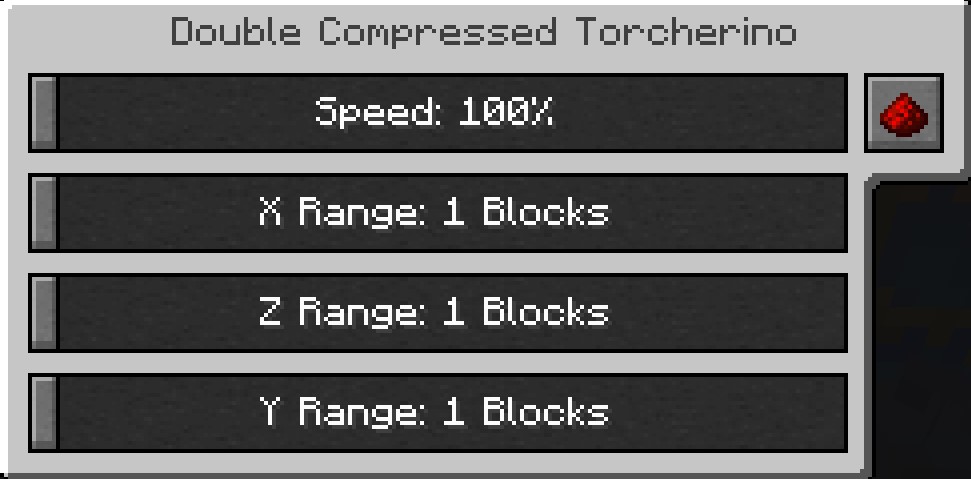
Right-clicking any Torcherino variant opens a Graphical User Interface (GUI) where you can adjust the following settings:
- Speed Multiplier: Adjusts how much faster the affected blocks will tick. Standard settings usually range from 100% (normal speed) to 400% (4x speed).
- Range (X/Y/Z): Defines the radius of the effect. You can set the horizontal and vertical reach independently, typically ranging from a 1x1x1 area to a 9x9x9 cube.
- Status Toggle: A button to activate or deactivate the torch without breaking it.
How Acceleration Works
The mod targets two specific types of Minecraft logic:
- Random Ticks: This affects natural growth processes such as crops (wheat, carrots, etc.), saplings, grass spreading, sugar cane, cactus, and leaf decay.
- Tile Entities: This affects blocks that have internal logic or inventories, such as Furnaces, Blast Furnaces, Brewing Stands, Mob Spawners, and most modded machines (e.g., Mekanism Crushers or Thermal Expansion Redstone Furnaces).
Crafting Recipes#
The recipes for Torcherino items are designed to be mid-game, requiring gold and time-related items like clocks.
| Item | Ingredients | Pattern |
|---|---|---|
| Torcherino | 1x Torch, 1x Clock, 1x Gold Ingot | Gold Ingot + Clock + Torch |
| Lanternino | 1x Lantern, 1x Clock, 1x Gold Ingot | Gold Ingot + Clock + Lantern |
| Jack-o-Lanternino | 1x Jack-o'-Lantern, 1x Clock, 1x Gold Ingot | Gold Ingot + Clock + Jack-o'-Lantern |
| Compressed Torcherino | 9x Torcherino | Fill 3x3 Crafting Grid |
| Double Compressed | 9x Compressed Torcherino | Fill 3x3 Crafting Grid |
Configuration#
Server administrators and modpack creators can fine-tune the mod via the configuration file located at config/sci4me/Torcherino.cfg (or torcherino-common.toml in some 1.20.1 versions).
Key Configuration Options
- random_tick_rate: An additional multiplier for how many random ticks are forced per game tick.
- log_placement: If set to
true, the server console will log every time a Torcherino is placed. This is vital for admins to track down players causing server lag. - blacklisted_blocks: A list of block IDs (e.g.,
minecraft:grass_block) that the Torcherino is forbidden from accelerating. - blacklisted_blockentities: A list of specific machine IDs that should not be sped up, often used to prevent exploits with certain modded generators.
- online_mode:
ONLINE: Torcherinos only function if their owner is currently logged into the server.RESTART: Torcherinos run for anyone who has logged in since the last server restart.ANY: Torcherinos run whenever the chunk is loaded, regardless of player status.
- tiers: Allows for the creation of custom tiers with unique speed and range limits.
Compatibility#
Torcherino is designed to be highly compatible with both Vanilla and Modded Minecraft. It has been tested and confirmed to work with the following major mods:
- Agricultural Mods: Farmer's Delight, Mystical Agriculture, and Botany Pots.
- Tech Mods: Applied Energistics 2, Mekanism, Thermal Series, and Create.
- Magic Mods: Blood Magic (Altars), Thaumcraft, and Ars Nouveau.
- Storage: Refined Storage and Iron Chests.
Note on Performance: While the mod is performance-friendly, placing dozens of Torcherinos set to 400% speed in a small area can cause significant TPS (Ticks Per Second) drops on servers, especially when accelerating complex modded machines.
Gallery#