


Overview#
Customizable Player Models (CPM) is a powerful utility mod designed to break the limitations of the standard Minecraft player model. Unlike traditional skin-based customization, CPM allows for the addition of new geometry, custom animations, and high-resolution textures. The mod is purely cosmetic and does not affect gameplay mechanics, hitboxes, or player stats.
Key features include:
- In-Game Editor: A full-featured modeling and animation suite accessible directly within Minecraft.
- Steganography Export: Models are encoded into the unused pixels of a standard skin file, allowing them to be uploaded to official Minecraft skin servers.
- Dynamic Animations: Create custom poses and movement cycles for any part of the model.
- Cross-Platform: Compatible with both Forge and Fabric, with support for a wide range of Minecraft versions.
Getting Started#
To begin customizing your model, you must first access the CPM Editor. By default, the editor is opened by pressing the 'G' key while in-game.
Initial Setup
- Skin Preparation: It is recommended to use a 64x64 or 128x128 skin. High-resolution skins provide more space for custom textures.
- The Models Folder: Local model files (.cpmproject) are stored in your Minecraft directory under
.minecraft/player_models. - Navigation: Use the mouse to rotate the preview and the scroll wheel to zoom. The editor interface is divided into three main tabs: Model, Texture, and Animation.
Modeling Mechanics#
Modeling in CPM is based on a hierarchical system of 'Parts' (cubes). New parts must be parented to an existing element, such as a vanilla player limb or another custom part.
Part Properties
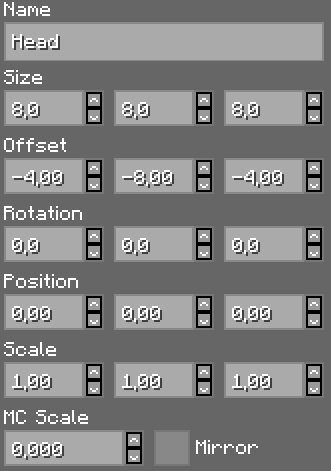
Each part has several adjustable parameters that define its appearance and behavior:
| Property | Description |
|---|---|
| Position | The center position and rotation point of the element relative to its parent. |
| Rotation | The orientation of the part in 3D space. |
| Offset | The part's position offset from its center/rotation point. |
| Size | The physical dimensions of the part box. |
| Scale | A multiplier for the part's overall size. |
| MC Scale | Increases size from the part box center by a set amount (similar to the 'inflation' on vanilla 2nd skin layers). |
| Mirror | Mirrors the texture mapping on the part. |
| Mode | Determines if the part uses a solid color or a custom texture from the skin. |
Hierarchy and Parenting
Custom parts move and rotate with their parent element. For example, a 'Hat' part parented to the 'Head' will follow the player's head movements automatically.
Hiding Vanilla Parts
Vanilla model parts (like the default arms or legs) can be hidden using the Toggle Visibility button in the editor. This allows you to replace the standard player model entirely with a custom creation, such as a creature or a robot. Note that hiding vanilla parts in the editor will not hide custom parts when exporting.
Texturing and UV Mapping#
CPM allows you to map specific areas of your skin texture onto your custom parts.
- UV Mapping: You can drag the UV box over your skin texture to select which pixels appear on each face of a custom part.
- High-Resolution Skins: By increasing the canvas size (e.g., to 128x128), you gain extra 'blank' space on your skin file to draw textures for your custom parts.
- Glow Effect: Parts can be set to 'Glow,' which makes them ignore in-game lighting and appear at full brightness (similar to Glow Squid eyes).
- Hidden by Default: Custom parts can be hidden by default using the 'Effects' menu. These parts can then be triggered to appear via custom animations or poses.
Animations#
The animation system uses a keyframe-based approach to create fluid movement.
Animation Types
- Standard Poses: These trigger automatically during specific actions (Standing, Walking, Running, Sneaking, Swimming, Climbing, etc.).
- Global Animations: These play constantly in a loop regardless of player action.
- Custom Poses: User-defined animations that can be triggered via keybinds or specific conditions.
Creating Animations
Animations are built by adding 'Frames' and adjusting the position, rotation, or scale of parts in each frame. The mod automatically interpolates (smooths) the movement between these frames. You can adjust the Duration of each frame to control the speed of the animation.
Exporting and Sharing#
Once a model is complete, it must be exported to be visible to others.
- Export to Skin: This is the most common method. The model data is saved into the alpha channel or unused pixels of your skin PNG. When you upload this PNG to your Minecraft account, the mod reads the data and reconstructs the model.
- Export to Gist: For very large or complex models that exceed skin pixel limits, the model can be uploaded to a GitHub Gist. The mod then provides a URL that can be linked to your skin.
- Visibility: Other players must have the Customizable Player Models mod installed to see your custom model. If they do not, they will only see your base 2D skin.
Commands and Configuration#
While most functions are handled through the GUI, the mod includes several configuration options and commands.
Keybinds
- G: Open Editor (Default).
- V: Open Model Selection Menu (Default).
Commands
/cpm reload: Reloads local models from theplayer_modelsfolder./cpm export: Quick export command for the current project.
Configuration
In the mod settings menu, players can toggle safety features, such as:
- Model Scaling: Enable or disable the ability for models to change the player's visual height.
- Safety Profiles: Block models from specific players or limit the complexity of models rendered to improve performance.
Advanced Features#
Blockbench Integration
For professional-grade modeling, a CPM Plugin for Blockbench is available. This allows users to utilize Blockbench's superior modeling tools and then export the file directly into a .cpmproject format compatible with the mod.
While CPM is primarily a client-side mod, a server-side version (or plugin for Bukkit/Spigot) exists. This allows the server to manage and sync models more efficiently, ensuring all players see custom models correctly without relying solely on the skin-encoding method.
