


Overview#
MyTown is a server-side land-claiming and grief-protection mod centered on the idea of towns. A player founds a town, claims the chunks it occupies, invites other players to join as residents, and uses a system of flags and ranks to control exactly what outsiders and residents are allowed to do inside the claimed area.
Protection in MyTown is extremely granular. Towns and individual plots within them each carry a set of flags that govern building, block interaction, item pickup, PvP, mob spawning, explosions, and more. On top of this, the mod uses an extensible protection system that can recognize the blocks, items, and machines added by other mods so that things like quarries, autonomous activators, and modded tools respect town boundaries.
The mod also includes an economy layer. Founding a town, claiming chunks, teleporting to spawn, and keeping a town running all carry configurable prices, and each town has a bank that residents can deposit into and withdraw from. Almost everything is driven by chat commands and a permission system, making MyTown well suited to multiplayer survival servers.
Towns and Claiming#
A town is created with /town new <name>. Creation fails if the name is already in use, the player has reached the maximum number of towns they may belong to, the current chunk is already claimed, or a nearby town within a configurable radius (default 5 chunks) has the nearby flag set to false.
Land is added to a town by claiming chunks. /town claim [range] claims the chunk you are standing in plus all chunks around you within the given radius. Claims that are not adjacent to the town's main block of land count as a single far claim, and towns have a configurable limit on how many far claims they may have (maxFarClaims). Claiming fails if a chunk is already claimed, if a nearby town with nearby set to false is within range, or if the far-claim limit is reached. /town unclaim releases the chunk you are in; you cannot unclaim the chunk containing the town's spawn or the town's last remaining claim.
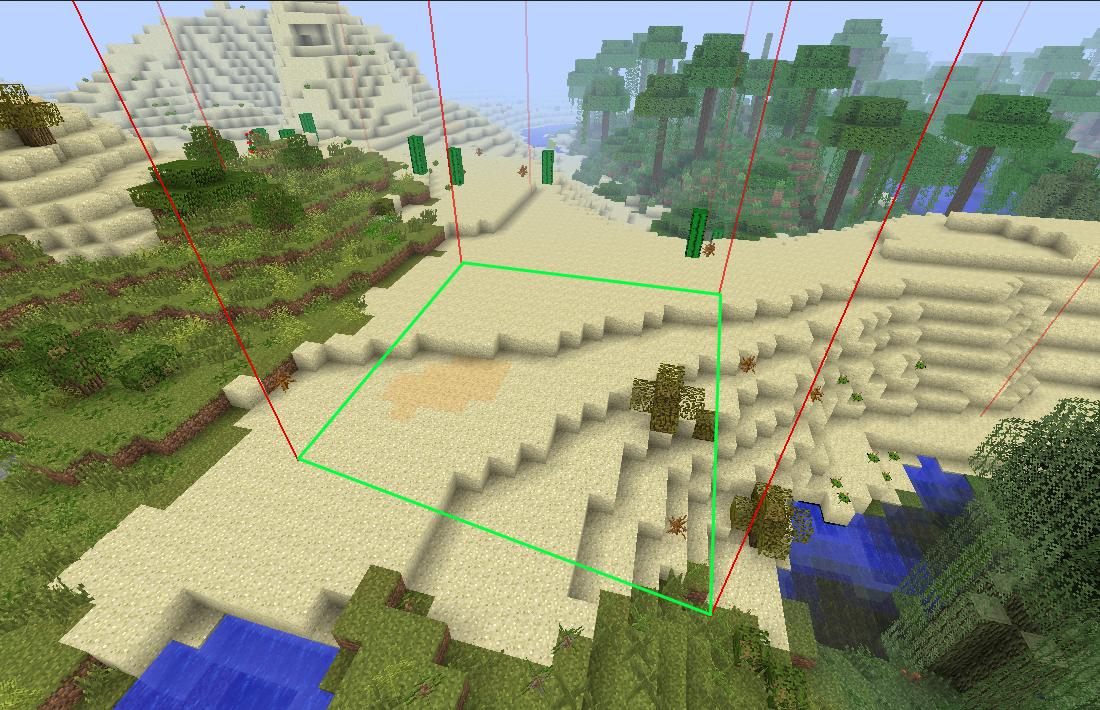
The town's spawn point is set with /town setspawn while standing inside the town, and /town spawn returns a resident to it (which may cost money). Players can visualize their land: /town borders show temporarily replaces some blocks with lapis blocks to outline the town's edges, and /town borders hide removes the outline. /town map prints an ASCII map of the claimed chunks around you, and /town blocks list lists all claimed chunks.
Residents and Membership#
Towns are populated by inviting players. An assistant or the mayor uses /town invite <resident> to invite a player, who then sees pending invites with /town invites and joins with /town accept [town] or declines with /town refuse [town]; the town name is required when more than one invite is pending.
Residents can leave a town with /town leave. The mayor cannot simply leave; they must either pass ownership to another resident or delete the town. Assistants can remove other members with /town kick <resident>, which cannot target the mayor or yourself. A player who belongs to more than one town chooses the active one with /town select <town>.
Information commands are available to everyone: /town info [town] shows details about a town (your own if no name is given), /town res <resident> shows information about a specific player, and /town list lists all towns on the server.
Ranks and Permissions#
MyTown controls who can run which commands through permission nodes (for example mytown.cmd.assistant.claim), and it groups those permissions into ranks. Common rank tiers referenced throughout the commands are the mayor, assistants, and regular residents, plus outsiders who are not in the town.
With the modifiableRanks config option enabled, towns can manage their own ranks. /town ranks list lists a town's ranks. /town ranks add <name> [templateRank] creates a rank, optionally copying the permissions of an existing template rank. /town ranks remove <rank> deletes a rank, except ranks of type mayor or default. /town ranks set <rank> <type> sets a rank's type, where the type may be default (automatically given to any player who joins; unique), mayor (the mayor rank; unique), or regular (any other rank).
Individual permissions are managed with /town ranks perm add|remove <rank> <perm> and listed with /town ranks perm list [rank]. /town promote <resident> <rank> promotes a resident to a non-mayor rank. If a town's ranks have drifted out of date, /town ranks reset restores them to their default state.
Plots#
Within a town, residents can carve out plots: smaller areas with their own owners, members, and flags. Plot flags take higher priority than the town's flags, so a plot can be made more or less permissive than the town around it.
A plot is created with /town plot new <name>, which gives you a selection tool to pick two corners; creation fails if the plot is too small or too large, you have reached your plot limit, or the selection falls outside the town. /town plot select reset clears the current selection. /town plot show and /town plot hide visualize all plots in the selected town, and /town plot info describes the plot you are standing in. Plots are renamed with /town plot rename <name> and removed with /town plot delete.
Access to a plot is managed through owners and members. /town plot add owner <resident> grants full access (owners must be in the same town), while /town plot add member <resident> lets a player bypass the plot's protections without being able to change its settings or add others; members do not have to be in the town. /town plot remove <resident> removes a member or owner. Plot flags are managed with /town plot perm set <flag> <value> and /town plot perm list. Plots can even be sold: /town plot sell <price> gives a tool that places a sign which, when right-clicked by another town member, transfers ownership to them, removes the previous owners, and pays the seller the listed price. The number of plots a resident may own is shown with /town plot limit show and set with /town plot limit set <limit>.
Flags#
Flags are the heart of MyTown's protection: each one controls a single aspect of what is allowed inside a town or plot. Throughout the descriptions below, "regular players" means players who are not members of the town/plot and are not server operators.
Some flags apply to both towns and plots (with the plot value taking priority): enter, access, pickup, pvp, pve, mobs, entities, usage, activate, and fakers. A few flags apply only to towns, for performance reasons: modify, explosions, restrictions, and nearby.
| Flag | Effect when set |
|---|---|
enter |
Whether regular players may enter the area |
access |
Whether regular players may open GUIs that change a block's contents/settings |
pickup |
Whether regular players may pick up items |
pvp |
Whether players may attack each other (applies to all non-operators) |
pve |
Whether regular players may attack/interact with passive entities; also shields residents from such damage |
mobs |
Whether hostile mobs may spawn or exist in the area |
entities |
Whether any entities (hostile or passive) may spawn or exist |
usage |
Whether regular players may use (right-click) items that can damage the area |
activate |
Whether regular players may right-click state-changing blocks (doors, buttons, levers, repeaters, etc.) |
fakers |
Whether fake players (e.g. golems, autonomous activators) may bypass flags applied to regular players |
modify |
Whether regular players may break or place blocks |
explosions |
Whether explosions are allowed; when off, exploding entities near the town are removed |
restrictions |
When true, residents are treated as regular players in town areas outside their own plots |
nearby |
Whether other players may found towns near this town (distance configurable in chunks) |
Town flags are set with /town perm set <flag> <value> and listed with /town perm list; plot flags use the /town plot perm equivalents. Both town and plot permission commands offer a whitelister tool (currently a work in progress) that can let a specific block bypass protection for a chosen flag — for example whitelisting a furnace for the access flag so anyone may use it.
Wilderness#
The unclaimed chunks on a server are collectively called the Wilderness, and they carry their own set of flags so server owners can decide what is permitted on open land. A resident can inspect those rules with /town wild perm, which shows the Wilderness flags, their values, and their descriptions.
Administrators control the Wilderness directly. /townadmin perm wild list lists its flags and values, and /townadmin perm wild set <flag> <value> changes a flag's value. This makes it possible to, for example, disable PvP or block griefing across all unclaimed territory while leaving towns free to set their own rules.
Economy and Bank#
MyTown attaches configurable prices to most town actions, and each town has a bank to pay for them. /town prices lists the cost of town creation, the base town claim, the additional cost added per existing claim, far claims, teleporting to spawn, setting the town spawn, teleporting to another town's spawn, the per-real-day town upkeep, and the per-real-day claim upkeep.
Residents fund the town through its bank. /town bank deposit <amount> transfers money from the player's balance into the town bank (and fails if the player lacks the amount), while /town bank withdraw <amount> takes money back out. /town bank info shows the current state of the bank. Because upkeep is charged per real-time day, towns need a healthy bank balance to remain standing over time.
Protections System#
MyTown's compatibility with other mods comes from a data-driven protection system. Instead of hardcoding support for each mod, the system reads a set of JSON "protection" files, one per mod, that describe how that mod's content should be treated. The mod ships compatible with a wide range of other mods, and additional protection files can be dropped into config/MyTown/protections (all subdirectories are scanned). Incompatible or invalid protection files are skipped, and if a single protection errors during play, only the affected entity, tile entity, item, or block is disabled rather than the whole system.
Each protection file declares a modid, a minimum compatible version (checked with a startsWith match against the mod's version), and an array of segments. A segment describes one thing in the mod — an entity, tile entity, item, or block — via its class, its type, and the flags it should be checked against, with an optional condition expression. For example, a block-breaker machine would most reasonably be tied to the modify flag.
Segments use "getters" (cascading method, field, formula, or NBT lookups) to read information from the game object so the system can decide whether to allow an action. Entity segments use actions such as TRACKED (checked every tick, ideal for keeping hostile mobs out of towns), PROTECT (checked on interaction), and PVP (checked when the entity hits a player). Item segments use actions like BREAK_BLOCK, RIGHT_CLICK_BLOCK, RIGHT_CLICK_AIR, RIGHT_CLICK_ENTITY, and LEFT_CLICK_BLOCK, and block segments use LEFT_CLICK, RIGHT_CLICK, or ANY_CLICK. Tile-entity segments can define a bounding box (xMin/yMin/zMin to xMax/yMax/zMax) and a retainsOwner option so that, for instance, a quarry is checked against the permissions of the player who placed it. The admin command /townadmin debug itemClass prints the class hierarchy of a held item or block to help build these segments.
Admin Commands#
Administrators manage the server through the /townadmin command (aliases /ta and /mytownadmin; regular /town may also be written /t or /mytown). Admins can create special AdminTowns with /townadmin new <name>, which by default have no residents and no ranks, and delete any town with /townadmin delete <town>. They can place or remove residents directly using /townadmin add <resident> <town> [rank] and /townadmin kick <resident> <town>.
Admins can claim and unclaim land for any town with /townadmin claim <town> [range] and /townadmin unclaim, adjust a town's extra block allowance and far-claim allowance with the /townadmin blocks extra and /townadmin blocks far commands (both default to 0 per town), and grant a resident extra blocks via /townadmin res blocks extra. Town, plot, and Wilderness flags can all be edited through the /townadmin perm commands, and ranks and plots have full admin equivalents of the player-facing commands.
Server maintenance commands include /townadmin config reload, which reloads the main config plus all protection files and the rank, Wilderness, and flag config files, and /townadmin safemode <on|off> to restrict the server to operators (noted as not fully working). For the database, the console-only /townadmin db purge completely wipes the mod's tables — a destructive operation.
