


Overview#
Chest Tracker is an essential quality-of-life mod designed to solve the common problem of losing track of items in complex storage systems. Functioning as a client-side memory bank, the mod automatically logs the contents of chests, barrels, shulker boxes, and even ender chests the moment you open them. It then provides a powerful, search-oriented interface—similar to Applied Energistics 2—allowing you to find exactly which container holds a specific item without having to manually check every block.
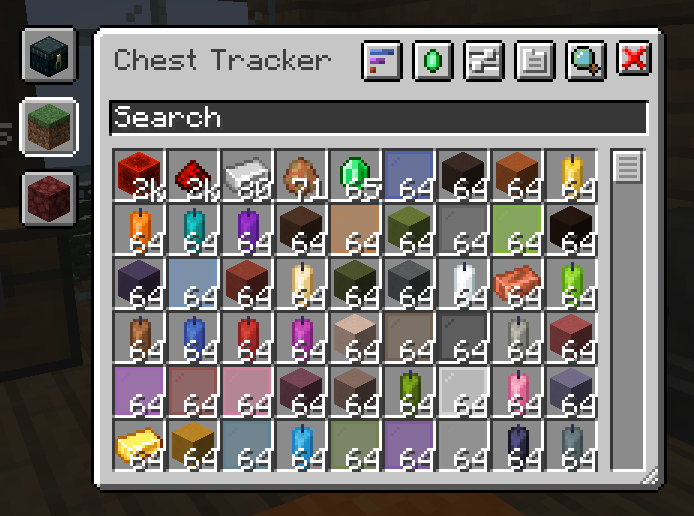
Because the mod is entirely client-sided, it works seamlessly on vanilla servers, Realms, and modded environments. It does not require any server-side installation, as it simply 'remembers' what your character has seen. This makes it a powerful tool for both survival players and those managing massive automated farms on SMPs or specialized servers like Hypixel Skyblock.
Core Mechanics#
The mod operates on a 'see-to-remember' logic. It does not scan the world for chests; instead, it updates its internal database every time a container's inventory is loaded on your screen.
Memory Bank
The Memory Bank is the core data structure where item locations are stored. It tracks:
- Item Type: The specific block or item.
- Quantity: The total count of that item in a specific container.
- Location: The exact X, Y, Z coordinates and the dimension (Overworld, Nether, End).
- Container Type: Whether it is a chest, barrel, shulker box, or modded container.
Integrity Checks
Since the mod is client-side, it cannot know if a chest was broken or emptied while you were away. To mitigate this, Chest Tracker includes integrity checks. When you are near a remembered container, the mod can verify if the block still exists. If a container is found to be missing or changed, the mod updates its records accordingly.
Controls and Keybindings#
Chest Tracker utilizes a few primary keybinds to streamline the searching process. These can be reconfigured in the standard Minecraft controls menu.
| Action | Default Key | Description |
|---|---|---|
| Quick Search | Y |
Hover over an item in any inventory and press this to highlight all containers containing that item. |
| Open Main GUI | ` (Grave) |
Opens the full Chest Tracker interface to browse all remembered items. |
| In-GUI Search | Left Click |
Clicking an item within the Chest Tracker GUI initiates a world-space search for that item. |
| Toggle Labels | Configurable | Toggles the visibility of chest name tags in the world. |
User Interface (GUI)#
The main GUI is the central hub for managing your stored resources. It features a clean, grid-based layout that displays every unique item the mod has recorded.
Features of the GUI:
- Search Bar: Supports advanced filtering, including searching by item name, mod ID, or tags (e.g.,
#logs). - Item Grid: Displays icons of all tracked items. Hovering over an item shows the total count across all known containers.
- Container List: Selecting an item reveals a list of every container holding it, sorted by distance from the player.
- Dimension Filtering: Toggle between viewing items in your current dimension or across all dimensions.
- Sorting Options: Sort items by name, quantity, or most recently seen.
Chest Labels and Customization#
To help organize large storage rooms, Chest Tracker allows you to assign custom names to containers. These names appear as floating labels above the blocks, visible only to you.
- Client-Side Naming: You can rename a chest within the mod's GUI. This name is stored locally and does not affect the actual block data on a server.
- Automatic Naming: If a container has a custom name (e.g., renamed in an anvil), Chest Tracker will automatically use that name for its label.
- Visual Customization: Labels can be toggled on or off, and their rendering distance can be adjusted in the settings to prevent screen clutter.
Integrations and Compatibility#
Chest Tracker is built to work in harmony with other popular client-side mods. It embeds the 'Where Is It' library to handle item highlighting.
- JEI / REI / EMI: You can use the search keys directly on items within these recipe viewers to find them in your chests.
- Jade / WTHIT: When looking at a container, these mods can display a 'Chest Tracker' tooltip showing what the mod remembers is inside without you having to open it.
- Shulker Box Tooltip: Provides enhanced previews for ender chests based on the mod's memory.
- Litematica: Includes quick-search buttons and can add nearby tracked containers to the material list for easy project planning.
- Hypixel Skyblock: Features specialized handling for Private Islands and the Skyblock Ender Chest, ensuring data remains accurate across server instances.
Configuration#
The mod offers extensive configuration options via the Yet Another Config Lib (YACL) or Cloth Config menu. Users can fine-tune how data is collected and displayed.
Key Settings:
- Visual Settings: Adjust label scale, background opacity, and the color of the 'highlight' effect on searched chests.
- Memory Bank Settings: Configure how long the mod remembers 'temporary' chests (like those in generated structures) and set limits on the number of tracked containers.
- Tracking Toggles: Enable or disable tracking for specific types of containers (e.g., ignore furnaces or brewing stands).
- User Profiles: Create different tracking profiles for different servers or survival worlds to prevent data overlap.
Technical Limitations#
While highly accurate, users should be aware of the following limitations inherent to a client-side mod:
- Direct Observation Required: The mod cannot track items in a chest you have never opened. If another player moves items while you are offline, the mod will show outdated information until you open the chest again.
- Chunk Loading: Chests in unloaded chunks cannot be 'verified' by integrity checks. They will remain in the database until you return to that area.
- Server-Side Changes: On some servers, containers might be moved by plugins or scripts. Chest Tracker attempts to follow these changes but may occasionally require a manual 'Reset' of a specific container's data if it becomes desynced.
