


Overview#
Minecoprocessors Mod is a specialized utility mod designed for advanced redstone engineers and players interested in computer science. It adds a single-block programmable microprocessor that can execute custom assembly code to control redstone signals. Unlike traditional redstone logic which requires massive physical footprints, a single Redstone Processor can handle complex timing, arithmetic, and conditional logic within a single block space.
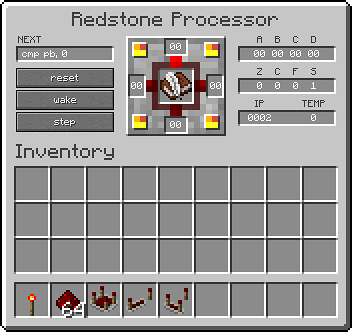

The mod is built to be perfectly synchronized with Minecraft's redstone engine, where every instruction in your program takes exactly one redstone tick (0.1 seconds) to execute. This allows for precise, lag-free automation and the creation of compact circuits such as pulse extenders, clocks, and multi-stage logic gates.
Blocks#
The mod adds two primary blocks that serve as the heart of your programmable circuits.
Redstone Processor
The standard Redstone Processor is an 8-bit microprocessor. It operates at a frequency of 10Hz, meaning it executes one line of code per redstone tick. It features six I/O ports (Front, Back, Left, Right, Top, and Bottom) that can be configured as either inputs or outputs.
Overclocked Processor
The Overclocked Processor is an upgraded version of the standard unit. It operates at 20Hz, effectively executing two instructions per redstone tick. This is essential for high-speed logic where standard redstone timing is too slow.
| Block | Execution Speed | I/O Ports | GUI Support |
|---|---|---|---|
| Redstone Processor | 10Hz (1 inst/tick) | 6 | Yes |
| Overclocked Processor | 20Hz (2 inst/tick) | 6 | Yes |

Items#
Programming the processors requires specific items to store and transfer code.
Book and Quill
The standard Minecraft Book and Quill is the primary tool for writing programs. You write your assembly code on the pages of the book and then place the book into the processor's inventory slot to begin execution.
- Tip: Programs must fit on a single page to be pasted correctly. If a program is too long, use multiple pages or the Code Book.
- Signing: Signing a book makes it read-only and allows it to be copied using the standard vanilla mechanics.
Code Book
The Code Book is a mod-specific item designed to improve the programming experience. Unlike the vanilla Book and Quill, the Code Book provides a more traditional text-editing interface, making it easier to manage large programs.
- Note: The Redstone Processor is not consumed when crafting the Code Book; it acts as a tool for the recipe.
Programming & Assembly Language#
The mod uses a custom assembly language. Each line of code represents one instruction.
Registers
Registers are internal memory slots used to store and manipulate data.
| Register | Type | Description |
|---|---|---|
| A, B, C, D | General Purpose | Used for variables and arithmetic. |
| ports | Configuration | A bitmask used to set ports as Input (0) or Output (1). |
| PF, PB, PL, PR, PT, PD | I/O | Front, Back, Left, Right, Top, and Down ports. |
Port Bitmask (ports)
The ports register uses a 4-bit or 6-bit binary value to define port direction. The bit order is typically:
[Bottom][Top][Right][Left][Back][Front]
Example: mov ports, 0010b sets the Back port as an output/active port for monitoring.
Instruction Set
| Instruction | Syntax | Description |
|---|---|---|
| MOV | mov dest, src |
Copies the value from source to destination. |
| ADD | add dest, src |
Adds source to destination. |
| SUB | sub dest, src |
Subtracts source from destination. |
| MUL / DIV | mul dest, src |
Multiplies or divides destination by source. |
| CMP | cmp val1, val2 |
Compares two values and sets internal flags. |
| INC / DEC | inc reg / dec reg |
Increases or decreases a register by 1. |
| JMP | jmp label |
Jumps to a specific label in the code. |
| JZ / JNZ | jz label |
Jump if Zero / Jump if Not Zero. |
| CALL / RET | call label |
Calls a subroutine and returns. |
| NOP | nop |
No Operation (waits for 1 tick). |
| SLEEP | sleep |
Pauses execution until an external signal is received. |
Recipes#
The following recipes are used to create the core components of the mod.
Redstone Processor
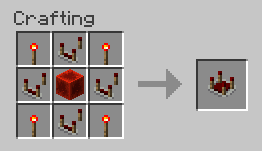
Crafted using standard redstone components. It is placed like a repeater, with the "front" facing away from the player.
| Component | Amount | Position |
|---|---|---|
| Redstone Block | 1 | Center |
| Redstone Comparator | 4 | Top, Bottom, Left, Right |
| Redstone Torch | 4 | Corners |

Overclocked Processor
To upgrade a processor for 20Hz operation:
- Recipe: 1x Redstone Processor + 1x Glowstone Dust (or similar speed-enhancing material depending on version).
Code Book
To create the advanced editor:
- Recipe: 1x Redstone Processor + 1x Book and Quill (The processor is returned to the player).
Mechanics & Logic#
Timing
The mod operates on the principle of 1 Instruction = 1 Redstone Tick. This makes it easy to calculate delays. For example, a loop that runs 10 times with 2 instructions inside will take exactly 20 redstone ticks (2 seconds) to complete.
Number Formats
The assembler supports four number formats for flexibility:
- Decimal:
10 - Hexadecimal:
0x0A - Octal:
0o12 - Binary:
1010b
Flags
The processor tracks the state of the last operation using flags:
- Z (Zero): Set if the result was 0.
- C (Carry): Set if an arithmetic operation overflowed.
- F (Fault): Set if an error occurred (e.g., division by zero).
- S (Sleep): Set when the processor is in a low-power sleep state.
Example: Pulse Extender#
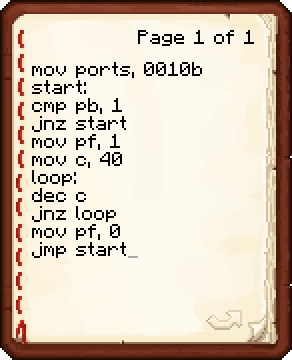
This program waits for a signal on the back port and then powers the front port for approximately 80 redstone ticks.
mov ports, 0010b; Configure ports
start:
cmp pb, 1; Check if Back Port is powered
jnz start; If not, loop back to start
mov pf, 1; Turn on Front Port
mov c, 40; Set counter to 40
loop:
dec c; Decrease counter
jnz loop; Loop until counter is 0
mov pf, 0; Turn off Front Port
jmp start; Return to waiting state
Explanation: The delay is longer than 40 ticks because the dec and jnz instructions each take 1 tick per iteration, totaling 2 ticks per loop cycle.
