Overview#
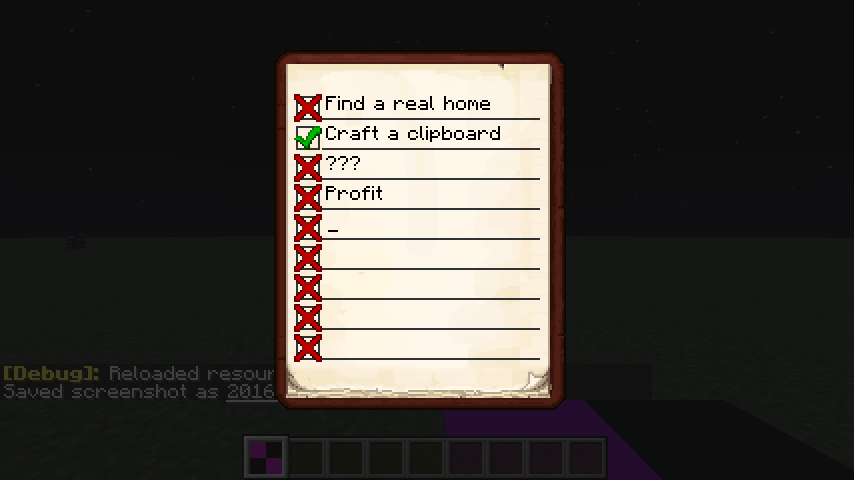
The Clipboard mod is a streamlined utility designed to help players stay organized during complex projects. It introduces a single, highly functional item—the Clipboard—which allows for the creation of multi-page checklists. Unlike simple signs or books, the Clipboard provides a dedicated interface with interactive checkboxes and text fields, making it the ideal tool for tracking resource gathering, building progress, or quest objectives.

Key features include:
- Interactive Checklists: Toggleable status icons for every task.
- World Placement: The ability to mount your list on walls or floors for quick reference.
- Multi-Page Support: Extensive space for long-term project planning.
- NBT Data Persistence: Tasks are saved directly to the item, allowing it to be shared with other players.
Items#
Clipboard
The primary item added by the mod. It serves as a portable notebook that stores all user-entered data.
| Property | Value |
|---|---|
| Stack Size | 1 |
| Durability | N/A |
| Creative Tab | Tools / Utility |
When held in the main hand, the player can interact with the Clipboard to manage their tasks. It does not consume resources to write in and can be edited indefinitely.
Blocks#
Placed Clipboard
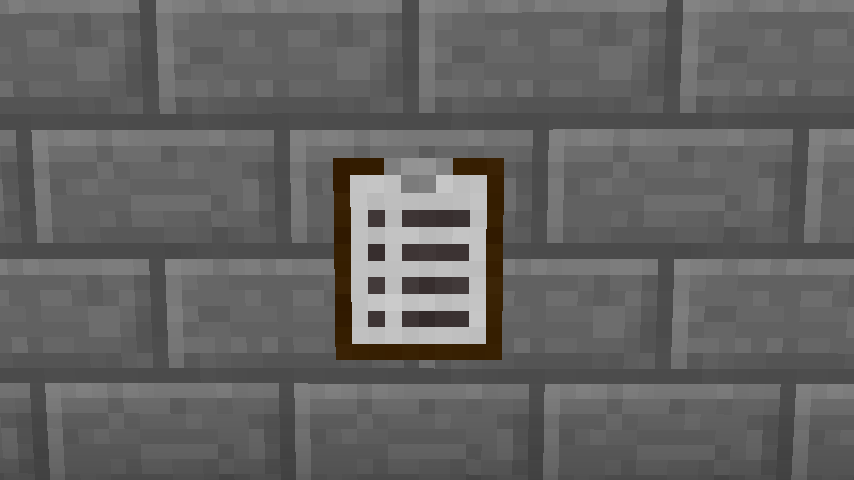
While primarily an item, the Clipboard can be placed into the world as a block. This allows it to function as a physical notice board or a shared task list for multiplayer bases.

- Placement: To place the Clipboard, the player must Sneak + Right-Click on any solid surface. It can be placed on the top, sides, or bottom of blocks.
- Visuals: When placed, the Clipboard model displays the first few lines of the current page, allowing players to see their top priorities without opening the GUI.
- Interaction: Right-clicking a placed Clipboard opens the same editing interface as the item version. Breaking the block will drop the Clipboard item with all its data preserved.
Mechanics#
The mod operates through a custom Graphical User Interface (GUI) and specific world-interaction rules.
The GUI Interface
Upon right-clicking with the Clipboard, a window opens featuring several lines for text entry. Each line is accompanied by a checkbox on the left.
- Text Entry: Click on any line to begin typing. Each line supports approximately 20-30 characters depending on the version.
- Checkbox States: Clicking the box to the left of a task cycles through three states:
- Empty: Indicates a pending task.
- Green Checkmark: Indicates a completed task.
- Red X: Indicates a cancelled or failed task.
- Pagination: Use the arrow buttons at the bottom of the interface to flip through pages. The mod supports a vast number of pages (up to 200 in some versions), allowing for categorized lists (e.g., "Base Materials," "Mob Farm Steps," "End Preparation").
Data Handling
Because the data is stored in the item's NBT (Named Binary Tag) data, the Clipboard can be passed between players in multiplayer. Any player holding the item can read and edit the existing notes.
Recipes#
The Clipboard is inexpensive to craft, requiring only basic early-game materials.
Crafting Recipe
To craft a Clipboard, combine an Ink Sac, a Feather, a piece of Paper, and a Wooden Pressure Plate in a crafting grid.

| Ingredient | Amount | Slot Position |
|---|---|---|
| Ink Sac | 1 | Top-Left |
| Feather | 1 | Top-Right |
| Paper | 1 | Bottom-Left |
| Wooden Pressure Plate | 1 | Bottom-Right |
Note: Any type of wooden pressure plate (Oak, Spruce, Birch, etc.) can be used in the recipe.
Technical Requirements#
For the mod to function correctly in Minecraft, the following library dependencies must be installed in the mods folder:
- ShadowMC: A core library required for the mod's base functionality.
- Forgelin: A library that provides Kotlin language support for Forge mods.
Failure to include these libraries will result in a game crash upon startup.
Gallery#