
OptiFine HD 9minecraft (26.3) – Run Smooth Shaders Without the Lag
 3,562
 5


OptiFine HD 9minecraft is the all-in-one performance, shaders, and visual-features pack that brings everything you love about OptiFine – and more – to the latest version of Minecraft. Boost your FPS, turn on stunning shaders, and unlock the full set of OptiFine-style features in a single installer, all with a free key.

Whether you want buttery-smooth frame rates on a low-end PC, beautiful realistic shaders, or the classic OptiFine touches like connected textures and custom entity models, OptiFine HD 9minecraft delivers it in one clean package. It installs itself for you, works alongside hundreds of thousands of other mods, and is safe to add to any world.
#xkg-optifinehd-9mc-v1.xkg-wrap{margin:24px 0;padding:20px 22px;border:2px solid #1e40af;border-radius:10px;background:#f5f8ff;font-family:-apple-system,BlinkMacSystemFont,”Segoe UI”,Roboto,sans-serif;box-shadow:0 2px 8px rgba(0,0,0,.08);box-sizing:border-box;color:#1e3a8a} #xkg-optifinehd-9mc-v1.xkg-wrap *{box-sizing:border-box} #xkg-optifinehd-9mc-v1 .xkg-title{margin:0 0 6px;color:#1e3a8a;font-size:16px;font-weight:700;line-height:1.3;display:flex;align-items:center;gap:8px} #xkg-optifinehd-9mc-v1 .xkg-sub{margin:0 0 14px;color:#1e3a8a;font-size:13px;line-height:1.5} #xkg-optifinehd-9mc-v1 .xkg-btn{display:inline-flex;align-items:center;gap:8px;padding:11px 22px;border:0;border-radius:6px;background:linear-gradient(180deg,#2563eb 0%,#1e40af 100%);color:#fff;font-size:15px;font-weight:700;cursor:pointer;letter-spacing:.3px;box-shadow:0 2px 6px rgba(0,0,0,.3);line-height:1;transition:filter .12s,transform .1s} #xkg-optifinehd-9mc-v1 .xkg-btn:hover{filter:brightness(1.08)} #xkg-optifinehd-9mc-v1 .xkg-btn:active{transform:translateY(1px)} #xkg-optifinehd-9mc-v1 .xkg-out{display:none;margin-top:14px} #xkg-optifinehd-9mc-v1 .xkg-out.show{display:block;animation:xkgFade .3s ease} @keyframes xkgFade{from{opacity:0;transform:translateY(-4px)}to{opacity:1;transform:translateY(0)}} #xkg-optifinehd-9mc-v1 .xkg-label{font-size:11px;color:#1e3a8a;font-weight:700;text-transform:uppercase;letter-spacing:1px;margin-bottom:6px} #xkg-optifinehd-9mc-v1 .xkg-box{position:relative;display:flex;align-items:center;justify-content:center;gap:10px;padding:14px 16px;background:#1f1f1f;border-radius:6px;border:1px solid #444;box-shadow:0 2px 6px rgba(0,0,0,.15);cursor:pointer;user-select:none;transition:background .15s,border-color .15s} #xkg-optifinehd-9mc-v1 .xkg-box:hover{background:#262626;border-color:#666} #xkg-optifinehd-9mc-v1 .xkg-box:hover .xkg-hint-icon{opacity:1} #xkg-optifinehd-9mc-v1 .xkg-box:active{transform:translateY(1px)} #xkg-optifinehd-9mc-v1 .xkg-code{font-family:Consolas,”Courier New”,monospace;font-size:18px;font-weight:700;color:#7cd4ff;letter-spacing:2px;word-break:break-all;line-height:1.3;text-align:center} #xkg-optifinehd-9mc-v1 .xkg-hint-icon{display:inline-flex;align-items:center;color:#888;opacity:.55;transition:opacity .15s;flex-shrink:0} #xkg-optifinehd-9mc-v1 .xkg-popup{position:absolute;top:-38px;left:50%;transform:translateX(-50%) translateY(6px);background:#16a34a;color:#fff;padding:7px 16px;border-radius:6px;font-size:13px;font-weight:700;white-space:nowrap;opacity:0;pointer-events:none;transition:opacity .2s ease,transform .2s ease;box-shadow:0 4px 12px rgba(22,163,74,.4);display:flex;align-items:center;gap:6px} #xkg-optifinehd-9mc-v1 .xkg-popup::after{content:””;position:absolute;bottom:-5px;left:50%;transform:translateX(-50%);width:0;height:0;border-left:6px solid transparent;border-right:6px solid transparent;border-top:6px solid #16a34a} #xkg-optifinehd-9mc-v1 .xkg-popup.show{opacity:1;transform:translateX(-50%) translateY(0)} #xkg-optifinehd-9mc-v1 .xkg-hint{margin-top:10px;font-size:12px;color:#1e3a8a;font-style:italic;line-height:1.5} @media(max-width:520px){#xkg-optifinehd-9mc-v1 .xkg-code{font-size:14px;letter-spacing:1px}#xkg-optifinehd-9mc-v1 .xkg-box{padding:11px 12px}#xkg-optifinehd-9mc-v1 .xkg-btn{width:100%;justify-content:center}}Free License Key
Generate Your License Key
Click the button to get a license key for OptiFine HD 9minecraft. Click the key to copy, then paste it into the installer’s License field and click Validate.
Features:
-
t
- Huge FPS boost – higher frame rates, less lag and stutter, smoother gameplay. t
- Beautiful shaders – enable famous shader packs (BSL, Complementary, SEUS and more) with a couple of clicks. t
- Connected Textures (CTM) – seamless glass, bookshelves and blocks. t
- Custom & Random Entities – varied mobs, custom models, and emissive glowing textures. t
- Custom Sky & Custom Colors – skies and colors that follow your favorite resource packs. t
- Zoom (hold C) and Fullbright for full-map brightness. t
- Detailed Video Settings – fine-tune every option to match your PC. t
- Works with most mods – compatible with the vast majority of Minecraft mods.
Requirements:
-
t
- Java 21 – Minecraft runs on Java 21, so install Java 21 and set it as the default for opening .jar files before running the installer. t
- Minecraft with Fabric or NeoForge – the installer sets up the loader profile for you.
Screenshots:
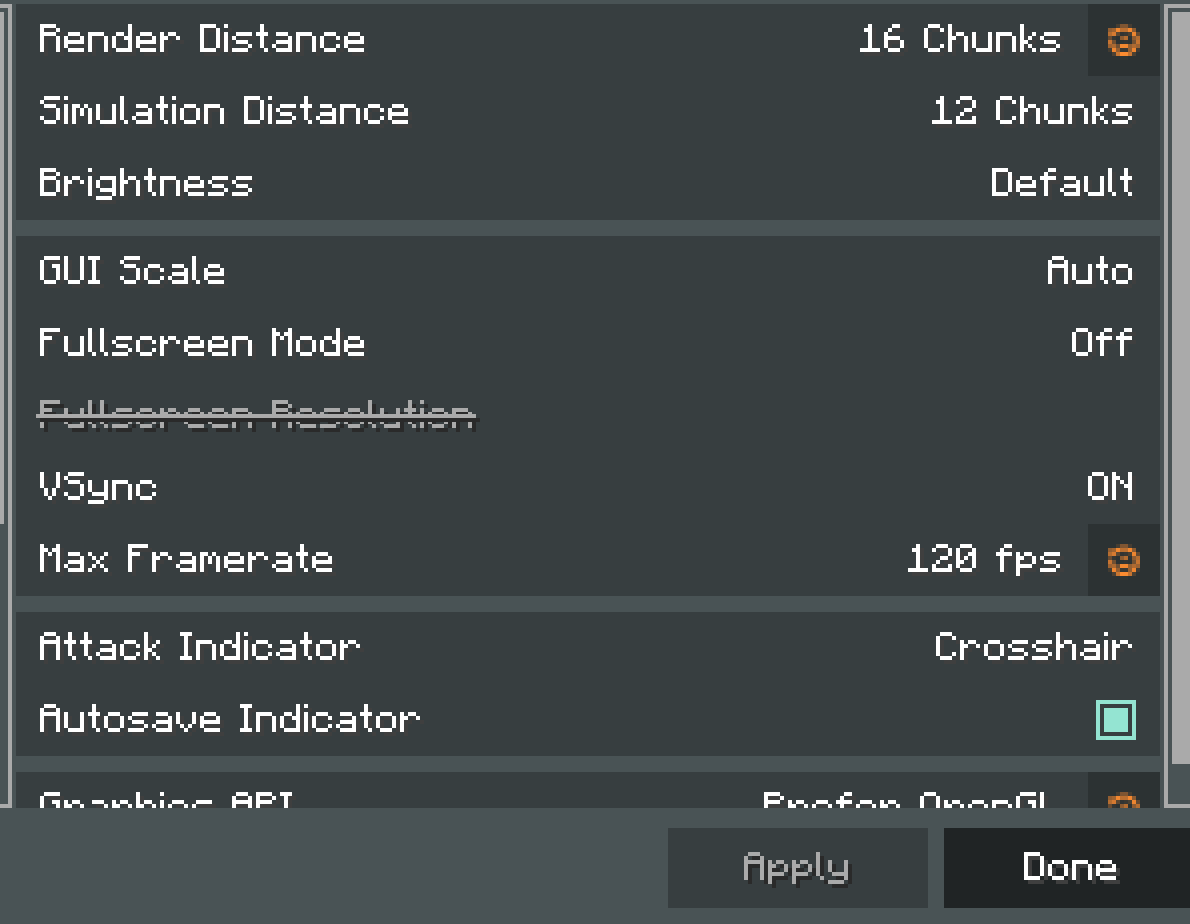
Fine-tune everything from render distance and performance to shaders – all in one clean, in-game menu:

HD Capes:
OptiFine HD 9minecraft can display a custom high-resolution cape on any player – even players who do not have an official cape. Capes can be any HD size, so crisp, detailed designs stay sharp in-game.
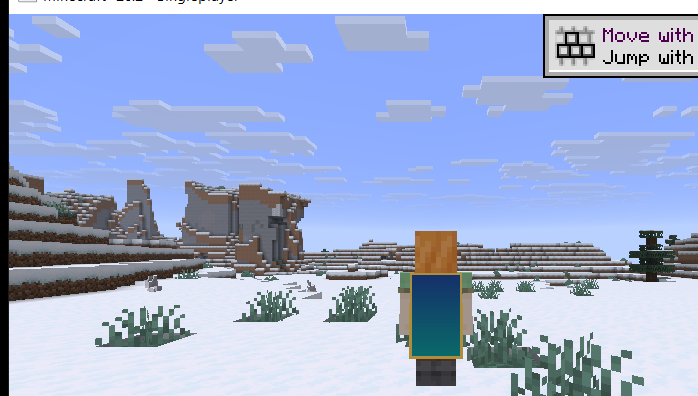
An HD cape rendered on the player in third-person view.
How to add your own cape:
- Open your .minecraft folder and go into the optifinehd9mc-capes folder (it is created automatically the first time you run the game).
- Put a PNG cape file inside it:
- <YourUsername>.png – shows that cape on that specific player (for example Notch.png).
- default.png – shows on everyone who does not have their own file.
- The cape uses the standard cape layout and can be any HD resolution. Restart the game (or rejoin the world) to see it.
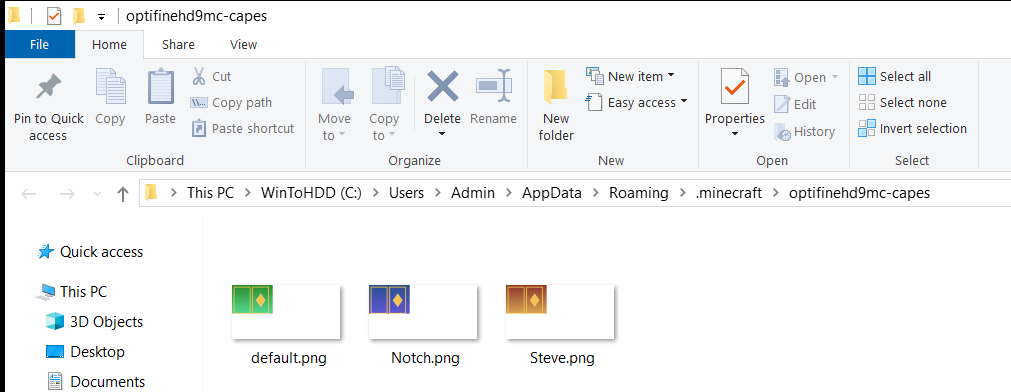
Drop your cape PNG files into the optifinehd9mc-capes folder.
How to install:
Installer preview & steps:
-
t
- Run the downloaded installer (double-click the .jar with Java 21). t
- Paste your free key (get one from the Gen Key box above) and click Install. t
- Open the Minecraft launcher, pick the created profile, and play.
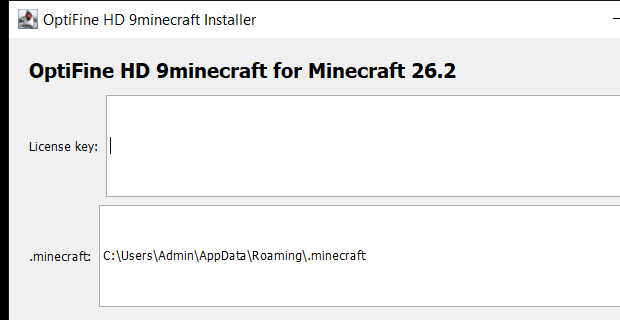 OptiFine HD 9minecraft Installer – main window
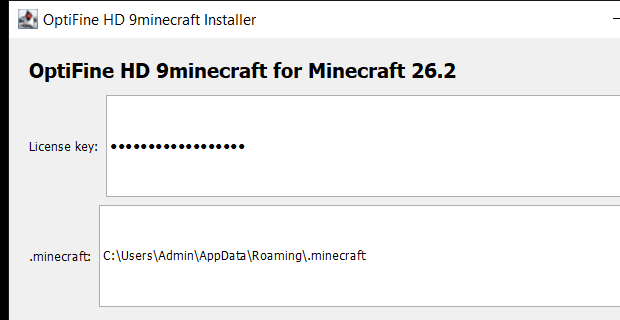 OptiFine HD 9minecraft Installer – enter your free key
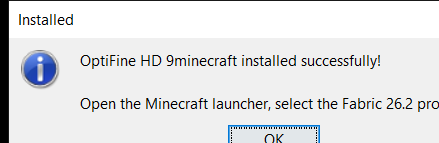 OptiFine HD 9minecraft Installer – installed successfully
-
t
- Click Gen Key above to get your free license key. t
- Download the Fabric or NeoForge installer below. t
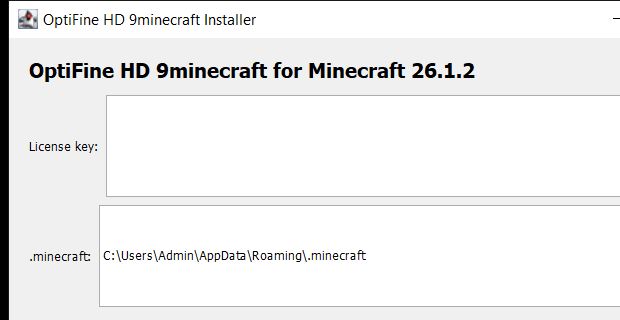
- Run the installer, paste your key, choose your .minecraft folder, and click Install. t
- Open the Minecraft launcher, select the profile, and play.
OptiFine HD 9minecraft Download Links
Sign in to unlock this download
Inside: 26.3 26.2 26.1.2
Choose one way to sign in
Free · takes a few seconds · you come straight back to this page

5 Comments
What do you think?
Your opinion means a lot - we'd love to hear from you.
You May Also Like
Picked for this page
 Humbling Bundle Mod (26.3, 1.20.1) – Doubles All Entity Loot
 ItemPhysic Lite Mod (26.3, 1.20.1) – Enhanced Item Animation
 Trinkets Canary Mod (1.21.11, 1.21.8) – Fork Of Trinkets For Latest Game Versions
 Heart Indicator Mod (26.3, 1.21.1) – See Exactly How Much Health Your
 Extinction Z Mod (1.20.1, 1.19.2) – Scavenge Ruined Cities to Survive
 Replaceitem Maze World Mod (26.3, 1.20.1) – The World Is A Maze!
 Creeper Overhaul 9minecraft Mod (26.3) – Find Unique Biome Creepers
 Blue Archive Halo Mod (26.2, 1.20.1) – Float Glowing Rings Above Beacons
 Materia 1 Mod (1.21.1, 1.20.1) – Start in the Stone Age and Master Realistic
 Juxt UI Mod (26.3, 1.21.1) – Manage Items and Health with a Clean Modern UI
 Cubic Crypt Descent Mod (26.2, 1.20.1) – Conquer Procedural Roguelike Dungeons
 Wen Xin’s Marioverse Mod (1.21.1) – Turn Your World Into a Classic Platformer
Most viewed in Clients over the last 7 days
 Lunar Patcher (v10) – Using Lunar Client for Free
 Meteor Client Mod (26.3, 1.20.1) – Xray, HUD, Fly
 Aristois Client Mod (1.21.4, 1.20.1) – World Class Minecraft Utility
 Baritone 9minecraft Client Mod (26.3, 26.1.2) – Mine and Build Bases Hands-Free
 Prestige Client Mod (1.21.11, 1.21.4) – Powerful Ghost Features for Crystal & Sword PvP
 CatLean Client Mod (26.2, 1.21.11) – ThunderHack Recode Alternatives
- Baritone Client Mod (26.3, 1.20.1) – Autominer, Build with AI, Xray
 9minecraft Xray Client (26.3, 1.20.1) – The #1 Ore Finder of 2026
 LiquidBounce Client Mod (26.3, 1.20.1) – LiquidLauncher, A Free Client
 DoomsDay Client (26.1.2, 1.20.1) – Best Free Injectable Client
 EaglerForge Old Mods (1.8.8) – Using for Eaglercraft
 Amber 9minecraft Client Mod (26.3, 1.21.11) – Gain Godlike Survival Powers
More from Clients
 Swyzzy Client Mod (1.21.11, 1.21.4) – Dominate Anarchy Battles with Zero Lag
 Amethyst Client Mod (1.21.11) – Dominate Crystal PvP on Anarchy Servers
 Fake Client Mod (1.21.11, 1.21.4) – Pull Hilarious Visual Pranks on Friends
 Lumi Client Mod (1.21.11) – Smooth Vector Menus and Live Spotify HUD
 67 Client Mod (1.21.11) – Survive Anarchy Servers with Custom PvP Tools
 Zyron Client Mod (1.21.11) – Scout Hidden Caves and Rare Geodes
 Water v6 Client Mod (1.21.11) – Read Fast Server Chat Without Clutter
 Core Client Mod (1.21.11) – Win Anarchy Battles with Clean Combat Overlays
 Polar Client Mod (1.21.4) – Dominate Anarchy Servers and Crystal Duels
 Dqrkis Client Mod (1.21.11, 1.21.4) – Undetectable Ghost Client
 NoRisk Client Launcher (26.3, 1.8.9) – Super Boost FPS, Free Cosmetics
 Void Strike Client Mod (1.21.4) – Dominate Competitive Crystal PvP Battles

failed
Error loading mods
2 errors have occurred during loading
Mixin application of net. irisshaders. iris. mixin. forge.MixinLevelRenderer from Iris (iris) has failed
org . spongepowered. asm. mixin . in jection. throwables. InvalidInjectionException: Critical injection
failure: @WrapOperation annotation on skip could not find any targets matching
lambda$addAlwaysOnTopPass$0′ in net/minecraft/client/renderer/LevelRenderer. No refMap loaded.
[INJECT_PREPARE Applicator Phase -> mixins. iris. forge. json: MixinLevelRenderer from mod iris ->
Prepare Injections ->
wrapOperation$zpp000$iris$skip (Lcom/mojang/renderpearl/api/commands/CommandEncoder ; Lcom/mo jang/ren
derpearl/api/textures/GpuTexture; DLcom/llamalad7/mixinextras/in jector/wrapoperation/Operation; )v ->
Parse -> -> Validate Targets]
java.lang.NoClassDefFoundError: Could not initialize class
net.neoforged.neoforge.client. NeoForgeRenderPipelines
NeoForge (neoforge) has failed to load correctly
I followed the instructions step by step. What do you think might have happened?
A Java Exception has occurredNeoForge’a 26.3
You were right, and the cause was on our side.
The OptiFine HD 9minecraft download is an installer you double-click, so Windows runs it with whatever Java is registered for .jar files – usually an older standalone Java 8, not the Java the game itself uses. Our installer was built for Java 21, so Java 8 refused to start it and Windows showed exactly that dialog.
All six OptiFine HD downloads (26.3, 26.2 and 26.1.2 – Fabric, NeoForge and Vulkan) have been rebuilt to run on Java 8, and we tested each one by actually installing with a Java 8 runtime. Please download again – same link, same file name – and it should open straight away. Nothing else inside the file changed.
Gjnbbh
This mod is the best