Overview#
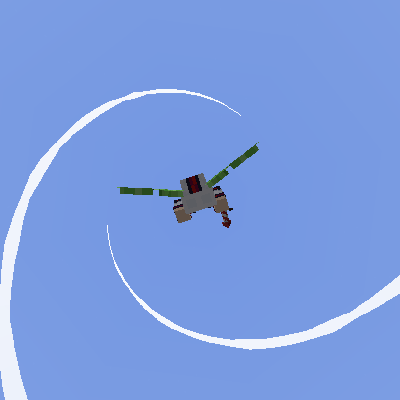
The Elytra Contrails Mod enhances the flight experience in Minecraft by adding accurate, physics-based trails that emit from the wingtips of an Elytra. Unlike simple particle effects, these trails are rendered as smooth splines that follow the player's exact flight path, creating a cinematic and realistic look. The mod is designed with performance in mind, utilizing a custom rendering system that supports translucency, glowing effects, and high-refresh-rate displays.
Key features include:
- Fully Customizable Trails: Adjust color, width, length, and transparency.
- Twirling Mechanics: Perform barrel rolls and spins that create beautiful helix patterns.
- Server Synchronization: When installed on a server, players can see each other's custom trails and twirls.
- Resource Pack Support: Define custom textures, presets, and trail spawners for any entity model.
Mechanics#
Trail Generation
Trails are generated based on the movement of the Elytra's wingtips. The mod calculates the "Angle of Attack" to ensure trails spawn at the most realistic point. By default, trails only appear when the player is moving above a certain speed threshold, though this can be overridden in the settings.
Twirling
Twirling is a core mechanic that allows players to rotate their character model during flight. This is not just visual; the trails follow the rotation, allowing for the creation of complex spiral and helix shapes in the sky.
| Feature | Description |
|---|---|
| Helix Trails | Created by constant twirling while moving forward. |
| Input Buffer | Ensures twirls feel natural and responsive to key presses. |
| Camera Sync | Optional setting to make the camera roll with the player during a twirl. |
General Settings#
The General Settings menu controls the global behavior of the mod and how trails interact with the environment.
- Enable Mod: Global toggle to turn all trail rendering on or off.
- Render Distance: Determines how far away other players' trails will be rendered.
- Hide in First Person: Toggles whether you see your own trails while in first-person view.
- Snap to Wingtips: Prevents trails from "flickering" or lagging behind the model during high-speed maneuvers.
- Fade Close to Camera: Gradually fades trails as they get near the player's view to prevent screen clutter.
- Disable Trail Splines: If enabled, trails will appear as discrete segments rather than smooth curves (useful for a retro look or extreme performance saving).
- Force Hidden Entity Render Pass: A technical fix for first-person trail visibility issues in certain Minecraft versions.
Trail Specific Settings#
These settings allow you to define the base appearance of your personal trails.
| Setting | Description | Range/Options |
|---|---|---|
| Trail Color | The primary color of the trail. | Hex Code / RGB Picker |
| Trail Alpha | The transparency of the trail. | 0.0 to 1.0 |
| Trail Width | How thick the trail appears. | 0.1 to 5.0 |
| Trail Length | How long the trail persists before disappearing. | Measured in ticks |
| Trail Texture | Choose from built-in textures (e.g., Pride flags, Solid, Gradient). | List of Textures |
| Glowing Trail | Makes the trail ignore lighting and glow in the dark. | Toggle |
| Wireframe Mode | Renders only the outlines of the trail segments. | Toggle |
Advanced Trail Specific Settings#
For users who want total control, advanced settings provide dynamic behavior based on flight conditions.
- Width Variation (Jitter): Adds a random modifier to the trail width, creating a flickering or "unstable" energy effect.
- Speed-Dependent Transparency: Trails become more or less transparent based on how fast the player is flying.
- Speed-Dependent Width: Automatically thins or thickens the trail based on velocity.
- Gap Distance: Creates a physical gap between the wingtip and the start of the trail.
- Distance-Based Fade: Causes the trail to fade out smoothly at the very end of its length.
- XYZ Offsets: Manually adjust the spawn position of the trails relative to the wingtips. This is useful for fixing alignment on custom player skins or models.
Twirling!#
Twirling adds a new layer of expression to flight. You must bind keys in the standard Minecraft Controls menu to use these features.
- Twirl Left/Right: Rotates the player 360 degrees in the chosen direction.
- Constant Twirl: Keeps the player spinning as long as the key is held, perfect for long helix trails.
- Random Twirl: Performs a random roll or flip.
- Twirl Timing: Adjust how fast the rotation occurs.
- Twirl Types: Choose from 6 different animation styles, ranging from tight barrel rolls to wide loops.
- Ignore Speed for Twirling: Allows trails to spawn during a twirl even if the player is moving below the minimum required speed.
Presets#
The mod includes a Preset system to quickly switch between different trail styles.
- Built-in Presets: Includes defaults like "Rainbow," "Fire," "Ice," and "Classic White."
- Custom Presets: Players can save their current configuration as a new preset to be reloaded later.
- Other's Defaults: You can set a specific preset to be applied to all other players who do not have the mod installed or have not shared their config.
- Resource Pack Presets: Resource packs can bundle
.jsonfiles that add new presets to the selection menu.
Resource Packs#
Custom Textures
To add custom trail textures, place .png files in assets/elytracontrails/textures/trails/. These can then be selected in the Trail Specific Settings.
EMF (Entity Model Features) Integration
If you use custom Elytra models via EMF, you can define exactly where trails spawn by naming bones in your model:
leftWingTip/rightWingTip: Standard dual-trail setup.trailSpawner: A generic name for any bone that should emit a trail.
Custom Trail Spawners
Advanced creators can define trails for any entity (not just players). By adding a JSON file to assets/elytracontrails/trails/, you can attach contrails to Arrows, Allays, or even custom modded mobs.
{
 "entity": "minecraft:arrow",
 "color": "#FFFFFF",
 "width": 0.2,
 "length": 20,
 "texture": "elytracontrails:textures/trails/smoke.png"
}Compatibility#
The mod is highly compatible with other flight-enhancing mods:
- Do a Barrel Roll: Fully compatible; the trails will follow the advanced banking and rolling physics of the mod.
- Entity Model Features (EMF): Allows for trails to be attached to custom 3D Elytra models.
- Shaders: Compatible with most modern shader packs (Iris/Oculus). If trails appear invisible, ensure "Translucent Trails" is toggled on in the mod settings.
Gallery#