


Overview#
Iron Jetpacks is a utility mod designed to provide players with modular and scalable flight capabilities. Unlike many other jetpack mods, Iron Jetpacks is built with extreme customizability in mind, allowing modpack developers and players to define their own jetpack tiers, stats, and materials via JSON configuration files.
The mod integrates seamlessly with the Forge Energy (FE) system, making it compatible with almost any energy-generating mod. It also features native Curios API support, allowing jetpacks to be equipped in a dedicated back slot rather than occupying the chestplate armor slot.
Core Features:
- Tiered Progression: Start with basic wooden flight and work up to emerald-tier propulsion.
- Flight Modes: Includes standard engine toggles and a dedicated Hover Mode for precision building.
- Throttle Control: Dynamically adjust your flight speed on the fly.
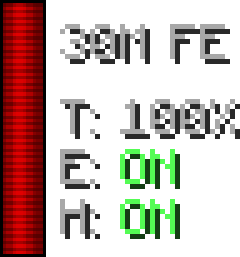
- In-Game HUD: A customizable overlay showing energy levels, engine status, and throttle percentage.
- Fully Configurable: Every aspect of a jetpack—from its speed to its fuel consumption—can be modified.
Mechanics#
Flight & Engine Control
Jetpacks must be charged with FE and equipped (either in the chestplate slot or the Curios back slot) to function.
- Engine Toggle: By default, the engine is turned on/off using the V key. The jetpack will not provide thrust unless the engine is active.
- Ascension: Hold the Space Bar to fly upwards. The vertical speed and acceleration are determined by the jetpack's tier.
- Hover Mode: Toggled with the G key (or H depending on configuration). When active, the jetpack will counteract gravity, allowing the player to stay at a constant altitude or descend very slowly. Hovering still consumes energy.
- Throttle Control: Players can adjust their movement speed using the Increase Throttle (.) and Decrease Throttle (,) keys. This allows for slow, precise movement or high-speed travel.
Energy & Charging
Jetpacks do not have an internal generator. They must be charged using external FE-compatible blocks such as Energetic Infusers, Wireless Chargers, or Battery Buffers. Higher-tier jetpacks have significantly larger energy buffers but consume more FE per tick during flight.
HUD (Heads-Up Display)
The mod includes a built-in HUD that provides real-time data on the jetpack's status. It typically displays:
- Energy Bar: Current FE stored vs. maximum capacity.
- Engine Status: On/Off indicator.
- Hover Status: On/Off indicator.
- Throttle: Current speed percentage.
Jetpack Tiers & Stats#
The following table lists the default jetpack tiers provided by the mod. Note that these values are the standard defaults and may be altered by modpacks.
| Tier | Material | Energy Capacity | Usage (FE/t) | Speed | Vertical Speed | Armor |
|---|---|---|---|---|---|---|
| 0 | Wood | 20,000 FE | 32 FE/t | 0.18 | 0.10 | 0 |
| 1 | Stone | 100,000 FE | 50 FE/t | 0.25 | 0.15 | 2 |
| 1 | Copper | 120,000 FE | 60 FE/t | 0.28 | 0.18 | 2 |
| 2 | Iron | 400,000 FE | 80 FE/t | 0.40 | 0.25 | 4 |
| 2 | Bronze | 500,000 FE | 100 FE/t | 0.45 | 0.28 | 4 |
| 2 | Silver | 600,000 FE | 120 FE/t | 0.48 | 0.30 | 4 |
| 3 | Gold | 2,000,000 FE | 300 FE/t | 0.55 | 0.40 | 6 |
| 3 | Electrum | 2,500,000 FE | 350 FE/t | 0.60 | 0.45 | 6 |
| 3 | Steel | 3,000,000 FE | 400 FE/t | 0.65 | 0.50 | 6 |
| 4 | Diamond | 10,000,000 FE | 1,000 FE/t | 0.80 | 0.70 | 8 |
| 5 | Emerald | 48,000,000 FE | 5,000 FE/t | 1.00 | 0.90 | 10 |
| -1 | Creative | Infinite | 0 FE/t | 1.50 | 1.20 | 20 |
Note: Tier -1 (Creative) jetpacks do not require energy and provide the highest possible flight speeds.
Items & Components#
Crafting a jetpack requires several sub-components that scale in cost and quality with the jetpack's tier.
Jetpack Coils
Coils are the fundamental crafting ingredient for all jetpack parts.
- Basic Coil: Crafted with Iron Ingots, Redstone, and a Stick.
- Advanced Coil: Crafted with Gold Ingots, Redstone, and a Basic Coil.
- Elite Coil: Crafted with Diamonds, Redstone, and an Advanced Coil.
- Ultimate Coil: Crafted with Emeralds, Redstone, and an Elite Coil.
Capacitors
Capacitors determine the energy storage of the jetpack. Each tier requires the previous tier's capacitor or specific materials.
- Recipe Pattern: Typically 6x Material and 3x Energy Cells (or Coils).
Thrusters
Thrusters determine the speed and acceleration. Two thrusters are required for every jetpack recipe.
- Recipe Pattern: Typically 4x Material, 2x Coils, 1x Energy Cell, and 1x Furnace.
Leather Strap
The Leather Strap is a base component used only for the Tier 0 (Wood) or Tier 1 (Stone) jetpacks to represent the harness.
- Recipe: 3x Leather and 2x Iron Nuggets.

Recipes & Upgrading#
Base Jetpack Recipe
To craft a starting jetpack (e.g., Stone), use the following layout in a Crafting Table:
| Slot | Item | Slot | Item | Slot | Item |
|---|---|---|---|---|---|
| Top-Left | Material | Top-Mid | Material | Top-Right | Material |
| Mid-Left | Thruster | Center | Capacitor | Mid-Right | Thruster |
| Bot-Left | Material | Bot-Mid | Leather Strap | Bot-Right | Material |
Upgrading Jetpacks
To upgrade a jetpack to the next tier (e.g., Stone to Iron), the recipe replaces the Leather Strap with the previous tier's jetpack. This allows you to retain the energy stored in the previous jetpack during the upgrade process.
| Slot | Item | Slot | Item | Slot | Item |
|---|---|---|---|---|---|
| Top-Left | Iron Ingot | Top-Mid | Iron Ingot | Top-Right | Iron Ingot |
| Mid-Left | Iron Thruster | Center | Iron Capacitor | Mid-Right | Iron Thruster |
| Bot-Left | Iron Ingot | Bot-Mid | Stone Jetpack | Bot-Right | Iron Ingot |
Configuration#
Iron Jetpacks is unique because it generates its items based on JSON files found in the config/ironjetpacks/jetpacks/ directory.
Adding Custom Jetpacks
To add a new jetpack (e.g., a "Copper" jetpack if it's missing), you can create a new .json file in the config folder. A standard jetpack file includes:
{
 "name": "example_jetpack",
 "tier": 3,
 "color": "#FFFFFF",
 "armor": 6,
 "capacity": 2000000,
 "usage": 300,
 "speedVertical": 0.4,
 "accelVertical": 0.12,
 "speedSideways": 0.18,
 "sprintSpeedMulti": 1.5,
 "craftingMaterial": "minecraft:gold_ingot"
}
Key Configuration Values:
- name: The internal ID and display name (formatted automatically).
- tier: Determines which coils and components are used in its auto-generated recipes.
- usage: The amount of FE consumed per tick of flight.
- speedVertical: How fast the jetpack ascends.
- accelVertical: How quickly the jetpack reaches its top vertical speed.
Controls#
The following are the default keybindings for Iron Jetpacks. These can be remapped in the standard Minecraft Controls menu.
| Action | Default Key |
|---|---|
| Toggle Engine | V |
| Toggle Hover Mode | G |
| Increase Throttle | . (Period) |
| Decrease Throttle | , (Comma) |
| Ascend | Space Bar |
| Descend (Hover On) | Shift (Sneak) |
