


Overview#
Dynamic Surroundings is a 100% client-side mod designed to breathe life into the Minecraft world without altering core gameplay mechanics. By weaving together hundreds of high-quality sound effects and subtle visual enhancements, it creates a living, breathing environment. Because it is client-side, it can be used on any server, including vanilla ones, to provide a personalized immersive experience.
The mod focuses on three primary pillars: Acoustics, Visuals, and Player Immersion. It replaces the often-silent Minecraft world with a rich soundscape where every biome has a unique voice, and every block has a distinct physical presence.
Sound Mechanics#
The core of the mod is its advanced sound engine, which performs background calculations to provide realistic audio depth and variety.
Biome-Specific Acoustics
As players move through the world, the mod seamlessly blends ambient loops based on the current and surrounding biomes.
| Biome Type | Day Sounds | Night Sounds | Weather Effects |
|---|---|---|---|
| Forests | Birds chirping, rustling leaves | Crickets, owls hooting | Heavy wind, muffled rain |
| Swamps | Bullfrogs, distant splashes | Dense cricket chirps, frogs | Bubbling gas sounds |
| Deserts | Dry wind, sand shifting | Cold wind, rattlesnakes | Dust storm howling |
| Beaches | Gentle waves, seagulls | Crickets, distant ocean roar | Crashing surf |
| Caves | Echoing drips, stone groans | Deep rumbles, eerie echoes | Muffled thunder |
Footstep & Interaction Sounds
Dynamic Surroundings features a robust footstep system (often integrated with Presence Footsteps) that assigns unique sounds to every block type. Walking on grass, stone, wood, or metal produces distinct, high-fidelity audio.
- Armor Clink: Moving while wearing armor produces subtle metallic or leather sounds based on the material.
- Item Handling: Swapping tools, drawing bows, or swinging swords triggers realistic mechanical sounds.
- UI Sounds: Subtle audio feedback when navigating menus or moving items in the inventory.
Visual Enhancements#
Visual effects are rendered entirely on the client to ensure they do not impact server performance or block placement.
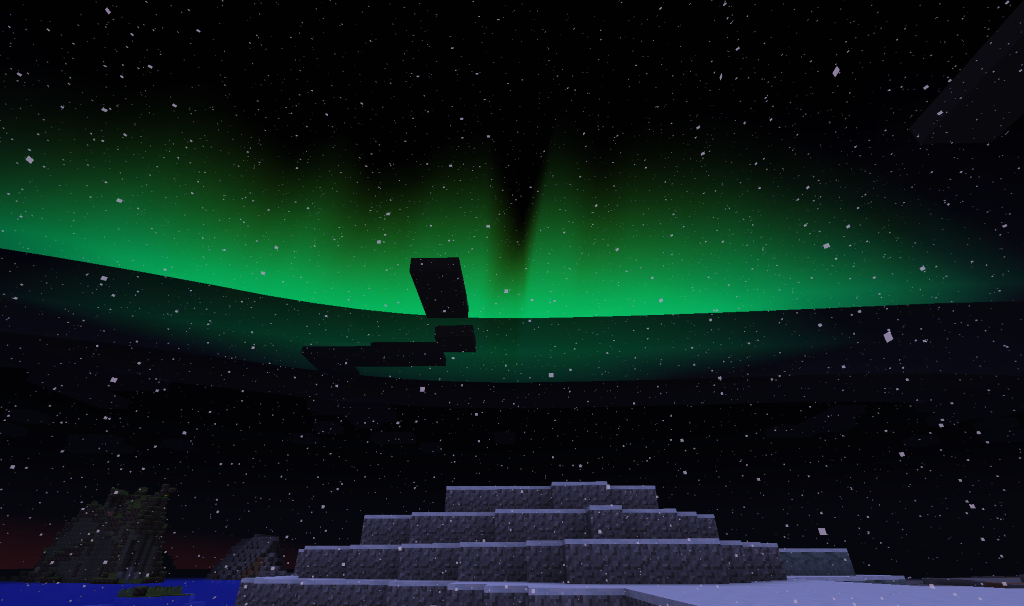
Aurora Borealis
In polar biomes (such as Snowy Tundra or Taiga), stunning auroras can appear in the night sky.
- Conditions: Must be night in a cold/polar biome.
- Variability: The size, shape, and color of the aurora are randomized each night, seeded by the Minecraft day.
- Moon Phase: The brightness of the aurora is influenced by the current phase of the moon.
Weather & Atmospheric Effects
- Rain Ripples: Rain falling on water surfaces creates realistic ripple particles.
- Desert Dust Storms: During storms in desert biomes, visibility is reduced by thick sand fog and flying dust particles.
- Steam & Fire Jets: Lava source blocks can emit fire jets or lava sparks. When water touches a "hot block" (Lava, Magma, or even a lit furnace), steam plumes rise from the contact point.
- Waterfalls: Flowing water that falls from a height triggers both a splashing sound and mist particles at the base.
Ambient Creatures#
While Dynamic Surroundings does not add traditional mob entities with health and drops, it introduces "Ambient Creatures" through visual particles and localized sound emitters to populate the world.
| Creature | Type | Spawn Conditions | Behavior |
|---|---|---|---|
| Fireflies | Particle | Swamps/Plains at night | Small glowing dots that hover and flicker around flowers. |
| Birds | Audio/Particle | Forests/Jungles during day | Chirping sounds that move through the canopy; occasional feather particles. |
| Frogs/Crickets | Audio | Swamps/Lush biomes | Positional audio loops that fade as the player approaches. |
| Dust Motes | Particle | Dark areas/Caves | Tiny specks of dust visible in light shafts or stagnant air. |
These creatures are purely cosmetic and cannot be killed, captured, or interacted with, ensuring the mod remains compatible with all gameplay styles.
Player & HUD Effects#
The mod enhances the player's physical connection to the environment through sensory feedback.
- Breath Fog: In cold biomes, the player will occasionally emit a small puff of white steam from their face, simulating breath in freezing air.
- Heartbeat: When the player's health drops below a certain threshold (configurable), a rhythmic heartbeat sound plays, increasing in intensity as health decreases.
- Hunger Sounds: Low hunger levels may trigger stomach growling audio.
Diagnostic & Utility HUDs
Dynamic Surroundings includes several optional HUD elements that can be toggled via keybinds:
- Light Level HUD (F7): Displays numerical light levels on the ground to help identify where mobs can spawn.
- Chunk Border HUD (F9): A visual fence showing the boundaries of the current chunk.
- Compass & Clock HUD: Displays the current heading and Minecraft time on the screen when the respective items are held in the inventory.
Environmental Interactions#
The mod identifies specific block properties to trigger environmental effects.
Hot Blocks
Blocks categorized as "Hot" will interact with water to produce steam and have unique ambient sounds (like hissing or crackling).
- Lava & Magma Blocks
- Campfires (Lit)
- Furnaces & Blast Furnaces (Active)
- Cauldrons containing Lava
Sound Control Mechanics
The Individual Sound Control system allows players to manage every sound in the game. By pressing the designated keybind (default 'P'), players can open a menu to:
- Block: Completely disable specific sounds.
- Cull: Limit how many times a sound can play simultaneously to prevent audio clutter.
- Volume: Adjust the volume of individual sounds relative to the master settings.
Commands & Configuration#
Dynamic Surroundings is highly customizable. While most users will use the in-game GUI (requires Cloth Config API), several commands are available for advanced users and modpack authors.
Commands
/ds reload: Reloads all configuration files and sound registries./ds dump: Dumps the current configuration and biome/block registries to the logs for debugging./ds hud: Toggles the various diagnostic HUDs (Light Level, Chunk Borders).
Configuration Options
Through the config menu, players can toggle almost every feature, including:
- Visuals: Enable/Disable Auroras, Fireflies, Steam, and Weather effects.
- Audio: Adjust the master volume of biome sounds, footstep intensity, and battle music.
- Performance: Adjust the range at which effects spawn and the frequency of background calculations to suit lower-end hardware.
