


Overview#
Simple Trophies is a utility and decoration mod designed primarily for modpack creators to reward players for their achievements. It adds a single, highly versatile block: the Trophy.
Unlike standard decoration mods, Simple Trophies does not include a default crafting recipe or survival method for obtaining trophies. Instead, it provides a robust framework for customization through NBT data and Creative mode tools, allowing for the creation of unique rewards that display rotating items, custom titles, and specific color schemes.

Blocks & Items#
The mod adds exactly one block and its corresponding item form.
Trophy
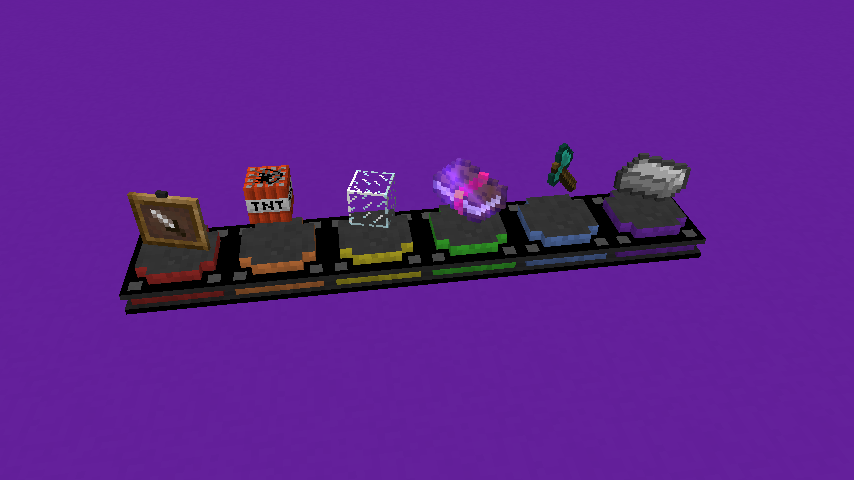
The Trophy is a decorative block that features a base stand and a rotating item suspended above it.
- Visuals: The item displayed on the trophy rotates continuously and cannot be retrieved by players in Survival mode.
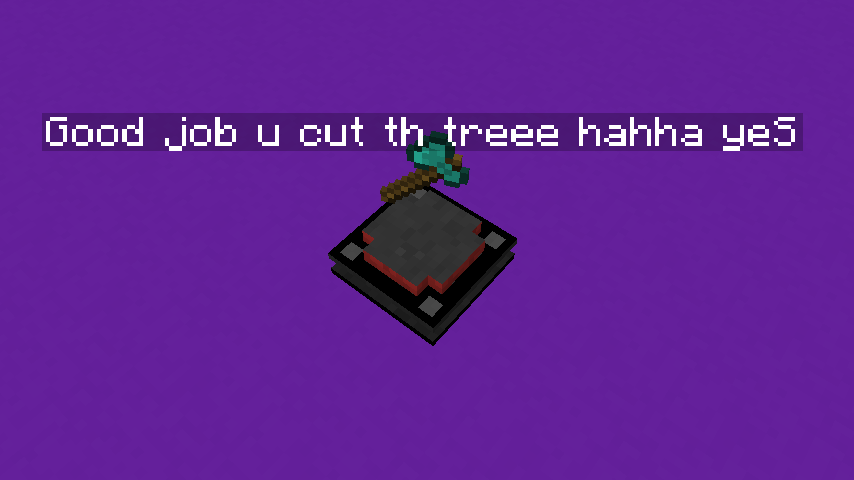
- Tooltips: When a player hovers their crosshair over a placed trophy, the custom name of the trophy is displayed in the world. Additionally, the item's own tooltip can be mirrored onto the trophy's tooltip.
- Customization: The inner ring of the trophy base can be tinted any RGB color, and the base itself can take on different material variants.

Creative Mode Customization#
For players in Creative mode, trophies can be customized in-world without manual NBT editing. These features are disabled in Survival mode to prevent players from altering their earned rewards.
Setting the Display Item
- Set Item: Right-click a placed trophy with any item to set it as the displayed rotating object.
- Clear Item: Right-click the trophy with an empty hand to remove the displayed item.
Setting the Color
- Single Color: Right-click the trophy with any vanilla dye to set the inner ring to that color.
- Color Mixing: Hold a different dye in each hand (mainhand and offhand) and right-click to set the color to the RGB average of the two dyes.
Renaming Trophies
- Anvil Renaming: Place a trophy item in an Anvil to change its name. This name will appear both on the item and as the in-world hover text.
- Resetting Names: To remove a custom name and return to the default "Trophy" label, rename the item to
<CLEAR>in an anvil.
Copying NBT Data
- NBT Dump: Right-click in the air with a customized trophy item to copy its full NBT tag to your clipboard and dump it into the game log. This is essential for modpack creators who want to use the trophy in loot tables or quest rewards.
- Pick-Block: Using the pick-block key on a trophy will give you the item with all its NBT data intact (no need to hold CTRL).
NBT Structure & Manual Editing#
For advanced users and modpack developers, trophies are controlled by specific NBT tags. These can be applied via the /give command.
NBT Tag Reference
| Tag | Type | Description | Default |
|---|---|---|---|
TrophyName |
String | The name displayed on the item and hover text. Supports translation keys. | "" (Displays as "Trophy") |
TrophyItem |
Compound | The item stack to be displayed (e.g., {id:"minecraft:apple",Count:1b}). |
air |
TrophyColorRed |
Integer | Red component of the inner ring tint (0-255). | 255 |
TrophyColorGreen |
Integer | Green component of the inner ring tint (0-255). | 255 |
TrophyColorBlue |
Integer | Blue component of the inner ring tint (0-255). | 255 |
TrophyVariant |
String | The visual style of the base: "classic", "neon", or "gold". |
"classic" |
TrophyShowsTooltip |
Boolean | If 1b, the displayed item's tooltip is shown on the trophy's tooltip. |
1b |
TrophyEarnedTime |
Long | Unix timestamp (seconds) of when the trophy was earned. | Current Time |
Example Command
To give a player a "Gold" variant trophy displaying a Diamond Axe with a custom red tint:
/give @p simple_trophies:trophy 1 0 {
 TrophyItem:{id:"minecraft:diamond_axe",Count:1b,Damage:0s},
 TrophyName:"Lumberjack Champion",
 TrophyColorRed:179,
 TrophyColorGreen:49,
 TrophyColorBlue:44,
 TrophyVariant:"gold"
}
Visual Variants#
The mod includes three distinct visual styles for the trophy base, selectable via the TrophyVariant NBT tag:
- Classic: The standard, multi-tiered stone-like base with a customizable inner ring.
- Neon: A sleek, pulsating grey base designed for modern or sci-fi themes.
- Gold: A smooth, shiny golden base for high-tier achievements.

Configuration#
Simple Trophies includes a client-side configuration option to prevent crashes or visual issues caused by complex items.
- Tooltip Killswitch: If a specific item from another mod causes the game to crash when its tooltip is mirrored onto a trophy, this can be disabled in the config file. This will stop the trophy from attempting to render the displayed item's extra information.
Technical Details#
The trophy is a standard block model. Resource pack creators can easily modify its appearance:
- Tinting: Any part of the model with a
tintindexof0will automatically receive the custom RGB color defined in the trophy's NBT. - Remodeling: The mod is compatible with Resource Loader, allowing for complete overhauls of the trophy model while maintaining the NBT-driven item rotation and coloring logic.
