
Easy Build (26+, 1.21) – Place Giant Shapes with Double Taps
 104
 0

Easy Build brings fast building tools and a simple menu to your world, inspired by the Effortless Building mod from Java Edition. This addon includes 4 building modes (Air, Rectangular, Spherical, and Conical), 3 matching destruction modes, a clipboard tool, and undo or redo options. You can pick Solid, Hollow, or Outline fill styles, check placements with a Hologram Block, and combine shapes to finish big builds faster. It also supports mobile-friendly controls where you press the interact button twice instead of holding it down. It needs Experimental Features turned on in your world settings to run its scripting APIs.
Requirements:
- MCPE/Bedrock 1.21.90 – 1.21.94
all 4 versions
1.21.94, 1.21.93, 1.21.92, 1.21.90
- Turn on Experimental Features — this addon uses scripting APIs
Features:
- Mode Selection Menu: Opens a dedicated menu to switch between building modes, destruction modes, clipboard actions, settings, undo, and redo.
- Clipboard Tool: Lets you cut, copy, and paste parts of your build after marking two corners with a stick.
- Fill Mode Settings: Lets you choose between Solid, Hollow, and Outline fill styles for your shapes.
- Mobile-Friendly Controls: Replaces holding down with pressing the interact button twice so mobile players can build with ease.
- Includes Undo and Redo actions to fix mistakes during long building sessions.
- Shows placement previews with a Hologram Block so you can see where blocks go before placing them.
- Matches block rotation to the first block you place so directional blocks line up properly.
- Lets you combine different building modes to create custom shapes and unique builds.
- Includes Normal Building and Normal Destruction options so you can return to regular controls and avoid mistakes on your builds.
- Loads huge builds in about 1 to 2 seconds when placing large shapes with the building modes.
Building Modes:
- Air Building: Place blocks in mid-air to build floating structures and parkour courses.
- Rectangular Building: Build flat walls, floors, and tall box-shaped towers quickly.
- Spherical Building: Shape round domes and spheres out of your chosen blocks.
- Conical Building: Build pointed cones, or mix this mode with Spherical Building for custom floating structures.
Destruction Modes:
- Rectangular Destruction: Clear neat box-shaped pits and cutouts from terrain or builds.
- Spherical Destruction: Carve round craters through blocks like sand, dirt, and stone.
- Conical Destruction: Dig tall cone-shaped holes into walls and terrain.
How to Use:
- Turn on Experimental Features in your world settings before loading the world so the scripting APIs can run.
- Open the Easy Build menu to pick a building mode (Air, Rectangular, Spherical, or Conical) or a destruction mode (Rectangular, Spherical, or Conical).
- Open Settings in the menu and select Solid, Hollow, or Outline as your Fill Mode.
- On mobile devices, press the Interact button twice instead of holding it down to trigger the active mode.
- Check the Hologram Block preview before placing blocks, and wait 1 to 2 seconds for huge builds to finish loading.
- To cut or copy a structure, hold a stick to set position 1 and position 2, then open the menu and select Cut or Copy.
- To paste a copied section, stand where you want the structure placed, open the menu, and select Paste.
- Open the menu and choose Undo or Redo whenever you need to reverse or redo a recent change.
- Switch back to Normal Building or Normal Destruction in the menu when you finish so you do not make accidental changes to your builds.
Screenshots:
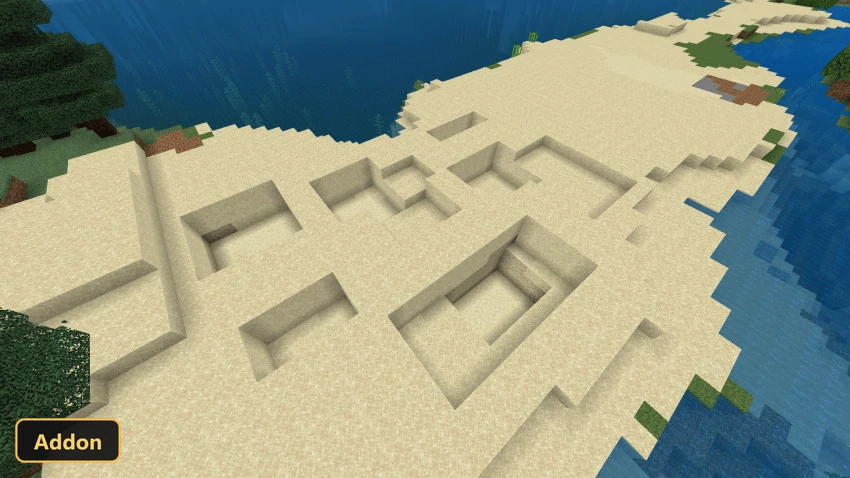
For MCPE/Bedrock 1.21+
You May Also Like
Picked for this page
 Tree Capitator with Vein Miner Addon (1.26+) – MCPE/Bedrock Mod
 Cappie Dweller Addon (26.x, 1.21) – MCPE/Bedrock Mod
 Warhammer40k BoltGun Addon (26.x, 1.21) – MCPE/Bedrock Mod
 Extra Swords Addon (26.x, 1.21) – MCPE/Bedrock Mod
 Herobrine Lurking Addon (26.x) – Survive Haunted Encounters and Blood Moon
 Rustic Furniture Addon (26.x) – Cozy Home Furnishings and Interior Decorations
 Verity Pocket Edition Addon (26.x) – Chat and Travel with an Intelligent AI
 Devil Vision Shader (1.26+) – MCPE/Bedrock
 The Shadow in Nightmare Addon (26.x, 1.21) – Survive an Immortal Horror Stalker
 Player Genders Addon (26.x, 1.21) – Custom Gender Models and New Player
 Craftable Super OP Tools Addon (26.x, 1.21) – Craft Overpowered Weapons
 Ethercraft Dream Dimension Addon (26.x) – Conquer Dangerous Dream Realms
Most viewed in Mods & Addons over the last 7 days
 Mob Girls Addon (1.26+, 1.21) – MCPE/Bedrock Mod
 Secrets of Berk Addon (26.33+) – How To Train Your Dragon Mod MCPE/Bedrock
 Jenny Colette Version Addon (26.x, 1.21) – MCPE/Bedrock Mod
 Jujutsu Awakening Addon (1.26+, 1.21+) – Prison Realm Update
 New Jujutsu Awakening Addon (1.26+) – MCPE/Bedrock
 Jenny Add-on (Fapcraft) APK MCPE Full Guide – How to use, Tutorial
 Shadow Company Addon (26.x, 1.21) – MCPE/Bedrock Mod
 Titan Craft Addon (1.26+, 1.21) – MCPE/Bedrock Attack on Titan Mod
 Asa’s One Piece Addon (1.26+, 26.32) – MCPE/Bedrock Mod
 Raxiores of Raxiore Addon (1.26+) – MCPE/Bedrock
 Fapcraft Addon (1.26, 1.21) – MCPE/Bedrock Jenny Mod
 Naruto Jedy Addon V8 (26.30+, 1.18+) for MCPE/Bedrock Edition
More from Mods & Addons
 Guard Villagers (26+) – MCPE/Bedrock Addon
 Gamemode Switcher (26+, 1.21) – MCPE/Bedrock Addon
 PvP HUD (26+, 1.21) – MCPE/Bedrock Addon
 Swagcasters Vehicles and Machines (26+, 1.21) – MCPE/Bedrock Addon
 Bebe Player (26+, 1.21) – MCPE/Bedrock Addon
 Stranger Things by MeBesm (26+, 1.21) – MCPE/Bedrock Addon
 Luncheon Meat ‘s Delight (26+) – MCPE/Bedrock Addon
 Player Graves (26+, 1.21) – MCPE/Bedrock Addon
 Yet Another Tree Capitator (26+, 1.21) – MCPE/Bedrock Addon
 Tempered in Flame (26+) – MCPE/Bedrock Addon
 XenoCraft the Return (26+) – MCPE/Bedrock Addon
 Backrooms Dimension (26+) – MCPE/Bedrock Addon

This post has no comments yet. Be the first — your comment will appear here.