


Poisoned Arrows Mod 1.7.10
 223
223
 0
0

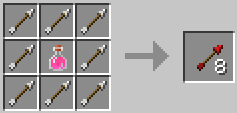
Poisoned Arrows Mod 1.7.10 allows you to add potion effects to your arrows. Once the arrow hits a mob, it will apply the effect. To add the potion effect to an arrow, you must put the potion effect you want to apply (not splash potions) in the crafting table with as many normal arrows surrounding it as you like (Outputs the amount of arrows put in the workbench). Just remember, if you only put one arrow along with the potion, you will end up wasting alot more of your resources to get more arrows.

Screenshots:
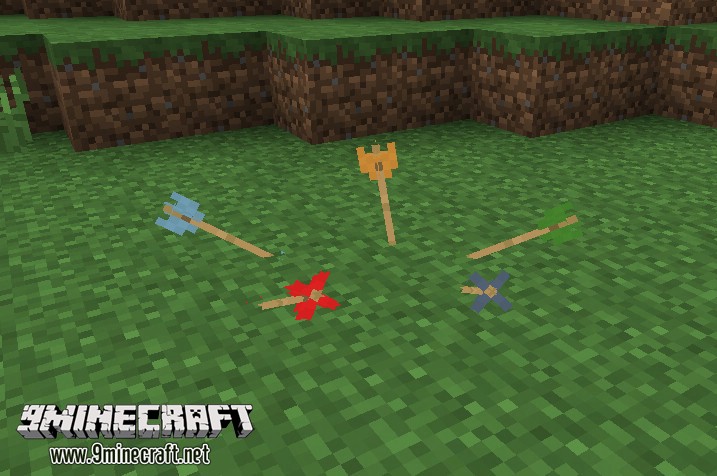
Effect Arrows in the ground
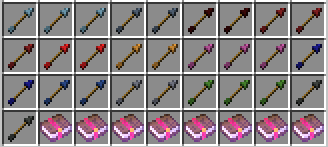
Here is what they look like inside the ‘Combat’ creative tab
Mod Showcases:
Crafting Recipes:
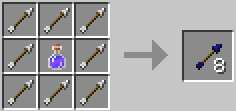
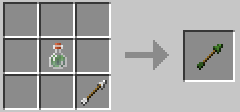
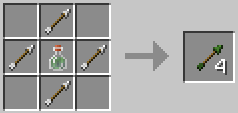
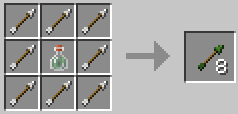
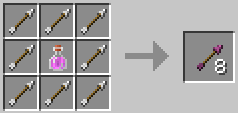
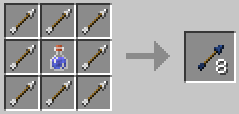
How to Install:
New to Minecraft? Follow our step-by-step guide to install Mods on your PC.View Guide
Download Links for Poisoned Arrows Mod 1.7.10
For Minecraft 1.7.10
Click to rate this post!
[Total: 0 Average: 0]
You May Also Like



















This post has no comments yet. Be the first — your comment will appear here.