
PleasureCraft Mod (26.3, 1.21.1) – Jenny Mod Remake for Fabric
 774,357
 213


PleasureCraft Mod is a complete remake and update of all the features of Jenny Mod for newer versions of Minecraft, with added support for Fabric. At the moment, there are only two characters, Lucy and Bia, but a lot more content will be added in the near future.

PleasureCraft Mod – Video Showcase
Features:
Modular Female Characters
- Currently, Lucy and Bia are implemented, with a modular system that makes it easy to add more female characters.
- Female characters can be tamed using specific items and will only respond to their owner.
- Shift + right-click opens a special owner-only GUI with:
- Interaction buttons (Sit, Follow, Talk, etc.)
- 4×3 inventory
- Option to set a home location as a respawn point.
Interactive Animation System
- Scene progress will include: hotkeys, progress bars, and transition effects.
Realistic Physics Effects
- Responds to:
- Movement inertia
- Rotation changes
- Bone-specific parameters (stiffness, damping, mass)
Screenshots:


How To Install PleasureCraft Mod With The Installer
The installer puts the mod and every library it needs in the right place for you. No manual file copying, and nothing you installed by hand is removed.
In the download section below, each Minecraft version has two rows. The row marked Installer (.jar) is this installer; the row marked Manual File (.jar) is the mod on its own. The installer is the larger of the two, because it carries the libraries as well:
- Minecraft 26.3 — Fabric Installer 17 MB (the manual file is 12 MB)
- Minecraft 1.21.11 — Fabric Installer 17 MB (the manual file is 13 MB)
- Download the Installer (.jar) row for your Minecraft version. It runs on the same Java you already use to play Minecraft, so there is nothing extra to install.
- Double-click it. The installer window opens:
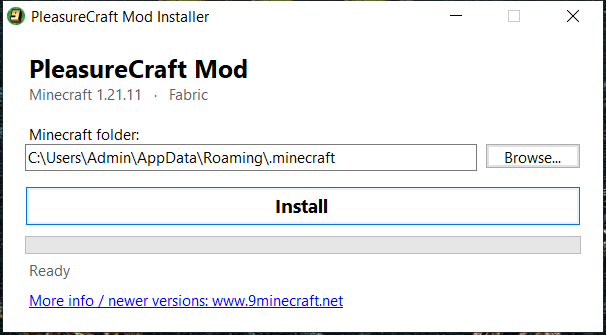
- Check that the Minecraft folder is correct. The installer fills in the default one for you; use Browse… if you keep Minecraft somewhere else.
- Click Install. When it is finished you will see:
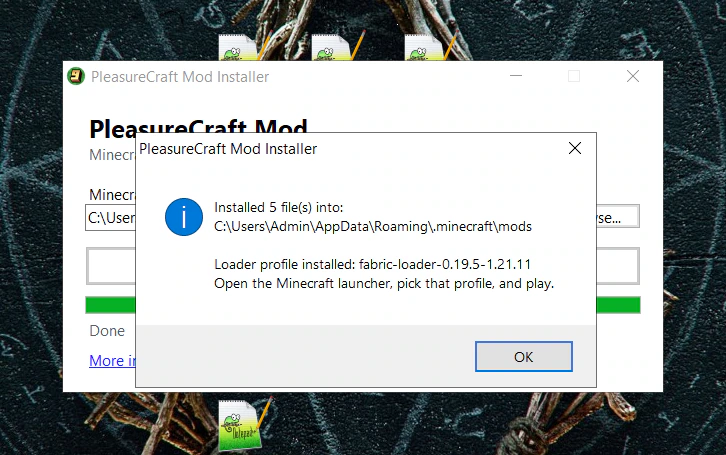
- Open the Minecraft launcher, pick the profile named in that message, and play.
If double-clicking opens the file in an archive program instead of starting it, open a command prompt in the folder you downloaded it to and run java -jar PleasureCraft-Mod-Installer-26.3-fabric.jar, using the name of the file you actually downloaded.
The installer also tells you once when a newer version of PleasureCraft Mod is released on 9minecraft.net. Prefer to do it yourself? The Manual File (.jar) rows in the download section are still there for manual installation.
How to Install:
New to Minecraft? Follow our step-by-step guide to install Mods on your PC.View Guide
Requirements:


PleasureCraft Mod Download Links
Sign in to unlock this download
Inside: 26.3 26.2 26.1.2 1.21.11 1.21 –> 1.21.8 1.21 –> 1.21.5
Choose one way to sign in
Free · takes a few seconds · you come straight back to this page

213 Comments
What do you think?
Your opinion means a lot - we'd love to hear from you.
You May Also Like
Picked for this page
 Fabric API (26.3, 1.20.1) – Play Hundreds of New Mods
 Marlow’s Crystal Optimizer Mod (26.3, 1.20.1) – Faster Crystal Speeds
 Flywheel of Terror Mod (1.20.1) – Survive When Your Base Fights Back
 Sinytra Connector Mod (1.21.11, 1.20.1) – Fabric Mod Support on Forge and NeoForge
 Coords HUD Mod (26.3, 1.21.1) – Customizable Coordinates
 GUI Followers Mod (26.3, 1.20.1) – Shows A List Of All Tamed, Non-Sitting Mobs
 Spice of Life Onion Mod (26.3, 1.20.1) – Encourages Dietary Variety
 Tokimis Toolshed Mod (26.2, 1.20.1) – Adds Multi-Block Mining Tools
 Puddles and Floods Mod (26.3, 1.20.1) – Watch Rainstorms Leave Puddles and Flood Valleys
 Spider Overhaul Mod (26.2, 1.20.1) – Survive Deadly New Spiders
 Voltaic API Mod (1.21.1, 1.20.1) – Dependency For Electrodynamics And Nuclear Science
 Anvil Uses Mod (26.2, 1.20.1) – Track Item Anvil Usage
Most viewed in Mods over the last 7 days
 Ala Industrial Mod (26.3) – Run Electric Power Grids and Automated Factories
 Jennycraft Mod (26.3, 1.20.1) – Virtual Girlfriend in Minecraft
 Fapcraft Mod (26.3, 1.12.2) – Comprehensive and Detailed Content
 Jenny Mod (Fapcraft) Official Complete Guide – How to use, Tutorial
 BangCraft Mod (1.20.1) – Jenny, Ellie and Elliot
 Fabric Loader (26.3, 1.20.1) – Fabric Installer for All Minecraft Versions
 The Shooting Star Demo Mod (26.3, 1.20.1) – Vaporize Terrain From Orbit
 OptiFine HD (26.3, 1.20.1) – Run Faster, FPS Boost, Shaders Support
 Meteor Client Mod (26.3, 1.20.1) – Xray, HUD, Fly
 Aristois Client Mod (1.21.4, 1.20.1) – World Class Minecraft Utility
 Baritone 9minecraft Client Mod (26.3, 26.1.2) – Mine and Build Bases Hands-Free
 Disabilities Mod (26.3, 1.20.1) – Survive with Random Physical and Mental Challenges
More from Mods
 Holyhell Mod (1.21.1, 1.20.1) – Fight Biblically Accurate Angels in Sacred Ruins
 7 Days to Mine Mod (1.16.5, 1.12.2) – Survive Endless Zombie Hordes
 Enhanced Attack Indicator 9minecraft Mod (26.3) – Time Every Attack and Item Cooldown
 RFTools Power Mod (26.3, 1.20.1) – Multi-Block Batteries
 I See You Over There Mod (26.3, 1.21.1) – Increases Render Distance
 Shared Health Mod (26.3, 1.20.1) – Linked Player Health System
 Creepy Pasta Craft Mod Revival Mod (26.3, 1.20.1) – Survive Iconic Internet
 Assorted Tech Mod (26.3, 1.20.1) – Protect Your Base with Smart Traps
 Better Fishtanks Mod (26.3, 1.20.1) – Build Massive Aquariums for Your Pet
 Much More Dungeons Mod (26.3, 1.20.1) – Battle Through Tall Towers
 TCT Flashlight Mod (26.3, 1.20.1) – Flashlight, Headlamp & Lantern
 Macabre Mod (26.3, 1.20.1) – New Dimension Of Blood And Gore

C.L.O.N.E
Very good
ive given the girls everything but no intraaction mneu shows when i do right click plus shift theey jst sit pls help
Just larping man
It’s tuff
.
Good
WHENEVER I TRY TO FUCK HER I GET TELEPORTED RANDOMY TO THE TOP OF MY WORLD WHY? DOES ANYONE KNOW THE SOLUTION???
Hola
.
K
Good
El juego es muy bueno
Hii
Nice im gonna definitely play this