
BlazeandCave’s Advancements Pack Data Pack (26.1.2, 1.20.1)
 23,176
 0


BlazeandCave’s Advancements Pack Data Pack adds over 1,000 new advancements to Minecraft and raises the total to 1,202. This data pack expands all five vanilla tabs and introduces new categories for 16 advancement tabs in total, including Mining, Building, Monsters, Weaponry, Redstone, Potions, and Super Challenges. You earn bonus item rewards and decorative trophies as you finish goals, while built-in scoreboards track your total advancements and tier points. It also includes Cooperative Mode for shared progress and colored teams for group competitions. The pack works in singleplayer survival worlds and on vanilla multiplayer servers, and it supports many languages with the separate BACAP Language Pack.
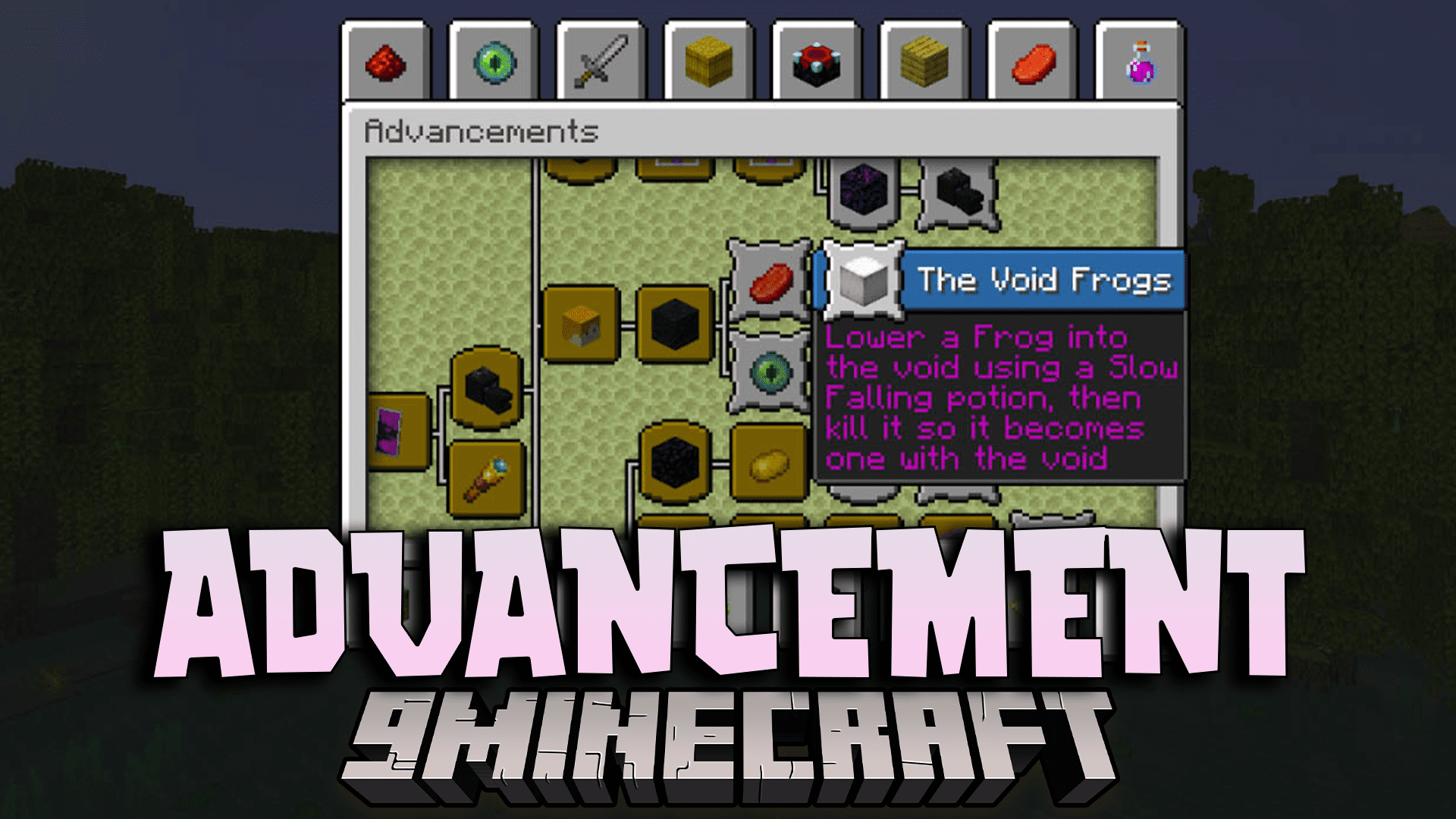
Features:
- Over 1,000 New Advancements: Brings the total count to 1,202 advancements, mixing original goals with ideas inspired by pre-1.12 achievements and Bedrock or Console edition achievements.
- Advancement and Points Scoreboards: Counts how many advancements each player completes and awards points for harder tiers like task, goal, and challenge, with point values you can change in the config menu.
- Item Rewards and Trophies: Gives bonus items through functions when you finish many advancements and awards special decorative trophies for many challenge advancements.
- Cooperative Mode: Shares unlocked advancements across all players in a world so small groups can work closely together.
- Multiplayer Teams: Lets players join colored teams and combine their scores for group competitions.
- Includes an in-game config menu where operators can toggle item rewards, trophies, welcome messages, tier completion messages, Cooperative Mode, and scoreboard displays on the sidebar or tab list.
- Assigns a CustomModelData value to every trophy so resource packs can give them custom textures or models.
- Supports full translation into Spanish, Russian, French, German, Japanese, Chinese, Korean, Pirate Speak, LOLCAT, and more when paired with the separate BACAP Language Pack.
- Keeps each advancement tab hidden until you complete at least one advancement in that tab.
- Offers optional addons and alternative versions, including a Hardcore Version, compatibility versions for Terralith, Nullscape, and Amplified Nether, and an April Fools 2021 edition.
- Requires a vanilla server in multiplayer because Spigot and Paper servers change internal data and can break detection for some advancements.
- Modifies vanilla advancements directly, so running other data packs that also change vanilla advancements may cause compatibility issues.
16 Advancement Tabs:
- BlazeandCave’s Advancements: Holds basic starter goals for a new world and milestone advancements that track how many advancements you earn in every other tab.
- Mining: Expands the mining goals from the vanilla Minecraft tab with more challenges for each ore and what you can make with them.
- Building: Focuses on crafting and building with many different blocks.
- Farming: Splits from the vanilla Husbandry tab to focus on crops and plants.
- Animals: Splits from the vanilla Husbandry tab to cover breeding, taming, and killing animals, as well as fishing.
- Monsters: Expands monster goals from the vanilla Adventure tab with unique challenges for nearly every hostile mob in the game.
- Weaponry: Focuses on both normal and unusual weapons.
- Biomes: Adds goals tied to different biomes, including the ocean.
- Adventure: Expands the vanilla Adventure tab with more goals for exploration, villages, trading, raids, and structures like ocean monuments and woodland mansions.
- Redstone: Focuses on crafting and using different redstone components.
- Enchanting: Focuses on enchanting items.
- Statistics: Tracks goals based on different in-game statistics.
- Nether: Expands the vanilla Nether tab with more goals for the fiery dimension, its mobs, and its structures.
- Potions: Expands potion goals from the vanilla Nether tab with challenges for many different potion effects.
- The End: Expands the vanilla The End tab with more goals for the dark, barren dimension, its mobs, and its structures.
- Super Challenges: Holds the hardest advancements in the pack that test the limits of what you can do in Minecraft, and unlocks after you defeat the Ender Dragon.
Commands:
/function blazeandcave:config: opens the in-game config menu to toggle item rewards, trophies, welcome messages, tier messages, Cooperative Mode, and scoreboard settings./team join bac_team_<colour> <player's name>: adds a player to a colored team so their scores combine for group competitions./datapack enable "file/bac_advancements": enables the data pack if it did not load when creating a new world./function bc_rewards:trophy/<tab>/<advancement name>: gives back a lost trophy for a specific advancement./reload: reloads data packs in-game if custom advancements do not appear right away./scoreboard objectives add bac_advancements dummy {"text":"Advancements"}: manually creates the advancement scoreboard objective if the config menu does not set it up./function bc_rewards:update_score: updates advancement scoreboard counts for players./scoreboard objectives setdisplay sidebar bac_advancements: shows the advancement scoreboard on the sidebar.
How to Use:
- Enter your world and look for the welcome message showing the pack is active, or open the advancements menu to check for the custom “BlazeandCave’s Advancements” tab.
- If the custom advancements do not show up, type
/datapack enable "file/bac_advancements"or/reloadin chat, or restart your server to load the pack. - Make sure you have operator permissions before changing settings; in singleplayer or Hardcore mode, click “Open to LAN” and set “Allow Cheats” to ON so the config menu can open.
- Type
/function blazeandcave:configin chat to open the config menu. - Click the checkboxes in the config menu to turn item rewards, trophies, and the welcome message on or off, or toggle completion messages for each advancement tier.
- Use the config menu options to display or clear the scoreboard on the sidebar or tab list, update scores for all online players, adjust point values for each tier, or turn on Cooperative Mode to share advancements across all players.
- If the scoreboard still does not work after using the config menu, run
/scoreboard objectives add bac_advancements dummy {"text":"Advancements"}, then/function bc_rewards:update_score, and then/scoreboard objectives setdisplay sidebar bac_advancementsin that exact order. - To compete in groups, type
/team join bac_team_<colour> <player's name>in chat; press Tab after typingbac_team_to see the list of available team colors. - Complete at least one advancement in any category to make its tab appear in your menu, and defeat the Ender Dragon to unlock the Super Challenges tab.
- If you lose a decorative trophy, run
/function bc_rewards:trophy/<tab>/<advancement name>in chat to get that trophy back.
For Minecraft 26.1.2, 26.1.1, 26.1
For Minecraft 1.21.11
For Minecraft 1.21.10, 1.21.9
For Minecraft 1.21.8, 1.21.7, 1.21.6
For Minecraft 1.21.5
For Minecraft 1.21.4
For Minecraft 1.21.1, 1.21
For Minecraft 1.20.6
For Minecraft 1.20.4
For Minecraft 1.20.2
For Minecraft 1.20.1, 1.20
For Minecraft 1.19.4
For Minecraft 1.19.3, 1.19.2, 1.19.1
For Minecraft 1.19
For Minecraft 1.18.2
For Minecraft 1.18.1
For Minecraft 1.17.1
Have you ever used 'Open to LAN' just to temporarily enable cheats in a singleplayer world?
0 responses · See the full results →
You May Also Like
Picked for this page
 TreeCapitator Data Pack (26.1.2, 1.20.1) – An Easy Way To Clear A Forest
 Simple Night Vision Data Pack (26.3, 1.20.1) – Alternative to Fullbright Texture Packs
 Vanilla Refresh Data Pack (26.2, 1.20.1) – 30+ Quality Of Life Features
 Horde Nights Data Pack (1.21.11, 1.20.1) – Survive The Blood Moon
 SATB Data Pack (26.1.2, 1.20.1) – Visualize Your Vital Stats
 Cauldron Concrete Powder Data Pack (26.3, 1.20.1) – Simplify Your Concrete Crafting
 Drop Head Data Pack (26.2, 1.20.1) – Drop Player Head
 Bubblellaneous Data Pack (26.2, 1.21.1) – Diverse Additions for Your World
 Ore Vein Miner Data Pack (26.3, 1.20.1) – Fast Automatic Vein Mining
 6 Stairs Data Pack (26.3, 1.20.1) – Craft More Stairs Efficiently
 Skippy Pearls Data Pack (26.3, 1.20.1) – Bounce Your Way Across Water
 Amethyst Cutting Data Pack (26.2, 1.20.1) – Easy Amethyst Collecting
Most viewed in Data Packs over the last 7 days
 True Ending 9minecraft Data Pack (26.3) – Fight a Multi-Phase Ender Dragon
 Unlimited Enchantments Data Pack (26.3, 1.21.1) – Break the Level Cap
 Simply One Block Data Pack (26.3, 1.21.11) – Mine One Infinite Block
 Weird and Powerful Weapons Data Pack (26.3, 1.21.11) – Wield Bizarre Gear
 RPG Enchantments Data Pack (26.3, 1.21.11) – Trade Raw Power for Specialized
- TreeCapitator Data Pack (26.1.2, 1.20.1) – An Easy Way To Clear A Forest
 Display Hearts DH Data Pack (1.21.11, 1.21.1) – Track Teammate Health
 Hearths 9minecraft Data Pack (26.3) – Raid Giant Spires for Nether Loot
 Orbital Strike Cannon Data Pack (26.3, 1.21.11) – Call Down Massive Explosions
 Armor Upgrades Data Pack (26.3, 1.21.11) – New Paths To Power Beyond Netherite
 Enchant Everything Data Pack (26.3, 1.20.1) – Forge Overpowered Gear
 Pedestal of the Master Sword the Legend of Zelda Data Pack (26.1.2, 1.21.11)
More from Data Packs
 Falling Tree Enchantments Data Pack (26.3, 1.21.1) – Fell Whole Trees
 Aztec Temple & Ruins Ruins Structure Data Pack (26.3, 1.21.1)
 Mc Donalds Structure Data Pack (26.3, 1.21.1) – Grab Quick Meals at Roadside
 Japanese Castle Structure Data Pack (26.3, 1.21.1)
 Tab Player Health Data Pack (26.3, 1.21.1) – Check Friend Hearts to Keep
 Ancient Jungle Ring Ruins Structure Data Pack (26.3, 1.21.1)
 Villager Plus More Trades Mason Data Pack (1.20.1) – Trade Masons for Building
 Amplified Ore Generation Data Pack (26.1.2, 1.21.1) – Find Massive Mineral
 The Admin Tool Data Pack (1.21.11) – Manage Your World and Players
 Plains Watchtower Structure Data Pack (1.21.11, 1.21.1)
 Healthy Sleep Data Pack (1.21.11, 1.21.1) – Rest in Bed to Heal Lost Hearts
 Cabbage Substances Data Pack (1.21.11, 1.21.1) – Brew Potent Drinks

This post has no comments yet. Be the first — your comment will appear here.