Overview#
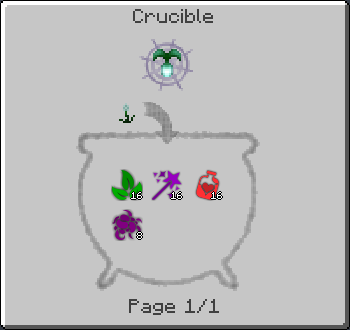
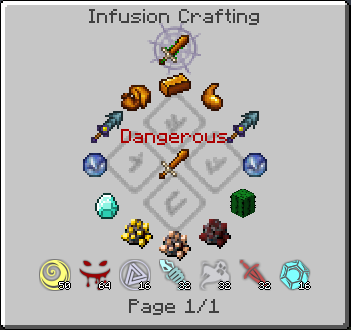
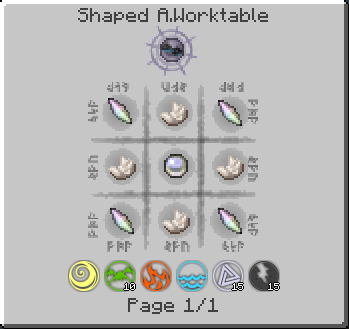
The Thaumcraft NEI Plugin serves as a bridge between Thaumcraft 4 and Not Enough Items (NEI). In base Thaumcraft, players are required to consult the Thaumonomicon for every recipe, which can be cumbersome during complex automation or large-scale crafting. This plugin allows players to view Arcane Worktable, Crucible, and Infusion recipes directly within the NEI interface.
Crucially, the mod maintains the progression-based spirit of Thaumcraft. It synchronizes with the player's research data, ensuring that recipes are only visible once they have been officially unlocked in the Thaumonomicon. This prevents spoilers and maintains the mod's intended discovery mechanics.
Core Mechanics#
Research Synchronization
The plugin's most significant mechanic is its adherence to the player's research progress. Unlike standard NEI recipes, Thaumcraft recipes are dynamically hidden. If a player has not yet completed the required research for an item (e.g., Nitor or Alumentum), searching for that item in NEI will not display its recipe until the research note is completed and consumed.
Scanning Integration
The Aspect "Usage" system is tied to the player's scanning history. When looking up what items contain a specific Aspect, the plugin only displays items that the player has successfully scanned with a Thaumometer. This encourages active exploration and world interaction.
Recipe Overlay
For the Arcane Workbench, the plugin provides a ghost-image overlay. By clicking the [?] button in the NEI recipe view, players can see exactly where items need to be placed in the 3x3 grid.
Recipe Handlers#
The plugin adds custom handlers for the three primary tiers of Thaumcraft crafting:
| Recipe Type | Description | Displayed Information |
|---|---|---|
| Arcane Workbench | Traditional 3x3 crafting using a wand. | Shows the item grid and the specific Vis cost for each of the six Primal Aspects. |
| Crucible | Alchemy-based crafting in a boiling cauldron. | Displays the catalyst item and the exact amount of Essentia (Aspects) required in the water. |
| Infusion | High-tier ritual crafting on an Altar. | Shows the central item, pedestal items, and the Instability Level of the ritual. |
Wand and Staff Crafting
The plugin specifically handles the dynamic recipes for Wands, Staffs, and Scepters. It calculates the total Vis cost based on the rod and caps used, displaying them accurately in the Arcane Workbench handler.
Aspect Integration#
The mod introduces a virtual item for every Aspect in Thaumcraft (both Primal and Compound). These appear in the NEI item list and allow for deep cross-referencing.
- Recipe Lookup (R): Pressing 'R' on an Aspect item shows its composition. For Primal Aspects, it shows no recipe; for Compound Aspects, it shows the two parent Aspects required to create it.
- Usage Lookup (U): Pressing 'U' on an Aspect item displays every scanned item in the game that contains that specific Aspect.
- Pagination: If an Aspect is found in a large number of items, the plugin automatically generates multiple pages in NEI to prevent UI overflow.
Controls and Shortcuts#
The plugin adds several quality-of-life shortcuts to speed up the magical crafting process:
- Shift-Click [?]: In the Arcane Workbench, holding Shift while clicking the [?] button in NEI will automatically move items from the player's inventory into the workbench grid. This works for both Thaumcraft-specific arcane recipes and standard vanilla recipes crafted on the workbench.
- Aspect Navigation: While viewing any Thaumcraft recipe, players can click on the Aspect icons (such as those required for a Crucible recipe) to immediately jump to that Aspect's Recipe or Usage page.
- Recipe Category Hopping: Clicking the text header of a recipe (e.g., "Crucible Recipe") will show a list of all recipes belonging to that specific crafting category.
Creative Mode Features#
For players in Creative Mode, the Aspect items serve an additional functional purpose:
- Research Points: Right-clicking an Aspect item while in Creative Mode will grant the player one research point for that specific Aspect. This is useful for testing or bypassing the research mini-game in a sandbox environment.
Technical Details#
Compatibility
The plugin is designed to be highly compatible with Thaumcraft addons. It automatically detects and displays recipes from popular expansions such as:
- Thaumic Tinkerer
- Automagy
- Thaumic Exploration
- Forbidden Magic
Localization
The mod includes full localization support for a variety of languages, including:
- English
- Chinese
- Russian
- Korean
- Portuguese
- Spanish
- Arabic
Gallery#