Overview#
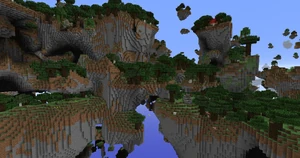
Open Terrain Generator (OTG) is not a standard world generator but a highly advanced terrain engine. It replaces the default Minecraft world generation logic with a fully customizable system. By itself, OTG generates a world similar to vanilla, but its true power lies in World Presets—pre-packaged configurations that can create anything from floating island chains to massive underground cavern worlds.
Main Features
- Total Terrain Control: Adjust horizontal and vertical noise, terrain height, and volatility.
- Custom Biomes: Create new biomes with unique climates, foliage colors, and terrain shapes.
- Advanced Structures: Design large, branching structures (villages, dungeons, cities) using the BO3 and BO4 systems.
- Image-to-World: Generate biome maps directly from image files (PNG/BMP).
- Multi-Dimension Support: Create custom dimensions with unique portals and physical laws (gravity, weather).
- In-Game GUI: Manage worlds and dimensions via an intuitive 'O' menu interface.
Getting Started#
To use OTG, you must install the mod and at least one World Preset. Presets are often distributed as separate .jar files or folders that you place in the mods or openterraingenerator/worlds directory.
The 'O' Menu
In-game, pressing the 'O' key (default) opens the OTG World Management GUI. This menu allows you to:
- Create and delete dimensions.
- Configure portal materials for specific worlds.
- Start and monitor the Map Pre-generator to reduce lag during exploration.
- Adjust gamerules and visual settings (fog, sky color) on the fly.
World Creation
When creating a new world in Single Player:
- Go to More World Options.
- Cycle through World Type until you see OTG.
- Click Customize to select your desired Preset (e.g., Biome Bundle, Skylands).
Configuration Files#
OTG is driven by three primary configuration file types located in the OpenTerrainGenerator/worlds/[WorldName] folder.
1. OTG.ini
Global settings for the mod engine. It controls performance-related features like the pre-generator speed and logging levels.
2. WorldConfig.ini
Defines settings for the entire world/dimension. Key parameters include:
- TerrainMode: Options like
Normal,TerrainTest, orOldGenerator(Beta 1.7.3 style). - BiomeMode:
Normal(procedural) orFromImage(uses a map file). - Landmass Settings: Controls the size of continents (
LandSize) and oceans. - Structure Toggles: Enable or disable vanilla structures like Strongholds, Villages, and Ocean Monuments.
3. BiomeConfigs (.bc)
Every biome has its own configuration file. This is where the "Resource Queue" resides, determining what spawns in the biome.
| Setting | Description |
|---|---|
| BiomeHeight | The base altitude of the biome terrain. |
| BiomeVolatility | How much the terrain fluctuates (hills vs. plains). |
| ReplaceToBiomeName | Allows a biome to "impersonate" another for mod compatibility. |
| SkyColor / WaterColor | Custom hex codes for environmental colors. |
Custom Objects & Structures (BO3/BO4)#
OTG uses Biome Objects (BO) to place everything from a single tree to a sprawling city.
BO3 vs BO4
- BO3 (1.12.2+): The standard format for custom objects. Supports NBT data, mob spawners, and branching.
- BO4 (1.16.5+): An optimized format designed for massive structures. It handles branching more efficiently and is required for complex procedural generation in newer versions.
Structure Mechanics
Objects are placed via the Resource Queue in the BiomeConfig using the CustomObject or CustomStructure tags.
- Branching: A BO3 can have "branches" that point to other BO3s. This allows the engine to "build" a village by starting with a path and branching out into houses, wells, and towers.
- Block Checks: Objects can be set to only spawn if certain conditions are met (e.g., "only spawn on Grass" or "only spawn if there is Air above").
- NBT Support: Chests in custom structures can be assigned specific loot tables, and spawners can be configured for any entity.
Resource Queue#
The Resource Queue in each BiomeConfig.ini determines the order and frequency of object generation. The engine processes this list from top to bottom for every chunk.
Common Resource Types
- Ore(Block, Size, Frequency, Rarity, MinHeight, MaxHeight): Generates mineral veins.
- Plant(Block, Frequency, Rarity, MinHeight, MaxHeight): Places flowers and small vegetation.
- Grass(Block, Frequency, Rarity): Covers the surface in grass or ferns.
- Liquid(Block, Frequency, Rarity, MinHeight, MaxHeight): Creates lakes or lava pockets.
- Dungeon(Frequency, Rarity, MinHeight, MaxHeight): Places vanilla-style dungeons.
- SmallLake(Block, Frequency, Rarity, MinHeight, MaxHeight): Generates surface water/lava bodies.
Dimensions & Portals#
OTG allows for an unlimited number of dimensions, each running a different preset.
The Quartz Portal
By default, OTG dimensions are accessed via a custom portal frame.
- Frame Material: Block of Quartz (configurable in the 'O' menu).
- Activation: Use a Flint and Steel on the inside of the frame.
Dimension Settings
In the WorldConfig.ini, you can define specific physical properties for a dimension:
- DimensionAbove / DimensionBelow: Links worlds vertically (e.g., falling into the void in one world drops you into the sky of another).
- Gravity: Adjust the jump height and fall speed.
- PortalMaterials: Change the block required to build the portal frame for that specific world.
Mob Spawning & Entities#
OTG does not add new mob entities but provides granular control over where vanilla and modded mobs appear. This is configured in the BiomeConfig under the MobSpawning section.
Spawning Parameters
For each mob type (Monster, Creature, Ambient, Water), you can define:
- Mob Name: The internal ID (e.g.,
minecraft:zombieorpixelmon:pikachu). - Weight: The probability of this mob spawning relative to others.
- Count: The minimum and maximum group size.
Custom Entity Tags
Within BO3/BO4 objects, you can use the Entity tag to place specific mobs at fixed locations. These entities can include NBT data for equipment, health, and custom names.
Commands#
OTG includes a suite of commands for developers and administrators. Most commands require OP permissions.
| Command | Description |
|---|---|
/otg map |
Generates a map of the surrounding biomes in the server folder. |
/otg tp <biome> |
Teleports the player to the nearest instance of the specified biome. |
/otg biome |
Displays detailed information about the biome at the player's current location. |
/otg pregen <radius> |
Starts the pre-generator for the current world. |
/otg export <name> |
Exports a WorldEdit selection as a BO3 or BO4 file. |
/otg flush |
Clears the object cache, useful when live-editing BO3 files. |
/otg entities |
Lists all entity names available for use in BO3 Entity tags. |
Popular Presets#
While OTG is the engine, these presets provide the content:
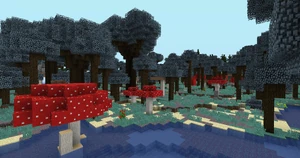
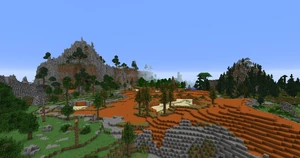
- Biome Bundle: The most famous preset, adding over 400 new biomes and thousands of custom trees and structures.
- Skylands: A world of floating islands with a lethal void below.
- Dregora: A massive overhaul featuring custom lore, unique structures, and a hand-painted biome map.
- Vanilla Vistas: A preset that enhances vanilla generation with smoother transitions and more realistic terrain without adding custom blocks.