


Overview#
The Adventure Backpack mod is a comprehensive utility mod for Minecraft that redefines portable storage. Unlike standard chest-style backpacks, these are designed as "mobile bases." Each backpack is immune to fire and lava, retains its inventory upon player death, and automatically places itself as a block at the death location to prevent item despawning.
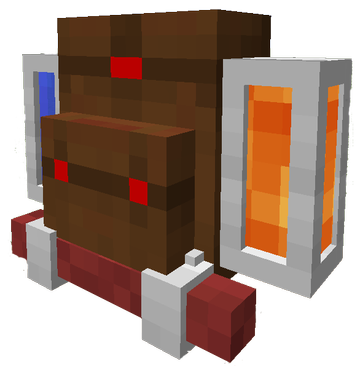
With over 70 variations based on mobs, blocks, and materials, many backpacks offer unique passive or active abilities. They feature two internal fluid tanks, a dedicated crafting matrix, and specialized slots for tools that allow for rapid switching without opening the inventory.
Core Mechanics#
Backpack Access
The backpack interface can be accessed through three primary methods:
- In Hand: Right-click while holding the backpack item.
- Equipped: Press the
Bkey (default) while wearing the backpack in the chest slot. - Placed: Right-click the backpack block when it is placed on the ground.
Fluid Tanks
Every backpack contains two internal tanks, each capable of holding 4,000 mB (4 buckets) of any fluid.
- GUI Interaction: Fluids can be added or removed using buckets or fluid containers (like IC2 cells) in the designated tank slots.
- Visuals: Fluids are rendered on the exterior of the backpack model. If the fluid emits light (like Lava), the backpack block will also emit light.
- Hose Integration: The Hose tool can be used to interact directly with these tanks.
Tool Slots and Switching
Backpacks feature two green "Tool Slots" on the right side of the GUI.
- Function: Only tools (Pickaxes, Axes, Shovels, Hoes, Machetes) can be placed here.
- Quick Switch: While wearing the backpack, hold
Sneakand use theMouse Wheelto cycle the tool in your hand with the tools stored in the backpack slots. - Rendering: Tools stored in these slots appear on the sides of the backpack model while worn.
Integrated Sleeping Bag
Each backpack comes with a built-in sleeping bag.
- Deployment: Place the backpack on the ground. Ensure there are two clear blocks in front of it. Open the GUI and click the Sleeping Bag icon.
- Usage: Right-click the deployed bag to sleep. Breaking the backpack automatically rolls the sleeping bag back inside.
Specialized Equipment#
The Hose
The Hose is a versatile tool used to manipulate fluids stored in the backpack tanks. It has three modes, cycled by holding Sneak and Scrolling:
| Mode | Function |
|---|---|
| Suck | Pulls fluid from the world or external tanks into the selected backpack tank. |
| Spill | Places fluid from the backpack tank into the world or fills external containers. |
| Drink | Allows the player to consume drinkable fluids (Water, Milk, Soup) for various effects. |
Note: Press N (default) to toggle which of the two backpack tanks the hose is currently connected to.
Piston Boots
Crafted using pistons and leather, these boots enhance mobility significantly:
- Jump Boost: Allows the player to jump up to 3 blocks high.
- Step Assist: While sprinting, the player automatically steps up 1-block high obstacles.
- Speed: Provides a passive movement speed increase.
Machete
The Machete is the ultimate clearing tool. It functions as a weapon and an axe, but its primary use is cutting through vegetation. It breaks grass and leaves instantly and ensures they drop as items rather than being destroyed.
Adventurer's Outfit
Consisting of the Adventurer's Fedora and Adventurer's Suit, this armor set provides moderate protection. Crucially, the Suit is designed to leave the chest slot open, allowing players to wear a backpack while still benefiting from armor values.
Backpack Variations and Abilities#
Many of the 70+ backpacks provide special abilities when worn or placed. Below are some of the most notable types:
| Backpack Type | Ability Description |
|---|---|
| Bat | Provides permanent Night Vision to the wearer. |
| Cactus | Acts like Thorns armor; damages entities that touch the wearer. If it rains, the tanks fill with water. |
| Cow | Periodically fills its tanks with Milk. Wearer can consume milk to remove debuffs. |
| Creeper | If the wearer is hit, there is a chance to release a non-destructive explosion that knocks back enemies. |
| Enderman | Prevents Endermen from becoming aggressive when looked at. Provides a chance to teleport away from damage. |
| Chicken | Periodically lays eggs into the backpack inventory. |
| Squid | Grants Water Breathing while submerged. |
| Ocelot | Scares away Creepers in a small radius around the player. |
| Iron Golem | Provides a significant Resistance buff but slows movement speed. |
| Magma Cube | Grants Fire Resistance and allows the player to walk on lava (slowly). |
| Melon/Cake | Slowly replenishes the player's hunger bar at the cost of the backpack's durability/fluid. |
| Rainbow | Leaves a trail of colorful particles behind the player. |
Crafting Recipes#
Standard Components
Backpack Tank
- 2x Glass Pane, 2x Iron Ingot
- Result: 1x Backpack Tank (Required for the main recipe)
Sleeping Bag
- 3x Wool (Any color), 2x Leather
- Result: 1x Sleeping Bag
Standard Adventure Backpack
- Top Row: Leather, Gold Ingot, Leather
- Middle Row: Backpack Tank, Chest, Backpack Tank
- Bottom Row: Leather, Sleeping Bag, Leather
Tools and Armor
The Hose
- 4x Leather/Rubber, 1x Gold Ingot, 1x Glass Pane
Machete
- 2x Iron Ingot, 1x Stick (Arranged diagonally)
Piston Boots
- 2x Piston, 2x Iron Ingot, 2x Leather
Adventurer's Fedora
- 5x Leather (Arranged in a helmet pattern)
Adventurer's Suit
- 8x Leather (Arranged in a chestplate pattern, though it occupies the legs/arms visual space) |
Configuration and Commands#
The mod includes a configuration file (adventurebackpack.cfg) that allows server administrators and players to tweak several settings:
- Backpack Death Behavior: Toggle whether backpacks place themselves as blocks or drop as items upon death.
- Ability Toggle: Enable or disable specific backpack abilities (e.g., disabling the Creeper explosion if it causes griefing issues).
- Fluid Blacklist: Restrict certain fluids from being stored in the tanks.
- Keybinds: While configurable in the standard Minecraft controls menu, the default keys are
Bfor Open Backpack andNfor Switch Hose Tank.
