


Overview#
Woot is a specialized technical mod designed to solve the performance issues associated with traditional mob farms. In a standard Minecraft mob farm, entities are spawned, moved, and killed, which consumes significant CPU resources (TPS lag) and network bandwidth. Woot replaces this process with a Mob Factory multiblock structure.
Instead of spawning mobs, the factory calculates the loot that would have dropped based on a "learned" loot table and generates those items directly into an attached inventory. This process consumes Redstone Flux (RF) or Forge Energy (FE) and requires specific upgrades to enhance efficiency, speed, and drop quality.
Key Features
- Lag-Free: No entities are rendered or processed in the world.
- Multiblock Progression: Factories scale from Tier 1 to Tier 4, supporting increasingly powerful mobs and bosses.
- Loot Learning: The mod dynamically learns loot tables from other mods, ensuring compatibility with custom mobs.
- Upgradable: Modular internal components allow for customization of spawn rates, looting levels, and power consumption.
The Learning System#
The core of Woot's efficiency is its learning system. Before a factory can produce loot, it must understand what a mob drops.
How Learning Works
When a factory is first tasked with a new mob/looting combination, Woot creates a server-wide table stored in Woot.json. To populate this table, the mod:
- Creates a virtual instance of the mob (not spawned in the world).
- Kills the entity using a FakePlayer.
- Captures the
LivingDropsEventto record the items. - Repeats this process until a statistically significant sample size is reached.
The Bedrock Learning Area
Some mods spawn items directly into the world during death events rather than adding them to the drop list. To account for this, Woot creates a small 3x3 area at bedrock level (y=0) directly below the factory. This area is used to "hoover up" any items spawned by "naughty" mods during the learning phase. This area must remain clear of blocks for the learning system to function correctly.
Flushing Loot Tables
If you add new mods that change mob drops after Woot has already learned them, you must flush the tables using the /woot flush command or by deleting the Woot.json file in the server's config folder.
Getting Started#
Progression in Woot begins with the creation of Stygian Iron, the foundational material for all factory components.
Stygian Iron
Stygian Iron is created by processing Iron Ingots with Nether materials.
- 1.12.2: Crafting Iron Ingots with Soul Sand or Netherrack in a standard furnace.
- 1.16.5: Using the Woot Anvil to hammer Iron Ingots with Soul Sand or Netherrack.
The Layout Tool
Building the multiblock structures manually is difficult due to their size. The Layout Tool is an essential item that visualizes the structure.
- Craft the Layout Tool.
- Shift-right-click in the air to cycle through the available factory tiers.
- Right-click on the ground where you want the Factory Heart to be placed.
- A ghost image of the structure will appear, showing you exactly where to place each block.
Mob Factory Tiers#
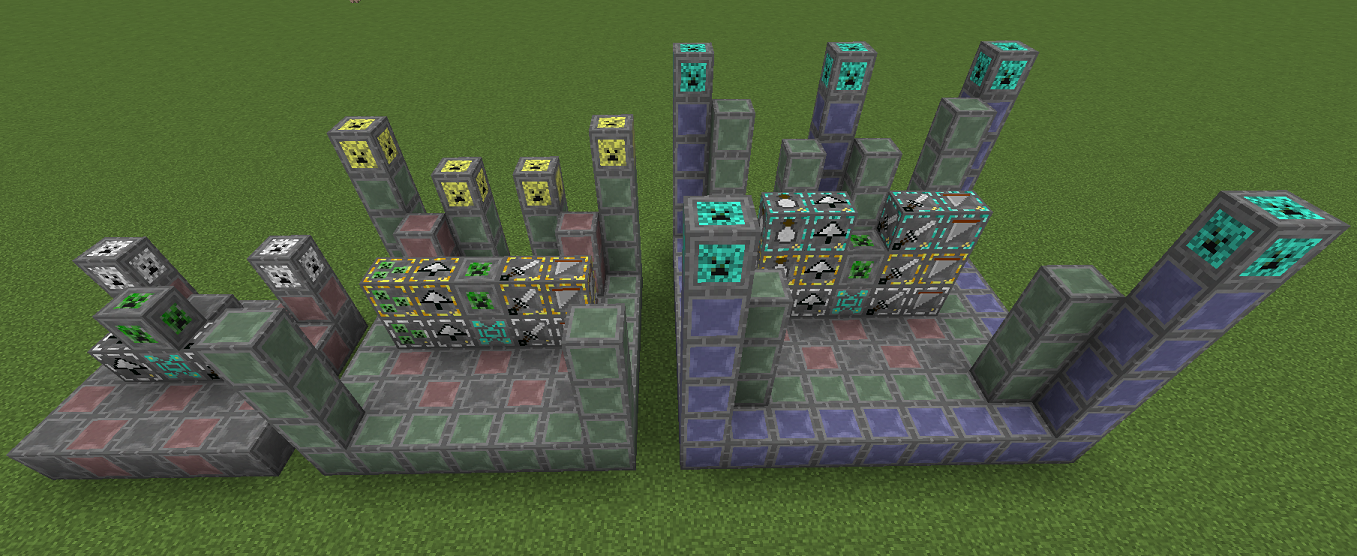
Factories are divided into four tiers. Each tier supports different mobs and provides more slots for upgrades.
| Tier | Dimensions | Supported Mobs | Upgrade Slots |
|---|---|---|---|
| Tier 1 | 5x5x4 | Passive mobs (Cows, Pigs, Sheep) | 1 |
| Tier 2 | 7x7x5 | Basic hostile mobs (Zombies, Skeletons, Creepers) | 2 |
| Tier 3 | 9x9x6 | Advanced mobs (Endermen, Blazes, Ghasts) | 3 |
| Tier 4 | 11x11x7 | Bosses (Wither, Ender Dragon) | 4 |
Required Components
- Factory Heart: The brain of the operation. Only one per factory.
- Factory Base: The floor of the structure.
- Structure Frame: The skeletal support of the factory.
- Tier Caps: Placed at the corners/top to define the tier level.
- Mob Controller: Contains the programmed Mob Shard/Swab.
Mob Programming#
To tell the factory which mob to produce, you must provide a programmed controller.
Mob Shards
- Craft a Mob Shard.
- Kill the target mob manually while the shard is in your inventory.
- You must kill a specific number of that mob (usually 5) to "program" the shard.
- Once programmed, place the shard into a Mob Controller block within the factory structure.
Mob Swabs
- Craft a Mob Swab.
- Right-click a mob with the swab to collect its DNA.
- Combine the swab with a Mob Controller in the Woot Anvil to program it.
Upgrades#
Upgrades are inserted into the factory to modify its behavior. Most upgrades have three levels (I, II, and III).
| Upgrade | Effect |
|---|---|
| Looting | Simulates the Looting enchantment (I, II, or III). Increases item drop counts. |
| Rate | Decreases the time between spawn cycles, increasing speed. |
| Efficiency | Reduces the RF/FE cost per operation. |
| Mass | Increases the number of mobs processed in a single cycle (up to 6 per cycle). |
| Decapitate | Specifically increases the drop rate of mob heads (Zombies, Skeletons, Creepers). |
| Blood Magic | If Blood Magic is installed, generates Life Essence (LP) instead of items. |
| XP | Generates Experience Orbs or fluid XP (depending on installed compatibility mods). |
Exoskeleton System
In the 1.16.5 version, upgrades are handled via the Exoskeleton system. You place Internals into the factory casing. This allows for a more modular approach where you can mix and match different internal components to fine-tune the factory's output and power draw.
Blocks and Items#
Key Blocks
- Factory Heart: The primary block that receives power and manages the multiblock. It must be placed at the center-front of the structure.
- Mob Controller: A block that holds the Mob Shard or Swab. It communicates the target mob to the Heart.
- Importer/Exporter: Used to move items and power into the internal slots of the factory (primarily in 1.16.5).
- Woot Anvil: A specialized crafting station used for creating Stygian Iron and assembling complex components.
Key Items
- Stygian Iron Ingot: The primary crafting ingredient for all Woot machinery.
- Layout Tool: Used to select and preview multiblock structures.
- Mob Shard: Used to capture mob data in 1.12.2.
- Mob Swab: Used to capture mob data in 1.16.5.
- Factory Upgrade Base: The template used to craft all specific upgrades.
Mechanics and Power#
Power Consumption
The RF/FE cost of a factory is determined by:
- The Mob: Bosses cost significantly more power than passive mobs.
- The Tier: Higher tier factories have a higher base power draw.
- Upgrades: Rate and Mass upgrades significantly increase power consumption, while Efficiency upgrades reduce it.
If the factory runs out of power mid-cycle, it will pause and retain its progress until power is restored.
Inventory Management
The factory does not have internal storage for loot. You must place a chest or any block with an inventory (like a Crate or an Interface) directly adjacent to the Factory Heart. If the inventory is full, the factory will stop operating to prevent item loss.
Commands#
Woot includes several administrative commands to manage the learning system and troubleshoot structures.
/woot flush [mobName]: Clears the learned loot table for a specific mob or all mobs if no name is provided./woot reload: Reloads the Woot configuration files and loot tables from the disk./woot dump: Exports the current learned loot tables to the console for debugging purposes./woot give [player] [item]: A helper command for obtaining specific Woot components.
