


Paintings ++ Mod (1.20.11, 1.20.1) – Decora con la tua arte
 2,893
2,893
 0
0


La Paintings ++ Mod ti permette di aggiungere i tuoi quadri personalizzati a Minecraft. Aggiunge anche un pratico menu che ti consente di scegliere esattamente quale dipinto vuoi piazzare su una parete, così non dovrai più andare a tentativi.
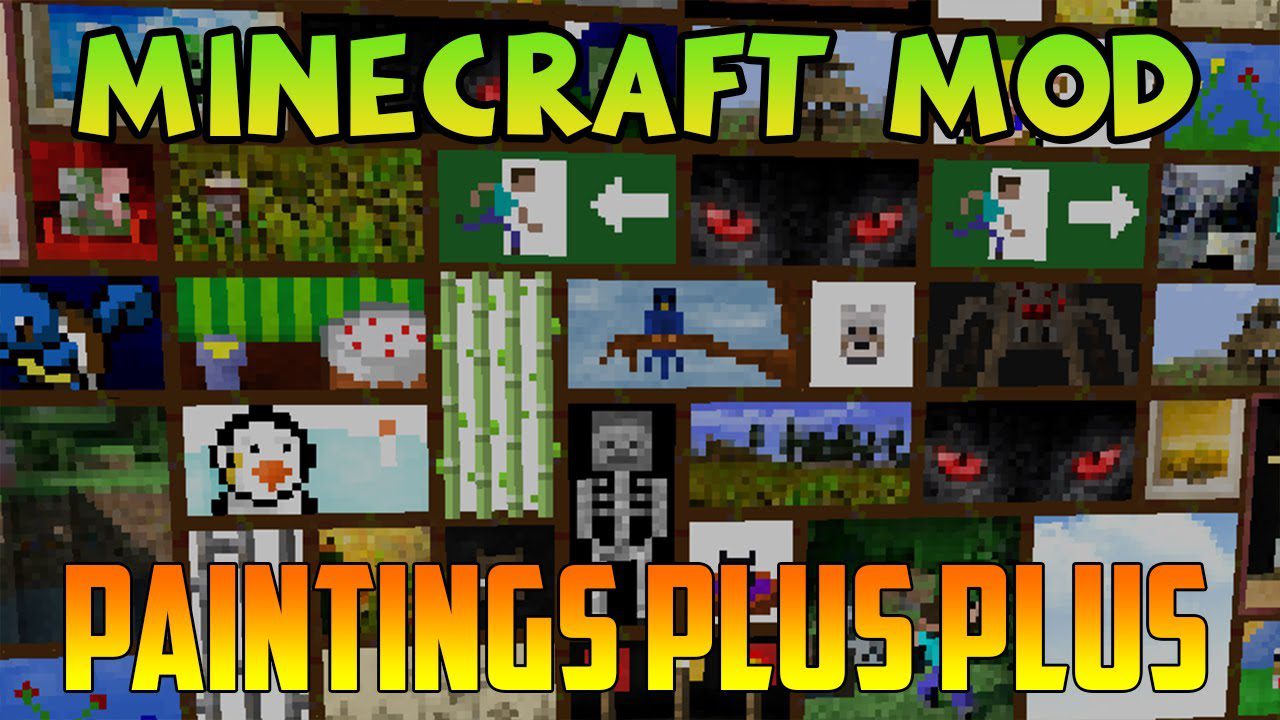
Caratteristiche:
- Aggiungi tutti i quadri personalizzati che vuoi usando i resource pack.
- Include una comoda schermata di selezione (GUI) per scegliere facilmente il quadro da piazzare.
- Supporta quadri con aree trasparenti per design più creativi (dalla versione 1.19 in poi).
- Funziona con uno strumento separato chiamato Painting Pack Maker per aiutarti a creare i tuoi pacchetti.
Come aggiungere i tuoi quadri
- Crea un resource pack e inserisci i tuoi file immagine all’interno.
- Le immagini dei tuoi quadri devono avere larghezza e altezza multiple di 16 (come 16×16, 32×16 o 48×48).
Come si usa:
- Per prima cosa, crea un resource pack con i quadri che vuoi aggiungere.
- Inserisci il resource pack finito nella cartella “resourcepacks” del gioco.
- In Minecraft, vai nel menu Opzioni e attiva il tuo nuovo resource pack dei quadri.
- Una volta nel tuo mondo, potrai piazzare i quadri e usare il nuovo menu di selezione per scegliere la tua arte personalizzata.
Come installare:

Paintings ++ Mod Download Links
For Minecraft 1.12.2
Forge Version: Download from Server 1
For Minecraft 1.16.5
Forge Version: Download from Server 1
For Minecraft 1.18.2
Forge Version: Download from Server 1
Fabric Version: Download from Server 1
For Minecraft 1.19.2, 1.19.1, 1.19
Forge Version: Download from Server 1
Fabric Version: Download from Server 1
For Minecraft 1.19.3
Forge Version: Download from Server 1
Fabric Version: Download from Server 1
For Minecraft 1.19.4
Forge Version: Download from Server 1
Fabric Version: Download from Server 1
For Minecraft 1.20.1, 1.20
Forge Version: Download from Server 1
Fabric Version: Download from Server 1
For Minecraft 1.20.4
NeoForge Version: Download from Server 1 – Download from Server 2
Fabric Version: Download from Server 1 – Download from Server 2
For Minecraft 1.21.1, 1.21
NeoForge Version: Download from Server 1 – Download from Server 2
Fabric Version: Download from Server 1 – Download from Server 2
For Minecraft 1.21.5
NeoForge Version: Download from Server 1
Fabric Version: Download from Server 1
For Minecraft 1.21.8, 1.21.7, 1.21.6
NeoForge Version: Download from Server 1
Fabric Version: Download from Server 1
For Minecraft 1.21.10, 1.21.9
NeoForge Version: Download from Server 1
Fabric Version: Download from Server 1
For Minecraft 1.21.11
NeoForge Version: Download from Server 1 – Download from Server 2
Fabric Version: Download from Server 1 – Download from Server 2
Forge Version: Download from Server 1
Forge Version: Download from Server 1
Forge Version: Download from Server 1
Fabric Version: Download from Server 1
Forge Version: Download from Server 1
Fabric Version: Download from Server 1
Forge Version: Download from Server 1
Fabric Version: Download from Server 1
Forge Version: Download from Server 1
Fabric Version: Download from Server 1
Forge Version: Download from Server 1
Fabric Version: Download from Server 1
NeoForge Version: Download from Server 1 – Download from Server 2
Fabric Version: Download from Server 1 – Download from Server 2
NeoForge Version: Download from Server 1 – Download from Server 2
Fabric Version: Download from Server 1 – Download from Server 2
NeoForge Version: Download from Server 1
Fabric Version: Download from Server 1
NeoForge Version: Download from Server 1
Fabric Version: Download from Server 1
NeoForge Version: Download from Server 1
Fabric Version: Download from Server 1
NeoForge Version: Download from Server 1 – Download from Server 2
Fabric Version: Download from Server 1 – Download from Server 2
Potrebbe Interessarti Anche







Questo post non ha ancora commenti. Sii il primo: il tuo commento apparirà qui.