Overview#
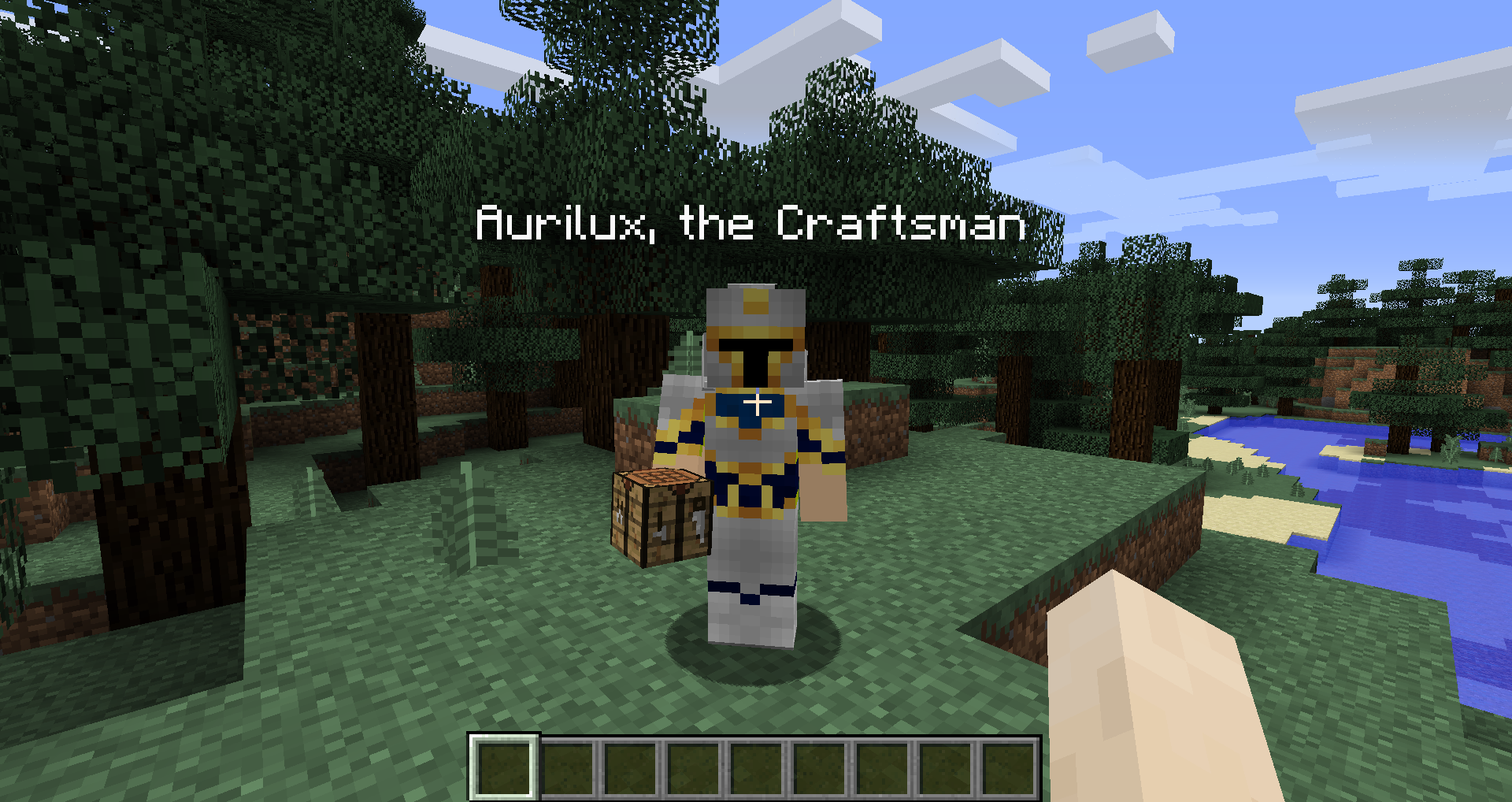
Titles Mod is a vanity-focused utility mod that introduces a system for players to earn and flaunt unique titles. These titles are displayed prominently next to a player's nametag in-game and within the player list (Tab menu). Inspired by the classic Hats mod, Titles provides a way for players to showcase their progression and feats to others on a server.
The mod is highly flexible, designed to be fully data-driven. This allows modpack creators and server administrators to add custom titles, modify existing ones, or integrate them with other mods. It features a robust GUI, gender-specific title variants, and multiple methods of acquisition ranging from advancement completion to trading with villagers.
Mechanics & Unlocking#
Titles are not available by default; they must be earned through specific gameplay actions. There are four primary ways to unlock titles:
- Advancements: The most common method. Completing specific vanilla or modded advancements will automatically grant the associated title. For example, reaching the End might grant "the End Slayer."
- Loot & Trading: Some titles are obtained as physical items. Players can find Title Fragments in world loot and trade them to Librarian villagers for Title Scrolls.
- Commands: Administrators can manually grant or revoke titles using server commands. This is often used for custom quest rewards in modpacks.
- Default/Starting: Certain titles are granted to every player upon joining the world, such as holiday-themed titles or basic identifiers.
Gendered Titles
Titles Mod supports gendered languages (such as Spanish or French). In the selection GUI, players can toggle between masculine and feminine variants. If a title has a feminine counterpart (e.g., "Lord of Mayhem" becoming "Lady of Mayhem"), it will update automatically. If no variant exists, the default masculine/neutral title remains.
Selection GUI#
The Title Selection GUI is the central hub for managing your earned titles.
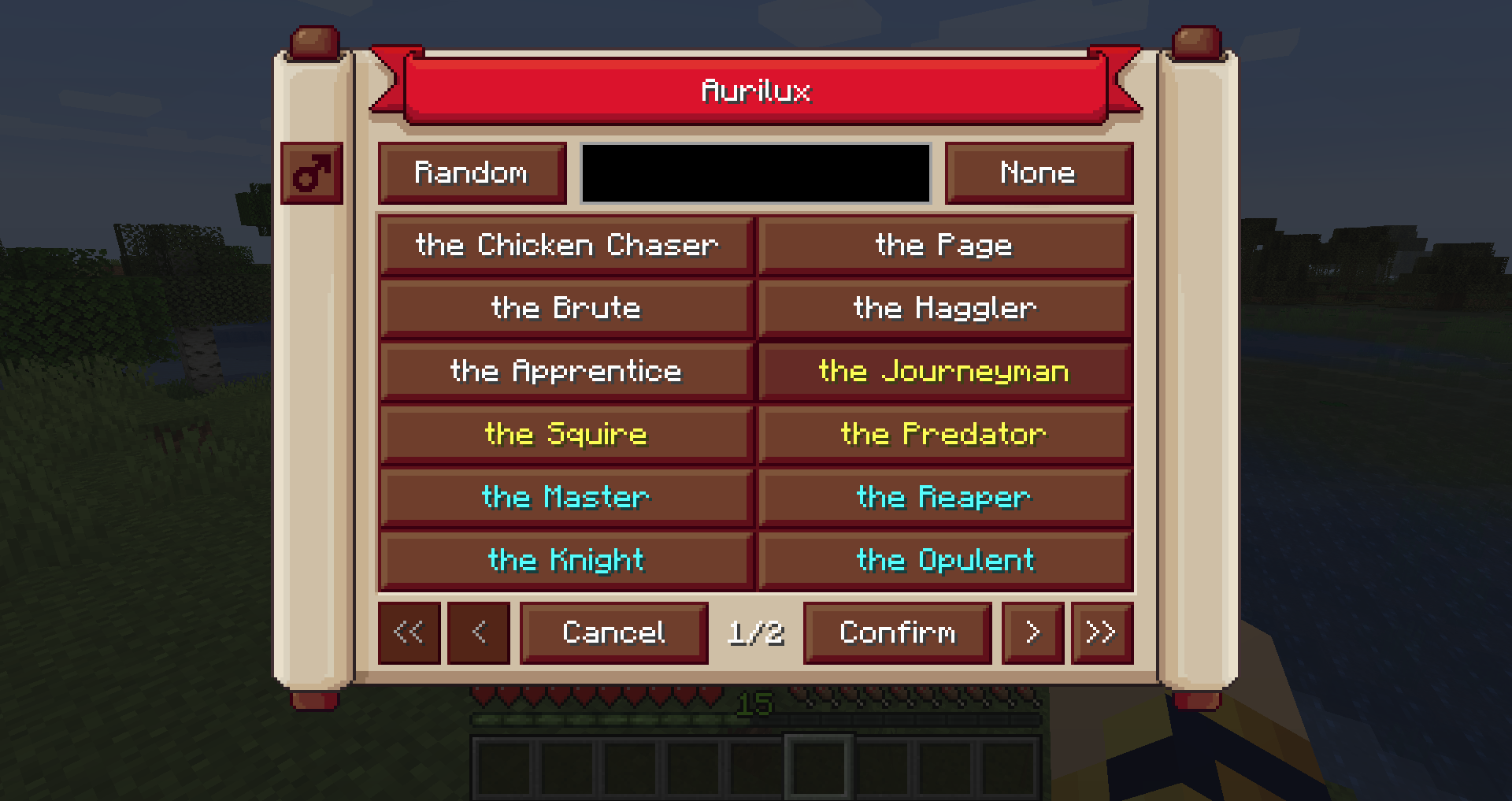
- Default Keybind: Press 't' to open the menu. Note: This may conflict with the default chat key and should be rebound in the controls menu if necessary.
- Search Bar: Allows players to sift through large collections of titles.
- Advanced Filters:
- Rarity Filter: Type
#followed by the first letter of the rarity (e.g.,#rfor Rare,#cufor Common and Uncommon). - Mod ID Filter: Type
@followed by the mod ID (e.g.,@minecraftfor vanilla titles,@titlesfor mod-specific titles). - Combined Search: You can combine these, such as
@titles #eto find Epic titles specifically from this mod.
- Rarity Filter: Type
Rarity System#
Titles are categorized into rarities that correspond to Minecraft's internal item rarity colors. This helps distinguish common achievements from legendary feats.
| Rarity | Color | Description |
|---|---|---|
| Common | White | Standard titles earned through basic gameplay and early advancements. |
| Uncommon | Yellow | Titles associated with mid-game progression or specific challenges. |
| Rare | Aqua | Difficult titles earned from end-game content or rare loot drops. |
| Epic | Light Purple | Reserved for notable community members and special contributors. |
| Mythic | Dark Purple | The highest tier, typically reserved for high-level recognition or unique events. |
Items#
While the mod is primarily a system mod, it adds several items to facilitate the collection of "Loot Titles."
| Item | Description | Acquisition |
|---|---|---|
| Title Fragment | A rare scrap of ancient text used as currency for titles. | Found in Dungeon, Stronghold, and Desert Temple chests. |
| Title Scroll | A consumable scroll that, when used, permanently unlocks a specific title. | Purchased from Librarian Villagers using Emeralds and Fragments. |
| Title Archive | (Legacy) An older method of purchasing titles. | Replaced by Villager trading in modern versions (1.19+). |
Villager Trading#
Librarian villagers have a chance to offer Title Scrolls as part of their trade pool. These trades typically appear in the later tiers of the villager's profession level.
- Cost: Usually requires a combination of Emeralds and Title Fragments.
- Availability: If the configuration option for fragment loot is disabled, villagers will no longer offer these trades.
Commands#
The mod includes a comprehensive set of commands for players and administrators to manage titles via the console.
| Command | Description |
|---|---|
/titles grant <player> <title_id> |
Manually unlocks a specific title for a player. |
/titles revoke <player> <title_id> |
Removes a specific title from a player's collection. |
/titles list |
Displays all titles currently available in the game. |
/titles display <title_id> |
Sets the player's active title without using the GUI. |
/titles refresh |
Clears and re-awards titles based on the player's current advancements. |
/titles addtype <type> |
Adds a specific award type to the player's unlocked categories. |
/titles removetype <type> |
Removes a specific award type from the player. |
Configuration & Customization#
Titles Mod is designed for extensive customization through JSON files and TOML configs.
Configuration Files
- titles-client.toml: Controls client-side settings such as GUI positioning and display preferences.
- titles-common.toml: Server-side settings, including whether titles show in the Tab list and fragment spawn rates.
Adding Custom Titles
Custom titles can be added via data packs. Each title requires its own JSON file located in data/titles/titles/.
Example JSON Structure:
{
 "name": "The Dragon Tamer",
 "rarity": "rare",
 "award_type": "advancement",
 "award_id": "minecraft:end/kill_dragon",
 "feminine_name": "The Dragon Mistress"
}- name: The display text of the title.
- rarity: common, uncommon, rare, epic, or mythic.
- award_type: advancement, loot_table, default, or command.
- award_id: The specific ID of the advancement or loot table required to unlock it.
Gallery#