


3D Player Skin Addon (1.21, 1.20) – MCPE/Bedrock Mod

 0
0 

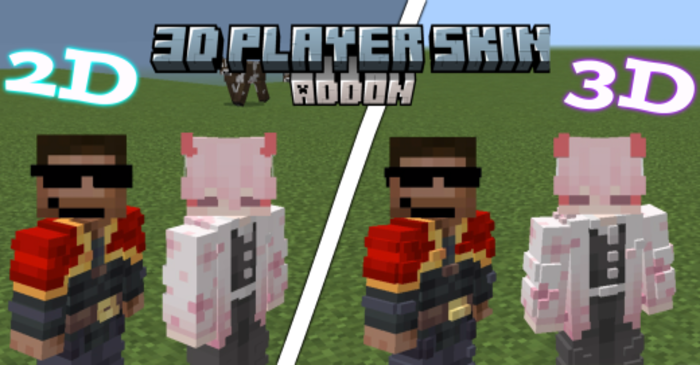
3D Player Skin Addon is a fantastic tool for MCPE players who want to add more depth and realism to their characters. This addon allows you to add a second 3D skin layer to your character, transforming their appearance and enhancing your immersion in the game world.
Features:
- To install the skin, you need to download the 3D Player Skin Addon file, locate the “textures” folder inside the 3D Player Skin folder, and rename your skin file to “steve.png”. Then, copy and paste your skin in PNG format into the “textures” folder. Once you’ve done this, open Minecraft, load a world, and your 3D skin should be applied to your character, adding a new layer of depth and realism.
- However, it’s important to note that the creator of the addon mentioned that Steve’s skin needs to be selected in-game for the addon to work properly.
- Overall, the 3D Player Skin Addon is a great way to customize your Minecraft character and make your gaming experience more visually engaging.
How to Install:
New to Minecraft PE? Follow our step-by-step guide to install Mods/Addons on your Mobile.View Guide
3D Player Skin Addon Download Links
For Minecraft PE/Bedrock 1.21
For Minecraft PE/Bedrock 1.20
Click to rate this post!
[Total: 4 Average: 3.8]
You May Also Like



This post has no comments yet. Be the first — your comment will appear here.