


MultiWorld Plugin (26.1.2, 1.20.1) – Spigot

 0
0 

MultiWorld Plugin is a Minecraft server plugin designed to facilitate the creation and management of multiple worlds. It provides a seamless way for players to switch between different worlds, each with its own unique settings and game modes. Whether you want a survival world, a creative world, or a world with its own specific rules, the MultiWorld plugin makes it possible.
Features:
- The primary feature of the MultiWorld plugin is the ability to create and manage multiple worlds on a single server. This allows for diverse gameplay experiences within the same server.
- Each world can have its own unique settings, including game mode, difficulty, and rules. This allows for a high degree of customization and variety in gameplay.
- The plugin provides a seamless way for players to switch between different worlds, making it easy to navigate the multiple worlds within a server.
- The MultiWorld plugin allows for control over world generation, including the ability to set world types and structures.
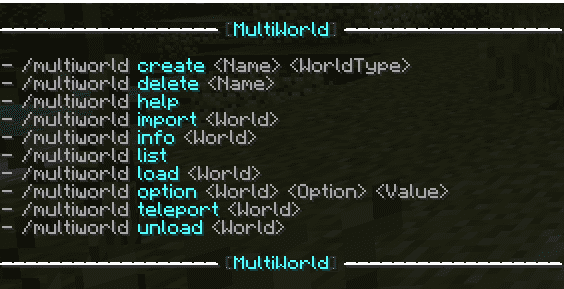
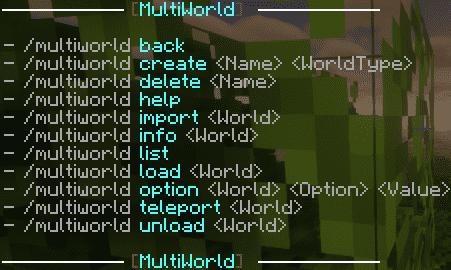
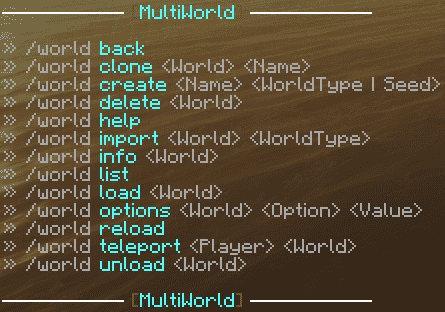
Commands:
- /world back
- /world clone <World> <Name>
- /world create <Name> <WorldType | Seed | Generator>
- /world delete <World>
- /world flag <World> <Property> <Value>
- /world help
- /world import <World> <WorldType>
- /world info <World>
- /world list
- /world link <World> <Nether | End> <Welt>
- /world load <World>
- /world reload
- /world teleport <Player> <World>
- /world unload <World>
- /world whitelist <World> <Enable | Disable | Add | Remove | List> <Name>
Permisions:
- multiworld.use: This permission allows a player to use the MultiWorld plugin.
- multiworld.create: This permission allows a player to create new worlds.
- multiworld.delete: This permission allows a player to delete worlds.
- multiworld.list: This permission allows a player to list all the worlds on the server.
- multiworld.teleport: This permission allows a player to teleport between worlds.
Screenshots:
How to Install:
New to Minecraft? Follow our step-by-step guide to install Plugins on your PC.View Guide
Requirements:
FacilisCommon Required
MultiPerms Optional
MultiWorld Plugin Download Links
For Minecraft
26.1.2,
26.1.1,
26.1
All Versions Covered
26.1.2
26.1.1
26.1
1.21.11
1.21.10
1.21.9
1.21.8
1.21.7
1.21.6
1.21.5
1.21.4
1.21.3
1.21.2
1.21.1
1.21
1.20.6
1.20.5
1.20.4
1.20.3
1.20.2
1.20.1
1.20
1.19.4
1.19.3
1.19.2
1.19.1
1.19
1.18.2
1.18.1
1.18
1.17.1
1.17
All Versions Covered
26.1.2
26.1.1
26.1
1.21.11
1.21.10
1.21.9
1.21.8
1.21.7
1.21.6
1.21.5
1.21.4
1.21.3
1.21.2
1.21.1
1.21
1.20.6
1.20.5
1.20.4
1.20.3
1.20.2
1.20.1
1.20
1.19.4
1.19.3
1.19.2
1.19.1
1.19
1.18.2
1.18.1
1.18
1.17.1
1.17
For Minecraft
1.21.11,
1.21.10,
1.21.9
All Versions Covered
1.21.11
1.21.10
1.21.9
1.21.8
1.21.7
1.21.6
1.21.5
1.21.4
1.21.1
1.21
All Versions Covered
1.21.11
1.21.10
1.21.9
1.21.8
1.21.7
1.21.6
1.21.5
1.21.4
1.21.1
1.21
For Minecraft
1.21.5,
1.21.4,
1.21.3
All Versions Covered
1.21.5
1.21.4
1.21.3
1.21.2
1.20.6
1.20.5
1.20.4
1.20.3
1.20.2
1.20.1
1.20
1.19.4
1.19.3
1.19.2
1.19.1
1.19
1.18.2
1.18.1
1.18
1.17.1
1.17
All Versions Covered
1.21.5
1.21.4
1.21.3
1.21.2
1.20.6
1.20.5
1.20.4
1.20.3
1.20.2
1.20.1
1.20
1.19.4
1.19.3
1.19.2
1.19.1
1.19
1.18.2
1.18.1
1.18
1.17.1
1.17
For Minecraft
1.21.4,
1.21.3,
1.21.2
All Versions Covered
1.21.4
1.21.3
1.21.2
1.20.6
1.20.5
1.20.4
1.20.3
1.20.2
1.20.1
1.20
1.19.4
1.19.3
1.19.2
1.19.1
1.19
1.18.2
1.18.1
1.18
1.17.1
1.17
1.16.5
1.16
All Versions Covered
1.21.4
1.21.3
1.21.2
1.20.6
1.20.5
1.20.4
1.20.3
1.20.2
1.20.1
1.20
1.19.4
1.19.3
1.19.2
1.19.1
1.19
1.18.2
1.18.1
1.18
1.17.1
1.17
1.16.5
1.16
For Minecraft All versions
Click to rate this post!
[Total: 0 Average: 0]
You May Also Like













This post has no comments yet. Be the first — your comment will appear here.