


Paintings ++ Mod (1.20.11, 1.20.1) – Décorez avec vos propres œuvres
 2,893
2,893
 0
0


Le Paintings ++ Mod vous permet d’ajouter vos propres tableaux personnalisés dans Minecraft. Il ajoute également un menu super pratique qui vous permet de choisir exactement quelle peinture vous voulez placer sur un mur, fini de poser et casser vos tableaux au hasard !
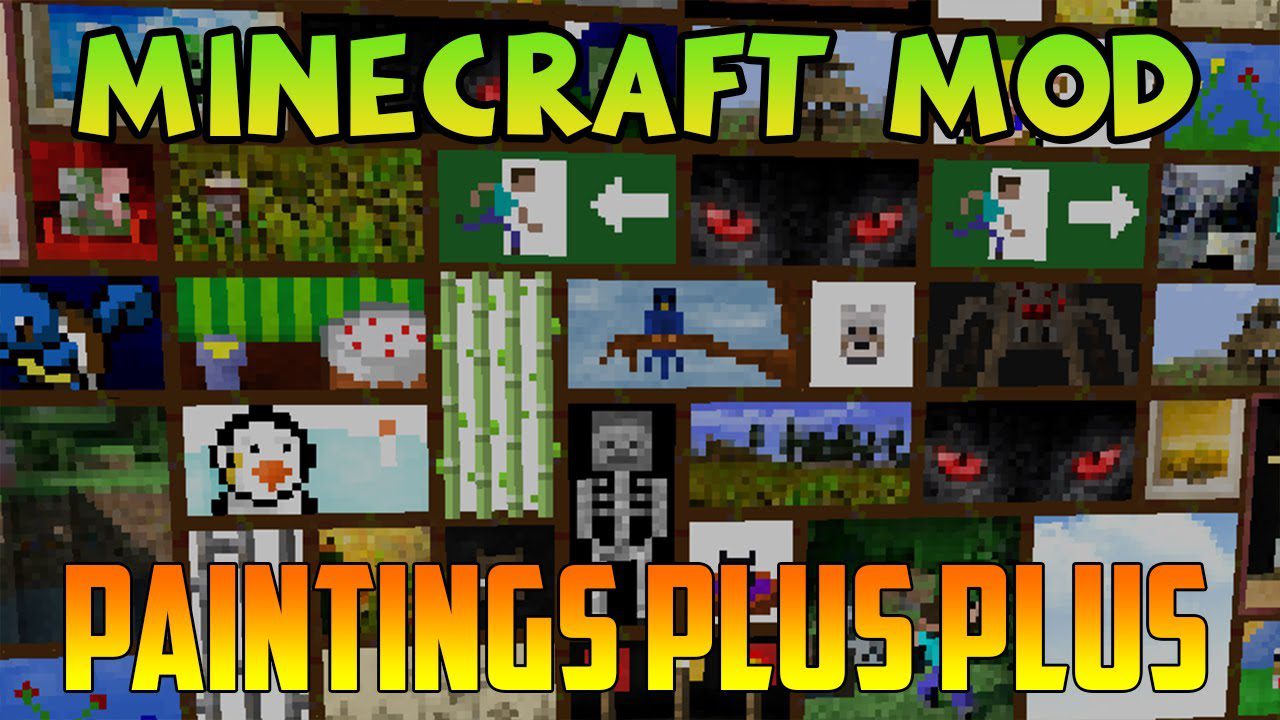
Caractéristiques :
- Ajoutez autant de tableaux personnalisés que vous le souhaitez via des packs de ressources.
- Inclut un écran de sélection (GUI) pour choisir facilement le tableau à poser.
- Prend en charge les zones transparentes pour des designs plus créatifs (sur la version 1.19 et plus récentes).
- Compatible avec l’outil externe Painting Pack Maker pour vous aider à créer vos propres packs.
Comment ajouter vos propres tableaux
- Créez un resource pack et placez vos fichiers images à l’intérieur.
- Vos images de tableaux doivent avoir une largeur et une hauteur multiples de 16 (comme 16×16, 32×16 ou 48×48).
Comment l’utiliser :
- D’abord, créez un pack de ressources avec les peintures que vous voulez ajouter.
- Placez le pack terminé dans le dossier “resourcepacks” de votre jeu.
- Dans Minecraft, allez dans le menu Options et activez votre nouveau pack de ressources.
- Une fois en jeu, posez un tableau et utilisez le nouveau menu de sélection pour choisir votre œuvre personnalisée.
Comment installer :
Prérequis :

Liens de téléchargement pour Paintings ++ Mod
Pour Minecraft 1.12.2
Version Forge : Télécharger depuis le Serveur 1
Pour Minecraft 1.16.5
Version Forge : Télécharger depuis le Serveur 1
Pour Minecraft 1.18.2
Version Forge : Télécharger depuis le Serveur 1
Version Fabric : Télécharger depuis le Serveur 1
Pour Minecraft 1.19.2, 1.19.1, 1.19
Version Forge : Télécharger depuis le Serveur 1
Version Fabric : Télécharger depuis le Serveur 1
Pour Minecraft 1.19.3
Version Forge : Télécharger depuis le Serveur 1
Version Fabric : Télécharger depuis le Serveur 1
Pour Minecraft 1.19.4
Version Forge : Télécharger depuis le Serveur 1
Version Fabric : Télécharger depuis le Serveur 1
Pour Minecraft 1.20.1, 1.20
Version Forge : Télécharger depuis le Serveur 1
Version Fabric : Télécharger depuis le Serveur 1
Pour Minecraft 1.20.4
Version NeoForge : Télécharger depuis le Serveur 1 – Télécharger depuis le Serveur 2
Version Fabric : Télécharger depuis le Serveur 1 – Télécharger depuis le Serveur 2
Pour Minecraft 1.21.1, 1.21
Version NeoForge : Télécharger depuis le Serveur 1 – Télécharger depuis le Serveur 2
Version Fabric : Télécharger depuis le Serveur 1 – Télécharger depuis le Serveur 2
Pour Minecraft 1.21.5
Version NeoForge : Télécharger depuis le Serveur 1
Version Fabric : Télécharger depuis le Serveur 1
Pour Minecraft 1.21.8, 1.21.7, 1.21.6
Version NeoForge : Télécharger depuis le Serveur 1
Version Fabric : Télécharger depuis le Serveur 1
Pour Minecraft 1.21.10, 1.21.9
Version NeoForge : Télécharger depuis le Serveur 1
Version Fabric : Télécharger depuis le Serveur 1
Pour Minecraft 1.21.11
Version NeoForge : Télécharger depuis le Serveur 1 – Télécharger depuis le Serveur 2
Version Fabric : Télécharger depuis le Serveur 1 – Télécharger depuis le Serveur 2
Version Forge : Télécharger depuis le Serveur 1
Version Forge : Télécharger depuis le Serveur 1
Version Forge : Télécharger depuis le Serveur 1
Version Fabric : Télécharger depuis le Serveur 1
Version Forge : Télécharger depuis le Serveur 1
Version Fabric : Télécharger depuis le Serveur 1
Version Forge : Télécharger depuis le Serveur 1
Version Fabric : Télécharger depuis le Serveur 1
Version Forge : Télécharger depuis le Serveur 1
Version Fabric : Télécharger depuis le Serveur 1
Version Forge : Télécharger depuis le Serveur 1
Version Fabric : Télécharger depuis le Serveur 1
Version NeoForge : Télécharger depuis le Serveur 1 – Télécharger depuis le Serveur 2
Version Fabric : Télécharger depuis le Serveur 1 – Télécharger depuis le Serveur 2
Version NeoForge : Télécharger depuis le Serveur 1 – Télécharger depuis le Serveur 2
Version Fabric : Télécharger depuis le Serveur 1 – Télécharger depuis le Serveur 2
Version NeoForge : Télécharger depuis le Serveur 1
Version Fabric : Télécharger depuis le Serveur 1
Version NeoForge : Télécharger depuis le Serveur 1
Version Fabric : Télécharger depuis le Serveur 1
Version NeoForge : Télécharger depuis le Serveur 1
Version Fabric : Télécharger depuis le Serveur 1
Version NeoForge : Télécharger depuis le Serveur 1 – Télécharger depuis le Serveur 2
Version Fabric : Télécharger depuis le Serveur 1 – Télécharger depuis le Serveur 2
Vous aimerez aussi







Cet article n’a pas encore de commentaires. Soyez le premier — votre commentaire apparaîtra ici.