


Overview#
The Personal Cars Mod (also known as "Just Driving Around") is a vehicle-focused mod for Minecraft that introduces a variety of functional, lockable automobiles. Unlike many other vehicle mods that use complex fuel systems or multiblock workshops, Personal Cars focuses on simplicity and ownership. Every car crafted in this mod is assigned a unique identifier, allowing players to pair them with specific keys. This ensures that only the owner (or those with a duplicate key) can unlock, enter, and drive the vehicle.

The mod adds five distinct types of vehicles, each available in four colors (Red, Blue, Green, and Grey). These vehicles behave similarly to ridable entities like horses, making them stable and easy to control across various terrains. They feature working headlights, taillights, horns, and specialized functions like mob transportation and trunk storage.
Vehicles#
The mod adds five primary vehicle types, each with unique stats for speed, durability, and passenger capacity.
Vehicle Statistics
| Vehicle Type | Seats | Speed | Durability | Special Features |
|---|---|---|---|---|
| Compact Car | 2 | Average | 40 HP | Balanced all-rounder for two players. |
| SUV | 2 | Low | 60 HP | High durability; water-resistant; does not explode easily. |
| Racecar | 1 | High | 30 HP | Fastest land speed; very fragile; poor performance in water. |
| Transporter | 1 | Low | 50 HP | Specialized for moving mobs; carries up to 9 small or 6 large mobs. |
| Truck | 2 | Average | 50 HP | Features a 36-slot trunk inventory for item transport. |
Vehicle Descriptions
- Compact Car: The standard vehicle for daily travel. It offers a balance of speed and health, making it the most common choice for general exploration.
- SUV (Sports Utility Vehicle): Designed for rough terrain. It is slower than the compact car but significantly sturdier. It is the only vehicle that can handle water effectively without immediately stalling or taking heavy damage.
- Racecar: Built for speed. It has the highest acceleration and top speed but the lowest health. It is highly susceptible to damage from collisions and water.
- Transporter: A wide vehicle (nearly 4 blocks) designed specifically for mob relocation. It requires a Whip and Leads to function correctly.
- Truck: A heavy-duty vehicle that acts as a mobile storage unit. It can carry two players and provides a full double-chest worth of inventory space.

Items#
Beyond the vehicles themselves, the mod adds several essential items for crafting, security, and utility.
Essential Components
- Car Wheel: The base component for all vehicles. Four are required for every car recipe.
- Car Engine: The power source for vehicles. It determines the base performance of the car.
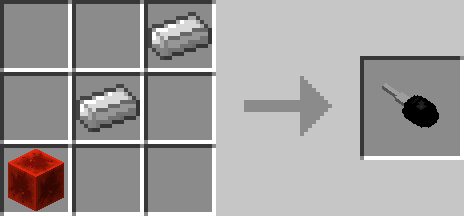
- Car Key: Used to claim and operate vehicles. When first crafted, it is "unpaired." Right-clicking a car with an unpaired key links them forever.
- Whip: A utility tool used to load and unload animals from the Transporter. It can also be used to make mobs flee in panic without dealing damage.
Item Recipes
| Item | Recipe Components |
|---|---|
| Car Wheel | 1 Iron Ingot (Center) + 4 Ink Sacs (Top, Bottom, Left, Right) |
| Car Engine | 5 Iron Ingots + 2 Pistons + 2 Redstone Dust |
| Car Key | 1 Redstone Block + 2 Iron Ingots |
| Whip | 2 Leather + 1 String |
Blocks#
The mod adds one functional block to manage vehicle security.
Key Modifier
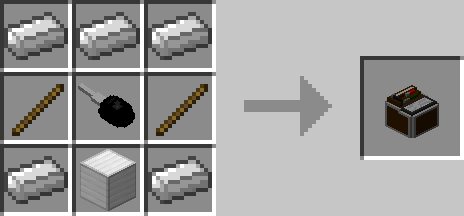
The Key Modifier is a utility block that allows players to manage their car keys through a dedicated GUI. It has two primary functions:
- Copying Keys: Place a paired key in the first slot and an unpaired key in the second slot. Clicking "Copy" will transfer the vehicle's unique ID to the new key, allowing multiple players to access the same car.
- Unpairing Keys: Place a paired key in the first slot and click "Unpair" to clear the vehicle ID, returning the key to its blank state.
Recipe: 5 Iron Ingots, 1 Iron Block, 2 Sticks, and 1 Car Key.
Mechanics#
Ownership and Security
When a car is first placed in the world, it is "unclaimed." To claim it, you must right-click the car with an unpaired Car Key. Once paired, the car is locked by default.
- Locking/Unlocking: Right-click with a paired key while standing near the car. When the headlights/taillights are OFF, the car is locked. When they are ON, the car is unlocked.
- Ignition: To start the engine, you must be sitting in the driver's seat and right-click with the paired key. An ignition sound will play, indicating the car is ready to drive.
Driving Controls
- W/A/S/D: Standard movement (Forward, Left, Backward, Right).
- H: Sound the horn. This scares nearby animals, causing them to run away.
- G: Open the trunk (Truck only). This opens a 36-slot inventory.
- Left Shift: Exit the vehicle.
Mob Transportation (Transporter)
To use the Transporter vehicle:
- Attach a Lead to the animal you wish to move.
- Hold a Whip in your hand.
- Right-click the Transporter with the Whip to load the animal.
- To unload a single animal, Left-click the car with the Whip.
- To unload all animals at once, Sneak + Right-click the car with the Whip or simply lock the car with the key.
Damage and Repair
Cars have health and can be damaged by collisions, falling, or being attacked. If a car's health reaches zero, it will be destroyed and drop its item form. In Creative mode, cars can be "killed" with a sword to remove them from the world.

Recipes#
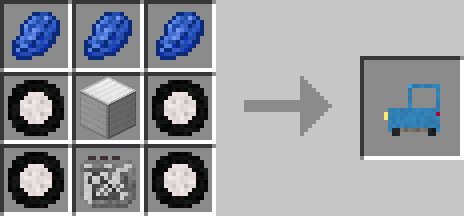
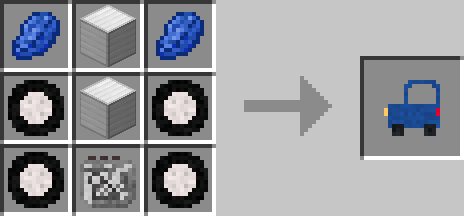
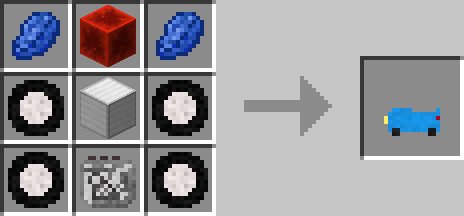
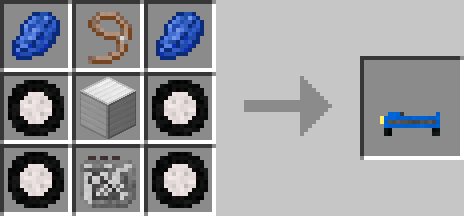
All cars follow a similar crafting pattern involving 4 Wheels and 1 Engine, with variable materials determining the car type and color.
Color Dyes: Use Rose Red (Red), Lapis Lazuli (Blue), Cactus Green (Green), or Light Gray Dye (Grey).
Car Crafting Table
| Car Type | Recipe Layout (3x3 Grid) |
|---|---|
| Compact Car | [Dye] [Iron Block] [Empty] / [Wheel] [Engine] [Wheel] / [Wheel] [Empty] [Wheel] |
| SUV | [Dye] [Iron Block] [Dye] / [Wheel] [Engine] [Wheel] / [Wheel] [Iron Block] [Wheel] |
| Racecar | [Dye] [Iron Block] [Dye] / [Wheel] [Engine] [Wheel] / [Wheel] [Iron Ingot] [Wheel] |
| Transporter | [Dye] [Iron Block] [Lead] / [Wheel] [Engine] [Wheel] / [Wheel] [Empty] [Wheel] |
| Truck | [Dye] [Iron Block] [Dye] / [Wheel] [Engine] [Wheel] / [Wheel] [Chest] [Wheel] |
Configuration#
The mod includes a configuration file (personalcars.cfg) that allows players to toggle between two distinct driving modes:
- Simple Mode (Default): Cars behave like horses, reaching maximum speed instantly and stopping immediately when keys are released. Steering is sharp and arcade-like.
- Realistic Mode: Cars gain and lose momentum gradually. This mode allows for higher top speeds and introduces a Drifting mechanic. While in Realistic Mode, pressing the Space Bar acts as a handbrake, allowing the car to slide around corners.
Keybindings for the Horn (H) and Trunk (G) can also be remapped in the standard Minecraft Controls menu.
