


Paintings ++ Mod (1.20.11, 1.20.1) – Decore com sua Própria Arte
 2,893
2,893
 0
0


O Paintings ++ Mod permite que você adicione suas próprias pinturas personalizadas ao Minecraft. Ele também adiciona um menu muito útil que permite escolher exatamente qual quadro você quer colocar na parede, para que você não precise mais ficar tentando na sorte.
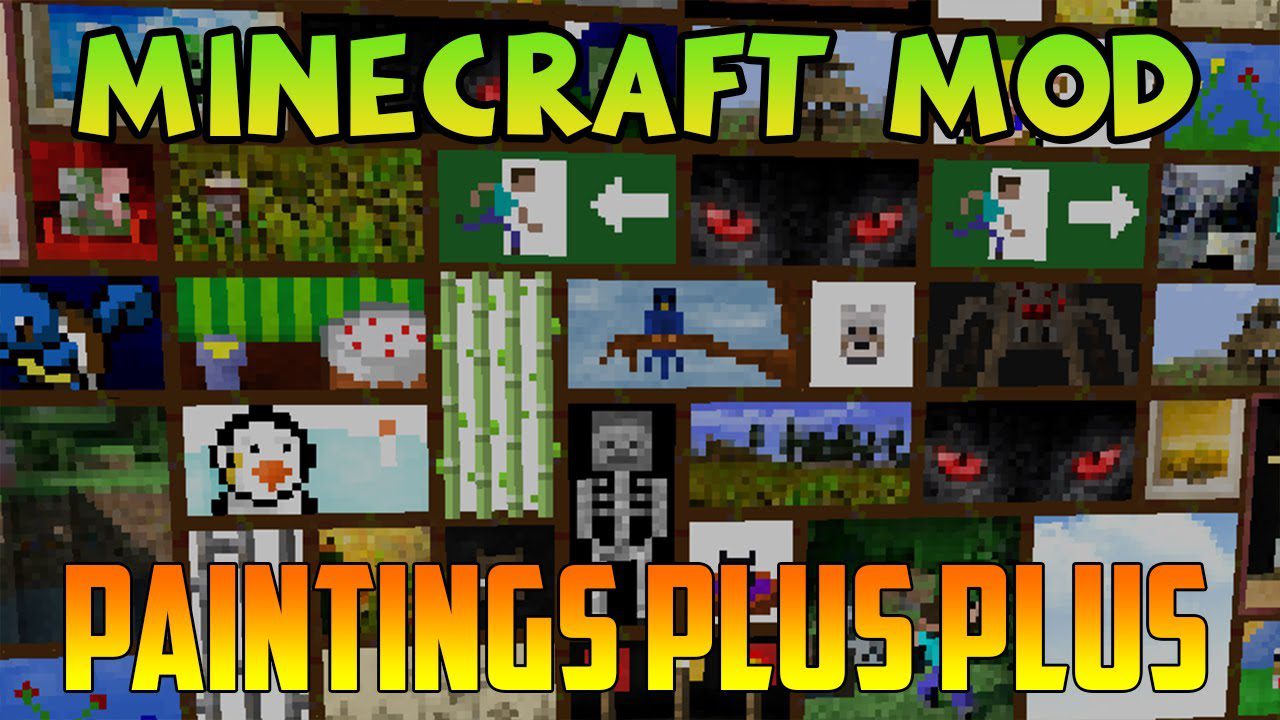
Funcionalidades:
- Adicione quantas pinturas personalizadas quiser usando pacotes de recursos (resource packs).
- Inclui uma tela de seleção (GUI) prática para escolher facilmente a pintura que deseja colocar.
- Suporta pinturas com áreas transparentes para designs mais criativos (nas versões 1.19 e superiores).
- Funciona com uma ferramenta separada chamada Painting Pack Maker para ajudar você a criar seus próprios pacotes.
Como Adicionar Suas Próprias Pinturas
- Crie um resource pack e coloque seus arquivos de imagem dentro dele.
- As imagens das suas pinturas devem ter largura e altura que sejam múltiplas de 16 (como 16×16, 32×16 ou 48×48).
Como Usar:
- Primeiro, crie um resource pack com as pinturas que deseja adicionar.
- Coloque o resource pack finalizado na pasta “resourcepacks” do seu jogo.
- No Minecraft, vá ao menu Opções e ative o seu novo pacote de recursos de pinturas.
- Uma vez no seu mundo, você pode colocar quadros e usar o novo menu de seleção para escolher sua arte personalizada.
Como Instalar:
Novo no Minecraft? Siga nosso guia passo a passo para instalar Mods no seu PC.Ver Guia
Requisitos:

Paintings ++ Mod Download Links
For Minecraft 1.12.2
Forge Version: Download from Server 1
For Minecraft 1.16.5
Forge Version: Download from Server 1
For Minecraft 1.18.2
Forge Version: Download from Server 1
Fabric Version: Download from Server 1
For Minecraft 1.19.2, 1.19.1, 1.19
Forge Version: Download from Server 1
Fabric Version: Download from Server 1
For Minecraft 1.19.3
Forge Version: Download from Server 1
Fabric Version: Download from Server 1
For Minecraft 1.19.4
Forge Version: Download from Server 1
Fabric Version: Download from Server 1
For Minecraft 1.20.1, 1.20
Forge Version: Download from Server 1
Fabric Version: Download from Server 1
For Minecraft 1.20.4
NeoForge Version: Download from Server 1 – Download from Server 2
Fabric Version: Download from Server 1 – Download from Server 2
For Minecraft 1.21.1, 1.21
NeoForge Version: Download from Server 1 – Download from Server 2
Fabric Version: Download from Server 1 – Download from Server 2
For Minecraft 1.21.5
NeoForge Version: Download from Server 1
Fabric Version: Download from Server 1
For Minecraft 1.21.8, 1.21.7, 1.21.6
NeoForge Version: Download from Server 1
Fabric Version: Download from Server 1
For Minecraft 1.21.10, 1.21.9
NeoForge Version: Download from Server 1
Fabric Version: Download from Server 1
For Minecraft 1.21.11
NeoForge Version: Download from Server 1 – Download from Server 2
Fabric Version: Download from Server 1 – Download from Server 2
Forge Version: Download from Server 1
Forge Version: Download from Server 1
Forge Version: Download from Server 1
Fabric Version: Download from Server 1
Forge Version: Download from Server 1
Fabric Version: Download from Server 1
Forge Version: Download from Server 1
Fabric Version: Download from Server 1
Forge Version: Download from Server 1
Fabric Version: Download from Server 1
Forge Version: Download from Server 1
Fabric Version: Download from Server 1
NeoForge Version: Download from Server 1 – Download from Server 2
Fabric Version: Download from Server 1 – Download from Server 2
NeoForge Version: Download from Server 1 – Download from Server 2
Fabric Version: Download from Server 1 – Download from Server 2
NeoForge Version: Download from Server 1
Fabric Version: Download from Server 1
NeoForge Version: Download from Server 1
Fabric Version: Download from Server 1
NeoForge Version: Download from Server 1
Fabric Version: Download from Server 1
NeoForge Version: Download from Server 1 – Download from Server 2
Fabric Version: Download from Server 1 – Download from Server 2
Você também pode gostar







Esta postagem ainda não tem comentários. Seja o primeiro — seu comentário aparecerá aqui.