


Void Island Control Mod (1.12.2, 1.11.2) – Create Your Own Sky Island
 434
434
 0
0
 February 1, 2019
🌐 Good news — we've translated this article into other languages!
Or pick the one you like:
Void Island Control Mod adds a special void world type for creating your own skyblock adventures. It is designed to work well in multiplayer, allowing you and your friends to build on separate islands in an empty world.
Features:
- Choose from several default island types, including grass, sand, snow, and wood.
- Create your own custom islands using structure block files (.nbt).
- Change the blocks that generate underneath your island.
- Decide the starting size and Y-level of each island.
- Set up a starting inventory and a starter chest for new players.
- Generate a void Nether dimension where portals link one-to-one with the Overworld.
- Optionally generate a full Overworld instead of a complete void.
- Enable a special “One Chunk Mode” that limits the world to a single chunk.
- Automatically run commands when the world starts or when an island is created.
Commands:
This mod provides the /island command with several options:
create [type]: Creates a new island for the player.invite [player]: Invites another player to join your island team.join: Accepts an invitation to join an island.leave: Leaves your current island and clears your inventory.home: Teleports you back to your island.spawn: Teleports you to the world’s spawn point.reset [type]: Deletes your island and inventory, letting you start over.onechunk: Creates a one-chunk world border at spawn. This must be enabled in the config first.startingInv: Sets your current inventory as the default starting inventory for new players.
How to Use:
- When creating a new world, select the world type. Choose Void? World for single-player or set it to Voidworld in your server settings.
- Once in the game, type the command
/island createto get your first island. You can also specify a type, like/island create sand. - To create custom islands, build your structure and save it as an .nbt file using a structure block.
- Place the .nbt file into the “voidislandcontrolstructures” folder inside your config folder to make it available in the game.
Screenshots:
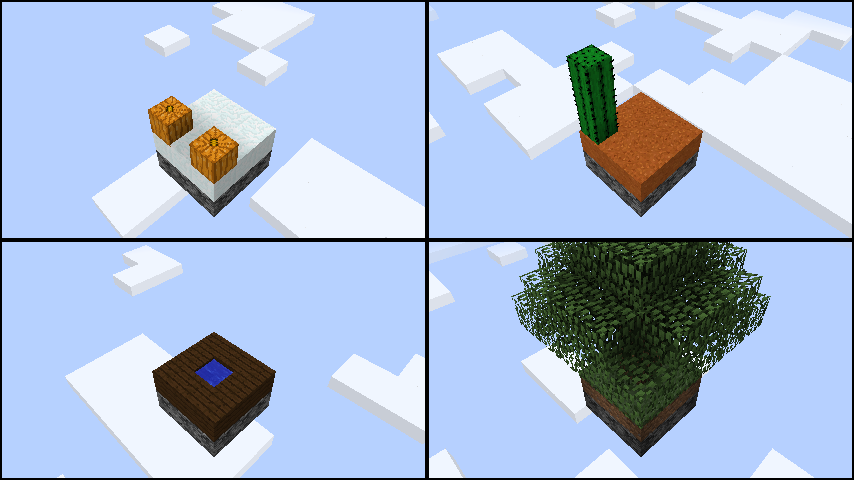
This mod comes with 4 default island types that all have some customize configs and can enabled/disabled:
- Grass
- Sand
- Snow
- Wood
- Garden of Glass (Only if enabled in config and Botania and Garden of Glass are installed)
These island types work with Sky Resources (except for wood in the 1.10 version).
How to Install:
New to Minecraft? Follow our step-by-step guide to install Mods on your PC.View Guide
Requirements:
Void Island Control Mod Download Links
For Minecraft 1.11.2
For Minecraft 1.12.1, 1.12
For Minecraft 1.12.2
Click to rate this post!
[Total: 0 Average: 0]
You May Also Like

This post has no comments yet. Be the first — your comment will appear here.