
Shulker Plus Mod (1.21.1, 1.20.1) – Label and Color Storage Boxes
 3,016
 0


Shulker Plus Mod lets you easily label and organize your Shulker boxes in Minecraft. It adds the ability to display an item on top of your Shulker box, even while it sits inside your inventory. This allows you to check box contents at a glance before placing them down. The mod also lets you dye Shulker boxes quickly to make them stand out and keep your items sorted on the go.

Features:
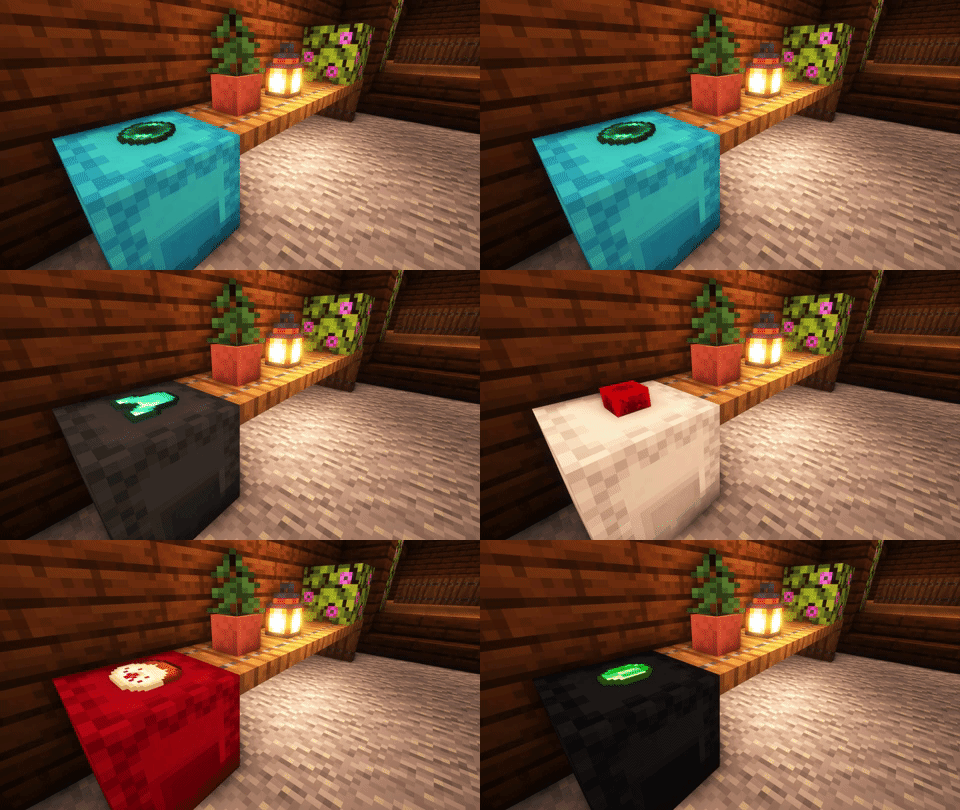
- Allows players to label Shulker boxes with an item rendered as an item frame on top.
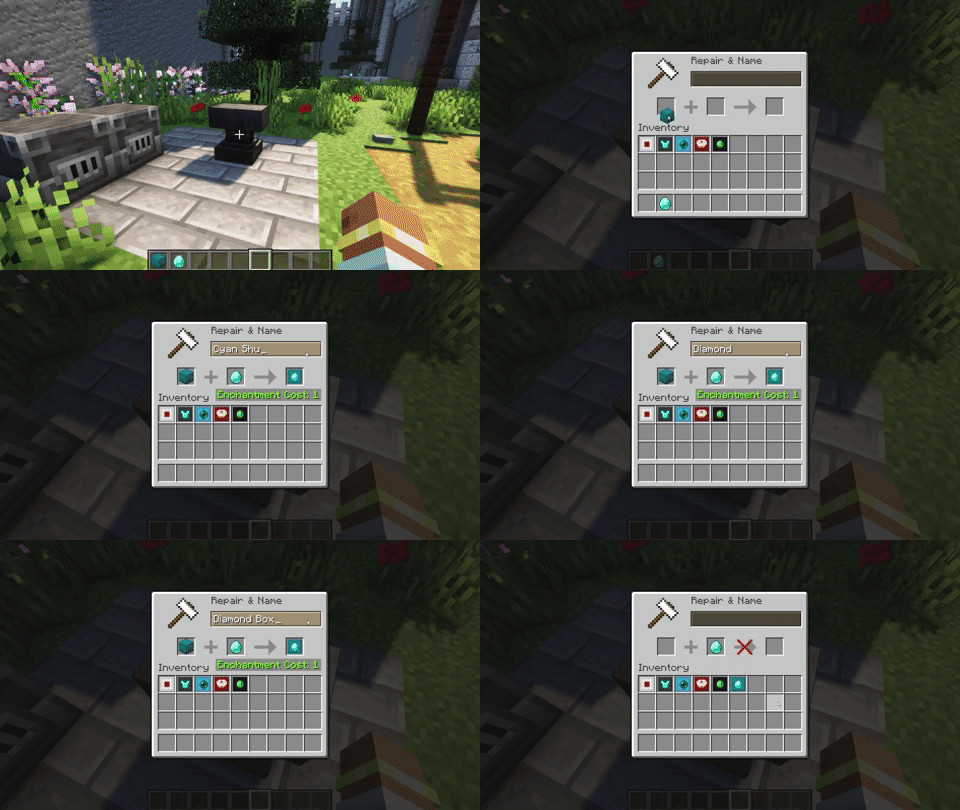
- Allows custom naming for Shulker boxes using an anvil.
- Offers two visual styles to render the item on the vanilla 3D version of the Shulker box or change the base texture to flat.
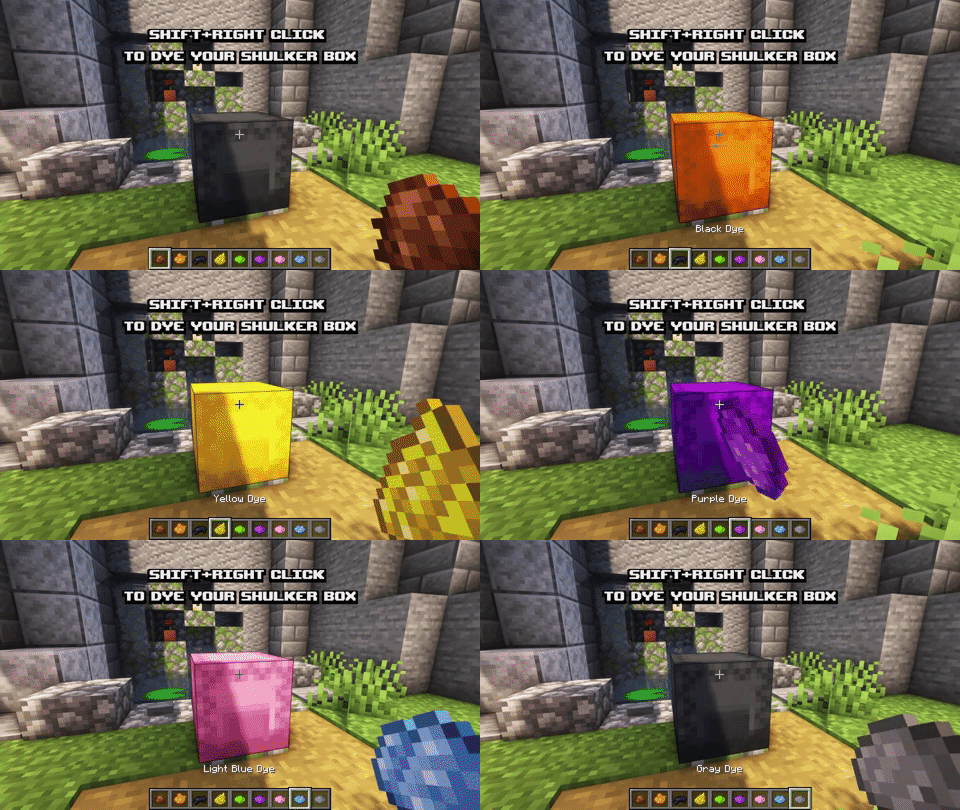
- Allows dyeing Shulker boxes by shift-right-clicking them with a dye.
- Allows server administrators to disable the Shulker dyeing feature on the server side.
How to Use:
- Combine a Shulker box with an item at an anvil to label it and keep its custom name.
- Hold any dye in your hand and Shift-right-click a Shulker box to change its color.
- Check your inventory to see the item rendered directly on top of the Shulker box.
Screenshots:

How to Install:
New to Minecraft? Follow our step-by-step guide to install Mods on your PC.View Guide
Shulker Plus Mod Download Links
For Minecraft 1.21.1, 1.21
Fabric Version: Download from Server 1 – Download from Server 2
For Minecraft 1.20.1
Forge Version: Download from Server 1 – Download from Server 2
Fabric Version: Download from Server 1 – Download from Server 2
For Minecraft 1.18.2
Forge Version: Download from Server 1 – Download from Server 2
Fabric Version: Download from Server 1 – Download from Server 2
What do you do when a mod you love is abandoned by its creator?
19 responses · See the full results →
You May Also Like
Picked for this page
 Full Brightness Toggle Mod (26.3, 1.20.1) – Instantly Turn The Brightness
 Powah Mod (26.1.2, 1.20.1) – Generation, Storage, Distribution of Forge Energy
 No Recipe Book Mod (26.3, 1.20.1) – Remove the Recipe Button from Inventory
 Macaws Trapdoors Mod (26.3, 1.20.1) – More Types of Trapdoors
 Stack Refill Mod (26.3, 1.20.1) – Automatic Item Refill
 Universal Bone Meal Mod (26.3, 1.20.1) – New Uses for Bone Meal
 DarkSpawn Mod (26.3, 1.20.1) – RPG Teleport to Spawn or Lobby
 No Template Netherite Tool Upgrades Mod (26.3, 1.20.1) – No Template Grinding
 Default Skill Trees Mod (26.3, 1.21.1) – Expand Pufferfish Skills With Combat
 Re-Dye Glass Mod (26.3, 1.20.1) – Allows The Recoloring Of Glass Blocks & Glass Panes
 Redstone Beacon Base Mod (26.3, 1.20.1) – Use Redstone Blocks For Beacon Bases
 Horse Breeding Fix Mod (26.3, 1.21.1) – Fixes Baby Horse Geneti
Most viewed in Mods over the last 7 days
 Ala Industrial Mod (26.3) – Run Electric Power Grids and Automated Factories
 PleasureCraft Mod (26.3, 1.21.1) – Jenny Mod Remake for Fabric
 Jennycraft Mod (26.3, 1.20.1) – Virtual Girlfriend in Minecraft
 Fapcraft Mod (26.3, 1.12.2) – Comprehensive and Detailed Content
 Jenny Mod (Fapcraft) Official Complete Guide – How to use, Tutorial
 BangCraft Mod (1.20.1) – Jenny, Ellie and Elliot
 Fabric Loader (26.3, 1.20.1) – Fabric Installer for All Minecraft Versions
 The Shooting Star Demo Mod (26.3, 1.20.1) – Vaporize Terrain From Orbit
 Meteor Client Mod (26.3, 1.20.1) – Xray, HUD, Fly
 OptiFine HD (26.3, 1.20.1) – Run Faster, FPS Boost, Shaders Support
 Aristois Client Mod (1.21.4, 1.20.1) – World Class Minecraft Utility
 Prestige Client Mod (1.21.11, 1.21.4) – Powerful Ghost Features for Crystal & Sword PvP
More from Mods
 Luxium Let There Be Light Mod (1.20.1) – Stunning Lighting on Low-End Computers
 Soulscraft Tarnished Legacy Mod (1.21.1) – Hunt Relics to Forge Dark Fantasy
 Fetzi’s Displays Mod (26.1.2, 1.20.1) – Turn Rare Gear and Weapons
 Primal Plushies Paleo Pals Mod (1.21.1, 1.20.1) – Decorate Your Base
 Ipla Mod (26.3, 1.20.1) – Showcase Your Favorite Items
 MesdagPortLib Mod (1.20.1) – Run Modern Minecraft Mechanics on Older Versions
 Hellion’s API Mod (1.21.11, 1.21.1) – Play Hellion Series Addons Without Crashes
 Terrestria Mod (26.3, 1.20.1) – Highly Detailed Biomes
 Tre’s Tack Library Mod (1.20.1) – Outfit Your Horses with Fully Detailed Tack
 YDM’s coreX Library Mod (1.20.1) – Loot RPG Gear with Random Names
 Gunpowder Recipe Mod (26.3, 1.20.1) – Gunpowder is Craftable
 Villager Timetable Mod (26.3, 1.20.1) – Master Villager Schedules

This post has no comments yet. Be the first — your comment will appear here.