
MCInstance Loader Mod (1.7.10) – Switch Packs in Main Menu
 232
 0


MCInstance Loader Mod lets you install modpacks directly inside Minecraft using .mcinstance files. Each pack is a repurposed ZIP file with INI-style .packconfig files that can copy bundled files, mix in your own files, and download mods from web links or the Modrinth and CurseForge APIs. This mod checks downloads with file hashes, saves files in a cache to skip repeat downloads after updates, and splits client and server files cleanly. It also offers client-side menus for picking optional mods and adds a Forge loading bar that shows how many downloads are left. After setup finishes, an info screen takes over the main menu to show errors or ask for a restart, and the pack file turns off on its own so your new mods load on the next launch.

Features:
- Direct .mcinstance Pack Installs: Installs modpacks right inside Minecraft using .mcinstance files, which are repurposed ZIP files built around INI-like .packconfig files.
- URL and API Downloads: Downloads files from any web link into any folder inside your Minecraft directory. It also supports both the Modrinth and CurseForge APIs, with multiple backup modes if a download fails.
- Optional Files Menu: Gives players a client-side menu to pick optional files, with groups, multiple menus, and multi-choice screens where you can set how many items can be toggled.
- Custom Info Screen: Replaces the main menu after setup to show errors or a custom success message so you remember to restart the game and load the new mods. It supports an auto-quit timer and works with other mods that change the main menu using a settable list of classes.
- Copies any bundled files from the overrides folder straight into your Minecraft root folder (usually .minecraft).
- Merges your own files from the carryover folder and lets them overwrite files bundled or downloaded by the pack.
- Verifies downloaded files using SHA-512, SHA-256, SHA-1, MD5, or CRC32 hashes.
- Saves hashed files in a cache and grabs hashes from the API when available, so you do not have to download everything again after an update.
- Uses StopModReposts to check links and discourage repost websites, with an option to turn this off if needed.
- Supports sided files so a pack can download certain mods only on the client or only on the server, such as client-only GUI mods.
- Adds a progress bar to the Forge loading screen that shows how many mods are left to download.
- Disables the pack.mcinstance file on its own after a successful install so you can play after restarting, with options to delete the file or turn off this auto-disable instead.
- Includes a full log system to inspect problems from this mod, along with a verbose option for Forge logs.
- Offers a toggleable update checker to help keep this mod up to date.
How to Install:
Installs modpacks directly inside Minecraft using the .mcinstance format, a repurposed ZIP file built around INI-like .packconfig files.
Screenshots:
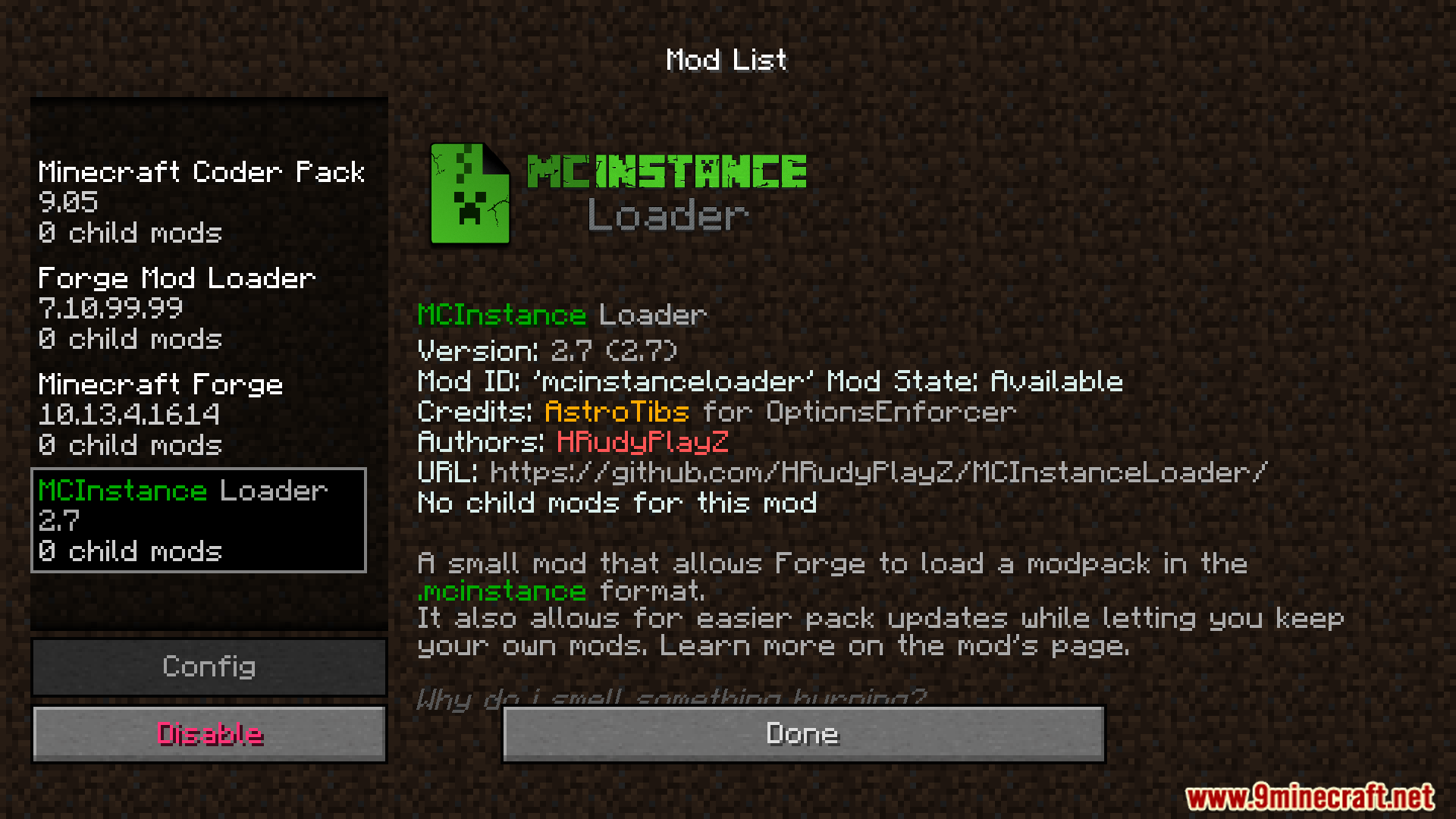
How to Install:
New to Minecraft? Follow our step-by-step guide to install Mods on your PC.View Guide
MCInstance Loader Mod Download Links
For Minecraft 1.7.10
Forge Version: Download from Server 1 – Download from Server 2
Which performance or optimization mod do you rely on the most?
44 responses · See the full results →
You May Also Like
Picked for this page
 Fabric API (26.3, 1.20.1) – Play Hundreds of New Mods
 Global DataPacks Resourcepacks Mod (26.3, 1.20.1) – Global Packs Mod
 Patbox’s Brewery Mod (26.3, 1.20.1) – Cauldron-Based Brewing
 Coins JE Mod (26.3, 1.20.1) – New Exchange Currency System
 Exordium Mod (26.1.2, 1.20.1) – Optimized GUI performance!
 Fast IP Ping Mod (26.3, 1.20.1) – Fix Slow Server Ping Times
 Animal Info Mod (26.3, 1.21.11) – Quick Stats For Your Animals
 retiNO Mod (26.2, 1.20.1) – Say NO to Retina
 ReArm Combat Overhaul Mod (26.3, 1.21.1) – Configurable Combat Expansion
 Aquatica Mod (1.20.1, 1.20) – New Ocean Depths And Biomes
 Ribbits Croaks Mod (1.20.1, 1.20) – Fight in Frog Raids to Protect Your Village
 Loot Integrations: Structory And Towers Mod (26.3, 1.20.1) – Custom Modded Items
Most viewed in Mods over the last 7 days
 Ala Industrial Mod (26.3) – Run Electric Power Grids and Automated Factories
 PleasureCraft Mod (26.3, 1.21.1) – Jenny Mod Remake for Fabric
 Jennycraft Mod (26.3, 1.20.1) – Virtual Girlfriend in Minecraft
 Fapcraft Mod (26.3, 1.12.2) – Comprehensive and Detailed Content
 Jenny Mod (Fapcraft) Official Complete Guide – How to use, Tutorial
 BangCraft Mod (1.20.1) – Jenny, Ellie and Elliot
 Fabric Loader (26.3, 1.20.1) – Fabric Installer for All Minecraft Versions
 Meteor Client Mod (26.3, 1.20.1) – Xray, HUD, Fly
 OptiFine HD (26.3, 1.20.1) – Run Faster, FPS Boost, Shaders Support
 The Shooting Star Demo Mod (26.3, 1.20.1) – Vaporize Terrain From Orbit
 Aristois Client Mod (1.21.4, 1.20.1) – World Class Minecraft Utility
 SchnurriTV Mod (1.12.2) – Characters and Features
More from Mods
 Tre’s Tack Library Mod (1.20.1) – Outfit Your Horses with Fully Detailed Tack
 Cores Mod (26.3, 1.20.1) – Never Lose Extra Levels and Recolor In-Game Menus
 DayTimeControl Mod (1.20.1) – Enjoy Longer Days for Big Builds or Endless Nights
 Builders Companion Core Mod (1.20.1) – Power Custom Waters for Better Creative
 Giacomo’s Fishing Net Mod (1.20.1) – Catch Fish and Treasure While Away
 Ender Portal Stone Mod (1.22) – Fast Travel to Distant Biomes and Dungeons
 Chat Spellcheck Mod (26.2) – Never Send Embarrassing Typos to Friends Again
 NovaUtils Mod (26.1.2) – Locate Buried Ores and Inspect Chests Through Walls
 In-Game Account Switcher with Cookies Mod (1.21.11) – Swap Your Alts Without Relaunching
 CrewX Mod (1.8.9) – Dominate Competitive Server Matches Without Lag
 Vanilla Refit Mod (1.21.1) – Build Thinner Walls with Vertical Slabs
 IZeMod Mod (26.2) – Helpful Survival Tools for Everyday Fabric Adventures

This post has no comments yet. Be the first — your comment will appear here.