


Island Utils Mod (1.21.11, 1.20.1) – Ang Iyong Competitive Edge sa MCC Island

 0
0 

Ang Island Utils Mod ay nagdaragdag ng ilang mga kapaki-pakinabang na feature para sa mga manlalaro sa MCC Island server. Nagdadala ito ng custom music sa mga laro, ipinapakita ang iyong ginagawa sa Discord, at nagdaragdag ng mga useful timer para sa mga challenge. Ang mod na ito ay nagbibigay din sa iyo ng confirmation screen para maiwasan ang aksidenteng pag-alis sa laro.

Mga Feature:
- Nagdaragdag ng special music na tumutugtog sa iba’t ibang laro sa server.
- Nagbibigay sa iyo ng hiwalay na volume sliders para sa music at game sounds.
- Nagpapakita ng confirmation screen kung i-click mo ang “Disconnect,” para hindi ka aksidenteng maka-leave sa laro.
- Hinahayaan kang makita ang preview ng iyong character habang tumitingin ng mga damit sa wardrobe o items sa shops.
- Ina-update ang iyong Discord status para ipakita sa iyong mga kaibigan ang ginagawa mo sa MCC Island.
- Naglalagay ng quick-access buttons sa itaas ng chat box para sa mabilis na paglipat ng channels.
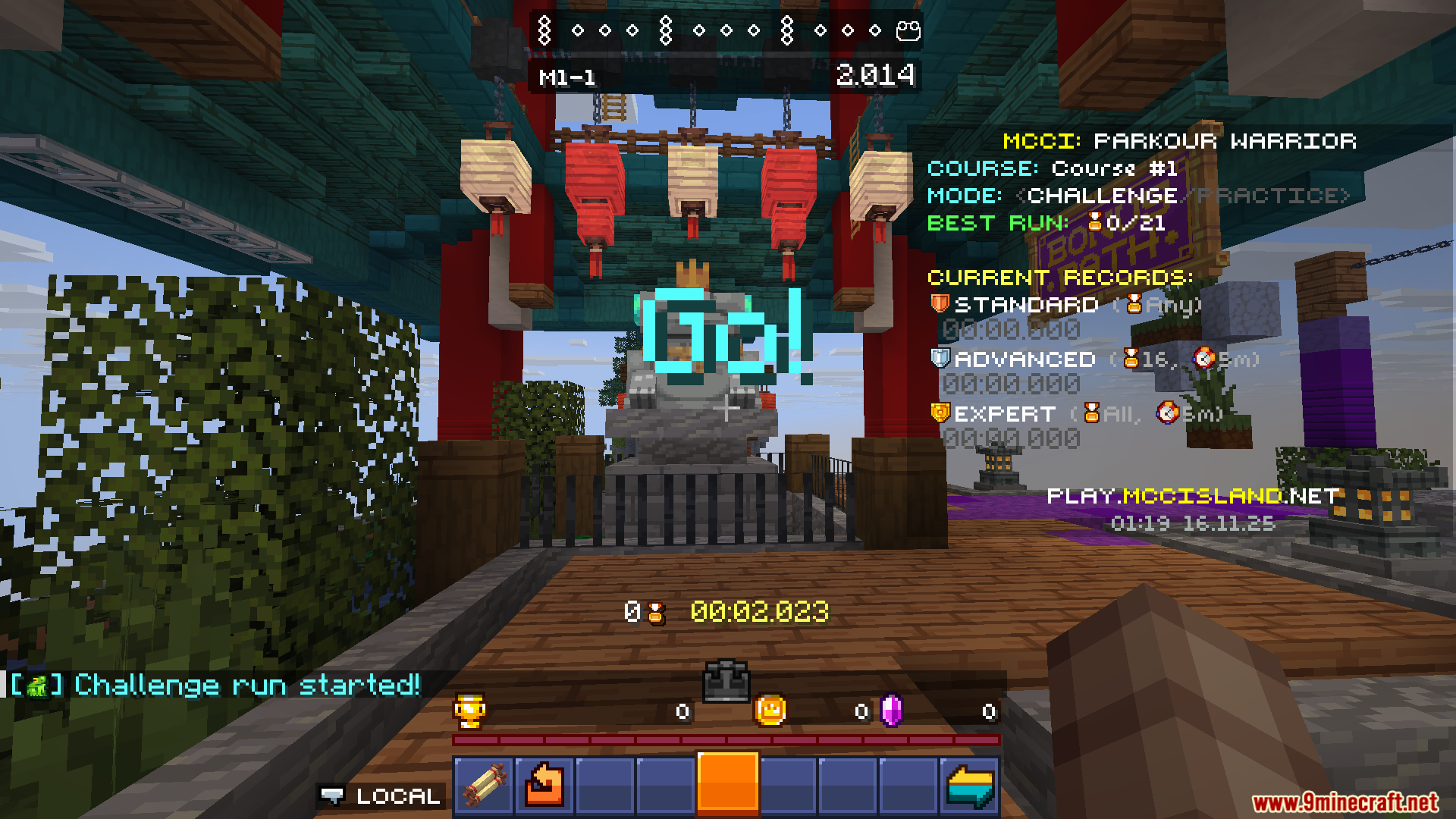
- May kasamang split timer para sa Parkour Warrior: Dojo para matulungan kang i-track ang oras mo sa bawat section.
- Nagpapadala ng notification kapag tapos na ang pag-craft ng iyong mga item sa Forge o assembler.
- Maaari kang gumamit ng special command para i-check kung gaano pa katagal ang natitirang oras sa iyong crafting jobs.
Configuration:
- Ang mod na ito ay may settings screen kung saan maaari mong baguhin ang ilang options.
- Maaari mong i-adjust ang volume para sa game music at sound effects gamit ang magkahiwalay na sliders.
- Mayroon din itong options para i-set up ang iyong Discord Presence para ipakita sa mga kaibigan ang ginagawa mo sa server.
Mga Command:
- May available na command para i-check ang natitirang oras para sa mga item na nica-craft sa Forge o assembler.
Mga Screenshot:



Paano I-install:
Mga Kailangan:
 Fabric Loader Kailangan
 Fabric API Kailangan
 Noxesium Mod Kailangan


Island Utils Mod Download Links
Para sa Minecraft 1.21.8, 1.21.7
Fabric version: Download mula sa Server 1 – Download mula sa Server 2
Para sa Minecraft 1.21.5
Fabric version: Download mula sa Server 1 – Download mula sa Server 2
Para sa Minecraft 1.21.4
Fabric version: Download mula sa Server 1 – Download mula sa Server 2
Para sa Minecraft 1.21.3
Fabric version: Download mula sa Server 1 – Download mula sa Server 2
Para sa Minecraft 1.21.1, 1.21
Fabric version: Download mula sa Server 1 – Download mula sa Server 2
Para sa Minecraft 1.20.6, 1.20.5
Fabric version: Download mula sa Server 1 – Download mula sa Server 2
Para sa Minecraft 1.20.4
Fabric version: Download mula sa Server 1 – Download mula sa Server 2
Para sa Minecraft 1.20.2
Fabric version: Download mula sa Server 1 – Download mula sa Server 2
Para sa Minecraft 1.20.1, 1.20
Fabric version: Download mula sa Server 1 – Download mula sa Server 2
Para sa Minecraft 1.19.2, 1.19.1, 1.19
Fabric version: Download mula sa Server 1 – Download mula sa Server 2
Para sa Minecraft 1.21.11
Para sa Minecraft 1.21.8, 1.21.7, 1.21.6
Para sa Minecraft 1.21.5
Para sa Minecraft 1.21.4
Para sa Minecraft 1.21.3, 1.21.2
Para sa Minecraft 1.21.1, 1.21
Para sa Minecraft 1.20.6, 1.20.5
Para sa Minecraft 1.20.4
Para sa Minecraft 1.20.2
Para sa Minecraft 1.20.1, 1.20
Para sa Minecraft 1.19.2, 1.19.1, 1.19
Baka Magustuhan Mo Rin






Wala pang komento ang post na ito. Maging una — lalabas dito ang iyong komento.