


Platforms Mod (1.21.1, 1.20.1) – Gumawa ng Custom Decks & Bridges
 6,993
6,993
 0
0


Ang Platforms Mod ay hinahayaan kang gumawa ng mga custom structures gaya ng decks, bridges, at pati na rin wooden roller coasters. Maaari mong pagsamahin ang halos kahit anong dalawang blocks o items mula sa laro, pati na ang mga galing sa ibang mods, para makabuo ng sarili mong unique building pieces. Dahil dito, mas madali nang magdagdag ng detalye at variety sa iyong mundo.
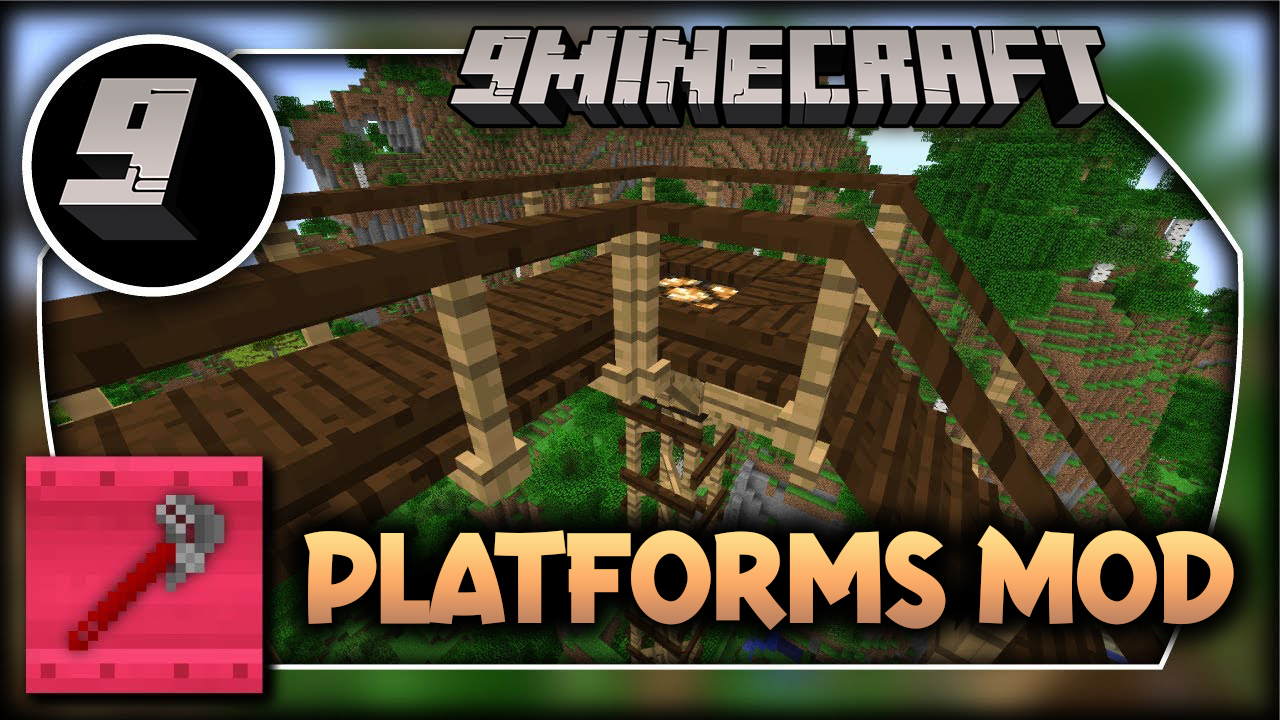
Features:
- Pagsamahin ang halos kahit anong dalawang blocks o items para makagawa ng bagong building materials.
- Bumuo ng iba’t ibang structures, kabilang ang mga deck, tulay, bubong, at mine shafts.
- Kung gagamit ka ng light-emitting block sa recipe, magliliwanag din ang final platform.
- Magdagdag ng mga ramp, step, at hagdan na gawa sa iyong custom materials.
- Maglagay ng mga handrail at rise para sa extra detail at safety sa iyong mga builds.
- Gumawa ng mga chimney at pipe sa pamamagitan ng paglalagay ng rise o handrail sa isang roof piece.
- Ang mga chimney at pipe ay maglalabas ng smoke particles, at ang effect na ito ay pwedeng i-toggle.
- Maglagay ng carpets nang direkta sa ibabaw ng mga platform para sa dagdag na dekorasyon.
- Sa mga snowy o desert biomes, natural na maiipon ang snow at sand sa iyong mga platform.
- Mag-apply ng soul, redstone, o torches nang direkta sa mga frame para sa functional o decorative na layunin.
Supported Platform Material Blocks:
Wood
- Mga blocks na nakarehistro sa Forge OreDictionary bilang “plankWood”
Stone
- Mod blocks na nakarehistro sa Forge OreDictionary bilang “stone” o “cobblestone” o “sandstone”
- Stone
- Cobblestone & Mossy Cobblestone
- Brick Block
- End Stone
- Hardened Clay & Stained Hardened Clay
- Prismarine
- Nether Brick Block
- Stone Brick Block
- Packed Ice
- Quartz Block
- Lapis Block
- Diamond Block
- Emerald Block
Metal
- Mga blocks na nakarehistro sa Forge OreDictionary bilang pairs ng ingot<Metal> block<Metal>
Medyo iba ang Metal dahil ingot ang ginagamit sa pag-craft pero ang texture ay galing sa block.
Halimbawa, parehong “ingotCopper” at “blockCopper” ay dapat nakarehistro sa Ore Dictionary.
Susubukan ng mod na ipares ang ingot at block mula sa parehong mod, pero kung ang mod ay nagrehistro ng ingot pero walang block, ang unang nakarehistrong block ng parehong metal ang gagamitin.
Paano Gamitin:
- Una, i-craft ang Platformer block. Ang special block na ito ay ginagamit para gawin ang lahat ng iba pang items sa mod na ito.
- Gamitin ang Wrench tool para madaling ma-edit ang iyong mga nailagay na platforms.
- I-right-click ang platform gamit ang Wrench para i-rotate ito.
- I-hold ang Shift at i-right-click ang platform para palitan ang style nito.
- I-hold ang Shift at i-left-click ang platform gamit ang Wrench para tanggalin ang rail nito.
- Kapag may hawak kang Wrench sa iyong off-hand, may lalabas na placement overlay para tulungan ka sa pag-build.
Crafting Recipes:
The Platformer:

Ang block na ito ay ginagamit para gawin ang lahat ng platforms.
Depende sa material na ginamit, mag-iiba ang itsura ng mga platforms.
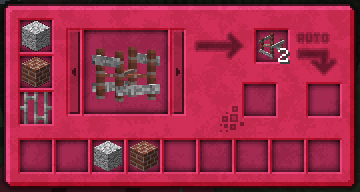
Ginagamit ng Platformer ang ore dictionary para suportahan ang mga mod added planks, ingots (dapat may block din), at ilang stones.
The wrench:

Right-Click para i-rotate ang platform.
Shift+Right-Click para palitan ang style ng platform.
Shift+Left-Click sa platform para tanggalin ang rail.
Kapag ang wrench ay nasa offhand, makikita ang placement overlay.
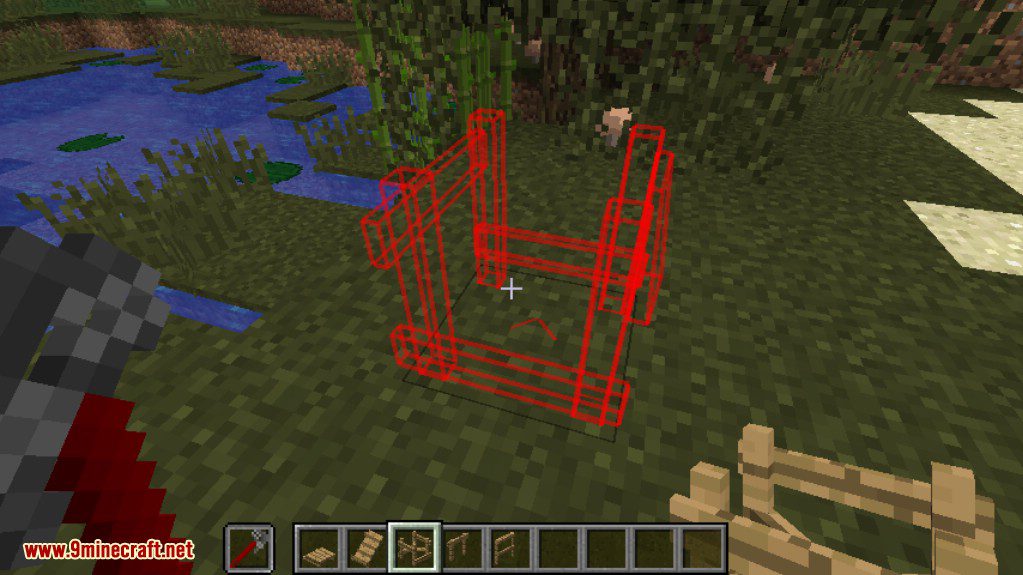
Screenshots:


Paano I-install:
Mga Kailangan:
Platforms Mod Download Links
Para sa Minecraft 1.7.10
Para sa Minecraft 1.8.9
Para sa Minecraft 1.12.2
Para sa Minecraft 1.14.4
Para sa Minecraft 1.15.2
Para sa Minecraft 1.16.5
Forge version: Download mula sa Server 1
Fabric version: Download mula sa Server 1
Para sa Minecraft 1.17.1
Forge version: Download mula sa Server 1
Fabric version: Download mula sa Server 1
Para sa Minecraft 1.18.2
Forge version: Download mula sa Server 1
Fabric version: Download mula sa Server 1
Para sa Minecraft 1.19
Forge version: Download mula sa Server 1
Fabric version: Download mula sa Server 1
Para sa Minecraft 1.19.2, 1.19.1
Forge version: Download mula sa Server 1
Fabric version: Download mula sa Server 1
Para sa Minecraft 1.19.3
Forge version: Download mula sa Server 1 – Download mula sa Server 2
Fabric version: Download mula sa Server 1 – Download mula sa Server 2
Para sa Minecraft 1.19.4
Forge version: Download mula sa Server 1 – Download mula sa Server 2
Fabric version: Download mula sa Server 1 – Download mula sa Server 2
Para sa Minecraft 1.20.1
Forge version: Download mula sa Server 1 – Download mula sa Server 2
Fabric version: Download mula sa Server 1 – Download mula sa Server 2
Para sa Minecraft 1.20.2
Forge version: Download mula sa Server 1 – Download mula sa Server 2
Fabric version: Download mula sa Server 1 – Download mula sa Server 2
Para sa Minecraft 1.20.4
Forge version: Download mula sa Server 1 – Download mula sa Server 2
NeoForge version: Download mula sa Server 1 – Download mula sa Server 2
Fabric version: Download mula sa Server 1 – Download mula sa Server 2
Para sa Minecraft 1.21.1, 1.21
Forge version: Download mula sa Server 1 – Download mula sa Server 2
NeoForge version: Download mula sa Server 1 – Download mula sa Server 2
Fabric version: Download mula sa Server 1 – Download mula sa Server 2
Baka Magustuhan Mo Rin














Wala pang komento ang post na ito. Maging una — lalabas dito ang iyong komento.