


Online Picture Frame Mod (1.12.2, 1.11.2) – Decorate with Real Photos
 5,235
5,235
 0
0
 September 29, 2021
Online Picture Frame Mod 1.12.2, 1.11.2 allows you to pick any picture of the internet and bring it to Minecraft. You can choose the size, rotate or flip it. You can do basically everything. No need for uploading files to the server (no need for storage) and no laggy server (no need for sending pictures to all clients). The idea is to copy a link from the internet and paste it into the frame. So all client will download the picture themselves, because nowadays everybody has internet, especially if he is playing on a server.
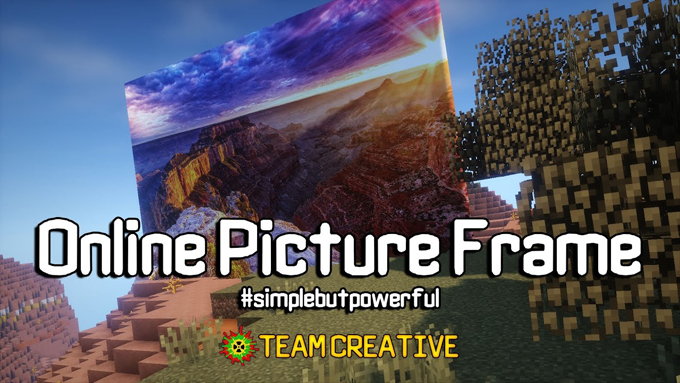
This mod also adds support for LittleTiles providing more freedom of placing your pictures everywhere you want to. You can also make a structure out of it.
Features:
- Decorate your world with any picture from the internet.
- Simply paste a URL into the frame; no file uploads are required.
- Saves server storage and reduces lag by having clients download images individually.
- Adjust your pictures by changing their size.
- Rotate or flip images to fit your design perfectly.
- Works with the LittleTiles mod for more creative placement options.
How to Use:
- Find a picture you like on the internet.
- Copy the direct URL (link) of the image.
- In Minecraft, paste the link into the picture frame. The image will then appear.
How to Install:
New to Minecraft? Follow our step-by-step guide to install Mods on your PC.View Guide
Online Picture Frame Mod Download Links
For Minecraft 1.7.10
For Minecraft 1.10.2
For Minecraft 1.11.2
For Minecraft 1.12.2
You May Also Like







This post has no comments yet. Be the first — your comment will appear here.