


Wurst Modified Client Mod (26.1.2, 1.21.1) – Best Client for Minecraft in 2026

 0
0 

Wurst Modified Client Mod extends the original Wurst 7 client with extra tools and helpful menus. It brings new interfaces and useful additions to the classic utility toolset. You get access to a custom server finder, detailed visual settings, and extra tracking options. The client organizes all these tools into easy-to-read windows right on your screen.
Features:
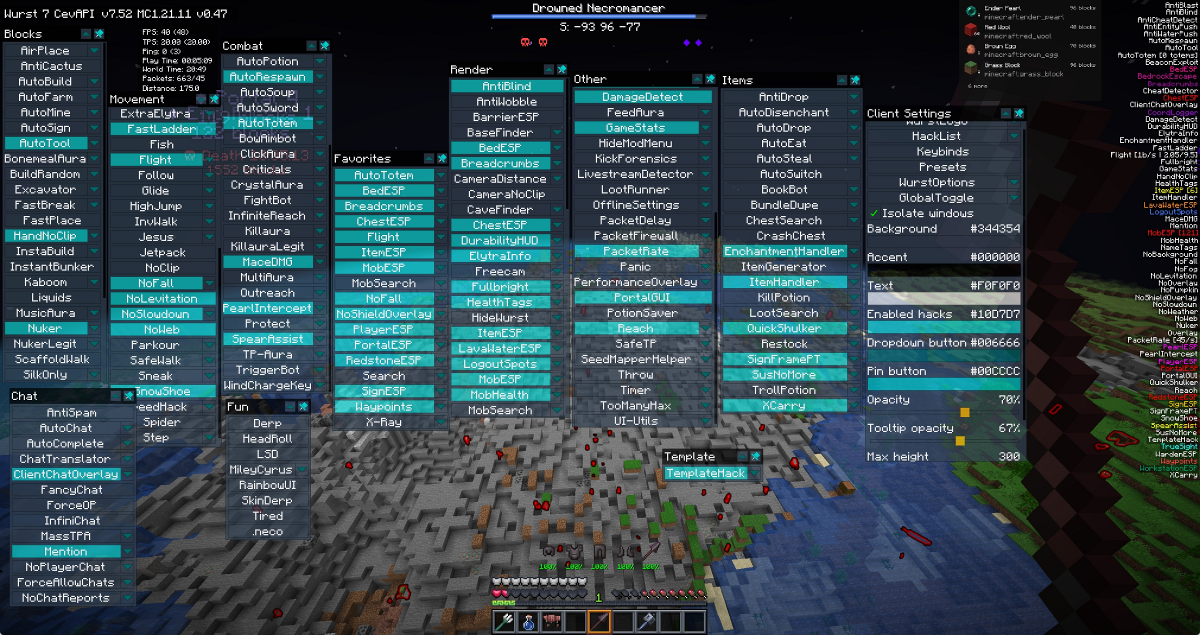
- Custom Menus: Adds a large multi-column interface so you can find all your tools quickly.
- Visual Highlights: Lets you draw bright boxes around important things like dropped items, beds, and crafting tables.
- Server Scanner: Includes a built-in server finder that scans IP addresses to locate active multiplayer worlds.
- Shows yellow tracer lines that connect directly to other players and mobs in the world.
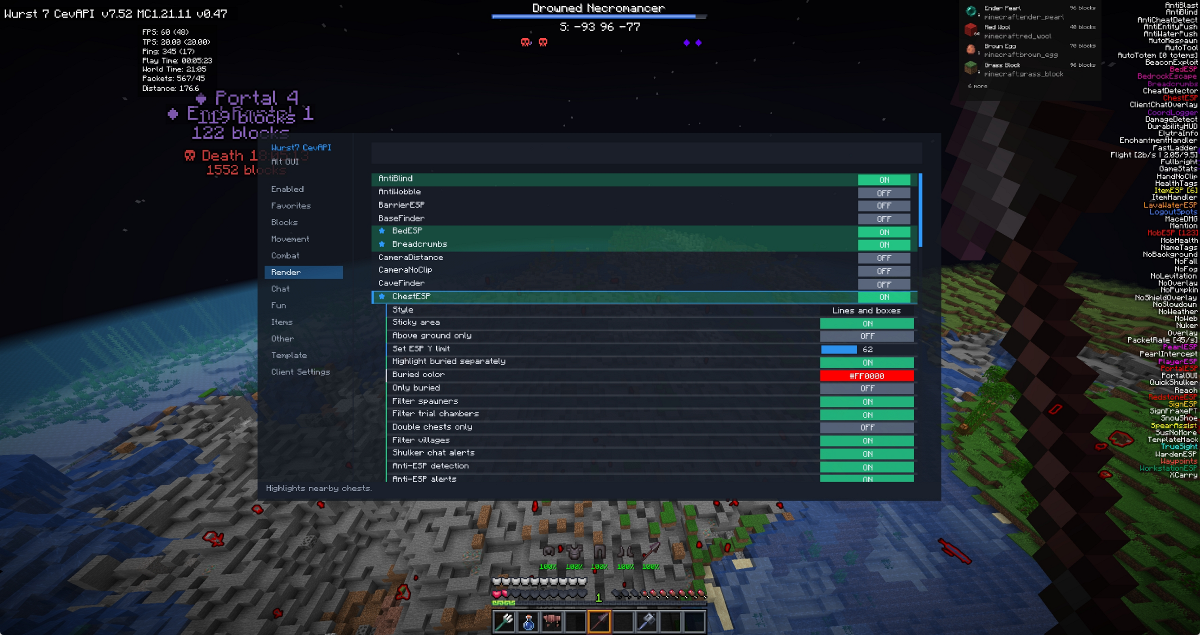
- Provides a detailed settings window for every single tool, letting you change colors and scan distances.
- Displays helpful information on your screen like player statistics, active armor enchantments, and an online user list.
- Lets you place bright red beacons as waypoints so you never lose your home base.
- Includes a livestream detector that scans at set intervals to keep you safe while playing.
- Offers a special cheat-free version called NiceWurst for players who only want the visual helpers.
How to Use:
- Open the game and press the designated menu key to bring up the main interface.
- Click through the multi-column layout to find the specific tool you want to turn on.
- Open the settings window next to any tool to adjust its range or highlight colors.
- Use the custom server finder from the main menu to scan for new places to play.
Wiki:
A (20)
Above GroundESP Y Limit New ESP Option
ItemESP, MobESP, MobSearch, Search, ChestESP, BedESP, SignESP, PortalESP, RedstoneESP and WorkstationESP now have an adjustable Y limit (default 62 which is approximately sea level)
There is a global toggle and setting that can apply to all, or the user can set toggle and set them individually in the hack’s settings (“.aboveground on/off`, `.aboveground toggle`, `.aboveground y #“) – also accessible via ‘GlobalToggle’ setting in the Other category within the ClickUI.
This will help prevent you from detecting inaccessible mobs/items and help you focus on scanning the surface of the world (if that’s your goal)
AdvancedPacketTool
Lets you manage packet behavior per packet type (S2C & C2S)
Supports 3 independent modes: Log, Deny and Delay
Modes can overlap (Log & Deny Packet A but also Log & Delay Packet B)
Toggles for enabling modes as well as cycling through packet edit list
Delay is tick based
Searchable dual-list UI with select all/none controls
Setting toggles are key bindable
Optional “Show Unknown Packets` feature to allow `class_####“ packets
Inspired by HelixCraft’s Packet Logger
AimAssist Improved
Added lock-on targetting
Added right-click lock-on targetting with added vertical matching when in flight
Optional auto-attack in the same method as MultiAura
Optional range override
Allowed new maximum 128 block range
AirWalk
Lets you walk on air by freezing your vertical motion.
Unlike other hacks, this one allows you to also jump and increase your height.
Alt Manager Improved
Can now multi-select and delete alt accounts
Moved to multiplayer screen
Can now accept alternative login methods
Updated import and export to suit new method
Added random button to randomly choose an account and attempt to join it, won’t stop until it finds a valid one.
Anti Fingerprint
Detects and stops resource-pack fingerprinting.
Basic protections are already enabled by default.
Policies: Observe (vanilla prompt + log), BlockLocal (decline private/LAN), BlockAll (decline all), SandboxAll (server sees fail; client saves copy).
Detects burst requests (N in M ms) with toasts; supports host whitelist.
Cache defenses: clear before download and per-session cache isolation.
Sandbox: optional auto-extract of resource-packs for inspection.
Telemetry: toast verbosity + audit log (host/IP/URL/UUID/required, cache/sandbox paths).
Access via Other → Anti-Fingerprint, Wurst Options, and Multiplayer/Server Finder buttons.
AntiBlast
Prevents push back from TNT, creeper explosions, respawn anchors, crystals, wither skulls, wither spawn explosions, ghast fireballs, breeze gusts (and wind charges) and other custom plugins/entities that use explosion physics.
Anticheat Detector
Watches server behavior and packets to estimate if anti-cheats are present and active
Flags the likely protection so you know which hacks might be risky to use
Setback Detection, tracks sudden position corrections/teleports that indicate that the server rejected your hack and automatically disables it.
Works independantly of Anticheat Detector
Anti-ESP Detection:
Detects suspicious anti-ESP behavior world-wide based on packet patterns (rapid block swaps, high update bursts and delayed block-entity reveals)
Noise handling for fluid/air transitions
Will be able to detect anti-xray traffic as well but will likely trigger burst signals
Added Anti-ESP detection specifically to ChestESP and Search in addition to global detection to avoid any false positives
AntiDrop
Prevents you from dropping the selected items by accident. Defaults to all weapons, tools, and shulker boxes.
When enabled you cannot press the throw button on the chosen items and you cannot drag the chosen items out of inventory.
Antisocial
Hooks into the PlayerESP enter/leave detector (even if ESP itself is off) and logs out the instant someone walks into range.
Reuses AutoLeave’s Quit/Chars/SelfHurt modes so you can pick the safest disconnect for your server.
Can also issue a command instead of the above.
Toggles AutoReconnect off so you stay gone.
Perfect for hiding or protecting yourself while AFK farming.
Able to ignore friends.
AntiVoid
Teleports you back to your last safe position when you are falling into the void.
Optionally enable air walk or flight to avoid falling.
Can also avoid falling into lava.
Able to respond only at void level
Auto-enabling on conditions
AutoBuild Improved
Air-start position support and continued air place for gaps in build
Template preview shows a ghost of the template which locks in position when freecam is activated
Placement validation, blocks are only considered done when the world has a non-replaceable block in that position
Stuck handling, if the strict build order fails it temporarily relaxes the order so it can resume easier
CTRL (Sprint) bypass, by holding it you can add your own blocks at any time, before during or after the build
Adjustable confirmation ticks
Shows block count on crosshair
Prevents interaction with chests etc
AutoChat
AutoChat watches incoming chat and keeps a rolling context history (configurable size).
API key source: setting or WURST_OPENAI_KEY (set in Java/Minecraft, not your PC).
Replies when directly addressed, in clear 1-on-1 chat, or freely based on configurable butt-in chance.
Can prioritize the newest message while keeping older lines as secondary context.
Mention detection supports your username plus nickname/derivative variants.
Optional Always reply when mentioned bypasses reply-gap timers for direct mentions.
Editable system prompt in-game.
Persona is configurable via text field and overrides whatever is in the system prompt.
Model is selectable, including:
chatgpt-4o-latest, gpt-5.2-chat-latest, gpt-5.2, gpt-4o,
gpt-5.1-chat-latest, gpt-5-chat-latest, gpt-5.1, gpt-5,
gpt-4.1, gpt-5-mini, gpt-4.1-mini, gpt-4o-mini,
gpt-4.1-nano, gpt-5-nano.
Generation controls: max tokens, temperature, max output chars.
Timing controls: min reply gap, min unsolicited gap, optional queued scheduling for gap-blocked replies, WPM pacing (toggle + words-per-minute), and max concurrent requests.
Debug mode can print raw OpenAI request/response JSON in the console.
Safety/sanitization: filters likely prompt-injection attempts, strips leading <Name>/[Name] style prefixes, prevents slash-command output, enforces single-line replies, and normalizes output to ASCII-safe chat text.
AutoDisenchant
Feeds items from your inventory (and or hotbar) that can be disenchanted into the grindstone automatically.
Show button toggle lets you hide the grindstone button so the hack auto-runs whenever it’s enabled; show the button and you must press it inside the container.
AutoFly
AutoFly follows SeedMapper exports or manually entered coordinates, automatically tuning flight height/speed and showing a crosshair status.
Able to adjust mid flight so you can get yourself unstuck if it failed to do it itself.
Able to somewhat path around blocks it crashes into either by moving around it or flying above it.
Auto lands and turns off flight when complete.
Optionally stop on discovery of new or old chunks, portals or specific blocks or mobs.
Able to fly in a specified grid pattern with optional breadcrumb style pathing.
Optionally turns on Antisocial, AutoEat or AutoLeave whilst enabled and auto turns off when disabled.
Comes with custom commands:
.autofly <x> <y> <z> [height] [speed] or .autofly <x> <z> [height] [speed] to AutoFly to a given waypoint (relative ~ values are supported as well as comma separated entries). Omitting Y causes it to simply land at the waypoint.
.autofly next/.autofly prev(ious) cycles the SeedMapper export list, while .autofly stop|off|disable turns off AutoFly.
AutoLibrarian Improved
Can now discover enchantments provided by data packs.
Able to search for enchantments by keywords.
Reasons for failure indicated in chat.
Will auto-break lecturn if they refuse the job.
AutoMace
Auto changes to mace and attacks when falling on a target
Has various settings such as minimum fall distance, switch delay, attack delay and filters
Novel design where it implements a toggleable modified AimAssist setting whilst falling
Adds toggleable MaceDMG hack on impact
AutoSign Improved
Can input sign text directly into ClickUI/Nagivator
Can now save and manage a list of presets
Added sign aura which supports HandNoClip and chat logging
AutoSteal Improvements
Toggle ‘Steal/Store Same’ to move items that match the same ones in the players inventory or chest. Bind-able to a key.
Added ‘Auto’ button which can enable and disable Auto stealing on the fly.
Added ‘Dump’ button which throws everything out of the container.
Buttons (Auto, Steal, Store, Dump) are toggled within the hack’s settings and persist even if AutoSteal is disabled.
Added Item List and ‘List Only’ toggle to only auto steal items on the list.
AutoTrader
Automatically sells selected items to villagers / merchants.
Adds an “AutoTrader” button to the trade screen and a configurable Item List setting where you pick which items to quickly sell.
When a merchant GUI is open the hack will detect matching trades (first and optional second buy-slot) and repeatedly perform purchases while:
the villager still has the trade available
the selected item is present in the player’s inventory
Robust sold-out detection and safe-stop logic to avoid spamming when offers are exhausted.
Ideal for quickly offloading farmed goods (seeds, string, paper, etc.) into emeralds without manual clicking.
B (10)
BarrierESP
Visually see invisible barrier blocks
Either render the icon, an ESP box or both together
BaseFinder Improvements
ESP Y range adjustability
Live updates for selected blocks, meaning you can adjust them on the fly without resetting the hack
Added tracer option
Added sticky area mode which makes the scan anchored instead of re-centering when you move
Updated natural blocks list to latest versions (including trial chambers)
Added HackList count
BeaconExploit
Force specific effects even on lower tiers
Get resistance, regeneration, jump boost and strength with 4 beacons on a single level for example
BedBreakAura
Finds all bed types and breaks them.
Basically Nuker, but works through walls, has extended reach and has a spam cut off to prevent being stuck on unreachable beds.
Great for some game types and or simply preventing people from respawning properly.
Works passively in the background.
BedESP
Finds all bed types.
Chunk-based scanning with configurable color and Box/Line style.
Adjustable tracer line thickness
Rendering: Boxes, Lines, or Both in a fixed color.
Filter for hiding Trial Chamber and or Villager beds.
BedrockEscape
Sends you up and down through bedrock instantly and from approx 50 blocks distance.
Gives you a readout of how many hearts of damage you will take going through the bedrock based on its thickness.
Only renders the ESP box when it’s a valid pass through.
Will only let you land on a safe spot or an area that has liquids (lava or water).
A green tick will appear when all teleport conditions are met: can reach, won’t die and able to pass through.
Able to adjust packet rate throttle to avoid spam or detection.
Holding shift above bedrock will attempt to break blocks under you to find a cheaper (less damage) route. Will auto switch to pickaxe if available.
Optionally holding shift above bedrock will make the bedrock layer transparent. If underneath it, looking up will make it transparent.
Able to find render escape routes that will cause you no damage
Wireframe, tile, fill, chunk size and other options available
You are able to override safeguards in the settings
Tested on Fabric and Paper servers
BedrockStash
Highlights caveties within bedrock that is air or has breakable blocks (completely surrounded by bedrock)
In combination with HandNoClip you can place and open chests in these spaces
May help in hiding items from people not using this client or don’t have HandNoClip (vanilla users etc)
BookBot
Based on the hack of the same name in Meteor. Needed for BundleDupe.
Auto-writes (optional sign) writable Books for high-entropy NBT or spam purposes.
Modes
Random: random chars
File: from .txt (word-wrap)
Settings
Pages / ASCII-only / delay
Sign + title + append count
File + word-wrap
Breadcrumbs
Leaves a line trail behind you (toggle-able/pause-able).
Trail can be infinitely long
Trail can be applied to other players (toggleable unique colors for each player (shared with PlayerESP))
Settings: color, max sections, section length, thickness, targets, keep trails toggle, unique colors toggle.
BundleDupe
One-click bundle dupe inspired by the work of Numbers/Autism Inc. Works on Paper 1.21.11 pre-v111.
Prep: 100-page high-entropy book in inv + bundle with ~63 target items + 1 filler.
Modes
TIMEOUT: wait KeepAlive, block KAs, after Ns use bundle, lag, off
KICK: lag, use bundle, disconnect
Kick
Hurt, Quit, Chars, Client Settings, Move NaN, Move Inf, Move OOB, Click Invalid, Update Slot, Custom Command
Lag
Boat NBT (Chest Boat/Minecart), Click Slot (Needs NBT Book (Or Similar)), Entity NBT (Crosshair Target), Inventory Spam, Chat Flood, Swing Spam, Dig Spam, Slot Spam, Custom Command.
Settings
TIMEOUT: Seconds + Interact delay (ms)
Lag: Packet Counts
Notes
Not all kicks suit all servers; BoatNBT needs riding; EntityNBT needs looking at entity.
C (10)
Cheat Detect
Watches other players each tick, tracking motion/swing stats to detect suspicious patterns
Detects speed, flight, boat flight and high CPS sword swings
Able to adjust the sensitivity for each detection
Alerts throttle themselves to prevent spam
Able to detect if other players are as cool as you!
Chest Search
Automatically or manually scan each chest and shulker you open and store its contents in a JSON file per server (You can also disable entirely)
Able to detect chest changes that you make, so adding or removing items instantly updates the JSON
Unable to detect chest changes that other players make
Able to delete entries
Able to determine and search for weapon/armor, potion and book enchantments
Visually search all scanned chests for content based on keywords
Create an ESP highlight of the chest that has your desired item or create a waypoint to track the chest down
Chests are auto-removed if it has been detected as broken/missing
Adjustable Waypoint and ESP timeout
Adjustable ESP and Waypoint colors
Adjustable search radius
Adjustable font size
Highlight open chests with X or an alternative color
Option to remove tracers for opened chests
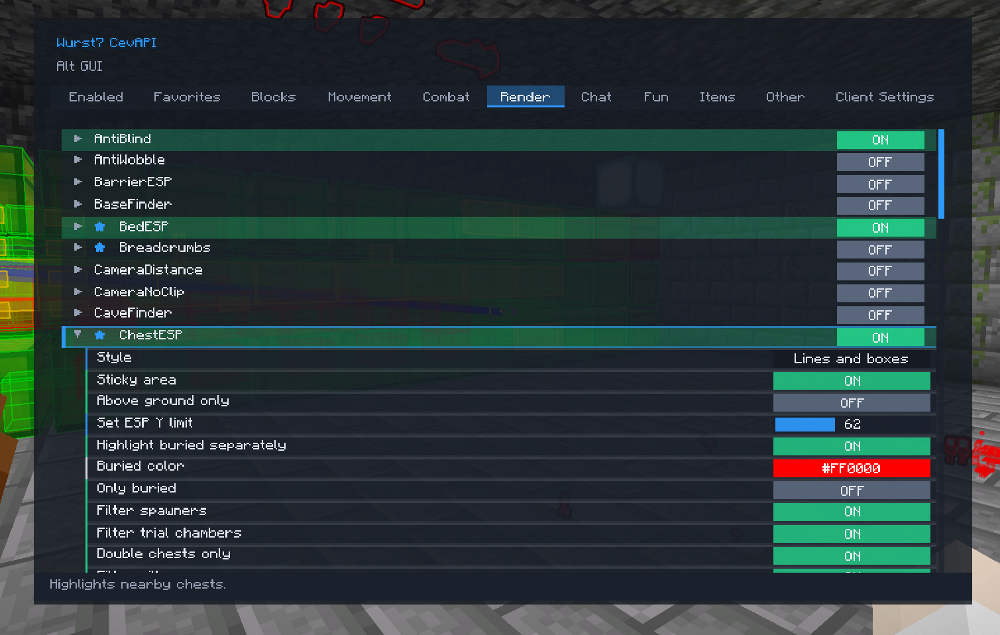
ChestESP
Added sticky area mode which makes the scan anchored instead of re-centering when you move
Added ESP Y limit
Added HackList count
Added Buried chest highlighting including a filter to only find buried chests
Added filters for chests and barrels to not highlight them if near spawners, trial chambers and villages (Excluding double chests and shulkers)
Added opacity settings
Added anti-ESP detection
Option to suppress all chests in favor of:
Double Chests
Shulkers
Ender Chests
Optional alert for shulkerboxes in chat
Added render limit which helps reduce update overhead by throttling DB refresh and how it selects and updates targets.
Prioritises rendering by closest to user
ChorusFruit
Navigator only hack that allows you to consume chorus fruit when a selected trigger happens and or your health is low
On player enter
On damage from player
On damage from all
Packet spam to help aid in the speed of consumtion
Silent switching and returning to previous item upon consumption
This hack is mostly designed for a specific datapack that allows a much greater range/distance of teleportation with these fruits
ClickGUI Improvements
Added Favorites category, middle click a hack for it to be added to Favorites. Middle click when within Favorites to remove it.
Accidentally typing in ClickGUI just continues what you typed in the Navigator.
Hacklist has font scaler, transparency, X & Y position adjustments, adjustable shadow box.
Hacklist has the ability to highlight entries pursuant to the selected ESP color.
Hacklist has the ability show the count of detected ESP items/blocks/entities (BedESP, SignESP, WorkstationESP, RedstoneESP, ChestESP, MobsearchESP, MobESP, ItemESP). They’re toggled in each hack.
UI now has more color options which are also applied to the Navigator UI
New Isolate Windows toggle which allows the active window (or sub category/setting) to not display any other windows behind it
Hacks can now support multiple pop up windows, or sub pop up windows. In Navigator these pop ups are drop downs instead.
Right-click Area setting resets it to default.
Can now scroll all drop down/pop ups with your mouse.
Pinned windows/settings now capture mouse input when a container screen is open, meaning you can now adjust settings without opening the ClickGUI.
Remembers scroll positions in categories
ClientChatOverlay
Adds a separate chat overlay that captures non-player/client/mod outputs and keeps normal player chat in the bottom vanilla chat
Optionally you can add another separation for just Wurst based messages
Optional transparancy, fade-out time, route to game console, Wurst only mode, max lines and X/Y offset
Can adjust its position by moving it with mouse when in inventory or container
Auto avoids vanilla chat messages if positioned above it
Is scrollable when chat is opened
Able to adjust font size of chat
Can now split into 3 (Wurst, Server, Chat)
Can change the color of chat text
CommandScanner
Enumerate server side commands that are typically unavailable to the player by sending specialised packets
Optionally elicit only ‘unknown’ commands. Scans via packets then compares via client commands, whichever isn’t available to the user is shown.
Your command list probing won’t appear in server side logs
Can also run each command, run specific commands via packets or enumerate via client side commands
Great replacement for when plugin scanners like UI-Utils returns no results
Connection Log Overlay
When connecting to a server you can optionally show the connection log on the joining screen
The overlay text size is controlled by Overlay Font Size in Wurst Options
CoordLogger
Detect world and local events and attempt to position them with ESP and chat messages
Events that are too far away the direction will be given
Toggles for various types of events
Toggles for debugging and ESP
Custom Command Prefixes
In the Wurst Options menu you can now change your command prefix
Cycle through commonly used command prefixes by pressing the Command Prefix button
D (3)
DamageDetect
A simple hack that tells you in chat what damaged you (or who) and where.
Great for determining strange damage from unknown effects (unexpected fall damage etc).
Discord Rich Presence
Discord Rich Presence is an optional Wurst Options feature that shows what you are doing in Discord.
Features
Displays one of 10 selectable messages.
Can optionally show your username and server IP.
Uses a different Discord application ID in NiceWurst mode.
Fails gracefully if Discord is not running.
Messages
Playing Wurst7-CevAPI
Cheating on Minecraft
Griefing on Minecraft
Basehunting on Minecraft
Duping on Minecraft
Playing Minecraft
Enjoying Minecraft
Playing BlockGame
Playing MC With My Besties!
Eating Cevapcici
Cooking Cevapcici
Screenshots
Durability HUD
Compact HUD overlay showing armor + held/offhand durability with icons and optional %/bar.
Shows you your armor and weapon durability %.
Customisable display: Percent Only, Bar Only, Boss Bar Style, Show Offhand, Icon Size, Font Scale.
Moveable with your mouse whenever an inventory menu is open.
Auto centres itself whenever items are removed.
Auto moves when action bar messages are shown (such as sleeping) behind the HUD.
Adjustable spacing between icons.
Optionally set the icons to be stacked vertically with durability either below or to the side of the icons.
Optionally allow showing of item enchantments in the action bar when scrolling through the hotbar (Compatible with resource packs).
E (4)
EasierQuicker ESP Commands
“.search <query>` -> query mode + set query + enable
`.search off` / `.search on- `.mobsearch <query>` -> query mode + set query + enable
`.mobsearch off` / `.mobsearch on- `.xray <query>` -> query mode + set query + enable
`.xray off` / `.xray on- Existing `.xray add/remove/list/reset“ still works
ElytraFlight
A static flight mode for elytra. Overrides motion every tick to let you hover, move and fly like the normal flight hack.
Optionally retain vanilla momentum.
ElytraInfo
HUD under crosshair for elytra info: yaw, pitch, altitude, speed, direction, durability%.
Draggable when chat/inventory is open.
Custom text color/opacity/size, optional background color/opacity, optional prefix hiding.
Optional durability gradient (green -> red).
Keybindable swap: .elytrainfo swap (elytra <-> best chestplate, skips Binding-cursed items).
Optional auto-switch back to chestplate on landing.
Optional auto-switch to new elytra on <= 5% durability.
EnchantmentHandler
Displays an inventory overlay for chests containing enchanted items, listing each item’s slot number, enchantments, and providing quick-take options (single or by category).
Renders on top of the vanilla screen darkening, stays aligned beside the container and has an adjustable size and font scaling
Draggable position with mouse
Works with books, potions and gear and will separate them in the list by category and type
F (3)
Flight Improvement
Added “Don’t Get Caught” toggle: Immediately rushes you to the floor (stops at water and simply turns off flight if above lava) when another player is in your range.
Able to ignore friends.
Added enable NoFall when flight is enabled toggle.
Added flight speed and velocity (blocks per second) to the hacklist
Optionally tie horizontal and vertical speeds together
Adjustable step for both speeds
Prevent dropping when holding SHIFT whilst in inventory
Prevent being slowed down by vines (Even if NoSlowDown is turned off)
Force Allow Chats
When on it forces Mojang account properties to follow:
Chat Allowed
Realms Allowed
Servers Allowed
Intercepts “`YggdrasilUserApiService.fetchProperties() – Accessible before game via Wurst Options or in-game via Chat category hack.
FreeCam Improved
Optionally tie horizontal and vertical speeds together
Adjustable step for both speeds
Option to allow older Wurst method of FreeCam which allowed interaction with the world
G (3)
GameStats
On-screen HUD with configurable stats: FPS, TPS, Ping, Play Time, Time, MC World Time, Packet Rate (in/out), Distance, Mob Kills, Player Kills, and XP Gained
Draggable/repositionable while inventory or chests screens are open
FPS/TPS/Ping show running averages in brackets (e.g. Ping: 30 (21))
Style settings: font size, font opacity, font color, font stroke, background box toggle, background color, and background opacity
Per-stat visibility toggles plus a universal Show Prefixes and Show Averages toggle for labels
FPS and TPS graph
Can be embedded into GameStats or detached
When detached can be resizable via settings or dragging bottom right corner
Adjustable colors
Global ESP Render Modes
Added a global ESP pipeline toggle in GlobalToggle:
LEGACY: keeps the original per-hack ESP rendering path.
SHADER_OUTLINE: redirects supported RenderUtils ESP draws into a centralized global collector/renderer for batched rendering.
Why use SHADER_OUTLINE:
Scales better when many ESP hacks are active (reduces per-hack draw overhead).
Produces more consistent ESP rendering across hacks.
Makes global ESP improvements easier (one pipeline to optimize/extend).
Keeps hack compatibility without rewriting each ESP hack manually.
Global Toggle
Applies to all hacks
Sticky area overrides
Y limit overrides
Search thread priority
.setslider limit override
Chunk scan mode
Global ESP render mode and limiter
Tracer disabler and whitelist
Compatible with keybinds
H (4)
HandNoClip Improved
Displays a red X on the crosshair when block placement or interaction is blocked while the hack is enabled.
The red X can also indicate blocks that can be interacted with when On-Target Mode is enabled; in this mode, HandNoClip remains disabled until you are within range of a valid block.
Toggle to enable villager intraction through blocks
Toggle to enable Bedrock passthrough (Break and place objects through Bedrock)
HealthTags Improved
Now optionally uses the same hearts as the new MobHealth hack
HideModMenu
Lets you hide mods from ModMenu using keyword matching.
Accepts comma-separated keywords so you can filter multiple mod names in one setting.
Designed to pair with HideWurst: HideWurst hides Wurst itself, while HideModMenu extends that behavior to other selected mods.
HideWurst
Disables all Wurst rendering (ESP, HackList, HUD, overlays, glow outlines) while keeping hacks enabled.
Can hide Wurst’s UI mixins (menus, containers, overlays) without disabling the hacks.
Can hide Wurst from ModMenu’s mod list.
Use HideModMenu to hide additional mods by keyword (comma-separated list).
Useful for recording/streaming or just hiding visuals without turning off your active hacks.
I (3)
InfiniteReach
Packet-based reach extender that blinks you into position, hits the target (entity or block), then optionally teleports you back so the server never sees you stay at distance.
Supports vanilla (22 block) and Paper (up to ~59 block) modes with configurable spam packet counts, max distance, and offsets for added stealth.
Clip Up adds a short vertical teleport to trigger extra Mace damage and bypass obstacles; optional “Clip Up When Mace” makes that only happen while holding a mace to avoid fall damage when flying.
The rendered entity/block boxes honor the “Through Blocks” toggle and hide the block box whenever a red entity highlight is shown, preventing misleading visuals.
Delay settings throttle mining, item use, and entity hits
Toggles for only using the hack when wielding a mace and for skipping collision when BoatNoclip is active.
Block breaking and long-range item-use are supported via the same teleport-and-act cycle, making it behave like a remote InstaMine/interaction handler.
Lock-on (vertically) mode for Mace attacks which applies through walls approx 50 blocks.
Credits to Trouser-Streak. The difference between mine and theirs is that I have added through block toggle, clip up toggle for mace, and better ESP highlighting.
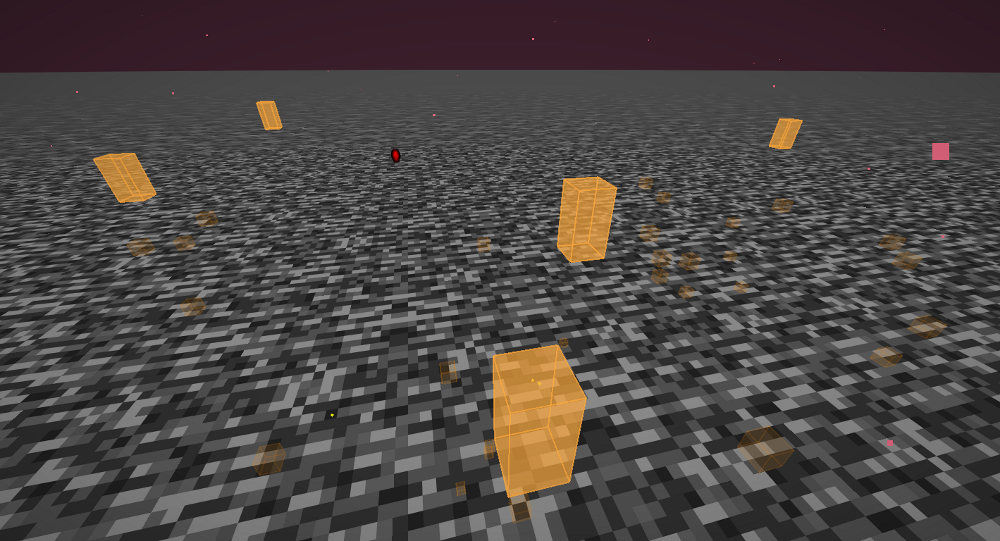
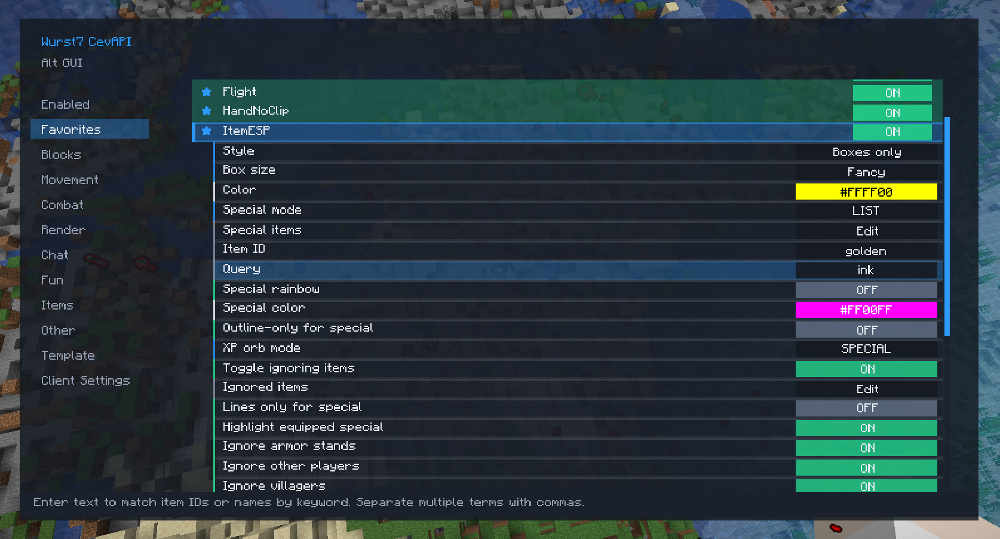
ItemESP Expanded
Highlights dropped, equipped, and framed items with powerful filters and customization.
Base highlighting: all dropped items with configurable base color.
Special filters: List, Item ID, or Query (multi-term keywords).
Special colors & styles: fixed or rainbow, outline-only, lines-only-for-special.
Equipped specials: highlight items held or worn by players/mobs (not yourself).
Item frames: highlight frames if the contained item matches special criteria.
Keyword matching: supports base ID, translation key, and display name (works with renamed/NBT/plugin-modified items).
Multi-term queries: comma-separated (e.g., head, axe).
Rendering: boxes with fill + outline; tracers use special color (or base color).
Robust parsing: lists accept unknown entries as keywords (safe parsing via Identifier.tryParse).
Ignore list: using keywords or specific item names you can exclude items from being highlighted entirely.
Entity ignore: Can ignore other players, armor stands etc
Detects XP Orbs and allows for different coloring or disabling entirely.
Examples:
Highlight skulls → Item ID: minecraft:player_head, special color: magenta, outline-only ON.
Highlight talismans (non-standard item) → Query: talisman, special color: rainbow, highlight frames ON, lines-only-for-special ON.
ItemHandler
Jade-style Popup HUD and full GUI that lists nearby dropped items, items in item frames or worn by mobs grouped by item ID with aggregated counts (with optional registry IDs).
Able to select or reject which item/s to pick up when moving over them:
Pick: reject (drop) everything except the selected types (only selected types will be picked up).
Reject: reject the selected types and drop them.
Trace Selected Items: toggles tracing for selected types (uses ItemESP world render pass to draw rainbow tracer lines and ESP boxes).
Works independently of ItemESP
Can SHIFT select multiple items
Adjustable tracer line thickness
Ignore Selected Items: adds the item/s you selected to the ItemESP ignore list
Toggle to adhere to the ItemESP ignored list (Including a link to edit the list)
Adjustable distance for item detection
Adjustable font scale setting (scales text and popup icon size)
Adjustable popup HUD display offset X/Y or simply click and drag to reposition (when in inventory or chest)
Detects XP Orbs and shows the exact XP each orb will give
Optionally detects items held or worn by mobs (Item count will be for all mobs in the area)
Can also filter out default mob items to prevent spam
Optionally can read the contents of signs in the popup HUD
Optionally pin special items (from ItemESP list) to the top of the popup HUD
Optionally display enchantments of gear in lieu of the registry name
Optionally detect and display armor stands and their associated enchantments
J (1)
Jesus Improved
Adjustable conditions added
Added lava walking
K (2)
Keybind Manager Improved
Can now clear the entire keybinds instead of just resetting.
Fixed bug where typing your new key bind resulted in adding that character to the command input
KickForensics
Captures a short window of packets and player state on disconnect and saves a report to kick-forensics.log.
Great for understanding anti-cheats and player states.
L (8)
Larger Scan Radius
Extended up to 65×65 chunks for all chunk-based features.
LavaWaterESP
Highlights lava and water blocks (source and flowing) with boxes and or traces.
Per type toggles, color and transparency sliders.
Render cap and adjustable chunk radius to keep FPS down and the view unobstructive.
List UI Search MobSearch ItemESP Xray etc Improvements
Able to specifically enter and save keywords into the list (Great for custom items on modded servers).
Able to clear the entire list with a single button
Can now multi-select items by holding CTRL or SHIFT
Deleting entries does not push you to the top of the list anymore
Livestream Detector
Scans the player list for Youtube, Twitch, Tiktok and Kick for live streams and announces them in chat
Supports API keys for large bulk scans without potential rate limiting
Option to skip automatic scans if player list exceeds a predefined limit
Option to cancel mid scan
Available debug command “.livestream <username>“ to manually check a username
Location on Disconnect
Copyable XYZ co-ordinates on disconnect/kick (Works with AutoLeave)
LogoutSpots
Records where players log out.
Removes spots when they rejoin.
Rendering: solid box + outline, optional tracers, name labels with adjustable scale.
Settings: side color, line color, name scale, tracers toggle, spot lifetime, waypoint toggle.
LootRunner
This hack is still undergoing development and has only been tested in the end. A fork of Baritone may be implemented to ensure better movement, additional structure support and reduce settings clutter.
Automatically loads SeedMapper export waypoints and runs the nearest valid target first.
Travels with Baritone or Flight, scans for nearby chests/barrels/shulkers, then opens and loots them.
Loot filters support All, List, Item ID, or Query mode (for example diamond).
Handles full inventory with optional QuickShulker support, with stop/quit behaviour if needed.
Saves progress per server (completed targets, logs, and resume position) so runs can continue later.
LootSearch
Using my fork of SeedMapper you can export loot tables for selected/all structures and then parse that information using the same UI as ChestSearch.
Also compatible with LootProbe’s exports.
Sorted by closest chest.
You can search for specific loot and set a waypoint towards it.
Supports enchantments.
Will not function without a valid SeedMapper or LootProbe loot export JSON for the server you’re in.
M (10)
MaceDMG Improved
Now has a height slider which goes from 1.7 to 50, the default being 22.23
In testing this made the Mace go from ~148 damage to ~295
Can be used to reduce damage to be less suspicious or bypass anti-cheats
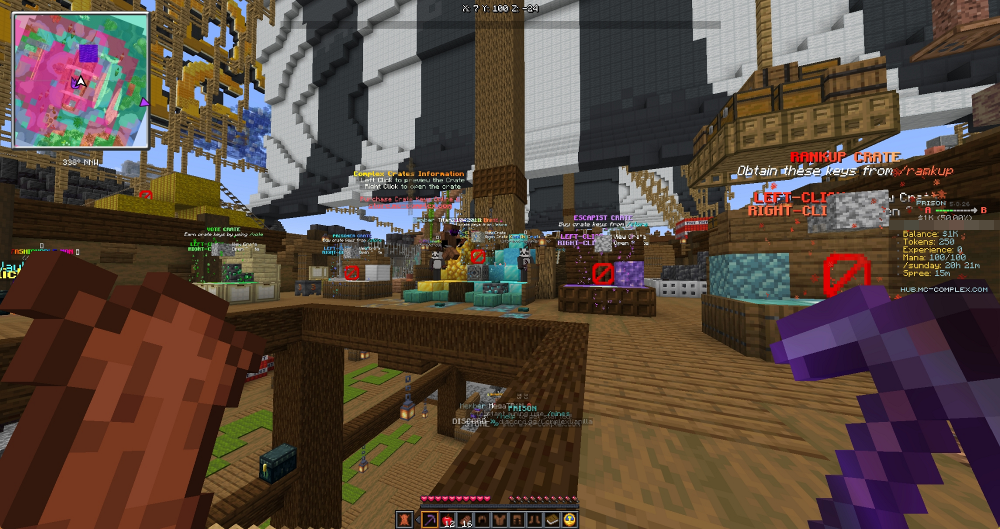
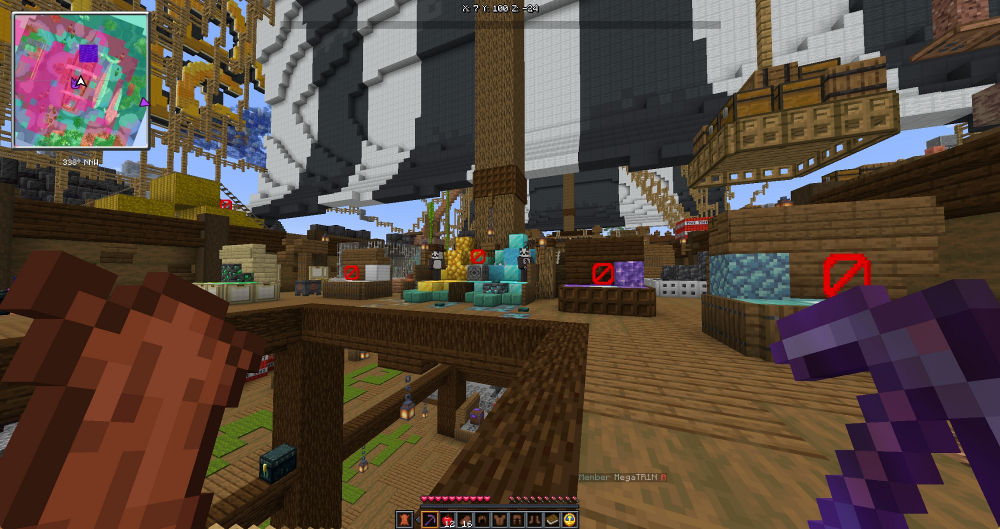
Mapa MinimapESP Combo
Adds a Voxelmap/Xaero style real world minimap and world map (1st Image)
Map has customisable color filters, modes, display rules and render tweaks
Minimap can be dragged around with mouse and resized
Shows ESP results on the map, including chest, workstation, sign, portal, player, logout spot and beds.
ESP icons can be resized or highlighted according to their ESP color
Can turn on/off specific ESP
No Map mode allows you to only show ESP markers so you can use it as an overlay for a different map provider (2nd Image)
PlayerESP markers use player heads and or names
Full screen mode allows you to view areas youve discovered and better see ESP markers
Map data is cached per server/dimension so explored terrain can be remembered instead of rebuilt every time
Supports rendering of NewerNewChunks with or without map or NewerNewChunks being enabled
Optionally can show an explored chunk path (breadcrumb) which persists across dimensions but is wiped on server quit or manually
NewerNewChunk Support & Chunk Breadcrumbs
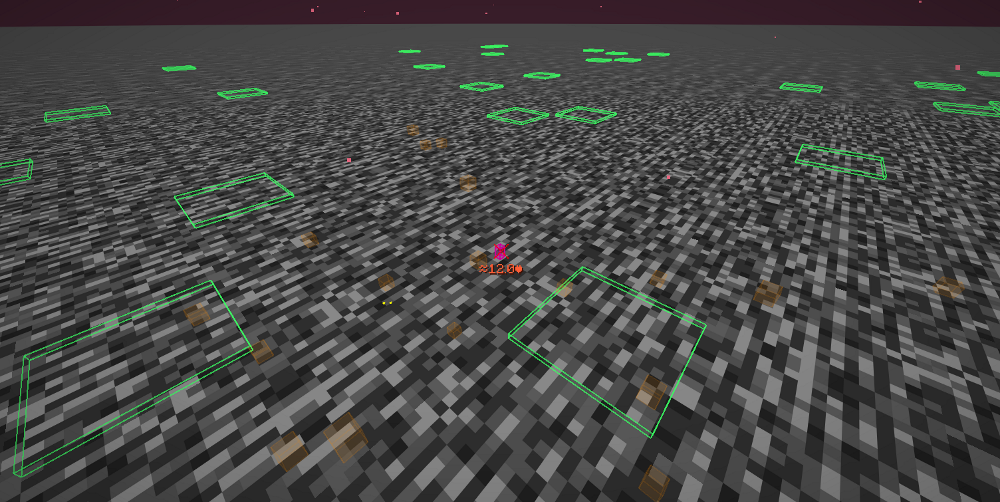
MeasurementESP
Navigator/Command-only ESP tool that draws a 1×1 box at a specified distance along your look direction
Box color shows air vs solid: green (air + above air), yellow (air), red (solid). Basically, can I fit in there?
Commands are: “.measurementesp <distance>` to enable and `.measurementesp off` to disable
You can also mark the target, so keep a fixed box by running the command `.measurementesp mark`, which can then be cleared with `.measurementesp clear“.
Usecase? Custom mods/datapacks that allow teleportation or weapons and tools that only work at a specific distance, or perhaps just literally measuring.
Mention
Plays a ping when your username, nickname, or common name variant appears in chat
Lets you choose any note block sound and adjust its volume
Can optionally color messages that mention you, including direct messages
Can optionally show a toast popup for mentions and direct messages, including the message text
Keeps Chat Heads icons intact in both colored messages and toast popups
Toast pop-ups on mention
Color highlight your name in chats
Pop-up and highlight for private messages
MiningEvidence
Designed to compliment the TunnelHoleStairESP
Will highlight lines between dropped blocks which indicate recent mining activity
Designed to work even after blocks disappear
Fully adjustable to avoid false positives
Adjustable ESP timeout
MobESP Improvements
Added rainbow/fixed color options for boxes/lines.
Added octahedron shapes.
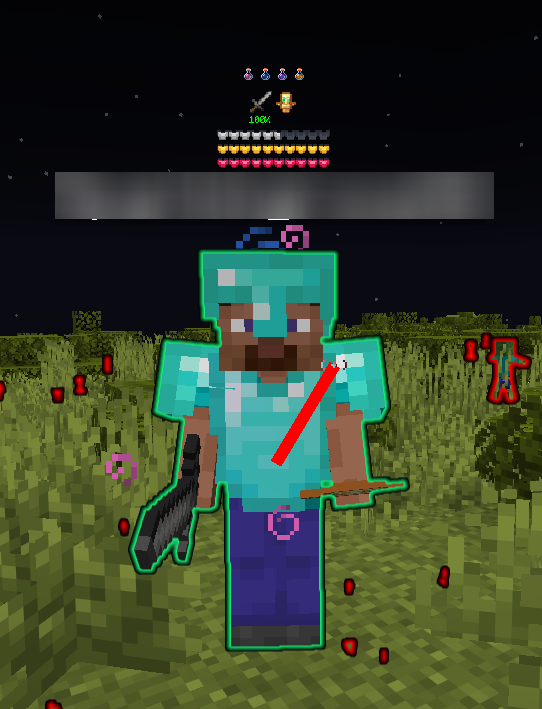
Added glow outlines as an option and set it as the new default.
Added box color fill option.
Added Shulker projectile ESP
Added Wither projectile ESP
MobHealth
Two dipslay modes; heart bar or a colored number.
Uses “hud/heart/*“ sprite IDs so it will change along with your resource pack.
Toggles for showing number, names or hostile mobs only.
Normalised to 10 max hearts.
Compatible with HealthTags so names don’t conflict.
Conforms to vanilla health status effects (poison, wither, frozen, absorption, hardcore, low health jittering).
Ignore NPCs and Armor Stands
Optionally can work through walls
Can now toggle an armor bar
Can now toggle a held items and potion effect status
Will show a colored potion bottle representing the color of the other players status effect
Will show the durability of main and offhand weapons as either a % or a bar
MobSearch
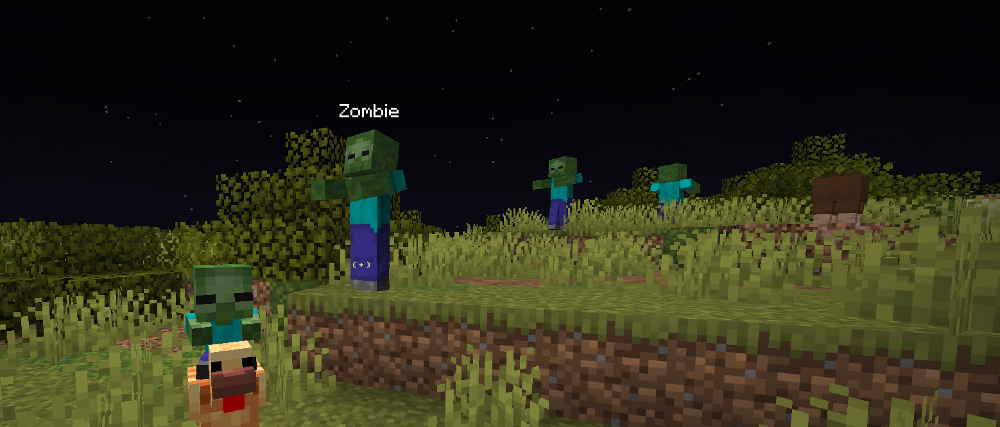
Search mobs by fuzzy name/ID or exact type (e.g., minecraft:zombie or zombie).
Added list mode with visual list of mobs.
Multi-term queries: comma-separated (e.g., skeleton, zombie).
Rendering: Glow Outlines, Boxes, Octahedrons, Lines, or Both. Rainbow or fixed color, filled or unfilled and configurable box size.
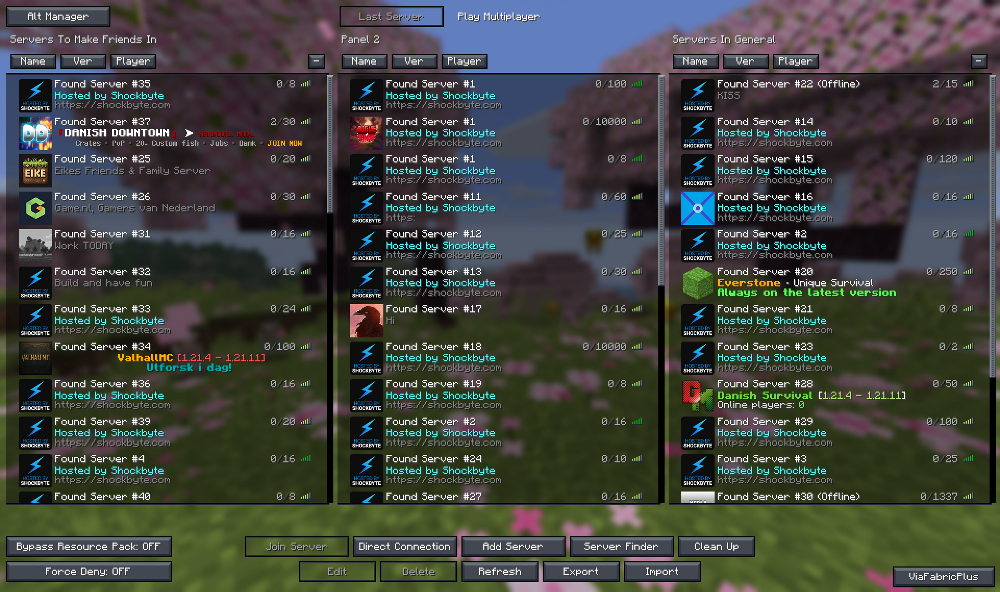
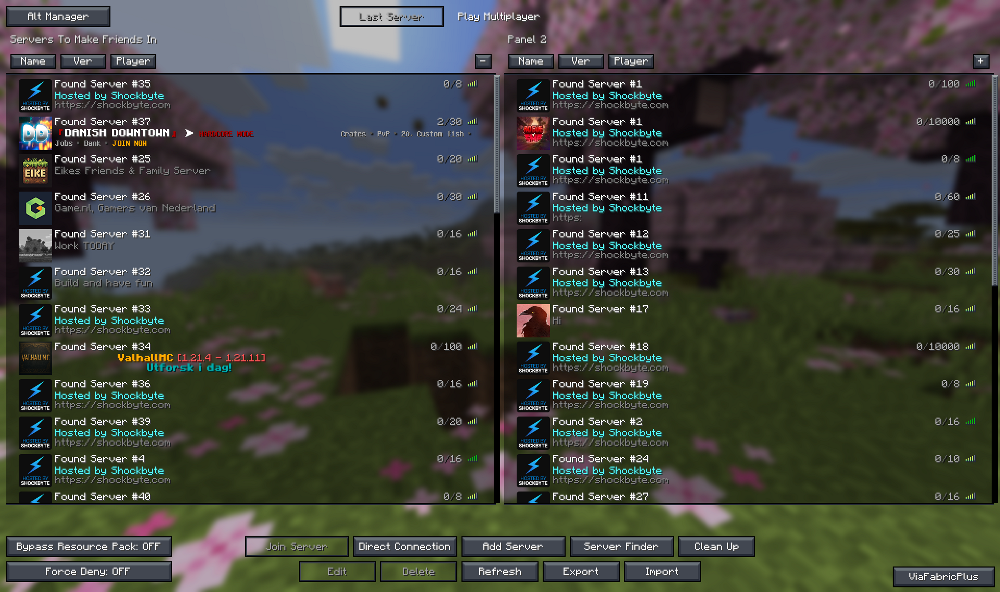
MultiplayerScreen Improved
Can now multi select servers by SHIFT or CTRL clicking
Use this to move them or bulk delete them
Can drag servers (single or multiple) up and down the list
Can create up to 3 server panels
Do this by clicking the + icon to create and – to remove
Removed panels store and hide servers from view
Can drag servers across each panel and name the panels
Can sort servers by name, version and player count
Can import and export a JSON list of your server collection
Can support saving the panel locations, if panels are removed/renamed they will go into the main middle panel
MusicAura
Randomly alter music blocks around you, even through walls
Totally pointless
N (8)
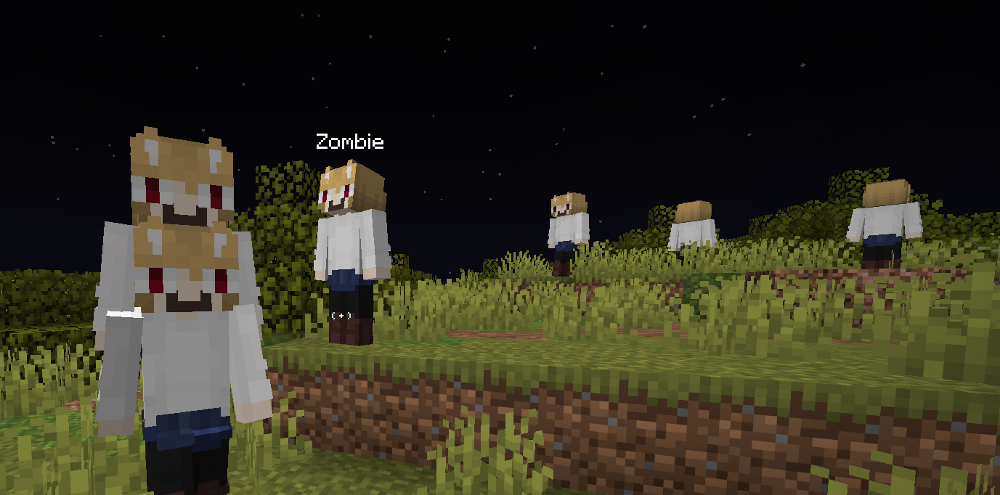
NecoMode
All living entities become Neco-Arc
Adjustable settings to set what type of mob or if players are included or not
New GUI AltGUI
Added a new alternative GUI which you can initially access from the navigator menu and bind to a key (Default Left ALT)
Totally separate from ClickGUI and Navigator
Customisable coloring, opacities and sizing with consistancy based on font scaling to prevent clipping
Changeable fonts, though pixel fonts are preferred unless you want performance hit
Non-pixel fonts benefit from smoothing; 2x for 4 alpha levels and 3x for 6 alpha levels
Global search function
Session persistent “Recently Disabled” entries within the Enabled category
Middle click favourite toggle with optional star icons
TooManyHax support to hide excess hacks from the UI
Configurable open behavior: Open on Favorites, Enabled or restore last category/scroll state
Replaced old color editor with HSV Color Picker giving access to a greater color spectrum
Supports keybind adding and removing
Optional top or side category modes
NewerNewChunk Support and Chunk Breadcrumbs
NewerNewChunk Support & Chunk Breadcrumbs
NewerNewChunks
Detects likely new vs old chunks using packet and fluid heuristics while you explore.
Color layers: New (red), Old (green), Block-exploit (blue), with adjustable render height and distance.
Modes: Normal, IgnoreBlockExploit, and BlockExploitMode to control how block-update signals are interpreted.
Optional alarms for newly detected chunks (rings, delay, volume, pitch).
Can save/load cached chunk detections per server + dimension, with optional auto-reload.
Includes one-click chunk cache delete (double-press confirm).
Note: Nether results are heuristic and can produce false positives/negatives.
Inspired by Trouser-Streak’s NewerNewChunks
NoChatReports
Defaults to off
NoPlayerChat
Allows you to disable or filter game chats
NoSlowDown Improved
Added no slowdown for lava
Added no slowdown for water
Added a toggle to allow swimming
Added no slowdown for vines (cannot climb)
Added no slowdown for sculk vines on the floor
Nuker Improvements
Auto toggle AutoTool option (If it wasn’t on already, it will be enabled when using Nuker then turned off with Nuker)
Now supports a skip blocks covered by suspicious dust flag which stops breaking any columns that contain suspicious sand or gravel.
O (3)
OfflineSettings
Auto Reconnect without 5 second timer, perfect for when you’re logged out from another location
Rejoin the current server with a random alt, with an alt with a specific name or with the same name as another player
Logout selected players in the current server with an option for auto logouts
Auto detect cracked/offline servers on connect (even when hack is disabled)
Reconnect to server and immediately send a command, such as /op player
Adds mixin buttons to disconnect/kick/ban screens for all cracked/offline servers that have the above functions
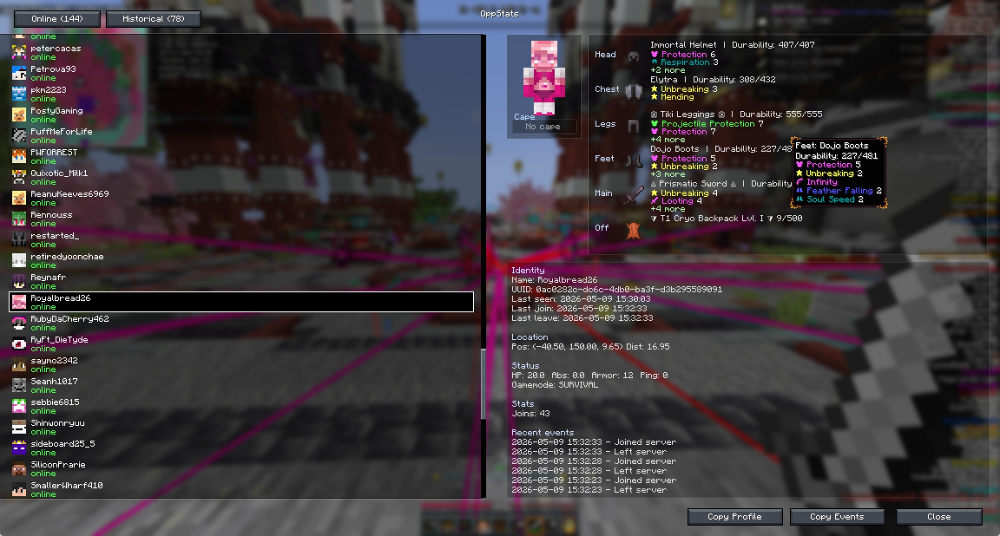
OppStats
Tracks players per server and builds a progressive dossier with join/leave history, deaths, kills, ping, gamemode, distance, health, absorption, armor, and held/equipped items.
Includes a dedicated UI, server-specific save data, and optional NPC filtering.
Outreach
Works the same as reach, gives you approximately 9 blocks of distance in attacking, but this time its through walls!
Has the same filters and FOV settings as KillAura.
Your attacks will spam when going through walls so an auto-cooldown is applied.
P (12)
Packet Delay
Delays incoming and/or outgoing packets into a queue.
Optional tick delay, then releases queued packets all at once.
Flushes the queue when disabled.
Keybind works even with GUIs open (chests, portals, etc.).
Tick count displayed in HackList
Packet Rate Limiter
Monitors outgoing packets per seconds and shows it in the hack list
Token-bucket limiter queues excess packets based on your chosen limit
Keep-alive packets bypass the limiter so server still sees you being there
Queue flushing runs every tick and sends packets in order while respecting your limit
PacketFirewall
Purpose: helps you avoid and debug anticheat flags by cleaning risky movement packets and, if the server “rubberbands” you, quickly turning off the hack that most likely caused it.
Cleans outgoing movement packets: drops broken coords (NaN/Infinity), keeps pitch/yaw in safe ranges, and can combine duplicate movement sends to reduce spam/jitter.
Tracks what caused your movement (about the last 1.5 seconds):
MovementMutationTracker: remembers what last changed your velocity, and links later movement packets to that source.
Grim surface trail: tags other sensitive packet types (movement, vehicle move, entity interact, block place/dig, animations, item swap) to the hack that sent them.
When a setback happens (server teleports you back):
Waits ~500ms to avoid repeat spam, then looks back ~1.5s, picks the most likely offender(s), and temporarily disables them.
Shows the reason in a “Temporarily disabled” list, and lets you re-enable or whitelist a hack so it won’t get auto-disabled again.
Turning PacketFirewall off restores anything it disabled and clears all stored evidence.
Panic Improved
It now saves your current enabled hacks and allows you to restore them via ClickUI/Navigator or keybind.
PearlESP
Highlight held pearls by other players
Highlights stasis chamber pearls
Shows where other players (including yourself) will be teleported
Predict where your pearl will go via a trajectory line
Adjustable color, default is purple
Optional tracer line with custom thickness
Optional sound or chat alerts on detection
PearlIntercept
Auto counters thrown ender pearls by throwing your own towards or at the same landing area
Has safety checks to avoid hazards
Throws only when within configured tolerances
Cooldown settings
Switch back to previous item
Performance Overlay Per Hack Profiler
Added a new PerformanceOverlay feature to help find lag sources across enabled hacks.
It shows per-hack timing in HUD with 1s window stats and sorting modes (total / peak), including:
T: total time
U: update time
R: world render time
G: GUI render time
P: peak callback time
Use it to identify which specific hacks are causing sustained load (total) vs stutters (peak).
You’re able to drag the overlay with your mouse when a container is open
PlaceNBreak
Cycles placing and breaking of a chosen block type at your crosshair target.
Block type is configurable by keyword or exact block ID (for example: hopper or minecraft:hopper).
Automatically enables FastPlace and FastBreak while active, and restores them when disabled.
Uses AutoTool when breaking to reduce desync and improve reliability.
Includes action delay and break-attempts-per-tick settings for server stability tuning.
PlayerESP Improvements
Added toggle for unique colors for each player (shared with Breadcrumbs)
Added box fill with transparency slider
Added static color option
Added rainbow color option
Added much thicker tracer lines (max 10px)
Added glow outlines as an option
Added Line of Sight Detection (LOS)
When you’re spotted ESP and tracer will turn a bold red regardless of distance or color settings
Adjustable FOV and range
Improved coloring for default distance based rendering, close (red) to far (green) (when all above off)
Able to ignore NPCs
Enter/Leave area notification option in chat with name, co-ordinates and block distance
Enter sound notifications with multiple different selectable note block sounds with optional cooldown
Customise the enter sound with any minecraft sound by entering its name and selecting custom in the dropdown
Supports pop-up alerts for player detection
Supports held items/armor detail for player detection
Supports Totem Pop alerts in chat
PlayerSonar
Detects player activities outside normal PlayerESP range
Specifically detects:
Block placement
Block breaking
Redstone interaction
Will show ESP and or tracer lines towards the target
ESP/Tracer expires after specified seconds
Customisable colors and tracer line thickness
Optional chat alerts
Works on servers with Anti-ESP
Portal ESP Improvement
Added Broken Nether Portal detection with its own controls:
Find broken nether portals
Allow complete unlit portals
Exclusions: crying obsidian, chests, magma, lava, netherrack, gold blocks
Uses confidence-based shape analysis for broken frames (including heavily damaged remnants), with chunk-based scanning like normal PortalESP.
Centered tracer lines for grouped portal structures (Nether Portal, End Portal, End Portal Frame, Broken Nether Portal).
Radius/area and relevant settings changes trigger immediate rescan.
Optional discovery alerts (sound/chat) and adjustable tracer line thickness (+ tracer flash).
Preset Manager
Save full setups (enabled hacks, favourites, settings, keybinds, UI layout, navigator preferences etc) as named presets
Load a preset to restore which will then reset the client state immediately
Lets you delete presets
Presets are stored under “.minecraft/wurst/presets/<name>“ for easy backup or sharing
Accessible through UI Settings in the ClickUI/Navigator or through the Wurst Options menu mixin
Includes a recommended default if no other preset exists
Q (1)
QuickShulker
Automates sorting and storage by moving items into a temporary shulker box. Works on both containers (like chests, barrels, hoppers) and your own inventory.
When used on an open container, it detects which items were taken (based on inventory slot increases) and transfers only those into the shulker, keeping the rest of your items untouched.
When used from your own inventory, it simply transfers eligible items according to your filters and mode.
Supports transfer modes (All / Stackable / Non-stackable) and blacklist / whitelist item lists.
Protects key hotbar slots (placed shulker and best pickaxe) from being moved or overwritten and optionally can block entire hotbar from being transferred.
Automatically places a shulker safely nearby, faces it, opens it, deposits items, then breaks and retrieves it.
Uses safe placement logic and short, latency-aware waits to sync with server timing.
Ideal for rapid looting, cleanup, or personal inventory compression without manual sorting.
Optionally can continue to a new shulker box if the first is full mid-transfer.
R (4)
Radius command
Modify or remove waypoints within <radius> blocks of the player (current dimension only).
.waypoint radius <radius> [key=value …] (alias: setradius)
Common keys: delete/remove, clear, color=<hex>, visible=<bool>, lines=<bool>, beacon=<mode>, maxvisible=<int>, icon=<name>.
Booleans: true/false/1/0/yes/no/on/off. Color accepts leading # or 0x; 6‑digit -> opaque.
Reports number of waypoints changed.
RedstoneESP
Highlights redstone components: Torch/Block, Lever, Tripwire Hook, Target Block, Dust, Repeater, Comparator, Observer, Daylight Detector, Skulk Sensor (+ Calibrated), Pistons, Dispenser, Dropper, Hopper, Trapped Chest, Note Block, Jukebox, Bell, Lectern (redstone), Powered/Detector/Activator Rails.
Buttons and pressure plates are grouped with individual toggles + colors.
Rendering: Boxes, Lines, or Both in a fixed color.
Color override settings option to force all blocks to be a single color.
Colors here will superseed ChestESP.
Added HackList count.
Active redstone circuit detection modes.
RenderAdjust
Recolor, fade, or remove fog and sky rendering passes via in-hack color and opacity controls.
Optionally hide common server-side decorative renders: scoreboards, boss bars, holograms, text/block/item displays, marker/named armor stands, item frames, paintings, and XP orbs.
Before
After
RoofESP
Tracks blocks and items that are not supposed to be on the nether roof
Bonus detection of ladders up to nether roof
Same ESP and alert settings as ChestESP and other ESP hacks
S (19)
SafeTP
Combines Blink, your desired teleport command and a timer into a single function
Allows you to teleport without worrying about the movement restrictions during the countdown
Safe TPA Here option: Allows you to auto activate blink when a player accepts your TPA Here request and then auto deactivates when they arrive.
Scaffold Walk Improved
Ignores shulker boxes
Search Improvements
Keyword queries supported; falls back to picker when empty.
List mode with visual item list.
Multi-term queries: comma-separated (e.g., ore, ancient).
Rendering: Boxes, Lines, or Both. Tracers cancel view-bobbing.
Fixed/rainbow line colors.
New minimum search to 100 results.
Replaced full-sort approach to bounded max-heap (PriorityQueue) that keeps the closest N matches. This avoids sorting entire result and keeps search as fast as X-Ray.
Safer rescans and better crash handling.
Improved search speed.
Added highlight corners (lines) and fill settings (Same as X-Ray).
Added anti-ESP detection.
SeedMapperHelper
UI for my fork of SeedMapper which covers all settings except for debug/dev mode.
Supports ESP color settings so long as you’re using my SeedMapper fork
Supports keybinds for all settings
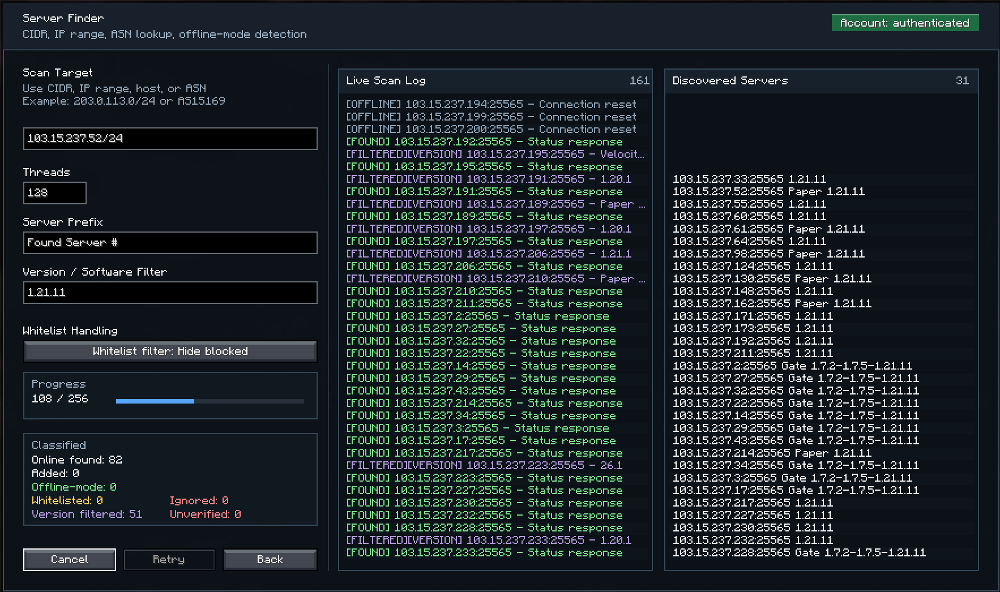
ServerFinder
Server Finder Improved
Old one removed entirely
Replaced with one capable of scanning based on subnet, IP range or ASN
Can filter by version or software (Eg. “1.21.11” or “Paper”)
Can filter out whitelisted servers
Able to discover/determine which servers are offline-mode or not
Can change the server prefix
Results are shown in a live log and valid results are shown in another separate log
Results are color coded
Shader Safe Mode
Detect shader usage (Iris/OptiFine) safely at runtime and keep a cached toggle state.
Automatically switch sensitive hacks to “shader-safe mode” when shaders are active.
Avoid render-thread crashes by snapshotting collections, disabling parallel streams, and avoiding unsafe joins.
Apply safe-mode behavior dynamically when shaders are toggled on/off.
Notify users once per toggle/enable so they know performance/behavior is adjusted.
Currently only in these higher risk hacks: Search, CaveFinder, PlayerESP and Excavator as well as in BlockVertexCompiler.
ShieldSwing
Lets you attack entities while actively blocking with a shield.
Optional auto-hold mode keeps your shield raised while the hack is enabled.
Optional auto-equip mode moves a shield from inventory to offhand when needed.
Includes an in-hack toggle to apply NoShieldOverlay behavior.
Works with AutoTotem conflict handling and can restore AutoTotem when shield use is no longer possible.
SignESP
Finds all sign types/materials.
Option: include frames (item frames + glow item frames) with a separate color.
Rendering: Boxes, Lines, or Both in a fixed color.
SignFramePassThrough
You can now open chests that have item frames or signs in the way!
Right-clicking item frames (with items in them) or signs interacts with the block behind them. Hold sneak to interact with the frame or sign normally.
Toggle between signs, frames or both
SilkOnly
Allows you to setup a list of blocks that can only be broken by the player using a tool that has Silk Touch.
Perfect for avoiding accidental breakage of Ender Chests and Amethyst Clusters.
Slider Override
When running “.setslider“ commands you can now exceed the limit of sliders in all hacks.
Should only be used experimentally, will likely break the game or cause rubberbanding in a lot of hacks.
May not be compatible with all hacks as some have their own internal limiting logic.
Enable or disable this in the GlobalToggle.
SpawnRadius
Simply draws a circle around regular mob spawners to show the radius in which they’ll spawn.
Changes from white to green when you’re within the radius.
SpearAssist
Boost Modes:
Dash – While charging with your right click you can boost yourself forward a specific distance with your left click creating a velocity based attack.
Hold – While charging you are constantly boosting forward whenever you press the left click.
Your player can optionally stay grounded when boosting as to avoid flying off into the distance on each attack.
Allow reverse toggle lets you hold S/back while attacking to flip boosts so they launch you backward instead.
Highlighting: You can highlight near and far entities within your attack range. Near meaning the distance you can jab at them and far the distance you can charge at them. Default set to 7 for near and 8.5 blocks for far.
Your charge is automatically and constantly resumed (no cooldown) so you can forever hold right click. It will be noisy but even if the spear is pointed down you will still be able to attack.
You can optionally allow aim assist to work whilst holding right click or stay on while spear is being used.
Auto Attack, your jab attack will continue to auto hit once the cooldown has expired so long as you’re hitting an entity.
Auto alignment flys you up or down to match the level of your target when AimAssist is enabled
Extended AimAssist range (Max 128 Blocks) while using SpearAssist
Added AimAssist lock-on whilst using spear
Spear charging no longer interferes with interactive blocks
SpearKill Mode
Enabled only when Mode = SpearKill; Assist behavior and settings are disabled.
Locks a target in a tight aim cone while you’re charging a spear.
Lunge mode: waits for charge time, aims at the target, then applies a forward velocity burst.
Blink mode: buffers movement packets while charging, then flushes them for a “teleport‑like” burst.
Able to slowly walk at a target and have it deal maximum velocity damage
Optional extras: blink distance boost, height‑based aiming, and target list filtering.
Credits to Trouser-Streak for the inspiration.
SpearKill Mode
Enabled only when Mode = SpearKill; Assist behavior and settings are disabled.
Locks a target in a tight aim cone while you’re charging a spear.
Lunge mode: waits for charge time, aims at the target, then applies a forward velocity burst.
Blink mode: buffers movement packets while charging, then flushes them for a “teleport‑like” burst.
Able to slowly walk at a target and have it deal maximum velocity damage
Optional extras: blink distance boost, height‑based aiming, and target list filtering.
Credits to Trouser-Streak for the inspiration.
SpectatorMonitor
Actively checks if and when another player enters Specator Mode
Will alert via chat and or sounds
SpeedHack Improved
Added 4 tunable settings (max speed, ground accel, air accel, sideways damping) instead of hardcoded values.
Switched from multiplying existing velocity + mini-hop (*1.8 and +0.1y) to a target-velocity approach based on player input + yaw.
Added sideways inertia control (projects current velocity into forward/side components and damps the sideways part) to stop the “ice” feel when turning.
Replaced the fixed aging NoCheat+ clamp with a configurable speed cap applied after steering/accel.
Made acceleration context-aware (separate ground vs air acceleration) instead of only boosting when grounded.
Added toggle for auto sprint.
Added auto normalise mode: If anything in game effects your speed, you will return back to vanilla speeds automatically. Overrides speed settings.
Added safety/compat guards: null player check, skip while flying, and skip in water/lava.
Speed is showin blocks per second (like Flight) in the HackList.
Sticky Area New ESP Option
Added to chunk-based ESPs (Search, Portal ESP, BedESP, SignESP, WorkstationESP, RedstoneESP, ChestESP).
Keeps results anchored as you move instead of re-centering as you move. Default OFF.
Greatly helps with FPS when using things like Search or X-Ray and moving quickly
Global toggle accessible via ‘GlobalToggle’ setting in the Other category within the ClickUI.
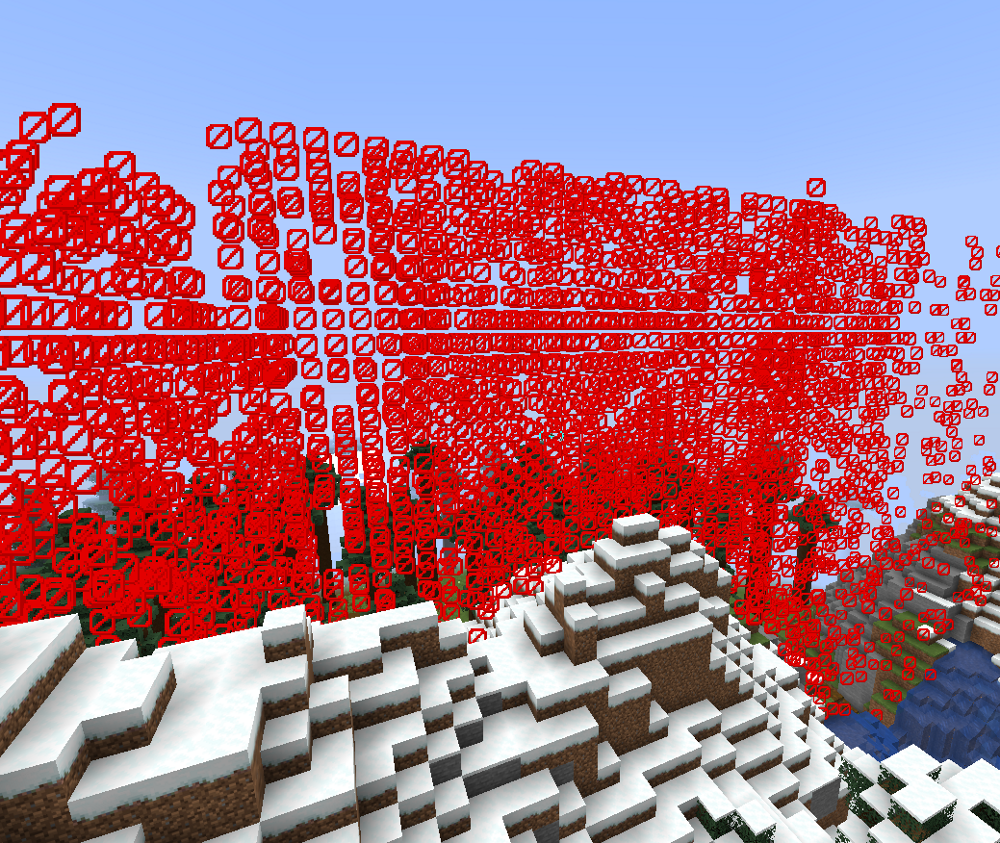
SurfaceXRay
Makes the exposed surface of tracked blocks or fluids like lava or water partially or fully transparent while clearing the matching volume underneath.
Works together with XRay
Can basically be used as a floor/block remover (see 2nd screenshot)
Add items with the list UI, meaning you can add keywords or just select multiple blocks easily.
SusNoMore
Listens to brushable block entity updates and reports instantly revealed loot in chat within the first brush.
Based on an auto-break/ignore list it will auto-switch to a shovel and break the block so you can avoid wasting brush durability and time.
Nuker and NukerLegit now supports a skip blocks covered by suspicious dust flag which stops breaking any columns that contain suspicious sand or gravel.
Able to detect custom items from datapacks.
T (9)
TargetPlace
Select a block by pressing P, when that block is broken or destroyed (turned to air) it is automatically replaced with the block you’re holding and it will be orientated down. This works from a distance as well.
Deselect by holding SHIFT + P
Useful for aiding in the breaking of bedrock with TNT and pistons. New piston can be spawned in the same tick as explosion, breaking bedrock all while just standing near it.
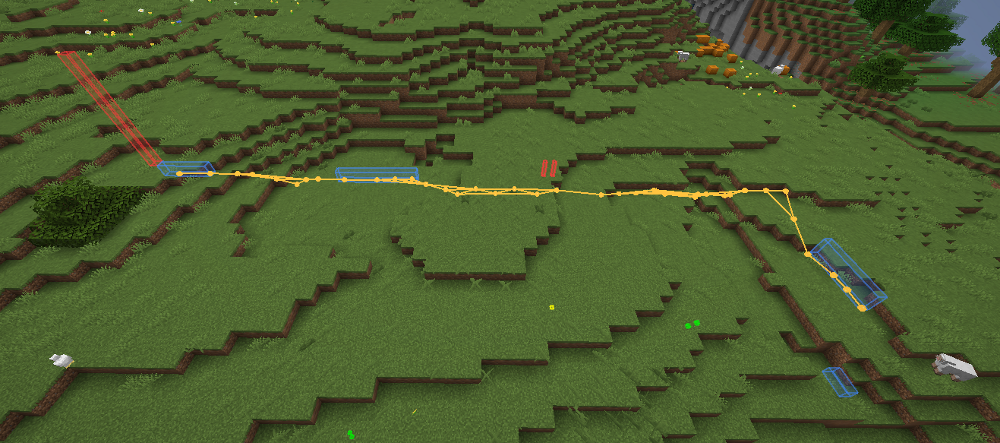
Teleport
Teleports you along a visible path
You can move at angles while going upward with little to no damage, but note that any upward travel can still hurt if you overshoot.
Going downhill always shows the approximate damage in the HUD and may not be 100 % accurate, and diagonal downward teleports usually fail.
Phasing through walls horizontally generally doesn’t work unless going on an angle.
There are toggles for Allow Liquids, Render Path, and separate colours for the regular and phasing boxes so you can adjust the visuals without clutter.
TooManyHax Improved
Submenu of TooManyHax in the ClickUI/Navigator shows a list of toggleable hacks instead of needing to manually enter the name of each one via cmd.
Hacks disabled by TooManyHax will be removed from the ClickUI to declutter
Towny
A very petty hack that simply enables/disables Towny PVP whilst you’re attacking
Customisable command and tick delay
Only visible in the Navigator
TrialSpawnerESP
Finds every Trial Spawner entity and renders colors based on the state (idle, charging, active, completed)
Draws activation ring which brightens when you’re within the detection range
Reads data on the on the spawner to show wave progress, active mob count, next-wave timer, cooldown countdown, trial type, distance, mob type and more
Uses block-decoration heuristics to determine mob type even if data is missing
Draws tethers to nearby Trial Vaults
Highlights and counts Trial/Ominous Vaults
Able to record opened Ominous Vaults to avoid re-trying the same ones in the future
Congifurable with toggles for all of the above
Toggle to alert in chat or via sound when Ominous Key was dispensed
Toggle to only display vaults
TridentESP
Highlights thrown tridents, plus held tridents by players/mobs.
Color distinctions: your tridents, other players, mobs.
Rendering: Boxes, Lines, or Both.
Box size: Accurate or Fancy.
Colors: fixed, rainbow, or by owner type.
Toggles for held-trident highlights.
TriggerBot Improvements
Can now select the mob and the desired weapon/tool to use against them and it will quickly auto-switch when detected
Limited to three different mobs for now to prevent clutter
TrueSight Improved
Added customisable glow ESP for invisible entities
TunnelHoleStairESP
Finds likely player-dug paths and highlights:
Vertical shafts
Straight tunnels
Stair mines
Additional independent detections:
Ladder columns
Bubble-column holes
Water-filled holes (non-bubble)
Detection mode controls holes/tunnels/stairs; ladder/bubble/water detection has separate toggles.
Area + Sticky area control coverage:
Area = scan radius
Sticky area = keep previously found results anchored while active scanning still follows your current position
Performance controls:
Chunks per tick = scan speed
Scan time budget = hard CPU cap per tick (main FPS stabilizer)
Refresh interval = periodic full re-queue of in-range chunks to refresh stale detections
Scan order prioritizes top-down passes to surface detections sooner
Accuracy controls:
Air only for stricter shape detection
Min/max hole width and depth
Min/max tunnel width, height, and minimum tunnel length
Stair height/length limits
Minimum ladder/bubble/water column heights
Natural wall filter + ratio to reduce cave/worldgen false positives
Tunnel detection treats torches as passable so lit tunnels don’t split.
Includes per-dimension toggles and separate render colors/styles for holes, tunnels, stairs, ladders, bubble columns, and water holes.
Heuristic system: strong for route/base hunting, not perfect.
Inspired by Trouser-Streak’s implementation, but heavily improved upon.
U (2)
UI Utils
Plugin debugging mod/hack.
Integrated into Wurst as a hack with an in-game, draggable Fabricate Packets overlay (remembers position; optional translucent background).
An alternative to and reworked version of my 1.21.11 fork of UI-Utils v2.4.0.
Started as a mojmap port of the original UI-Utils v2.4.0 by MrBreakNFix and Coderx-Gamer.
Vanilla-compatible packet simulation (minimal slot diffs, post-click revision, single-send) to avoid server resyncs.
Auto-filled Sync ID and Revision in Fabricate Packets.
Extra diagnostics and Wurst toggles (send/delay) wired into Wurst’s packet pipeline.
Toggleable chat logs.
Added customisable slot number overlay for containers.
Added extra tools from FrannnnDev’s fork of UI-Utils
Leave & send, Disconnect & send, Save/Load GUI, Clear Queue, Queue, Resync Inv, Disconnect, Spam +/-, Send One, Pop Last
Queue helper and counter
“.uiutils“ commands
Named GUI slot maps
Plugin scanner
Published with permission from MrBreakNFix.
Log Example
[12:52:54]: Fabricate ClickSlot: syncId=6, revision=1, slot=2, button=0, action=PICKUP, times=1, diffSlots=1, carriedBefore=<empty>, carriedAfter=class_10939[item=Reference{ResourceKey[minecraft:item / minecraft:oak_slab]=minecraft:oak_slab}, count=11, components=class_10936[addedComponents={}, removedComponents=[]]]
[12:52:54]: Fabricate ClickSlot: menu.containerId=6, syncIdMatch=true, diffDetail=[2: minecraft:oak_slabx11 -> empty]
[12:52:54]: UiUtilsConnectionMixin: attempting to send UI packet class_2813 (sendUiPackets=true, delayUiPackets=false)
Unsafe Chat Toast
Optional; toggle via NoChatReports or Wurst Options.
V (1)
ViewModel
Customize hand/item position and rotation for left and right hands with per-axis X/Y/Z and pitch/yaw/roll controls.
Per-hand opacity, hide toggle, overlay tint color and overlay opacity, plus optional artificial glint (forced enchant glint).
W (7)
WardenESP
Highlights Wardens with clear state labels (CALM/SEARCHING/AGITATED/LOCKED), attack warning, sniffing, and digging/emerging status.
Color‑coded ESP shapes (box/octahedron/glow), optional fill, and on/off tracers.
Target info and lock status, with pulsing danger flash on attacks.
Adjustable label scale for readability.
Waypoint Commands
Create a waypoint at the given coords (player position used when coords omitted).
Set color, icon, visibility, line/beacon behavior, auto-action when near, max visible distance and label scale.
.waypoint add <name> [x=<int>] [y=<int>] [z=<int>] [dim=<overworld|nether|end>] [color=<#RRGGBB|#AARRGGBB>] [icon=<square|circle|triangle|star|diamond|skull|heart|check|x|arrow_down|sun|snowflake>] [visible=<true|false>] [lines=<true|false>] [opposite=<true|false>] [beacon=<off|solid|esp>] [action=<disabled|hide|delete>] [actiondist=<int>] [maxvisible=<int>] [scale=<decimal>]
Waypoints
Create and save waypoints, with optional automatic death waypoints for all players.
Manager UI (.waypoints or apostrophe key) which sorts, highlights and filters waypoints.
Compass overlay: Show a bar at the top of the screen that shows the waypoint icons in your field of view
Shows names of waypoints when you’re directly facing them
Adjustable position and transparency
Moves out of the way of boss/town bars
Optionally shows death position
Optionally shows logout locations
Coordinates overlay: Show your direction and current XYZ position above the compass overlay
Preset icons; skull, arrow, heart etc.
Features: name, co-ordinates, dimension, icon, visibility, lines, color, copy button, opposite co-ordinates (nether), death pruning.
Constant-size labels and optional tracers.
Stored per world/server under wurst/waypoints/<worldId>.json.
Xaero’s Minimap integration, allows exporting and importing of waypoint data (disconnect & reconnect to update).
Adjustable Tri-state Beacon Mode on waypoints (On/Off/ESP) that matches the waypoint’s color.
Toggleable automatic portal logging, logs numerically each portal you enter and matches it in the opposite dimension with the same number.
Optional distance based label scaling.
Optional dimming or hiding of on-screen waypoints unless looking directly at them.
Waypoint Commands
Create a waypoint at the given coords (player position used when coords omitted).
Set color, icon, visibility, line/beacon behavior, auto-action when near, max visible distance and label scale.
.waypoint add <name> [x=<int>] [y=<int>] [z=<int>] [dim=<overworld|nether|end>] [color=<#RRGGBB|#AARRGGBB>] [icon=<square|circle|triangle|star|diamond|skull|heart|check|x|arrow_down|sun|snowflake>] [visible=<true|false>] [lines=<true|false>] [opposite=<true|false>] [beacon=<off|solid|esp>] [action=<disabled|hide|delete>] [actiondist=<int>] [maxvisible=<int>] [scale=<decimal>]
Radius command
Modify or remove waypoints within <radius> blocks of the player (current dimension only).
.waypoint radius <radius> [key=value …] (alias: setradius)
Common keys: delete/remove, clear, color=<hex>, visible=<bool>, lines=<bool>, beacon=<mode>, maxvisible=<int>, icon=<name>.
Booleans: true/false/1/0/yes/no/on/off. Color accepts leading # or 0x; 6‑digit -> opaque.
Reports number of waypoints changed.
WebhookAlerts
Sends selected client-side alerts to a Discord webhook, including:
Mentions
Player Enter Range
Portal Detection
Player Damage
Player Starving
New/Old Chunk Detection
Player Stopped Moving
Autofly Stopped
Unexpected Disconnect
Supports mention aliases, NPC filtering, travel-distance throttling for chunk alerts, and optional chat feedback when webhook delivery fails.
Designed for automation players who are legitimately AFK or are running MC externally in a niche configuration and need game updates.
WindChargeKey
Bind switching then throwing a wind charge to a key
Delay, silent and auto jump settings
WorkstationESP
Highlights crafting/workstation blocks: Crafting Table, Smithing Table, Anvil, Grindstone, Enchanting Table, Cartography Table, Stonecutter, Loom, Furnace, Blast Furnace, Smoker, Campfire, Soul Campfire, Brewing Stand, Cauldron, Barrel, Composter, Lectern, Fletching Table, Beacon.
Per-block toggles and colors. Defaults: all enabled.
Rendering: Boxes, Lines, or Both in a fixed color.
Color override settings option to force all blocks to be a single color.
Colors here will superseed ChestESP.
Added HackList count.
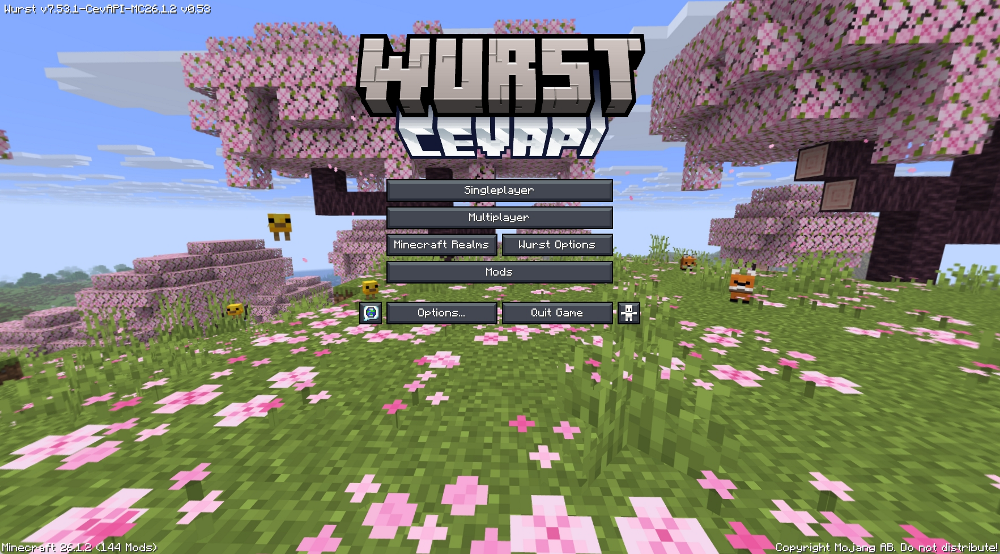
Wurst Options
Added to home screen in lieu of the Alt Manager.
Reworked from the old minimal 3-column options page into a full control center with grouped sections (Core, Presence & Privacy, Tools & Recovery, Links) and richer tooltips.
Added new toggles and controls not present in original Wurst Options, including:
Options Location, Hack Toggle Chat, Hide Enable Button, HideWurst, Command Prefix, Custom Capes, Force Allow Chats
Discord presence controls (on/off, status preset, show server IP, show username)
Privacy controls (Disable Telemetry, Disable Signatures, Unsafe Chat Toast) plus Connection Log + Connection Font
Added recovery/utility actions directly in the menu:
Presets, Keybinds, Alt Manager
Reconnect Last Server, Reconnect as Random Alt, Reconnect as Random Name, random reconnect toggle
Advanced Packet Tools, Hack Debugger, Blocked Hacks Editor
Panic Disable/Restore, Reload Wurst, Open Wurst Folder
Added fork navigation links (CevAPI/NiceWurst GitHub, CevAPI Discord) while keeping core Wurst links and changelog access.
X (3)
X Ray Improvements
Prevent zero-alpha and treat near-opaque as opaque to prevent Sodium translucent BSP crashes
Added ESP (Highlight Corners and or Fill Blocks)
Uses cached positions for speed
Optional transparency slider for ESP
Multi-term queries: comma-separated (e.g., diamond, ancient).
Opacity, block type changes and ‘only show exposed’ apply live without toggling.
New minimum search to 100 blocks.
XCarryHack
Store items in your crafting table
Added alerts if the game auto-drops or returns the items back into your main inventory
XPGUI
New GUI (XPGUI)
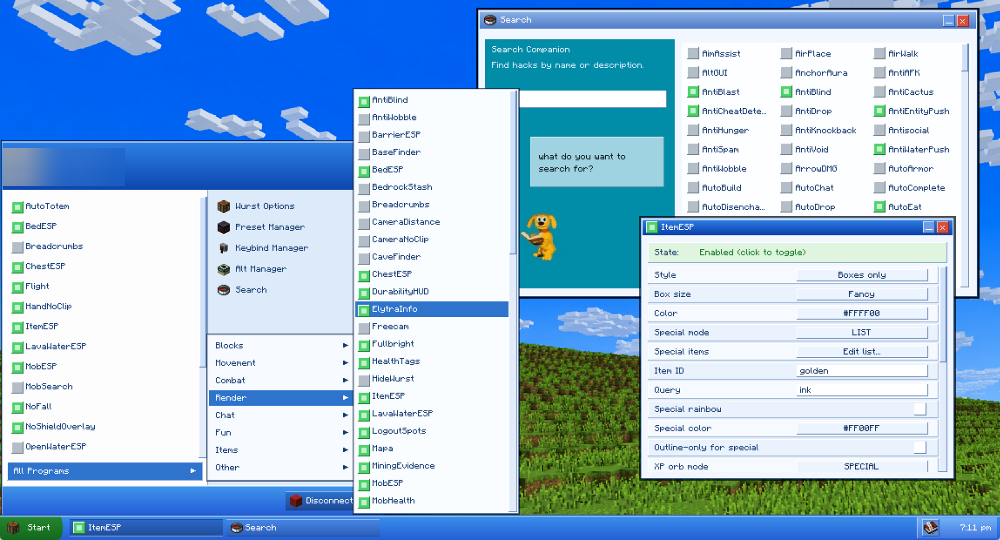
Added a Windows XP style taskbar + Start menu GUI you can open from the Navigator and bind to a key
Separate UI flow from ClickGUI and Navigator, focused on “desktop” usability
XP-style taskbar with Start button, window buttons, clock, and a settings button
Start menu shows Favorites with quick toggle boxes and an All Programs view with per-category hack lists
Built-in Search window with XP “Search Companion” styling and a 3-column Navigator-style results grid
Click name to open the hack/settings window
Click the small square to toggle hacks on/off
Hack windows behave like XP windows (title bar, minimize/close, draggable, scrollable settings)
XPGUI Settings window includes:
Desktop background mode (Image/Gradient/None) with opacity control
Wallpaper URL apply + “Use XP Default”
Start icon block selector
Hack list size slider (controls All Programs list height)
XP / Win2000 theme toggle (auto-sets wallpaper)
Screenshots:
How to Install:
New to Minecraft? Follow our step-by-step guide to install Mods on your PC.View Guide
Requirements:


Wurst Modified Client Mod Download Links
For Minecraft 26.1.2, 26.1.1, 26.1
For Minecraft 1.21.11
For Minecraft 1.21.10, 1.21.9
For Minecraft 1.21.8, 1.21.7, 1.21.6
For Minecraft 1.21.1, 1.21
You May Also Like








This post has no comments yet. Be the first — your comment will appear here.