
Potion View Mod (26.3, 1.21.1) – Never Open Inventories During Combat
 5
 0

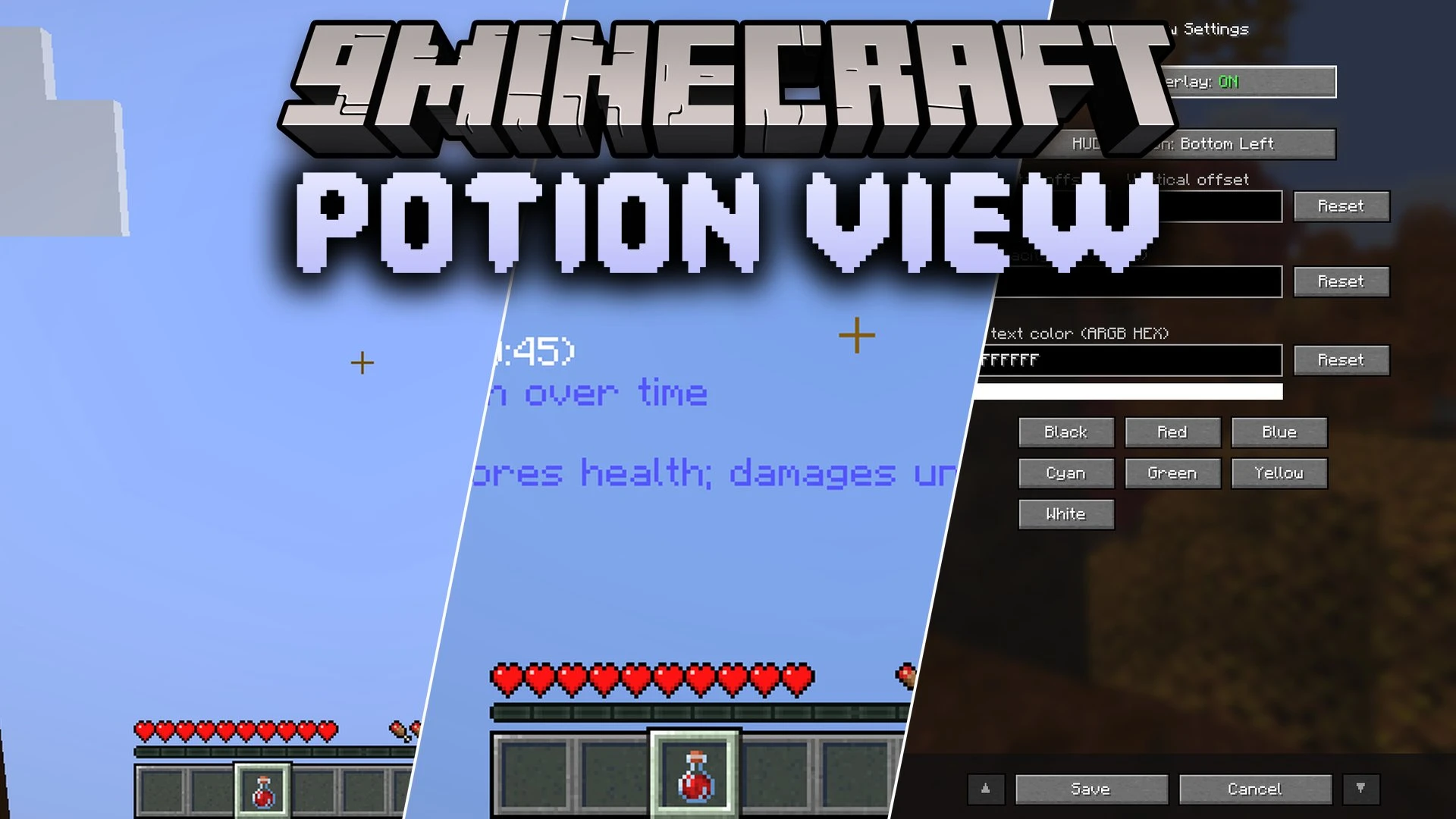
Potion View Mod displays all the potions in your inventory right on your main game screen. This mod lets you see how many potions you have left without opening your bag during a fight. You can also check effect details and change how the display looks to fit your screen.
Features:
- On-Screen Potion Counter: Shows icons and exact inventory counts for all your potions directly on your HUD.
- Quick Potion Info: Displays effect names, durations, and descriptions when you hold down a key.
- Lets you change the HUD position, colors, and transparency to match your style.
- Includes a toggle option so you can hide or show the display with a custom keybind.
- Works on the client side and gives you full access to all visual settings through Mod Menu.
How to Use:
- Keep potions in your inventory to see their icons and counts appear on your screen.
- Hold the Tab key to view the full effects, timers, and descriptions for those potions.
- Press your custom toggle keybind whenever you want to hide or show the potion display.
- Open the in-game settings through Mod Menu to adjust the HUD position, colors, and opacity.
Screenshots:


How to Install:
New to Minecraft? Follow our step-by-step guide to install Mods on your PC.View Guide


Potion View Mod Download Links
For Minecraft 26.3
For Minecraft 26.2
For Minecraft 26.1.2, 26.1.1, 26.1
For Minecraft
1.21.11,
1.21.10,
1.21.9
All Versions Covered
1.21.11
1.21.10
1.21.9
1.21.8
1.21.7
1.21.6
1.21.5
1.21.4
1.21.1
1.21
All Versions Covered
1.21.11
1.21.10
1.21.9
1.21.8
1.21.7
1.21.6
1.21.5
1.21.4
1.21.1
1.21
For Minecraft 1.21.10, 1.21.9
For Minecraft 1.21.8, 1.21.7, 1.21.6
For Minecraft 1.21.5
For Minecraft 1.21.4, 1.21.3, 1.21.2
Click to rate this post!
[Total: 0 Average: 0]
You May Also Like
Picked for this page
 Neat Mod (26.2, 1.20.1) – Track Mob Health in Combat
 Ctrl Q Mod (26.1, 1.20.1) – Stop Closing Game While Dropping Stacks
 Death Backup Mod (26.3, 1.20.1) – Never Lose Gear on Death Again
 I18n Update Mod (1.21.11, 1.20.1) – Play Modded Minecraft in Simplified Chinese
 NoWheel Mod (26.3, 1.20.1) – Stop Accidental Slot Swaps
 Sodium Shadowy Path Blocks Mod (26.3, 1.20.1) – Give Your Paths More Depth
 Noba Addon Mod (1.21.11, 1.21.1) – Modern SkyBlock Enhancements
 Dont Drop Your Compass Mod (26.3, 1.20.1) – Never Lose Your Recovery Compass
 Vigor Feast Reborn Mod (26.1.2, 1.20.1) – Cook Hearty Meals to Increase
 Vivid Idle Exploration Mod (26.3, 1.21.1) – Watch Cinematic Camera Angles
 I Want a Better Font Mod (26.3, 1.20.1) – Read Clean Custom Typography
 Vanilib Mod (26.3, 1.21.1) – Run Choculaterie Mods Smoothly Without Launch
Most viewed in Mods over the last 7 days
 Ala Industrial Mod (26.3) – Run Electric Power Grids and Automated Factories
 PleasureCraft Mod (26.3, 1.21.1) – Jenny Mod Remake for Fabric
 Jennycraft Mod (26.3, 1.20.1) – Virtual Girlfriend in Minecraft
 Fapcraft Mod (26.3, 1.12.2) – Comprehensive and Detailed Content
 Jenny Mod (Fapcraft) Official Complete Guide – How to use, Tutorial
 Meteor Client Mod (26.3, 1.20.1) – Xray, HUD, Fly
 BangCraft Mod (1.20.1) – Jenny, Ellie and Elliot
 OptiFine HD (26.3, 1.20.1) – Run Faster, FPS Boost, Shaders Support
 CatLean Client Mod (26.2, 1.21.11) – ThunderHack Recode Alternatives
 Fabric Loader (26.3, 1.20.1) – Fabric Installer for All Minecraft Versions
 SeedCrackerX Mod (26.3, 1.20.1) – Find Any World Seed
 SchnurriTV Mod (1.12.2) – Characters and Features
More from Mods
 Endfield Industry Mod (1.21.1, 1.20.1) – Run a Futuristic Factory Base
 Chrono Dawn Mod (26.3, 1.20.1)
 TONI’s Mob Battles Mod (26.3, 1.20.1) – Pit Any Mobs Against Each Other
 Animal Garden Butterflies Mod (26.3, 1.20.1) – Tame Butterflies That Help
 Phantom’s AE2 Tweaks Mod (1.21.1) – Browse Huge Crafting Networks Without Lag
 Cobblemon Raid Dens Icons Mod (1.21.1) – Spot Every Raid Den on Your Map
 Iris Render Fix Mod (26.3) – No More See-Through Players in Your Iris Shaders
 Slate Crafting Mod (1.21.1, 1.20.1) – Track Complex Recipes with Visual Trees
 Asymmetric Battles API Mod (1.21.1) – Survive Massive Wild Cobblemon Swarms
 NEO Armor Layers Compat Mod (1.21.1) – Restore Skin Layers Under Magic Armor
 Frozen Zombie Castle Mod (26.3, 1.20.1) – Battle Undead Inside Icy Fortresses
 Aeronautic Additions Tweaks Mod (1.21.1) – Create Styled Airship Utility Tweaks

This post has no comments yet. Be the first — your comment will appear here.