
Pack Relay Mod (26.3, 1.21.11) – Open a Shared Backpack Anytime on Servers
 0
 0

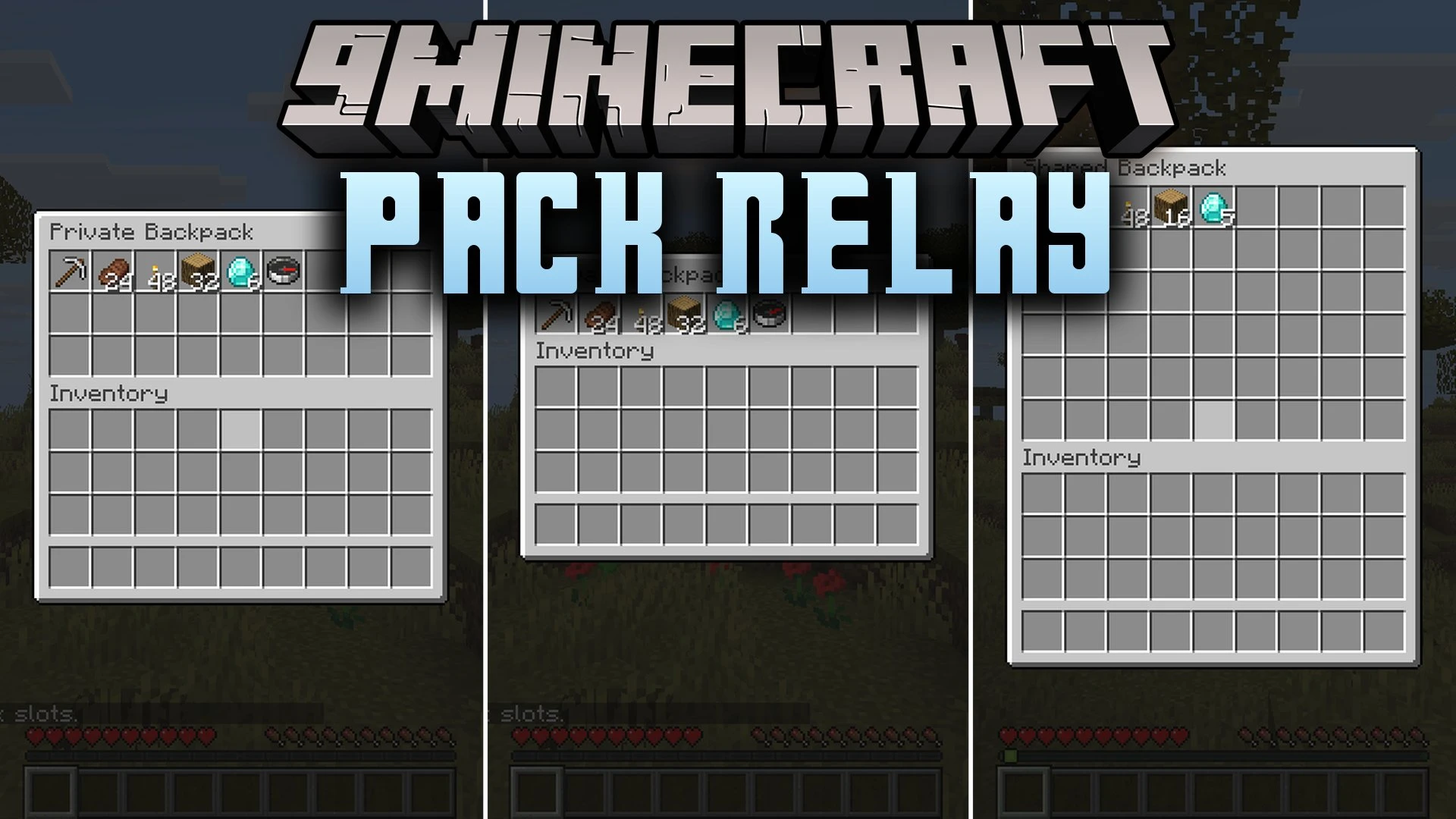
Pack Relay Mod gives players a persistent extra storage container accessible from anywhere in the world. It provides up to 54 extra inventory slots that save directly to your world file. In solo worlds, you get a private storage space, while multiplayer servers use a joint chest system by default. Multiple players can open the exact same storage screen at the same time to trade gear and gather materials together. Server owners can switch between shared and individual storage or adjust slot sizes to fit their gameplay needs.
Features:
- Anywhere Storage: Opens a chest-style storage grid from anywhere using a quick key press or chat command.
- Shared Multiplayer Storage: Connects players on servers to a single communal backpack where teammates can deposit and withdraw gear at the same time.
- Private Solo Mode: Keeps your personal items safe in your own private backpack during singleplayer sessions.
- Adjustable Capacity: Lets server owners pick between 9, 18, 27, 36, 45, or 54 slots of space.
- Unmodified Client Access: Lets players without client mods join servers and access the inventory using chat commands.
- Saves all backpack contents directly inside the world save data.
- Protects items when reducing capacity, returning hidden items once full storage size is restored.
- Lets you split and move item stacks exactly like a standard Minecraft chest.
- Lets you rebind the direct backpack opening key in the standard controls menu.
Commands:
/bp: Opens the backpack inventory window./backpack: Opens the backpack inventory window using the full command name.
Configuration:
All settings are stored in the config/packrelay.json file. Restart the server or reopen your world to apply any changes.
- Backpack mode: Switch between shared storage across the server or private per-player storage.
- Capacity: Set storage size to 9, 18, 27, 36, 45, or 54 slots.
How to Use:
- Press B on your keyboard to instantly open your backpack screen.
- Type
/bpor/backpackin chat if you play on a server without the mod installed on your client. - Move, organize, or split your item stacks inside the chest-like grid.
- Close the screen to automatically save your items in the persistent storage.
Screenshots:


How to Install:
New to Minecraft? Follow our step-by-step guide to install Mods on your PC.View Guide
Requirements:

Pack Relay Mod Download Links
For Minecraft 26.3
For Minecraft 26.2
For Minecraft 26.1.2, 26.1.1, 26.1
For Minecraft 1.21.11
You May Also Like
Picked for this page
 Inventory HUD+ Mod (26.3, 1.20.1) – Check Gear Without Menus
 Re-Chiseled Mod (26.3, 1.20.1) – Style Every Vanilla Build
 Legendary Tooltips Mod (26.3, 1.20.1) – View Your Gear in Custom RPG Frames
 Hand Over Your Items Mod (26.3, 1.20.1) – Trade Loot Without Dropping Items
 Auto Tools Mod (26.3, 1.20.1) – Swap Tools Instantly During Mining
 Trimmable Tools Mod (26.2, 1.20.1) – Match Your Weapons to Your Armor Trims
 Gone Fishing! Mod (26.3, 1.21.11) – Catch Rare Fish in the Nether
 Assorted Storage Mod (26.3, 1.20.1) – Organize Every Item and Never Run
 Wilder Roots Mod (26.3, 26.1.2) – Bring Peaceful Wildlife and Shiny Rubies
 Creative Palette Bundles Mod (26.3, 1.20.1)
 Friends&Foes Flowery Mooblooms Forge Neo Forge Mod (26.3, 1.20.1)
 Seamless Loading Screen Rethinking Mod (26.3, 1.20.1)
Most viewed in Mods over the last 7 days
 Ala Industrial Mod (26.3) – Run Electric Power Grids and Automated Factories
 PleasureCraft Mod (26.3, 1.21.1) – Jenny Mod Remake for Fabric
 Jennycraft Mod (26.3, 1.20.1) – Virtual Girlfriend in Minecraft
 Fapcraft Mod (26.3, 1.12.2) – Comprehensive and Detailed Content
 Jenny Mod (Fapcraft) Official Complete Guide – How to use, Tutorial
 Meteor Client Mod (26.3, 1.20.1) – Xray, HUD, Fly
 BangCraft Mod (1.20.1) – Jenny, Ellie and Elliot
 OptiFine HD (26.3, 1.20.1) – Run Faster, FPS Boost, Shaders Support
 Fabric Loader (26.3, 1.20.1) – Fabric Installer for All Minecraft Versions
 SeedCrackerX Mod (26.3, 1.20.1) – Find Any World Seed
 CatLean Client Mod (26.2, 1.21.11) – ThunderHack Recode Alternatives
 SchnurriTV Mod (1.12.2) – Characters and Features
More from Mods
 Better Effect HUD Mod (26.3) – Track Active Potion Timers Right on Your Screen
 Coins N’ Auctions Mod (26.1.2) – Trade Gear in a Player-Driven Auction House
 Leaderboard Hologram Mod (26.3, 1.20.1) – Display Live Server Stats
 Absolute Realistic Door Light Mod (26.3, 1.20.1) – Closed Doors Block Light
 Dap Your Homies Mod (26.3) – Unleash Shockwaves and Yeet Friends in Multiplayer
 Create Radars Remote Control Mod (1.21.1) – Track Enemies with Radar HUDs
 Blue Skies Spellbooks Iron’s Spells ‘n Spellbooks Addon Mod (1.20.1)
 Mossback Furniture Mod (26.3, 1.20.1) – Craft Rustic Decor Using a Stonecutter
 Villager Discount Green Apple Mod (26.3, 1.20.1) – Skip Zombie Cures for Deals
 Spear Amor Trims Mod (26.3) – Match Your Spears to Your Custom Trimmed Armor
 Realistic Fluids Simulation Mod (1.21.1) – Pour Splashing Liquids
 Serene Seasons Placeable Calendar Mod (1.21.1, 1.20.1)

This post has no comments yet. Be the first — your comment will appear here.