
Visible String Model – Transforms Faint Tripwire Into Clear 3D Lines

 0


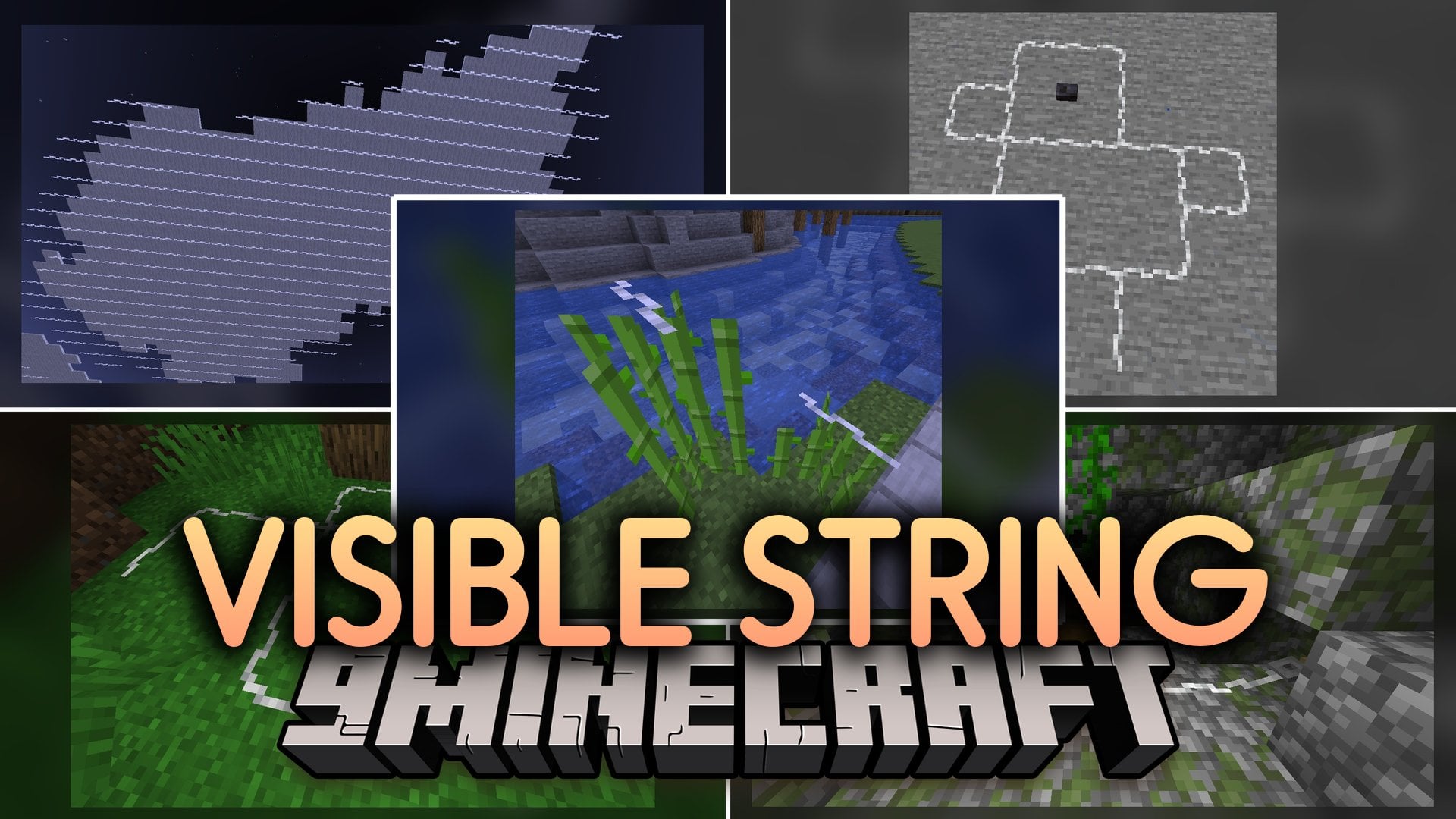
Visible String Model transforms the look of placed string and tripwire so you can spot them right away. This pack includes 12 custom 3D models and 6 texture files that make the placed string model wider and the string texture much easier to see on the ground. It covers every directional connection for both standalone string and attached tripwire hooks, helping you notice hidden traps in jungle temples or build with string without losing track of where you placed it.
Features:
- Wider String Model: Expands the thin vanilla tripwire geometry into a thicker, wider 3D shape that stands out against any floor block.
- Clearer String Texture: Replaces the faint default texture using 6 texture files so placed string is easy to spot from a distance.
- Includes 12 custom 3D models covering all directional states for placed string and attached tripwire hooks.
Custom 3D Models Included:
- Unattached tripwire string models for single, corner, straight, T-junction, and 4-way cross connections (
tripwire_n,tripwire_ne,tripwire_ns,tripwire_nse, andtripwire_nsew). - Attached tripwire string models for lines connected to active hooks in all directional layouts (
tripwire_attached_n,tripwire_attached_ne,tripwire_attached_ns,tripwire_attached_nse, andtripwire_attached_nsew). - Attached tripwire hook models for both the idle state (
tripwire_hook_attached) and the triggered active state (tripwire_hook_attached_on).
How to Use:
- Move the downloaded pack into your Minecraft
resourcepacksfolder, then open the in-game Resource Packs menu and move it to the active side. - Obtain string from spiders or cobwebs, and craft two tripwire hooks using iron ingots, sticks, and planks.
- Right-click the ground with string to place a single line (
tripwire_nortripwire_ns) and inspect the wider 3D model and brighter texture compared to vanilla string. - Place additional string pieces next to the first one to form corners, T-junctions, and 4-way crosses (
tripwire_ne,tripwire_nse, andtripwire_nsew) to see how the wider model connects in every direction. - Mount two tripwire hooks on opposite walls facing the string line so they snap together into the attached states (
tripwire_hook_attachedand thetripwire_attachedstring variants). - Walk across the connected tripwire to trigger the trap and watch the hook model switch to its active triggered state (
tripwire_hook_attached_on).
Screenshots:


Visible String Model Download Links
Click to rate this post!
[Total: 0 Average: 0]
You May Also Like
Picked for this page
 Bare Bones X Model – Brings Simple 3D Foliage and Modded Block Visuals
 Pixel Perfection Fidelity Model – Brings Cozy Medieval 3D Models to Blocks
 New Faithful Overlays Model – Brings Smooth Grass and Path Transitions
 Pastelcraft Model – Brings Soft Pastel Colors and 3D Redstone Blocks
 Quadral Model – Brings Vivid Colors and 31 Custom 3D Models to Vanilla
 Coquet Model – Transforms Vanilla Foliage and Terrain with 3D Shapes
 Pixel-Tree Model – Transforms Everyday Vanilla Blocks with Detailed 3D Shapes
 Goose’s Leaves Model – Transforms Flat Leaves Into Bushy 3D Foliage
 Gui’s Better Vanilla Model – Brings Animated 3D Torches and Plants
 Vanilla Realism Model – Transforms Flat Blocks Into Animated 3D Shapes
 Brush & Juice Model – Brings Animated 3D Redstone and Mechanical Blocks
 The Original Work Programmer Art Model – Brings Classic Retro Visuals and Models
Most viewed in Models over the last 7 days
 Jenny Mod Skin Pack Mega Collection – 310+ Characters
 The Most Complete Collection of Jenny Mod Resources – Models, Animations, Structures,…
 Albedo Rework Jenny Mod Model
 750 Models Addon for Yes Steve Model Mod
 Galath Rework Model – Custom Girl for PleasureCraft Mod
 Power Model – Custom Girl for PleasureCraft Mod
 Pomni Jenny Mod Model
 Ram Model – Custom Girl for PleasureCraft Mod
 Femboy Ellie Rework Jenny Mod Model
 100+ Custom Animations For Jenny Mod
 Ellie Rework Jenny Mod Model
 Steve (Jenny & Zoey) Pack Jenny Mod Model
More from Models
 Bucket’Em Remodeled Model – Brings Animated 3D Captured Mobs to Your Hand
 Sky 16x Model – Brings 3D Maces, Rails, and Animated PvP Visuals
 Torchified Model – Turns Held Torches Into 3D Shapes with Classic 2D Icons
 Resolute 16x Model – Brings Clean 3D Blocks and Smooth PvP Visuals
 Sakura PvP Model – Brings Pink Gear and Grayscale Terrain for NethPot Combat
 Keikyu New 1000 Series Model – Adds Keikyu Commuter Trains to MTR Railways
 700 Series Shinkansen Model – Brings Japanese Bullet Trains to Transit Railways
 Mark5a ‘Nova 3’ Set Model – Brings TPE Passenger Trains to Your Railways
 InterCity 225 Model – Brings Classic British Rail Trains to Railway Networks
 URBAN_128x Model – Transforms Vanilla Blocks with Animated 3D Urban Geometry
 Greenfield Model – Transforms Everyday Blocks Into Detailed 3D Urban Pieces
 Luminous Lanterns X Punchy Model – Brings Detailed 3D Copper and Soul Lanterns

This post has no comments yet. Be the first — your comment will appear here.