
Simplify Block Model – Turns Heavy Vanilla Blocks Into Lightweight FPS Boosters
 4
 0


Simplify Block Model replaces complex block shapes with basic 3D models to boost your FPS without any mods. It packs in 154 custom 3D models and 5 texture files that strip away heavy visual details from everyday blocks. You get smoother frame rates around laggy items like bamboo, brewing stands, bells, big dripleaves, and anvils. Because it works as a pure vanilla resource pack, you can use it in any survival or multiplayer world right away.
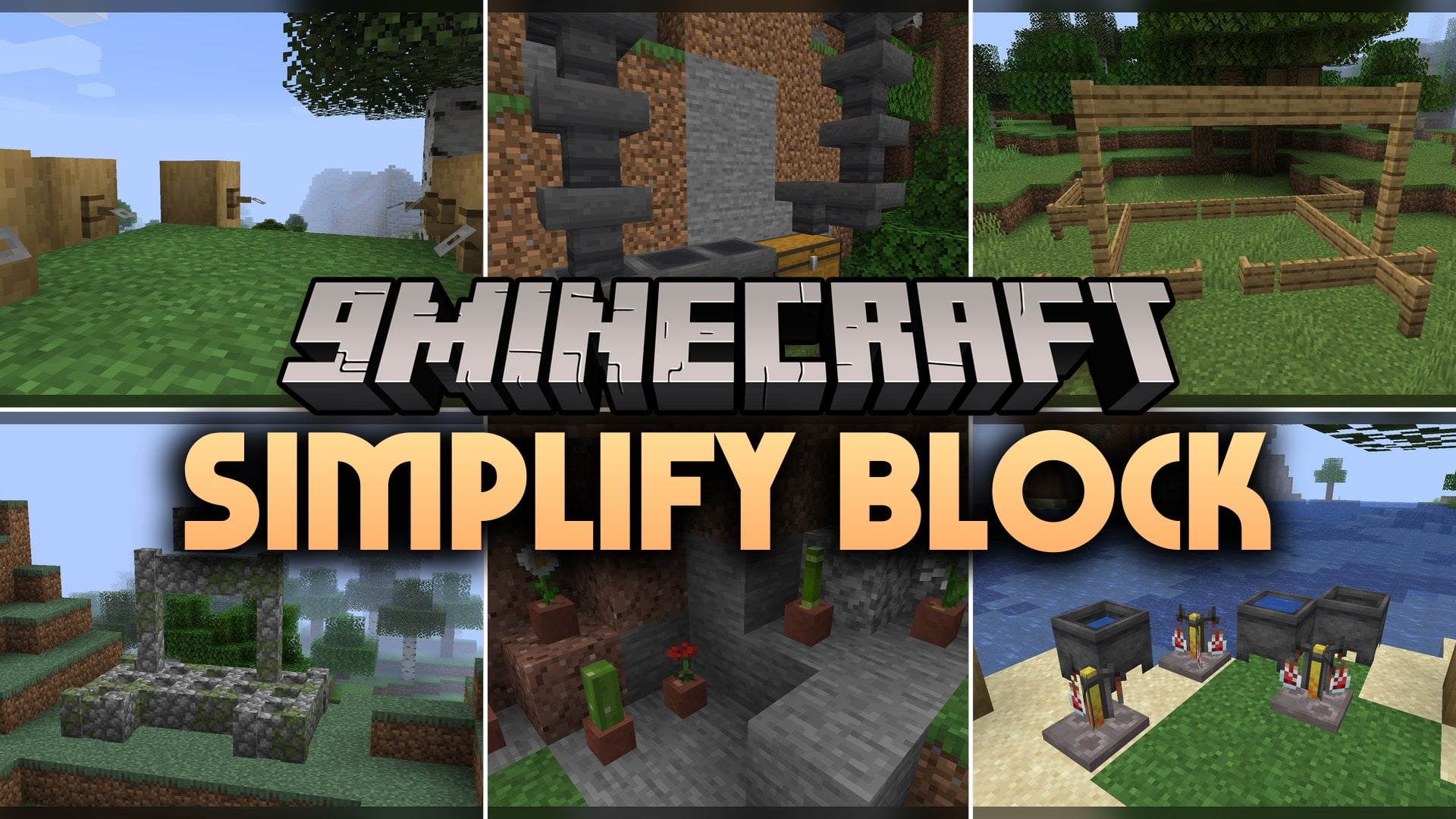
Features:
- Mod-Free FPS Boost: Improves game speed and frame rates by cutting down block polygons without needing any performance mods.
- 154 Simplified 3D Models: Swaps out detailed vanilla block shapes for flat, basic versions that are much easier for your computer to draw.
- Includes 5 texture files that match the simplified block shapes.
- Reduces lag around dense plant areas like growing bamboo shoots, big dripleaf plants, and chorus flowers.
- Flattens busy utility blocks around your base, including anvils, beacons, cauldrons, and unlit campfires.
Simplified Blocks & States:
- Utility & Crafting Blocks: Covers the anvil, beacon, cauldron, unlit campfire (
campfire_off), and the brewing stand across its base model, three bottle slots (brewing_stand_bottle0to2), and three empty slot states (brewing_stand_empty0to2). - Bells: Simplifies the bell model for every placement type, including floor, ceiling, single wall, and hanging between two walls.
- Bamboo & Fences: Replaces four bamboo variants across growth stages age 0 and age 1 (
bamboo1throughbamboo4), plus the bamboo fence post and its inventory icon. - Plants & End Flora: Includes the chorus flower along with the big dripleaf top, stem, partial tilt state, and full tilt state.
How to Use:
- Place the downloaded pack file into your Minecraft
resourcepacksfolder, then open the in-game Options menu, click Resource Packs, and move it to the active column. - Craft or place an anvil, cauldron, beacon, and an unlit campfire in your base to see their stripped-down 3D shapes right away.
- Set down a brewing stand and put glass bottles into the three brewing slots one by one to watch the simplified bottle states (
bottle0,bottle1, andbottle2) update on the stand. - Visit a village or craft a bell and hang it on the floor, ceiling, a single wall, or between two walls to check out all four simplified bell placements.
- Travel to a jungle or lush cave to find bamboo and big dripleaves; step onto a big dripleaf block to watch the simplified model change through its partial tilt and full tilt states, or craft bamboo fence posts to check both the placed post and inventory look.
- Head to the outer End islands to find chorus flowers growing on chorus plants and see their lighter block model in action.
Screenshots:


Simplify Block Model Download Links
Click to rate this post!
[Total: 0 Average: 0]
You May Also Like
Picked for this page
 Pixel Perfection Fidelity Model – Brings Cozy Medieval 3D Models to Blocks
 Quadral Model – Brings Vivid Colors and 31 Custom 3D Models to Vanilla
 Simply Alive Model – Brings Animated 3D Blocks and Capybara Totems
 Pixel-Tree Model – Transforms Everyday Vanilla Blocks with Detailed 3D Shapes
 Gui’s Better Vanilla Model – Brings Animated 3D Torches and Plants
 Night Model – Brings Custom 3D Blocks and Clean Textures for Competitive PvP
 Slimefun Model – Brings 3D Shields, Solar Panels, and Animated Server Tech
 Brush & Juice Model – Brings Animated 3D Redstone and Mechanical Blocks
 Vanilla SMP Model – Brings Clear 3D Weapons and Visible Traps to PvP
 THSR 700T Model – Brings Taiwan High-Speed Rail Trains to Railway Networks
 Visible String Model – Transforms Faint Tripwire Into Clear 3D Lines
 Diamond Smp Perfected Model – Brings Clean 3D Visuals to PvP Combat
Most viewed in Models over the last 7 days
 Jenny Mod Skin Pack Mega Collection – 310+ Characters
 The Most Complete Collection of Jenny Mod Resources – Models, Animations, Structures,…
 Albedo Rework Jenny Mod Model
 750 Models Addon for Yes Steve Model Mod
 Galath Rework Model – Custom Girl for PleasureCraft Mod
 Power Model – Custom Girl for PleasureCraft Mod
 Pomni Jenny Mod Model
 Ram Model – Custom Girl for PleasureCraft Mod
 Femboy Ellie Rework Jenny Mod Model
 100+ Custom Animations For Jenny Mod
 Ellie Rework Jenny Mod Model
 Steve (Jenny & Zoey) Pack Jenny Mod Model
More from Models
 SR BlackRose 16x Model – Transforms PvP Combat with Animated 3D Gear
 VN4’s Deep Dark Revamp Model – Brings Animated 3D Sculk Blocks to Caves
 Redstone Reloaded Model – Brings Readable 3D Visuals to Redstone Circuits
 TextureRevamp 64x Model – Transforms Vanilla Blocks with Detailed 3D Shapes
 3D Items-Vanillaism Model – Transforms Flat Vanilla Gear Into 3D Shapes
 MineColonies Vanillafied Model – Brings Vanilla-Styled 3D Colony Blocks
 Refined Redstone Model – Transforms Flat Dust Into Glowing 3D Cables
 ETR 470 Model – Brings Classic European Trains to Custom Transit Railways
 3D Rail Model – Transforms Flat Minecart Tracks Into Raised 3D Railways
 All Industry New Model – Transforms Industrial Mod Blocks Into 3D Factory Gear
 LuminusRemaster Model – Brings Animated 3D Torches and Glowing Lanterns
 SKM Model – Brings Custom Blockbench 3D Models and Detailed Visuals to Worlds

This post has no comments yet. Be the first — your comment will appear here.