
Simple Corpse Mod (1.21.1, 1.20.1) – Die, Then Mine Your Corpse For Your Gear
 0
 0

Simple Corpse Mod stops your items from despawning when you die by leaving a corpse in their place. When you die, a body appears at that spot holding everything you carried. There are no gravestones, waypoints, guides, menus, or keybinds, just the corpse. You still have to find your way back and mine the corpse to get your gear. It also works with Pehkui, Sable, Curios, Cosmetic Armor Reworked, and Jade.
Features:
- Corpse on Death: A corpse spawns where you die and holds all of your items, so nothing despawns.
- No Extra Menus: This mod adds no UI, no keybinds, no waypoints, and no guides, which keeps your screen clean.
- You must walk back to the spot where you died on your own.
- Mining the corpse drops all your items on the ground so you can pick them back up.
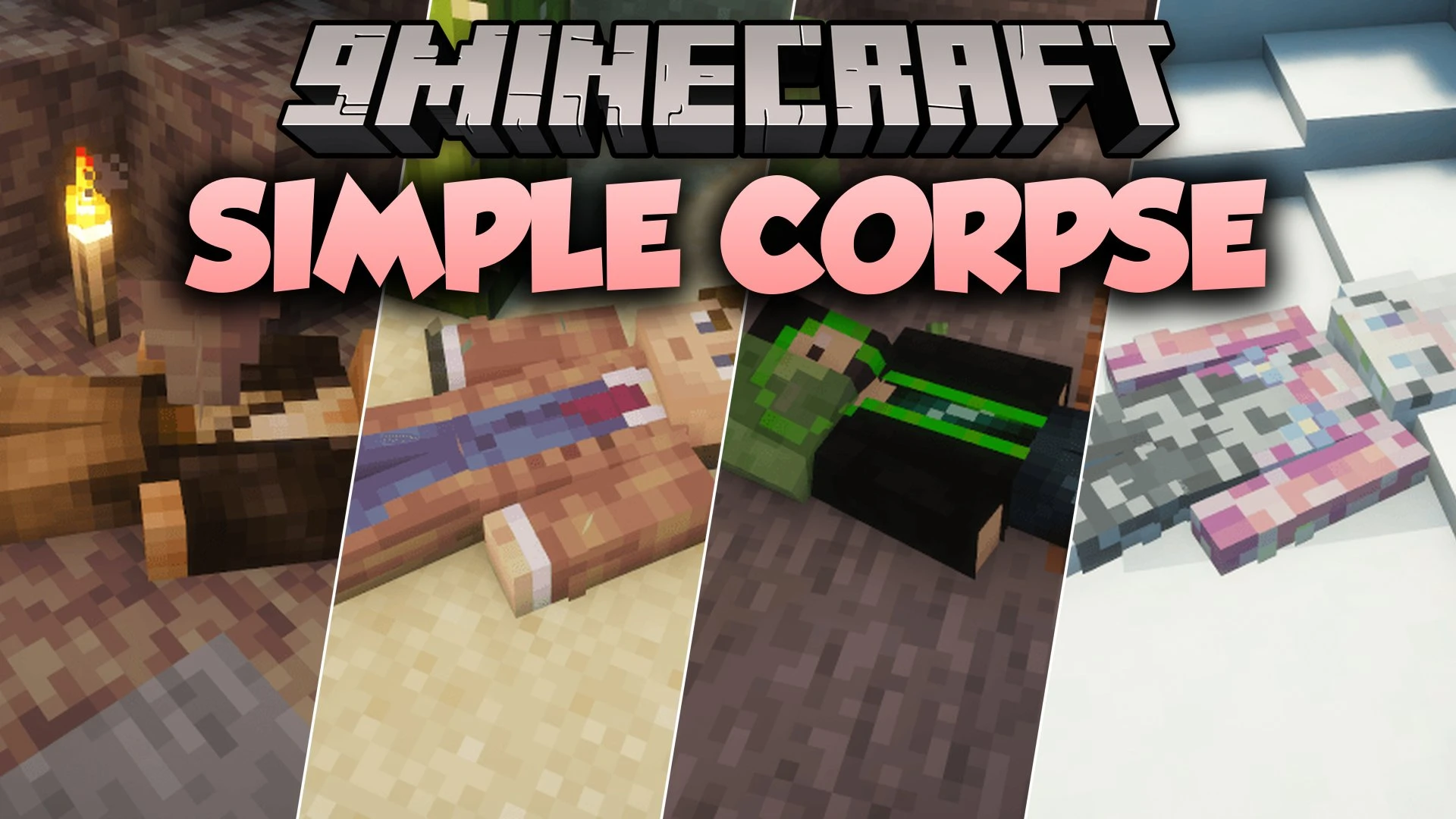
- The corpse looks like a real body instead of a gravestone block.
- Corpses change their look based on how you died, such as by arrow, cactus, freezing, slime, stalactite, or wither.
- Corpses can show up on moving builds, like a Create Aeronautics airship.
- Includes config options so you can tweak the mod to fit your play style.
- Works with Pehkui, Sable, Curios, Cosmetic Armor Reworked, and Jade.
Commands:
/simplecorpse lastinventory: Anyone can use this to see the items saved from their last death./simplecorpse lastinventory [Username]: Ops can see the last death items of any online player./simplecorpse restore [Username]: Ops can drop a player’s last death items right at that player’s feet.
Screenshots:


How to Install:
New to Minecraft? Follow our step-by-step guide to install Mods on your PC.View Guide
Requirements:

Simple Corpse Mod Download Links
For Minecraft 1.21.1, 1.21
For Minecraft 1.20.1, 1.20
Click to rate this post!
[Total: 0 Average: 0]
QUICK MINECRAFT SURVEY · ONE TAP
Mods & Modpacks
What do you do when a mod you love is abandoned by its creator?
19 responses · See the full results →
You May Also Like
Picked for this page
 Apotheosis Mod (26.1.2, 1.20.1) – Craft Godlike RPG Builds
 Balkon’s WeaponMod: Legacy Mod (26.3, 1.20.1) – Master Classic Medieval Combat
 Sky Aesthetics Mod (26.3, 1.21.1) – Paint Starry Night Skies
 Uranus Mod (26.2, 1.20.1) – Run Smooth Animations in Your World
 Cloud Glass Mod (26.3, 1.21.1) – Walk Through Solid Walls
 Sodium Chinese Localization Mod (26.3, 1.20.1) – Tune Graphics in Your Native
 Fracture Point Tactical Military Armory Mod (1.20.1) – Survive with Modern
 FTB Ez Crystals Mod (26.1.2, 1.20.1) – Farm Crystal Shards Without Breaking
 Zhipeiweidu Mod (1.20.1) – Build Safely in Your Own Private Empty Dimension
 Ancient Seed Crafting Mod (26.3, 1.20.1) – Farm Rare Ancient Flowers
 Metalborn Mod (1.21.1, 1.20.1) – Store Power in Metal and Draw It Back
 W1xdsT9 Mod (26.3, 1.21.11) – Catch In-Game Chat Typos Live Before Hitting Send
Most viewed in Mods over the last 7 days
 Ala Industrial Mod (26.3) – Run Electric Power Grids and Automated Factories
 PleasureCraft Mod (26.3, 1.21.1) – Jenny Mod Remake for Fabric
 Jennycraft Mod (26.3, 1.20.1) – Virtual Girlfriend in Minecraft
 Fapcraft Mod (26.3, 1.12.2) – Comprehensive and Detailed Content
 Meteor Client Mod (26.3, 1.20.1) – Xray, HUD, Fly
 Jenny Mod (Fapcraft) Official Complete Guide – How to use, Tutorial
 Minecraft Forge (26.3, 1.20.1) – Modding API and Library
 Tech Reborn Mod (26.3, 1.20.1) – Build Advanced Factories to Automate
 Madxray Hacks Mod (26.2, 1.20.1) – Spot Hidden Ores and Fly Freely
 BangCraft Mod (1.20.1) – Jenny, Ellie and Elliot
 OptiFine HD (26.3, 1.20.1) – Run Faster, FPS Boost, Shaders Support
 CatLean Client Mod (26.2, 1.21.11) – ThunderHack Recode Alternatives
More from Mods
 KitR Mod (26.3, 1.21.11) – Set Fair PvP Rules For Your Whole SMP From One Menu
 Dead Sun Zombie Apocalypse Mod (26.3, 26.1.2) – Survive Zombie Hordes At Noon
 Tokusatsu Hero Instrumentality Project Evolution Mod (1.20.1)
 Shinez’s Ancient Artifacts Mod (1.21.1, 1.20.1) – Loot Artifacts That Zap Mobs
 Caverns & Chasms Ingot Compat Mod (1.21.1, 1.20.1) – Use Modded Ingots As Decor
 Mo’ Structures 9minecraft Mod (26.3, 26.2) – Find Pyramids And Sky Castles
 Throw Anything Mod (26.3, 1.21.1) – Slingshot Any Item, From TNT To Totems
 Chop & Mine Tree Felling & Vein Mining Mod (26.3, 1.20.1)
 Noctis Expansion Mod (1.20.1) – Forge God Alloys And Ride Polar Bears
 Omni Lib Core Library & Central Hub Mod (26.3, 1.20.1)
 The Ancient Towns Mod (26.3, 1.21.1) – Stumble Onto Lost Towns Deep In Caves
 Chunkis Mod (26.3, 1.21.1) – Smaller World Saves And Fewer Lag Spikes

This post has no comments yet. Be the first — your comment will appear here.