
KitR Mod (26.3, 1.21.11) – Set Fair PvP Rules For Your Whole SMP From One Menu
 0
 0

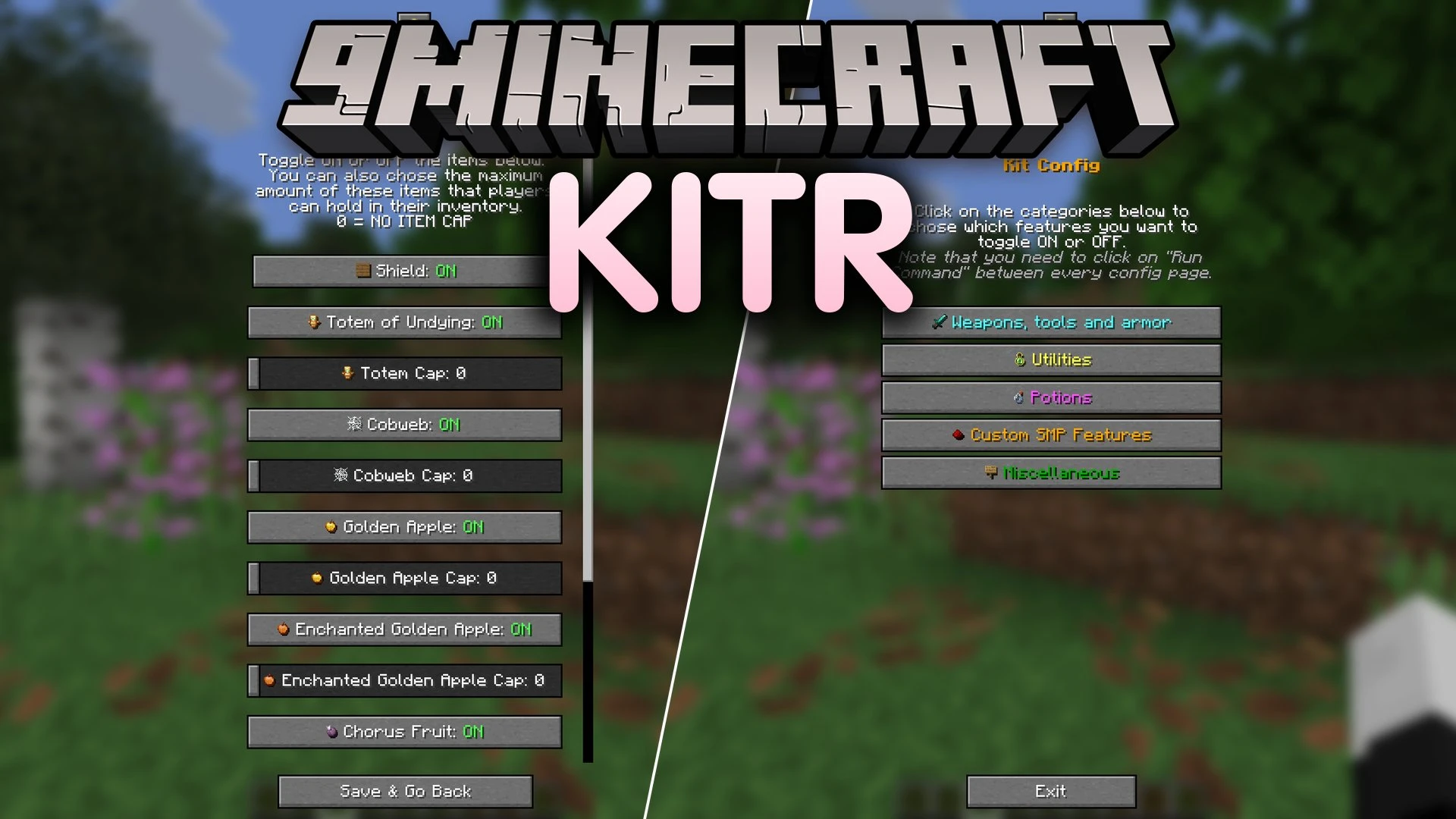
KitR Mod gives server owners one config screen to turn PvP features ON or OFF for an entire SMP. It splits the options into 5 categories: Weapons, tools and armor, Utilities, Potions, Custom SMP Features, and Miscellaneous. You can ban Netherite pieces, limit how many of an item a player holds, change Mace and Ender Pearl behavior, and more. Only players with OP permissions can open the config. This mod works for the whole server, so every player follows the same kit rules.
Features:
- Kit Config Screen: One main menu gives you access to all 5 categories of PvP settings.
- Server-Wide Toggles: Every setting you change applies to the entire server, not just one player.
- Item Caps: You can put a limit on how many of a certain item players can carry in their inventory.
- Lets you open the config from the Pause Menu or with a chat command.
- Locks the config behind OP permissions so normal players can’t change the rules.
- Builds several smaller PvP datapacks right into the config, like pearl cooldown, longer potions, and the Bliss Dragon Egg.
Weapons, Tools and Armor:
- Gives you a toggle for every single Netherite piece.
- Lets you turn the Netherite upgrade ON or OFF.
- Mace Options: a sub-category with toggles for certain Mace behaviors, including a Mace Cooldown and a Mace Limit. Setting either one to 0 turns it off.
- Explosives Options: a sub-category with toggles for most explosives, plus a TNT Auto Ignite option. It also includes the CPVP Begone datapack.
Utilities:
- Lets you toggle PvP utilities like Totems, Elytra, Cobwebs, and others.
- Lets you set item caps for certain utility items, though caps can act in a slightly annoying way.
- Ender Pearl Options: a sub-category with toggles for certain Ender Pearl behaviors. It also includes the Customizable Pearl Cooldown datapack.
Potions:
- Longer Strength II: a toggle that makes Strength II potions last longer.
- Longer Speed II: a toggle that makes Speed II potions last longer.
Custom SMP Features:
- Bliss Dragon Egg: whoever holds the Dragon Egg gets 20 hearts.
Miscellaneous:
- Adds toggles for how the config itself behaves.
- Adds a button that resets the config back to the default settings.
Commands:
/function kit:config: opens the Kit Config screen (OP only).
How to Use:
- Make sure you have OP permissions on the server or world.
- Press ESC to open the Pause Menu, then click Kit Config. You can also type
/function kit:configin chat. - Pick one of the 5 categories on the main config screen.
- Open sub-categories like Mace Options, Explosives Options, or Ender Pearl Options to see more settings.
- Turn each feature ON or OFF. For Mace Cooldown and Mace Limit, set the value to 0 to turn them off.
- Go to Miscellaneous and press the reset button if you want to go back to the default settings.
Screenshots:


How to Install:
New to Minecraft? Follow our step-by-step guide to install Mods on your PC.View Guide
Requirements:




KitR Mod Download Links
For Minecraft 26.3
For Minecraft
26.2,
26.1.2,
26.1.1
All Versions Covered
26.2
26.1.2
26.1.1
26.1
1.21.11
All Versions Covered
26.2
26.1.2
26.1.1
26.1
1.21.11
Click to rate this post!
[Total: 0 Average: 0]
QUICK MINECRAFT SURVEY · ONE TAP
Mods & Modpacks
Which mod loader do you use the most often?
78 responses · See the full results →
You May Also Like
Picked for this page
 Farsight Mod (26.3, 1.20.1) – Bypass Server Render Distance Caps
 Shields+ Mod (26.1, 1.20.1) – Block Every Fatal Strike
 Difficulty Lock Mod (26.3, 1.20.1) – Enforce Strict Survival Rules
 Command Keys Mod (26.3, 1.20.1) – Execute Complex Chat Macros Instantly
 Fast Item Frames Mod (26.3, 1.20.1) – Decorate Huge Bases Without Frame Drops
 IMBlocker Mod (26.3, 1.20.1) – Chat and Run Without Switching Keyboards
 Doors Closed Mod (26.3, 1.20.1) – Safe Homes for Villagers
 Easy Craft of Chainmail Armor Mod (26.3, 1.20.1) – Craft Chainmail Armor
 Basalt Crusher Mod (26.2, 1.20.1) – Renewable Sand and Gravel for Builders
 Turtle Armor Mod (26.3, 1.20.1) – Rule the Seas Like a Turtle
 Anvilwise Book Merge Planner & Enchantment Guide Mod (26.3, 1.20.1)
 Macabre Call of False Prophets Mod (26.1.2, 1.20.1) – Survive The Pit
Most viewed in Mods over the last 7 days
 Ala Industrial Mod (26.3) – Run Electric Power Grids and Automated Factories
 PleasureCraft Mod (26.3, 1.21.1) – Jenny Mod Remake for Fabric
 Jennycraft Mod (26.3, 1.20.1) – Virtual Girlfriend in Minecraft
 Fapcraft Mod (26.3, 1.12.2) – Comprehensive and Detailed Content
 Meteor Client Mod (26.3, 1.20.1) – Xray, HUD, Fly
 Jenny Mod (Fapcraft) Official Complete Guide – How to use, Tutorial
 Minecraft Forge (26.3, 1.20.1) – Modding API and Library
 Tech Reborn Mod (26.3, 1.20.1) – Build Advanced Factories to Automate
 BangCraft Mod (1.20.1) – Jenny, Ellie and Elliot
 Madxray Hacks Mod (26.2, 1.20.1) – Spot Hidden Ores and Fly Freely
 OptiFine HD (26.3, 1.20.1) – Run Faster, FPS Boost, Shaders Support
 CatLean Client Mod (26.2, 1.21.11) – ThunderHack Recode Alternatives
More from Mods
 Capable Carving Mod (1.21.1) – Draw and Copy Your Own Custom Pumpkin Faces
 Cheeeese Mod (1.21.1) – Age Custom Cheese Wheels Across Different Biomes
 Create Visible Clipboard Mod (1.21.1) – Read and Check Off Tasks Without Menus
 Anti Mob Torch Fabric Mod (26.3) – Protect Your Base Without Spamming Torches
 Toasty’s Emerald Armory Mod (1.21.1, 1.20.1) – Craft or Trade for Polished
 Alexs Caves Exemplified Mod (1.20.1) – Gamma Tremorzillas and New Underground
 Veinst Mod (26.3, 1.20.1) – Clear Massive Ore Veins with One Strike
 Puberty Female Gender Gender for Players Mod (26.3, 1.21.1)
 Savage Ender Dragon Mod (26.3, 1.20.1) – A Relentless Endgame Boss
 Router Reborn Mod (26.3, 1.16.5) – Build Smart Item Networks
 Boss Rifts Mod (26.3, 1.20.1) – Skip the Long Trek Home After Boss Battles
 Big Globe Mod (26.3, 1.20.1) – Trek Across Giant Worlds

This post has no comments yet. Be the first — your comment will appear here.