
Horse Combat Controls Mod (1.21.4, 1.20.1) – Aim Freely From Horseback

 0


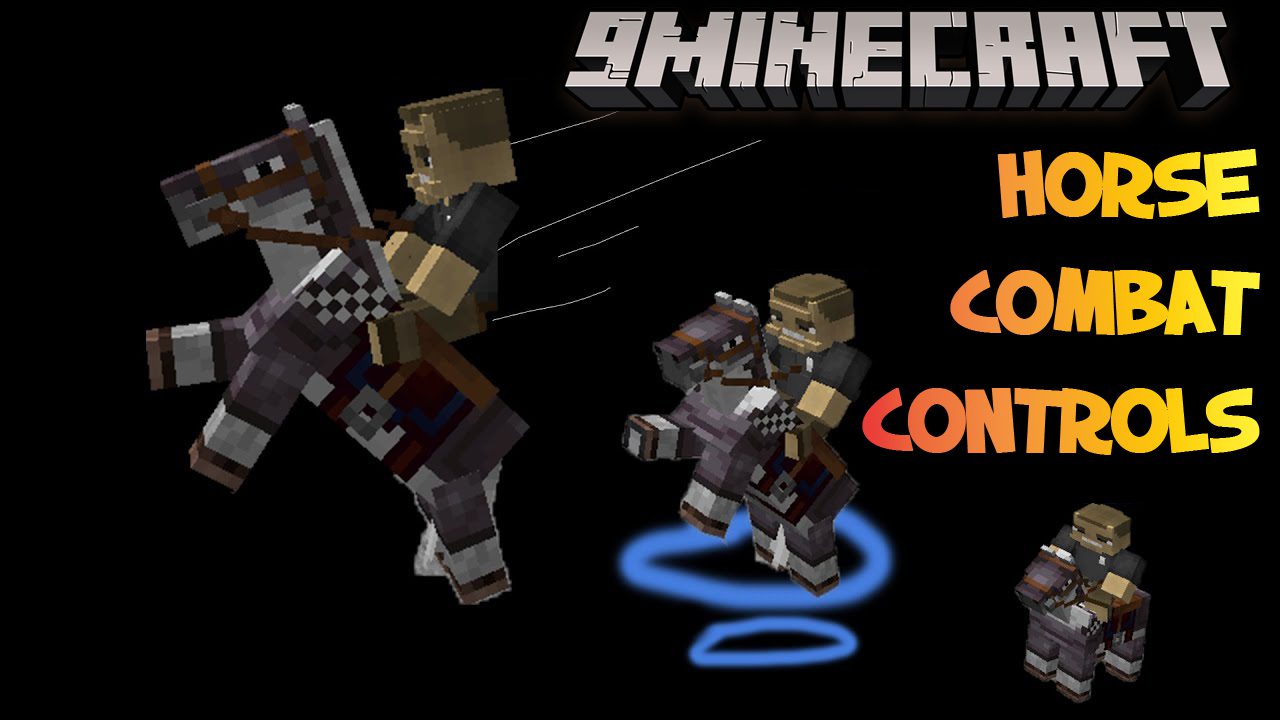
Horse Combat Controls Mod brings Mount and Blade style horse controls to Minecraft for better fighting on horseback. It lets you steer and change your horse’s speed with keyboard keys while your mouse stays free to aim. You can turn your head to hit targets with a sword or shoot with a bow without slowing down or changing direction. You can also switch between normal and combat controls at any time, or lock combat mode on through a server config file.
Features:
- Brings Mount and Blade style controls so you can move your horse with keys while aiming freely with your mouse to attack with a sword or bow.
- Keeps your horse moving in the same direction without losing speed when you turn your head to fight.
- Speeds up your horse when you press the Forward key.
- Slows down your horse or reverses acceleration when you press the Backward key.
- Steers your horse to the left or right when you press the Left and Right keys.
- Switches between vanilla controls and combat controls when you press Y, and you can change this keybind.
- Lets server admins lock players into combat mode through a server config file for servers or modpacks.
- Supports copying the config file into the default configs folder so every new world uses the same settings.
- Does not work with Better Third Person because that mod is closed source, so Open Third Person is recommended for third-person play instead.
Configuration:
.minecraft > saves > [world] > serverconfig > horsecombatcontrols-server.toml: Server config file that lets server admins lock players into combat control mode for a world or modpack..minecraft > defaultconfigs: Folder where you can paste a copy ofhorsecombatcontrols-server.tomlto apply your settings to every new world.
How to Use:
- Get on any horse in your world.
- Press Y to switch from vanilla horse controls to combat controls (you can change this keybind if needed).
- Press the Forward key to speed up your horse, or press the Backward key to slow down or reverse acceleration.
- Press the Left and Right keys to steer your horse while you move your mouse freely to look around, shoot a bow, or swing a sword.
- Press Y again whenever you want to switch back to vanilla controls.
- To lock players into combat mode on a server or modpack, edit
horsecombatcontrols-server.tomlinside.minecraft > saves > [world] > serverconfig, and copy the file into.minecraft > defaultconfigsto apply it to every new world.
How to Install:
New to Minecraft? Follow our step-by-step guide to install Mods on your PC.View Guide
Horse Combat Controls Mod Download Links
For Minecraft 1.21.4
NeoForge version: Download from Server 1 – Download from Server 2
Fabric version: Download from Server 1 – Download from Server 2
For Minecraft 1.21.1, 1.21
NeoForge version: Download from Server 1 – Download from Server 2
For Minecraft 1.20.4
NeoForge version: Download from Server 1 – Download from Server 2
For Minecraft 1.20.1
Forge version: Download from Server 1 – Download from Server 2
For Minecraft 1.19.3
Forge version: Download from Server 1 – Download from Server 2
For Minecraft 1.19.2
Forge version: Download from Server 1 – Download from Server 2
For Minecraft 1.19
Forge version: Download from Server 1
For Minecraft 1.18.2
Forge version: Download from Server 1 – Download from Server 2
For Minecraft 1.17.1
Forge version: Download from Server 1
For Minecraft 1.16.5
Forge version: Download from Server 1
You May Also Like
Picked for this page
 Deeper And Darker Mod (1.21.11, 1.20.1) – Deep Dark Expansion
 Customizable Elytra Mod (26.2, 1.20.1) – Make Elytra Dyeable Like Leather Armor
 Leap Mod (26.1.2, 1.20.1) – Double Jump
 Model Gap Fix Mod (1.21.11, 1.20.1) – Fixing Graphics Bug
 Realistic Bees Mod (26.3, 1.20.1) – Adding Realism to the Bees
 LotTweaks Mod (1.21.11, 1.20.1) – Powerful Toolkit for Builders
 Advanced Chimneys Mod (26.3, 1.20.1) – Highly Functional Chimneys
 Campfire Spawn and Tweaks Mod (26.3, 1.20.1) – Set Spawn at Campfires
 Luna Slimes Mod (26.3, 1.20.1) – Improved Slimes
 Ready Player Fun Mod (26.3, 1.20.1) – Managing Time And Seasons In Minecraft
 Mod Sound Volume Options Mod (26.2, 1.20.1) – Individual Mod Sound Adjustment
 Elytra Drag Mod (26.3, 1.20.1) – Add Air Brakes to Your Elytra
Most viewed in Mods over the last 7 days
 Ala Industrial Mod (26.3) – Run Electric Power Grids and Automated Factories
 PleasureCraft Mod (26.3, 1.21.1) – Jenny Mod Remake for Fabric
 Jennycraft Mod (26.3, 1.20.1) – Virtual Girlfriend in Minecraft
 Fapcraft Mod (26.3, 1.12.2) – Comprehensive and Detailed Content
 Jenny Mod (Fapcraft) Official Complete Guide – How to use, Tutorial
 BangCraft Mod (1.20.1) – Jenny, Ellie and Elliot
 Fabric Loader (26.3, 1.20.1) – Fabric Installer for All Minecraft Versions
 Meteor Client Mod (26.3, 1.20.1) – Xray, HUD, Fly
 The Shooting Star Demo Mod (26.3, 1.20.1) – Vaporize Terrain From Orbit
 OptiFine HD (26.3, 1.20.1) – Run Faster, FPS Boost, Shaders Support
 Aristois Client Mod (1.21.4, 1.20.1) – World Class Minecraft Utility
 SchnurriTV Mod (1.12.2) – Characters and Features
More from Mods
 Packing Tape Mod (26.3, 1.20.1) – Move Chests, Machines
 No XP Anvils Mod (26.3, 1.20.1) – Repair And Enchant Without XP
 Naruto Shippuden Mod (26.3, 1.16.5) – Immerse Yourself in The World of Ninja
 Araxer’s Bestiary Mod (26.3, 1.20.1) – Build an In-Game Encyclopedia of Every Mob
 Villagers Plus Mod (26.3, 1.20.1) – Expanded Villager Types and Villages
 Ore Excavation 9minecraft Mod (26.3) – Mine Ores and Chop Trees in a Single Swing
 Dirigo Mod (26.1.2, 1.21.1) – Walk Across Nether Lava Seas and Automate Animal
 HandLib Mod (26.3, 1.21.1) – Keep Your Multiplayer World Stable
 Happy Ghasts Boost Mod (26.1.2, 1.20.1) – Fly Across Vast Distances at Top Speed
 LiquidBounce Client Mod (26.3, 1.20.1) – LiquidLauncher, A Free Client
 Create Hand Made Mod (1.21.1) – Craft Create Recipes By Hand in Your Workshop
 Seed Map for Xaero Mod (26.1) – See Rare Biomes and Dungeons Before You Travel

This post has no comments yet. Be the first — your comment will appear here.