


Island Utils Mod (1.21.11, 1.20.1) – MCC Island पर आपकी जीत पक्की

 0
0 

Island Utils Mod MCC Island सर्वर पर खेलने वाले प्लेयर्स के लिए कई मददगार फीचर्स जोड़ता है। यह गेम्स में कस्टम म्यूजिक लाता है, Discord पर आपकी एक्टिविटी दिखाता है, और चैलेंजेस के लिए काम के टाइमर्स जोड़ता है। यह मोड आपको एक कन्फर्मेशन स्क्रीन भी देता है ताकि आप गलती से गेम छोड़कर बाहर (leave) न निकल जाएं।

Features:
- सर्वर पर अलग-अलग गेम्स के दौरान बजने वाला स्पेशल म्यूजिक जोड़ता है।
- म्यूजिक और गेम साउंड्स के लिए अलग-अलग वॉल्यूम स्लाइडर्स देता है।
- अगर आप “Disconnect” पर क्लिक करते हैं, तो एक कन्फर्मेशन स्क्रीन दिखाता है, ताकि गलती से गेम न छूटे।
- वॉर्डरोब में कपड़े या शॉप्स में आइटम्स देखते समय अपने कैरेक्टर का प्रीव्यू देखने की सुविधा देता है।
- आपके Discord स्टेटस को अपडेट करता है ताकि आपके दोस्तों को पता चले कि आप MCC Island पर क्या कर रहे हैं।
- चैनल स्विच करने के लिए चैट बॉक्स के ऊपर क्विक-एक्सेस बटन देता है।
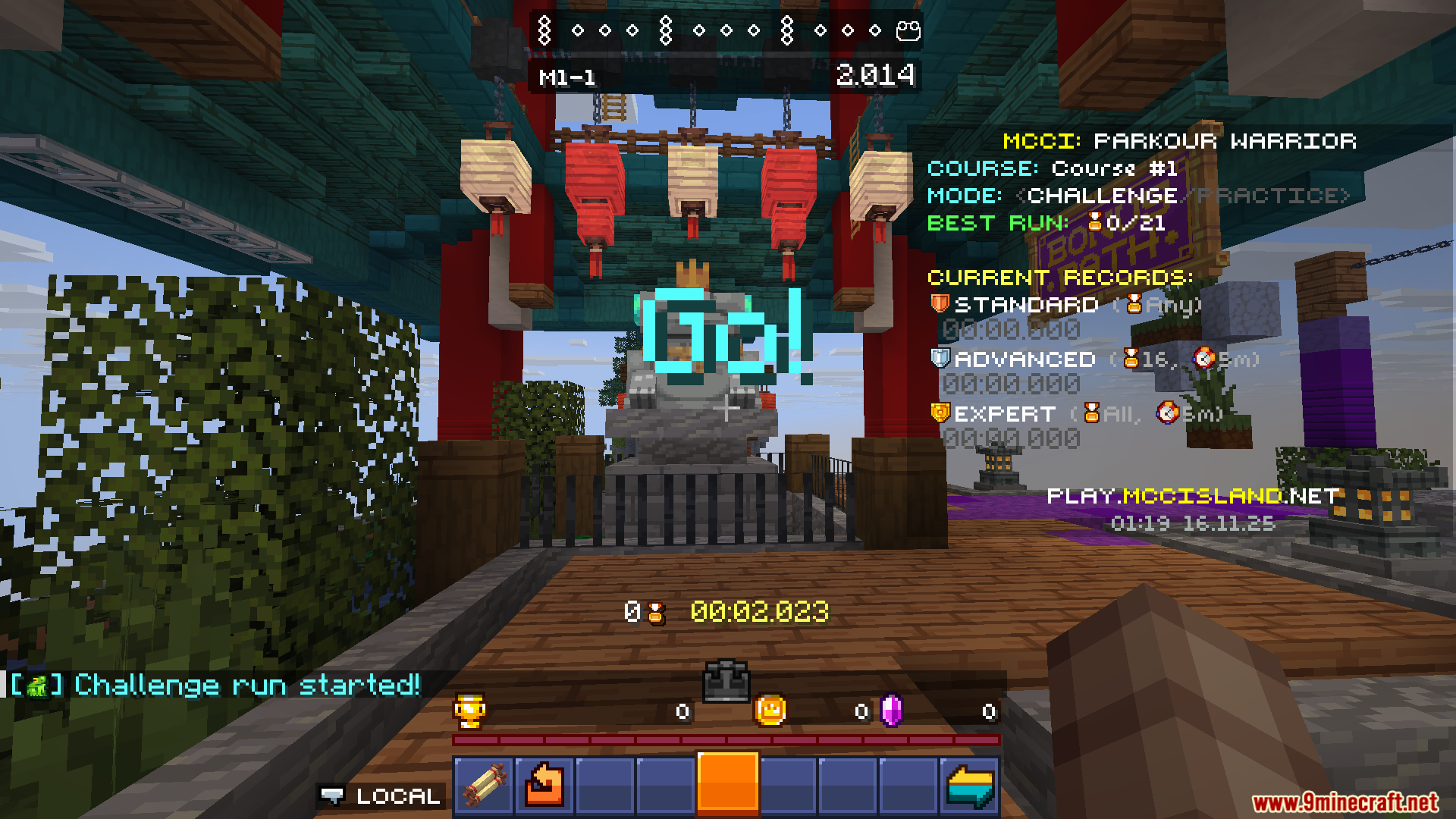
- Parkour Warrior: Dojo के लिए एक स्प्लिट टाइमर शामिल है ताकि आप हर सेक्शन का समय ट्रैक कर सकें।
- जब Forge या assembler में आपके आइटम्स क्राफ्ट हो जाते हैं, तो नोटिफिकेशन भेजता है।
- आप एक स्पेशल कमांड का उपयोग करके चेक कर सकते हैं कि क्राफ्टिंग में कितना समय बचा है।
Configuration:
- यह मोड एक सेटिंग्स स्क्रीन जोड़ता है जहाँ आप कई ऑप्शंस बदल सकते हैं।
- आप अलग स्लाइडर्स के साथ गेम म्यूजिक और साउंड इफेक्ट्स की वॉल्यूम एडजस्ट कर सकते हैं।
- इसमें आपके Discord Presence को सेटअप करने के ऑप्शंस भी हैं ताकि दोस्तों को सर्वर पर आपकी एक्टिविटी दिखे।
Commands:
- Forge या assembler में क्राफ्ट हो रहे आइटम्स का बचा हुआ समय चेक करने के लिए एक कमांड उपलब्ध है।
Screenshots:



इंस्टॉल कैसे करें:
आवश्यकताएँ:





Island Utils Mod Download Links
For Minecraft 1.21.8, 1.21.7
Fabric version: Download from Server 1 – Download from Server 2
For Minecraft 1.21.5
Fabric version: Download from Server 1 – Download from Server 2
For Minecraft 1.21.4
Fabric version: Download from Server 1 – Download from Server 2
For Minecraft 1.21.3
Fabric version: Download from Server 1 – Download from Server 2
For Minecraft 1.21.1, 1.21
Fabric version: Download from Server 1 – Download from Server 2
For Minecraft 1.20.6, 1.20.5
Fabric version: Download from Server 1 – Download from Server 2
For Minecraft 1.20.4
Fabric version: Download from Server 1 – Download from Server 2
For Minecraft 1.20.2
Fabric version: Download from Server 1 – Download from Server 2
For Minecraft 1.20.1, 1.20
Fabric version: Download from Server 1 – Download from Server 2
For Minecraft 1.19.2, 1.19.1, 1.19
Fabric version: Download from Server 1 – Download from Server 2
Minecraft के लिए 1.21.11
Minecraft के लिए 1.21.8, 1.21.7, 1.21.6
Minecraft के लिए 1.21.5
Minecraft के लिए 1.21.4
Minecraft के लिए 1.21.3, 1.21.2
Minecraft के लिए 1.21.1, 1.21
Minecraft के लिए 1.20.6, 1.20.5
Minecraft के लिए 1.20.4
Minecraft के लिए 1.20.2
Minecraft के लिए 1.20.1, 1.20
Minecraft के लिए 1.19.2, 1.19.1, 1.19
ये भी पसंद आ सकते हैं








इस पोस्ट पर अभी कोई टिप्पणी नहीं है। सबसे पहले बनें — आपकी टिप्पणी यहाँ दिखाई देगी।