
InfiniteFluids Mod (1.12.2, 1.7.10) – Pump Lava Without Limits
 1,177
 0


InfiniteFluids Mod lets you choose which liquids in Minecraft can turn into endless pools. In the base game, only water makes a new source block when it sits next to at least two source blocks. This mod brings the same rule to lava and liquids from other mods, with separate lists for inside and outside the Nether. You must edit its settings first, because it leaves all fluids unchanged by default.

Features:
- Lets you create custom lists of liquids that form infinite sources when a fluid block sits next to at least two source blocks.
- Splits settings into two separate lists: one for outside the Nether, and another for inside the Nether plus any modded dimensions where water cannot be placed.
- Includes an invert option that makes every fluid infinite except the ones you put on your list.
- Works with vanilla fluids like water and lava as well as modded liquids such as Tinkers’ Construct slime and BuildCraft oil using standard block IDs.
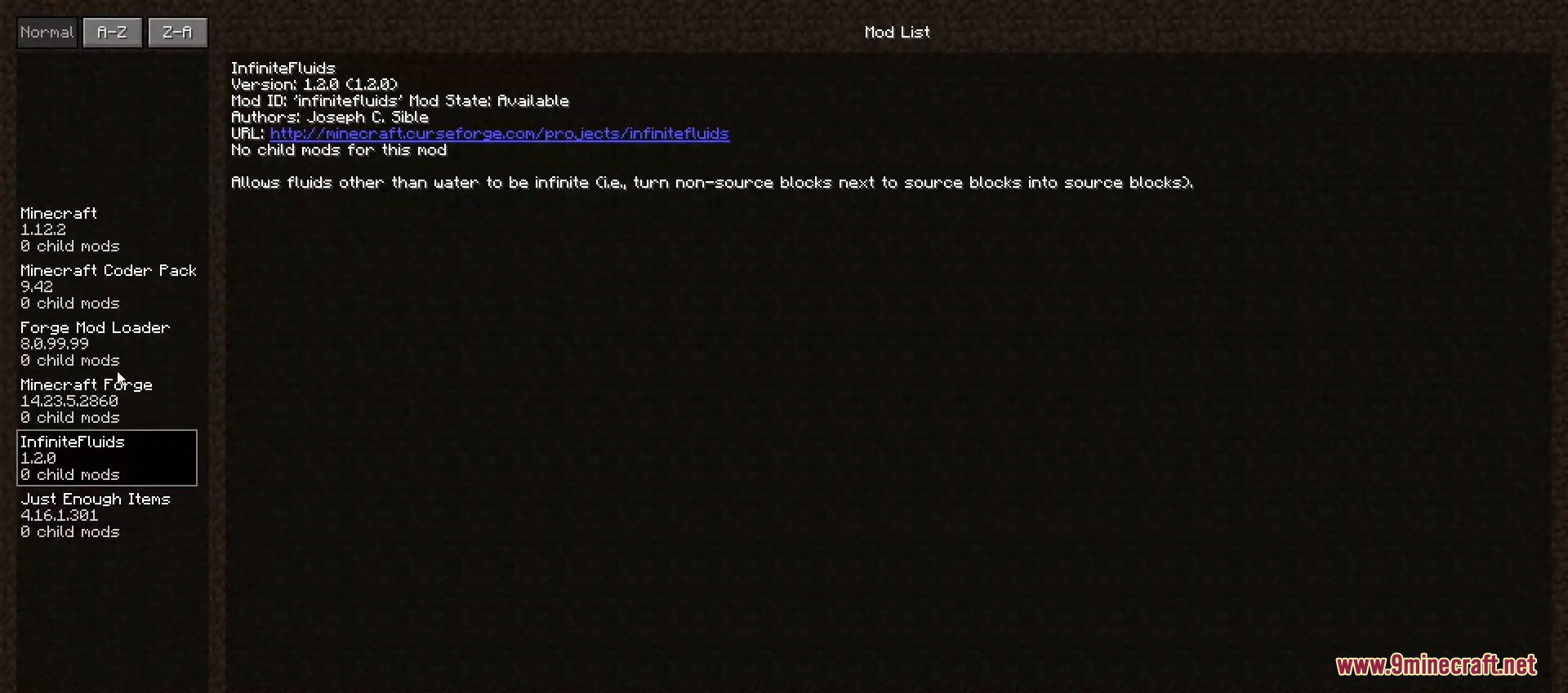
- Provides an in-game config screen under Mod Options so you can edit your fluid lists for each dimension group.
- Supports fluid pump setups when you build a larger source pool, letting multiple source blocks refill at the same time to keep up with pumping.
How to Use:
- Open “Mod Options” from the game menu, select InfiniteFluids, and open its config screen; nothing changes in the game until you edit these settings.
- Add the block ID of each fluid you want to make endless (the same block name used with
/setblock, likeminecraft:lava) to the outside-Nether list or the inside-Nether list, which also covers modded dimensions where water cannot be placed. - Invert the lists if you want all fluids to be infinite except the ones you type in.
- On Minecraft 1.7.10, turn on the “Show ID:Metadata” and “Liquids” settings in Waila if you need to check a modded fluid’s block ID.
- Place your chosen fluid so a flowing block sits next to at least two source blocks to make an endless pool; if pumps drain the pool too fast, build a larger source pool so multiple source blocks refill at once.
Configuration:
minecraft:water: Block ID for vanilla water, using the same name format as/setblock.minecraft:lava: Block ID for vanilla lava.tconstruct:blueslime: Block ID for Tinkers’ Construct liquid blue slime in Minecraft 1.10.2.TConstruct:liquid.slime: Block ID for Tinkers’ Construct liquified slime in Minecraft 1.7.10.BuildCraft|Energy:blockOil: Block ID for BuildCraft oil in Minecraft 1.7.10.
Screenshots:


How to Install:
New to Minecraft? Follow our step-by-step guide to install Mods on your PC.View Guide
InfiniteFluids Mod Download Links
For Minecraft 1.12.2, 1.11.2
Forge version: Download from Server 1 – Download from Server 2
For Minecraft 1.10.2
Forge version: Download from Server 1
For Minecraft 1.7.10
Forge version: Download from Server 1 – Download from Server 2
How do you usually learn how a complex mod works?
23 responses · See the full results →
You May Also Like
Picked for this page
 Mermod (1.21.11, 1.20.1) – Transform Into a Mermaid
 Repurposed Structures Mod (26.3, 1.20.1) – New Sights in Every Biome
 Simple Health Indicator Mod (26.3, 1.20.1) – Displays Others’ Health
 Camerapture Mod (26.3, 1.20.1) – Capture Your Minecraft Memories
 Plan | Player Analytics Mod (26.3, 1.21.11) – View Player Activity of Your Server
 Bocchium Mod (1.21.1, 1.20.1) – Performance-Boosting Rendering
 Just Another Grass Seed Mod (26.1.1, 1.20.1) – JAGS Mod
 End Villager Outpost Mod (26.3, 1.20.1) – Trading Outpost Expansion
 Eternal Food Mod (26.2, 1.20.1) – Non-Depleting Food
 Epic Tweaks Mod (1.21.1, 1.20.1) – Swap From Sword to Pickaxe Instantly
 AE2 Overclocked Mod (1.21.1, 1.20.1) – Process Items Instantly in Your AE2
 Base Origins Tweaks Mod (1.20.1, 1.19.3) – QOL Changes To Base Origins
Most viewed in Mods over the last 7 days
 Ala Industrial Mod (26.3) – Run Electric Power Grids and Automated Factories
 PleasureCraft Mod (26.3, 1.21.1) – Jenny Mod Remake for Fabric
 Jennycraft Mod (26.3, 1.20.1) – Virtual Girlfriend in Minecraft
 Fapcraft Mod (26.3, 1.12.2) – Comprehensive and Detailed Content
 Jenny Mod (Fapcraft) Official Complete Guide – How to use, Tutorial
 BangCraft Mod (1.20.1) – Jenny, Ellie and Elliot
 Fabric Loader (26.3, 1.20.1) – Fabric Installer for All Minecraft Versions
 Meteor Client Mod (26.3, 1.20.1) – Xray, HUD, Fly
 The Shooting Star Demo Mod (26.3, 1.20.1) – Vaporize Terrain From Orbit
 OptiFine HD (26.3, 1.20.1) – Run Faster, FPS Boost, Shaders Support
 Aristois Client Mod (1.21.4, 1.20.1) – World Class Minecraft Utility
 Prestige Client Mod (1.21.11, 1.21.4) – Powerful Ghost Features for Crystal & Sword PvP
More from Mods
 LiquidBounce Client Mod (26.3, 1.20.1) – LiquidLauncher, A Free Client
 Create Hand Made Mod (1.21.1) – Craft Create Recipes By Hand in Your Workshop
 Seed Map for Xaero Mod (26.1) – See Rare Biomes and Dungeons Before You Travel
 MCPersist Mod (26.3) – Keep Your World Online for Friends Even After Logging Off
 Minecraft Java MCP Server Mod (1.21.11) – Command Your World Through External AI Tools
 Arcanism Mod (26.2) – Build Magic Factories and Program Custom Spells
 Archangel Client Mod (1.21.11) – Master Every PvP Duel with Clean Screen Stats
 Block Front Survival Patch Mod (1.21.1) – Wage Tactical Warfare in Survival
 SimpleRPGCore Mod (1.21.4, 1.21.1) – Fight with Classic RPG Stats
 Bard RPG Series Plus by Fichte Mod (1.21.1, 1.20.1) – Buff Allies in Combat
 Fabric Gui ImGui Mod (26.3, 1.21.11) – Clean Custom Menus and In-Game Control
 Multi Item Lib Mod (1.20.1) – Wield Custom Gear with Flawless Hand Animations

This post has no comments yet. Be the first — your comment will appear here.