


Wart Tunnel Schematic (1.19.x) – Red Nether Brick Tunnel Design

 0
0 

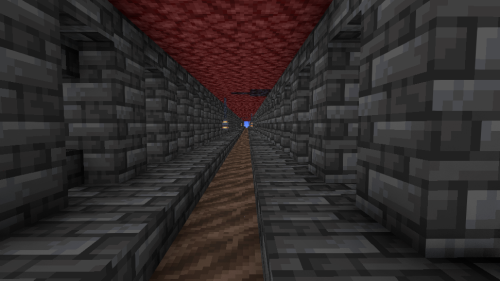
Wart Tunnel Schematic gives you a ready-made path for your Nether hub. This build helps you connect your portals with a safe hallway. The tunnel uses red Nether blocks to match the fiery world around it. It is a small piece that you can copy and paste over and over to make long roads.
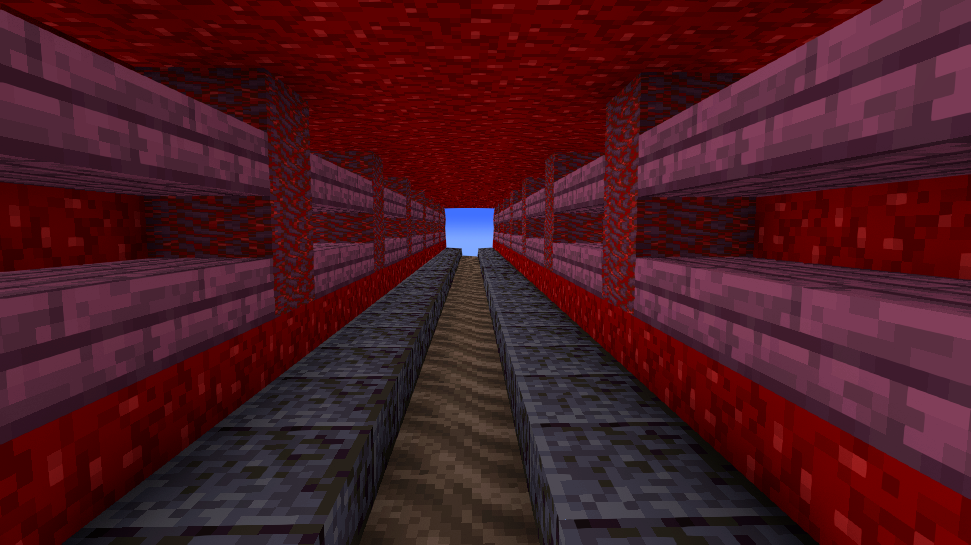
3D Preview:
Features:
- Size: Measures 30 blocks long, 7 blocks wide, and 6 blocks tall.
- Block Count: Contains exactly 1,024 blocks in a single piece.
- Uses mostly red Nether materials like Nether wart blocks and red Nether bricks.
- Keeps players safe from ghasts while walking between portals.
- Comes as a .litematic file that loads directly into your game.
- Fits perfectly into vanilla worlds without needing extra block mods.
- Lines up neatly so you can place multiple copies end-to-end for a longer path.
Schematic Specs:
 Minecraft1.19.x
 Dimensions30×6×7
 Total Blocks1,024
How to Use:
- Install the Litematica mod so your game can read schematic files.
- Put the downloaded file into your game’s schematics folder.
- Open the Litematica menu in the game and load the tunnel file.
- Move the outline to the spot where you want your path.
- Paste the blocks or build it yourself using the glowing guide.
Wart Tunnel Schematic Download Links
For Minecraft 1.19.x
Click to rate this post!
[Total: 0 Average: 0]
You May Also Like






This post has no comments yet. Be the first — your comment will appear here.