
WirelessCharger Mod (1.12.2) – Never Run Out of Power Across Dimensions

 0


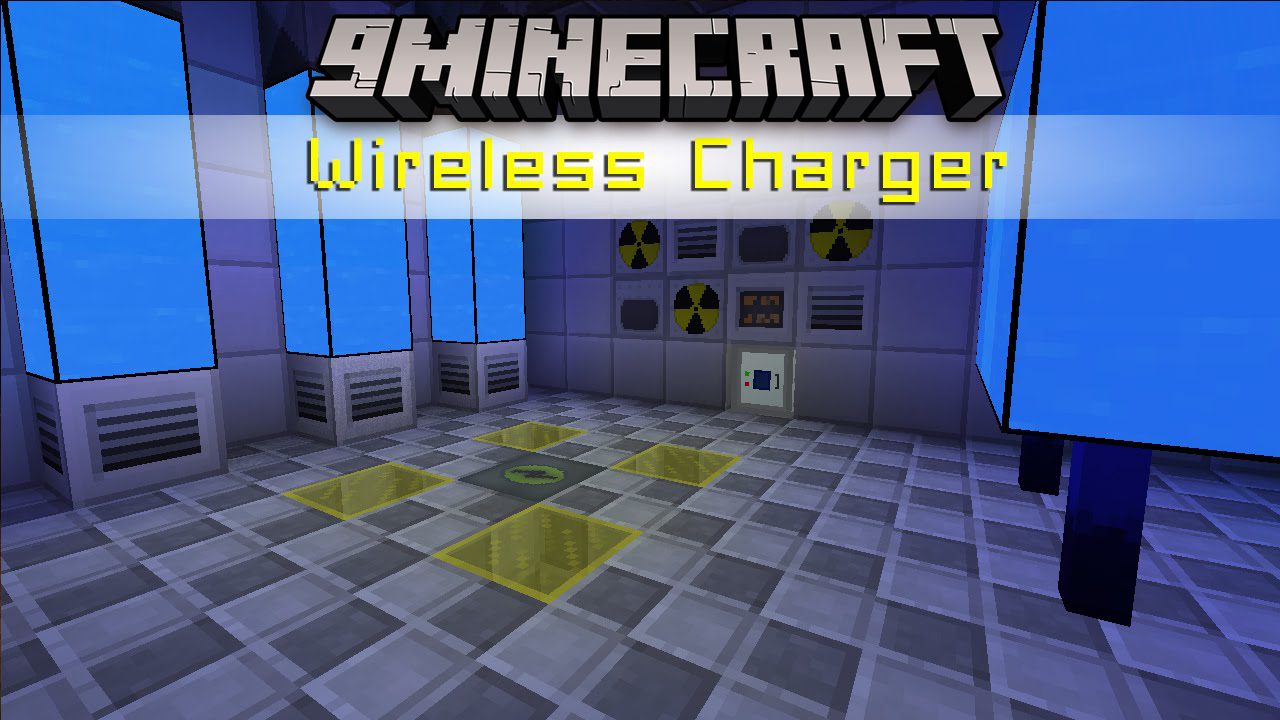
WirelessCharger Mod adds a charging block that fills ForgeEnergy compatible items for nearby players. You can upgrade the block with a Nether Star to charge your own items from any distance or across dimensions. It also lets you turn charging off with redstone, check block details with a right-click, and change settings in the config file. With another mod like EnergySynergy, this mod can also charge IC2 items.
Requires:
Features:
- Adds a charging block that charges ForgeEnergy compatible items for nearby players.
- Lets you upgrade the block by right-clicking it with an upgrade item, which is a Nether Star by default.
- Allows an upgraded block to charge your items at any distance in the same dimension or across different dimensions.
- Makes an upgraded block charge only the player who upgraded it.
- Drops the upgrade item when you break an upgraded block properly.
- Lets you disable the charging block by sending a redstone signal to it.
- Shows information about the block when you right-click it.
- Works with another mod like EnergySynergy to allow charging IC2 items.
- Lets you check the crafting recipe using JEI or the vanilla recipe book.
- Includes config settings to change range, transfer rate, capacity, blacklisted items, and the upgrade item.
Configuration:
Range: Changes how far the block can reach to charge nearby players.TransferRate: Changes how fast the block sends power to items.Capacity: Changes how much power the block can hold.BlacklistedItems: Sets items that the block will not charge.UpgradeItem: Sets the item used to upgrade the block for personal charging across distances and dimensions (default isminecraft:nether_star).
How to Use:
- Check the crafting recipe in JEI or the vanilla recipe book and craft the charging block.
- Place the block in your base and stand nearby to charge your ForgeEnergy compatible items.
- Right-click the block directly to see information about it.
- Right-click the block with a Nether Star (or your configured
UpgradeItem) to upgrade it so it charges only your items across any distance or dimension. - Apply a redstone signal to the block whenever you want to disable charging.
- Break an upgraded block properly when you move it so the upgrade item drops back out.
How to Install:
New to Minecraft? Follow our step-by-step guide to install Mods on your PC.View Guide
WirelessCharger Mod Download Links
For Minecraft 1.12.2
Forge version: Download from Server 1 – Download from Server 2
Click to rate this post!
[Total: 0 Average: 0]
QUICK MINECRAFT SURVEY · ONE TAP
Mods & Modpacks
What is your biggest frustration when playing with mods?
22 responses · See the full results →
You May Also Like
Picked for this page
 Guns Plus Plus Mod (26.3, 1.20.1) – Diverse Weapon Arsenal
 Balm Mod (26.3, 1.20.1) – Library for Mod Developers
 Plonk Mod (26.1.2, 1.20.1) – Place or Hang Any Item
 Exotelcraft Mod (26.3, 1.20.1) – New Dimension, Biomes, Mobs and Structures
 End Portal Recipe Mod (26.3, 1.20.1) – Craftable End Portal
 Compact Help Command Mod (26.3, 1.20.1) – Show All Information
 Space Cube Mod (26.2, 1.20.1) – Create Space In Another Dimension
 DragN’s Livestock Overhaul Mod (1.20.1, 1.18.2) – Raise Realistic Farm Animals
 FPS Overlay Mod (26.2, 1.20.1) – Displays FPS on the Screen
 Pickaxe Effective Glass Mod (26.3, 1.20.1) – Makes Glass Blocks Pickaxe Mineable
 VinURL Mod (26.2, 1.20.1) – Play Custom Music Via URL
 GregTech New Horizons 5 Mod (1.7.10) – Extended GT5 Endgame
Most viewed in Mods over the last 7 days
 Ala Industrial Mod (26.3) – Run Electric Power Grids and Automated Factories
 PleasureCraft Mod (26.3, 1.21.1) – Jenny Mod Remake for Fabric
 Jennycraft Mod (26.3, 1.20.1) – Virtual Girlfriend in Minecraft
 Fapcraft Mod (26.3, 1.12.2) – Comprehensive and Detailed Content
 Jenny Mod (Fapcraft) Official Complete Guide – How to use, Tutorial
 BangCraft Mod (1.20.1) – Jenny, Ellie and Elliot
 Fabric Loader (26.3, 1.20.1) – Fabric Installer for All Minecraft Versions
 The Shooting Star Demo Mod (26.3, 1.20.1) – Vaporize Terrain From Orbit
 Meteor Client Mod (26.3, 1.20.1) – Xray, HUD, Fly
 OptiFine HD (26.3, 1.20.1) – Run Faster, FPS Boost, Shaders Support
 Aristois Client Mod (1.21.4, 1.20.1) – World Class Minecraft Utility
 Prestige Client Mod (1.21.11, 1.21.4) – Powerful Ghost Features for Crystal & Sword PvP
More from Mods
 Better Nether 9minecraft Mod (26.3, 26.2) – Survive Forever in the Nether
 BCLib 9minecraft Mod (26.3, 26.2) – Power Custom Nether and End Overhauls
 ForgedLoaderAPI Mod (1.19.2, 1.18.2) – Bring Ported Fabric Creations
 Shield System Mod (1.21.1) – Tank Heavy Monster Hits Without Losing Hearts
 Shin’s Tensura Race Models Mod (1.19.2) – Play As Unique 3D Anime Race
 Offgrid Mod (26.3, 1.20.1) – Furnish Compact Interiors Without Strict Grid
 Tempest Almanac Iron’s Spells ‘n Spellbooks Mod (1.21.1, 1.20.1)
 Chat Guides Mod (26.3, 1.21.11) – Never Memorize Complex Server Commands Again
 TRMT Reimagined the Roads More Travelled Mod (26.3, 1.20.1)
 Morrowless Mod (1.21.1) – Defend Your Shelter From Nightmare Creatures
 THE SLOPSTROSITY Mod (1.21.1) – Battle a Ridiculous Slime Boss
 Decoween Mod (1.21.1, 1.20.1) – Transform Ordinary Survival Bases

This post has no comments yet. Be the first — your comment will appear here.