


F22 Raptor by CoolSignal Schematic (1.21.x) – Realistic Fighter Jet for Create Mod
 0
0
 0
0


F22 Raptor by CoolSignal Schematic brings a powerful jet fighter into your Minecraft world. It uses the Create mod and its addons to build a detailed plane for air travel. This model looks like a real military jet and fits perfectly in a modern base or airport. It is small enough to fit in most hangars but large enough to look cool in the sky.
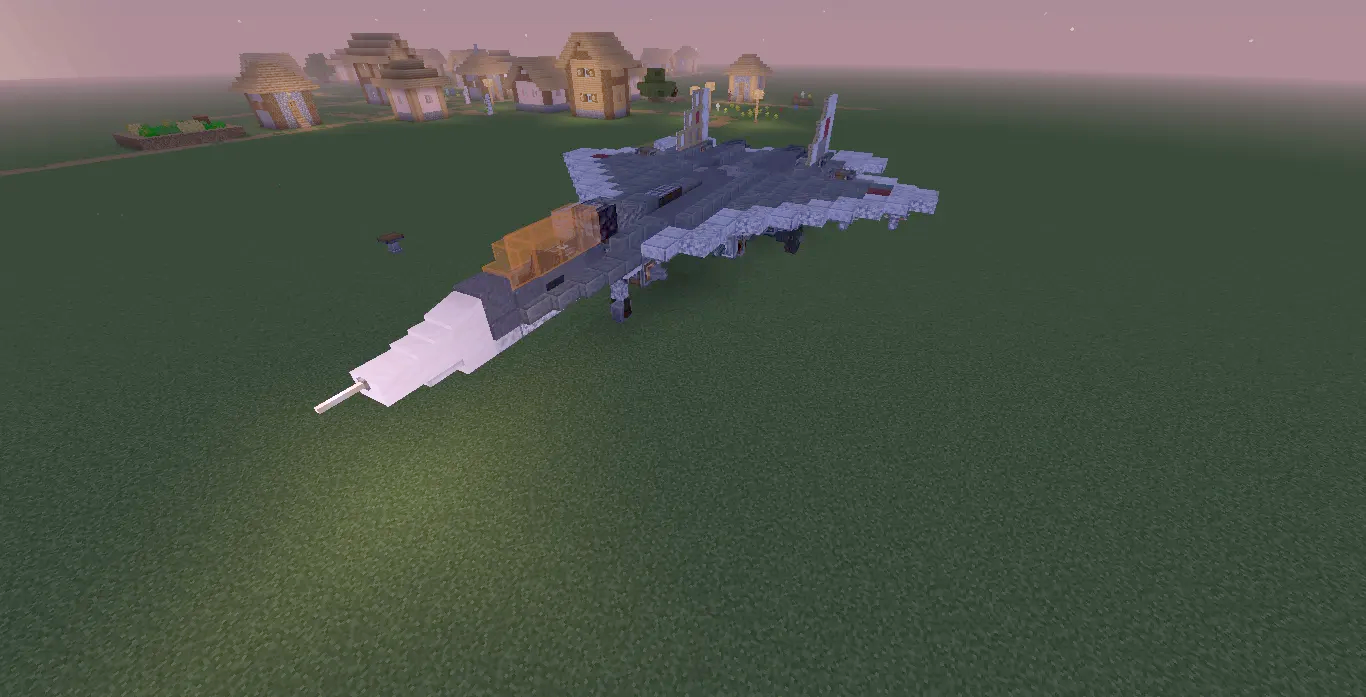
3D Preview:
Features:
- Adds a detailed F22 Raptor jet model for your world.
- Uses blocks from the Create mod and several addons for a realistic look.
- Fits in a space of 21 blocks wide and 30 blocks long.
- Includes 481 blocks to make a complete fighter plane.
- Works best with aircraft-themed mods to fly through the sky.
Schematic Specs:
 Minecraft1.21.x
 Create Mod6.0.10
 Dimensions21×7×30
 Total Blocks481
 Top Blocks Used
Copycat Wing 8 118Polished Tuff Stairs 40Iron Trapdoor 40Cyan Terracotta 28Redstone Link 22
How to Play:
- Place the schematic file in your world’s schematic folder.
- Use the Schematicannon or a Creative mode tool to place the jet.
- Make sure you have all the required Create mod addons installed first to see all the blocks.
Screenshots:


Requirements:
 Create Mod Required
offroad Required
interiors Required
createpropulsion Required
simulated Required
Aeronautics Utility Objects Required
copycats Required
Create The Air Wars Required
F22 Raptor by CoolSignal Schematic Download Links
For Minecraft 1.21.x
Click to rate this post!
[Total: 0 Average: 0]
You May Also Like





This post has no comments yet. Be the first — your comment will appear here.