


Chest Statues Schematic (1.21.x) – Large Wooden Storage Container Building Blueprints

 0
0 

Chest Statues Schematic provides blueprints for building giant wooden chests in your world. These builds look exactly like the storage blocks you use every day but on a much larger scale. The design fits well in nature-themed areas or as a fun decoration for your main base. Each statue is small enough to build quickly while still looking detailed. You can even hollow out the inside to create a secret room or a hidden storage area. This build uses standard blocks and works perfectly with the Litematica mod.
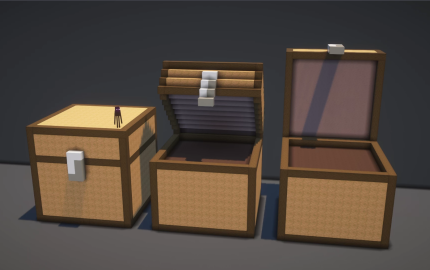
3D Preview:
Features:
- Nature Theme: The colors and materials blend well with trees, gardens, and natural landscapes.
- Provides a detailed blueprint for a giant version of the classic wooden chest.
- The structure measures 14x14x14 blocks making it easy to fit into tight spaces.
- Uses vanilla Minecraft blocks so you can build it on any server or world without extra mods.
- The file comes in a .litematic format for easy placement and building.
- Works as a great landmark to help you find your storage room or village.
Schematic Specs:
 Minecraft1.21.x
 Dimensions19×24×49
 Total Blocks3,318
 Top Blocks Used
Stripped Jungle Wood 1,982Stripped Dark Oak Wood 684Light Gray Terracotta 348Gray Terracotta 288Light Gray Concrete 8
How to Use:
- Download the .litematic file and place it in your schematics folder.
- Open Minecraft and use the Litematica mod menu to find the file.
- Select the chest statue and load it into your current world.
- Position the blue ghost image exactly where you want to build the statue.
- Follow the ghost blocks to place the correct materials in the right spots.
Chest Statues Schematic Download Links
For Minecraft 1.21.x
Click to rate this post!
[Total: 0 Average: 0]
You May Also Like


This post has no comments yet. Be the first — your comment will appear here.