
Simple Equip Mod (26.3) – Wear Elytra with Full Armor and Free Your Hands
 3
 0

Simple Equip Mod adds six dedicated accessory slots to your inventory so you can carry essential gear without wasting storage space. The mod gives you designated spots for a clock, arrows, head accessories, elytra, torches, and a totem of undying. Equipped items retain their full utility, letting you light up dark caves with a slotted torch or survive fatal blows using a hands-free totem while holding a shield. It also includes interface buttons to toggle slot visibility or hide worn armor to show off your character skin. Multiplayer works when both the client and server run the mod together.
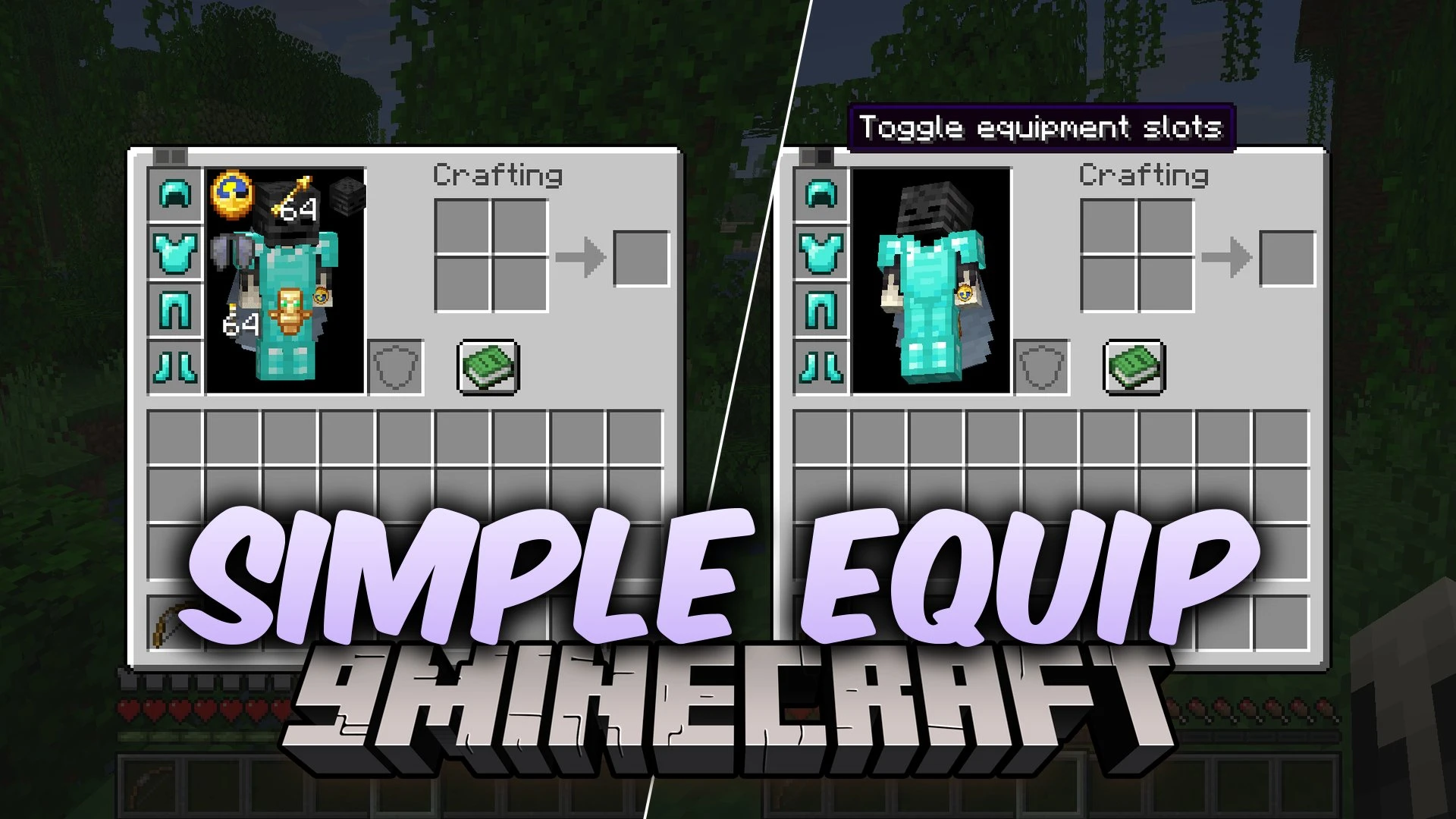
Features:
- Clock Slot: Displays the current game day and time on the left side of your screen while holding a standard clock.
- Arrow Slot: Stores a full stack of any game arrow, leaving normal inventory space open for other items.
- Head Accessories Slot: Lets you wear pumpkins, mob heads, or player heads while showing them visibly over your helmet.
- Elytra Slot: Lets you wear an Elytra together with a chestplate, rendering both items on your character model at once.
- Torch Slot: Emits light around you while holding a stack of torches, keeping your hands free for shields or weapons.
- Totem Slot: Automatically saves you from fatal damage using a slotted totem, leaving your off-hand free for shields.
- Adds a toggle button in the inventory interface to show or hide the extra slot panel whenever needed.
- Includes an armor visibility button that hides equipped armor parts so your custom character skin stays visible during play.
- Accepts every arrow variant available in the game without restrictions.
- Features a customizable keybind to quickly place torches from your dedicated slot.
- Translates interface text automatically to match your selected game language.
- Runs on multiplayer worlds as long as the mod is installed on both the server and player clients.
How to Use:
- Open your character inventory screen.
- Click the slot toggle button to display the six accessory slots next to your inventory.
- Place items such as a clock, arrows, an Elytra, a torch, or a totem into their matching slots.
- Click the armor toggle button if you want to hide your worn armor pieces and view your player skin.
- Use the rebindable torch hotkey in your controls settings to quickly place torches from your dedicated slot.
Screenshots:


How to Install:
New to Minecraft? Follow our step-by-step guide to install Mods on your PC.View Guide
Requirements:
 Fabric Loader Required
 Fabric API Required
 Universal Graves Mod Required
Simple Equip Mod Download Links
For Minecraft 26.3
For Minecraft 26.2
Which mod loader do you use the most often?
6 responses · See the full results →
You May Also Like
Picked for this page
 Grind Enchantments Mod (26.3, 1.20.1) – Salvage Rare Spells From Unwanted Gear
 MCDoom Mod (1.21.1, 1.20.1) – Survive Demonic Invasions with Iconic Weapons
 Magic Feather Mod (1.20.1) – Build Bases From the Sky
 Better Mount HUD Mod (26.3, 1.20.1) – Never Starve While Riding Your Horse
 Wooden Bucket Mod (26.3, 1.20.1) – Move Water Without Iron
 Colorize Mod (26.3, 1.20.1) – Paint Any Block Instantly
 Immersive Weapons Compatibility Bridge Mod (26.3, 1.20.1)
 This Matters Mod (26.1.2, 1.20.1) – Turn Farm Waste Into Unlimited Fuel
 Bonded Mod (26.3, 1.21.1) – Weapons That Grow Stronger with You
 Tab Ping Mod (26.1.2, 1.21.1) – Check Connection Speeds Instantly
 Lenient Death 9minecraft Mod (26.3, 26.2) – Server-side Death QoL
 Crosshair Info Mod (26.3, 1.21.11) – Keep Your Eyes on PvP Fights
Most viewed in Mods over the last 7 days
 Ala Industrial Mod (26.3) – Run Electric Power Grids and Automated Factories
 PleasureCraft Mod (26.3, 1.21.1) – Jenny Mod Remake for Fabric
 Jennycraft Mod (26.3, 1.20.1) – Virtual Girlfriend in Minecraft
 Fapcraft Mod (26.3, 1.12.2) – Comprehensive and Detailed Content
 Jenny Mod (Fapcraft) Official Complete Guide – How to use, Tutorial
 Meteor Client Mod (26.3, 1.20.1) – Xray, HUD, Fly
 BangCraft Mod (1.20.1) – Jenny, Ellie and Elliot
 OptiFine HD (26.3, 1.20.1) – Run Faster, FPS Boost, Shaders Support
- Fabric Loader (26.3, 1.20.1) – Fabric Installer for All Minecraft Versions
 SeedCrackerX Mod (26.3, 1.20.1) – Find Any World Seed
 CatLean Client Mod (26.2, 1.21.11) – ThunderHack Recode Alternatives
 Baritone Client Mod (26.3, 1.20.1) – Autominer, Build with AI, Xray
More from Mods
 Sable Bridge Mod (1.21.1) – Run Physics Mods on Pojav Launcher
 Level Storage FE Mod (1.20.1) – Power Your Late-Game Tech Base Without Cables
 Zombies Utils Core Mod (26.3, 1.21.11) – Power Up Your Hypixel Zombies Client
 Text Placeholder API Mod (26.1.2) – Backend Library for Custom In-Game Text
 Xeno Tech Vehicles Mod (1.21.1) – Assemble Armored Sci-Fi Vehicles
 Nebula Pre Generator Mod (26.3, 1.20.1) – Start Every New World
 Ancient City Companion Mod (26.3) – Loot the Deep Dark Without Waking the Warden
 Telekinesis Mod (1.20.1) – Grab Helpless Mobs and Launch Them
 Cobblemon Champion Ranked Battles Mod (1.21.1) – Fight Your Way Up the Ranked
 Lazy Pets Mod (26.3) – Sitting Wolves and Cats Finally Lie Down to Rest
 Infernal Mobs Retro Render Mod (1.20.1) – Spot Dangerous Champion Mobs
 Caliber Arms Realistic Guns Mod (26.3, 1.20.1) – Turn Survival Combat

This post has no comments yet. Be the first — your comment will appear here.