
FoamFix Mod (1.14.4, 1.12.2) – Play Modpacks Without Lag
 70,695
 0

FoamFix Mod optimizes modded Minecraft using simple, targeted fixes. On heavy modpacks, it cuts Java heap memory usage by up to 50% on the main menu. This mod also improves server TPS and reduces lag for smoother multiplayer worlds.

Features:
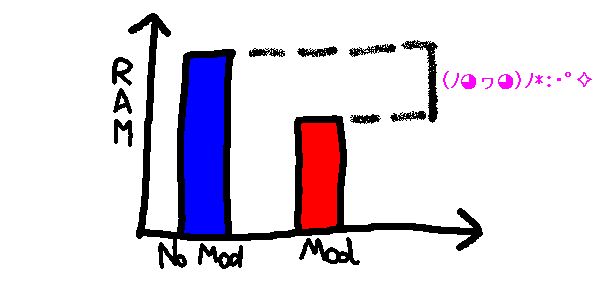
- Memory Reduction: Cuts Java heap usage by up to 50% on heavy modpacks after the game finishes loading.
- Better Server TPS: Fixes ghost chunk-loading and improves network performance to help large multiplayer worlds run smoothly.
- Works independently on the client or server side without needing the mod installed on both ends.
- Allows mixing different versions of the mod between the client and the server.
- Automatically turns on off-thread terrain setup in Forge on new instances to boost performance.
- Includes extra minor tweaks that you can check and manage inside the config file.
Configuration:
foamfix.cfg: Contains the complete list of minor optimizations and settings for this mod.coremod.optimizedBlockPos: Disable this setting inconfig/foamfix.cfgto fix crashes when running alongside SpongeForge.alwaysSetupTerrainOffThread: Located inforge.cfgand automatically enabled by this mod on new instances.dormantChunkCacheSize: Increase this value inforgeChunkLoading.cfgto reduce lag spikes from ghost chunk loading.max-tick-time=0: Set this on dedicated servers to prevent server watching crashes.
How to Install:
New to Minecraft? Follow our step-by-step guide to install Mods on your PC.View Guide
FoamFix Mod Download Links
For Minecraft 1.7.10
For Minecraft 1.8.9
For Minecraft 1.11.2, 1.11.0, 1.10.2
For Minecraft 1.14.4
Fabric version: Download from Server 1
For Minecraft 1.12.2
For Minecraft 1.13.2
Rift Modloader version: Download from Server 1
Click to rate this post!
[Total: 2 Average: 4.5]
You May Also Like
Picked for this page
 Straw Dummy Mod (1.20.1, 1.18.2) – Hitable Mannequins
 ModernFix Mod (26.1.2, 1.20.1) – Play Modpacks Without Lag
 Better Treasure Map Mod (1.21.11, 1.20.1) – Enhanced Treasure Hunting
 XXL Packets Mod (26.3, 1.20.1) – Raising The Packet Size Limit
 Limitless Banners Mod (1.21.11, 1.20.1) – Increased Banner Pattern Limit
 Clear Water Lava PowderSnow Mod (26.3, 1.20.1) – Clear Fog
 Universal Shops Mod (26.3, 1.20.1) – Adds Player Trade Shops
 Moar Concrete Mod (1.21.11, 1.21.1) – Design Modern Builds in Every Color
 Better Swords Trims Mod (26.1.2, 1.20.1) – Area Damage, Glow Detection And Levitation Effects
 Badland Villages Mod (1.21.11, 1.20.1) – Villages And Statues For The Badlands
 Functional Storage Downgrade Fix Mod (1.20.1) – Stop Storage Drawers
 Lazyboy’s No Fire Spread Mod (26.3, 1.20.1) – Preventing Fire Spread On Load
Most viewed in Mods over the last 7 days
 Ala Industrial Mod (26.3) – Run Electric Power Grids and Automated Factories
 PleasureCraft Mod (26.3, 1.21.1) – Jenny Mod Remake for Fabric
 Jennycraft Mod (26.3, 1.20.1) – Virtual Girlfriend in Minecraft
 Fapcraft Mod (26.3, 1.12.2) – Comprehensive and Detailed Content
 Jenny Mod (Fapcraft) Official Complete Guide – How to use, Tutorial
 BangCraft Mod (1.20.1) – Jenny, Ellie and Elliot
 Fabric Loader (26.3, 1.20.1) – Fabric Installer for All Minecraft Versions
 The Shooting Star Demo Mod (26.3, 1.20.1) – Vaporize Terrain From Orbit
 Meteor Client Mod (26.3, 1.20.1) – Xray, HUD, Fly
 OptiFine HD (26.3, 1.20.1) – Run Faster, FPS Boost, Shaders Support
 Aristois Client Mod (1.21.4, 1.20.1) – World Class Minecraft Utility
 Prestige Client Mod (1.21.11, 1.21.4) – Powerful Ghost Features for Crystal & Sword PvP
More from Mods
 Cataclysm X Yung’s Better Nether Fortresses Compat Mod (1.21.1, 1.20.1)
 Patchouli 9minecraft Mod (26.3) – Read Mod Guides Without Leaving Minecraft
 Paintings ++ 9minecraft Mod (26.3) – Pick the Exact Painting You Want
 owo-lib 9minecraft Mod (26.3) – Run Your Favorite Mods Without Errors
 Moonlight 9minecraft Lib (26.3, 26.2) – Run Complex Mods Without Errors
 Load My Tags 9minecraft Mod (26.3) – Mix Mods Without Breaking Recipes
 Kambrik 9minecraft Mod (26.3) – Run Kotlin Mods Without Game Lag
 Fast Paintings 9minecraft Mod (26.3, 26.2) – Place Wall Art Exactly Where You Want It
 Bonsai Trees 9minecraft Mod (26.3, 26.2) – Automate Wood Farming in Tiny Pots
 Enhanced Block Entities 9minecraft Mod (26.3) – Build Lag-Free Storage Rooms
 Better Nether 9minecraft Mod (26.3, 26.2) – Survive Forever in the Nether
 BCLib 9minecraft Mod (26.3, 26.2) – Power Custom Nether and End Overhauls

This post has no comments yet. Be the first — your comment will appear here.