
Auto Third Person Mod (1.21.5, 1.20.1) – No More Pressing F5 While Traveling

 0


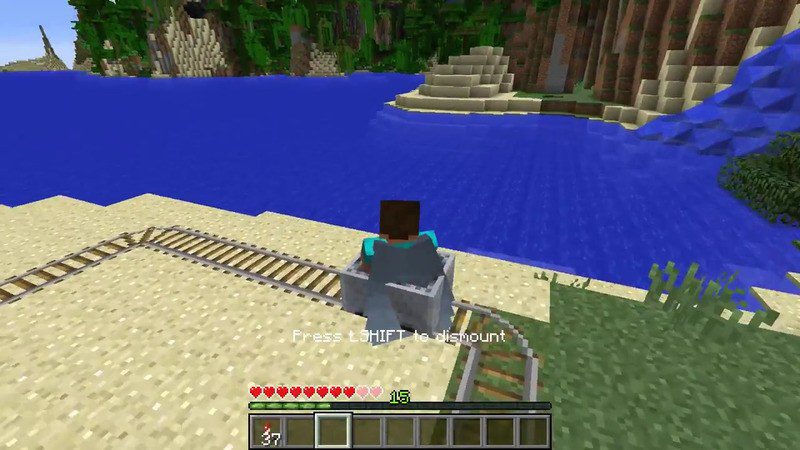
Auto Third Person Mod switches your camera to third-person view when you ride an animal, enter a boat or minecart, swim underwater, or fly with Elytra. It returns your camera to its previous view as soon as you stop flying or leave your ride. Moving across rough terrain on a horse or steering a boat becomes easier without pressing F5 over and over. This mod runs only on the client side and lets you adjust triggers, camera restoration, and extra view options through its config file.

Features:
- Automatic Third Person: Switches your camera to third-person view whenever you fly with Elytra, ride an animal, sit in a boat or minecart, or swim underwater.
- Automatic Camera Restore: Brings your view back to whatever camera angle you used before as soon as you stop flying or leave your ride.
- Lets you pick which mobs and vehicles trigger the automatic camera switch.
- Allows you to turn off automatic camera restoration or cancel it when you change the camera view by hand with F5.
- Includes an option to disable the flipped first-person camera view.
- Adds an unbound toggle key under the Miscellaneous section of the Controls menu so you can turn the mod off temporarily.
- Includes an option to fix the oddly rotated first-person hand bug when looking at yourself in F5 view on Minecraft 1.7.10 and earlier.
- Backports pressing Shift to exit vehicles for Minecraft 1.4.7.
- Stores all settings in a detailed config file, using the standard Forge config format on Forge versions.
- Runs completely on the client side without needing server support.
How to Use:
- Ride an animal, get into a boat or minecart, swim underwater, or fly with Elytra so the camera switches to third-person view on its own.
- Stop flying or leave your ride to bring the camera straight back to the view you used before.
- Press F5 while riding or flying to change your camera angle manually, which can also cancel automatic restoration if enabled in the config.
- Press Esc, open Options, go to Controls, and check under Miscellaneous to bind a toggle key if you want to turn off Auto Third Person Mod temporarily.
- Open the config file to choose which mobs and vehicles activate third-person view, change camera restore behavior, or turn off the flipped first-person camera.
Screenshots:

How to Install:
New to Minecraft? Follow our step-by-step guide to install Mods on your PC.View Guide
Auto Third Person Mod Download Links
For Minecraft 1.21.5
NeoForge version: Download from Server 1 – Download from Server 2
Fabric version: Download from Server 1 – Download from Server 2
For Minecraft 1.21.1, 1.21
NeoForge version: Download from Server 1 – Download from Server 2
Fabric version: Download from Server 1 – Download from Server 2
For Minecraft 1.20.1
Forge/NeoForge version: Download from Server 1 – Download from Server 2
Fabric/Quilt version: Download from Server 1 – Download from Server 2
For Minecraft 1.20
Forge version: Download from Server 1 – Download from Server 2
Fabric/Quilt version: Download from Server 1 – Download from Server 2
For Minecraft 1.19.4
Forge version: Download from Server 1 – Download from Server 2
Fabric/Quilt version: Download from Server 1 – Download from Server 2
For Minecraft 1.19.2
Forge version: Download from Server 2
Fabric version: Download from Server 2
For Minecraft 1.18.2
Forge version: Download from Server 2
Fabric version: Download from Server 2
For Minecraft 1.17.1
Forge version: Download from Server 2
Fabric version: Download from Server 2
For Minecraft 1.16.5
Forge version: Download from Server 2
Fabric version: Download from Server 2
For Minecraft 1.12.2
Forge version: Download from Server 2
For Minecraft 1.7.10
Forge version: Download from Server 2
How often do you play pre-made modpacks instead of making your own?
35 responses · See the full results →
You May Also Like
Picked for this page
 Solar Generation Mod (26.3, 1.20.1) – Produce FE from the Sun
 Better Clouds Mod (26.3, 1.20.1) – Realistic Sky
 DefaultSettings Mod (26.3, 1.20.1) – Preserve Local Settings
 Enhanced Celestials Mod (1.21.1, 1.20.1) – Blood, Blue, Harvest Moons
 Better Ping Display Mod (1.21.11, 1.20.1) – Ping in the Player List
 Exposure Mod (1.21.1, 1.20.1) – Expose Your Film, Print Your Photos
 XP Tome Mod (26.3, 1.20.1) – Store and Withdraw XP Easily
 Elemental Enchantments Mod (26.3, 1.20.1) – Curses and Enchantments
 Advanced Shulkerboxes Mod (26.2, 1.20.1) – Improved Function of Shulker Box
 Librarian’s Balance Mod (26.3, 1.20.1) – Rebalances Librarian Trades
 Craftify Mod (1.21.11, 1.20.1) – Control Your Music In Minecraft
 Poly Weather Mod (26.3, 1.21.1) – Change How the Weather Looks
Most viewed in Mods over the last 7 days
 Ala Industrial Mod (26.3) – Run Electric Power Grids and Automated Factories
 PleasureCraft Mod (26.3, 1.21.1) – Jenny Mod Remake for Fabric
 Jennycraft Mod (26.3, 1.20.1) – Virtual Girlfriend in Minecraft
 Fapcraft Mod (26.3, 1.12.2) – Comprehensive and Detailed Content
 Jenny Mod (Fapcraft) Official Complete Guide – How to use, Tutorial
 BangCraft Mod (1.20.1) – Jenny, Ellie and Elliot
 Fabric Loader (26.3, 1.20.1) – Fabric Installer for All Minecraft Versions
 Meteor Client Mod (26.3, 1.20.1) – Xray, HUD, Fly
 OptiFine HD (26.3, 1.20.1) – Run Faster, FPS Boost, Shaders Support
 The Shooting Star Demo Mod (26.3, 1.20.1) – Vaporize Terrain From Orbit
 Aristois Client Mod (1.21.4, 1.20.1) – World Class Minecraft Utility
 SchnurriTV Mod (1.12.2) – Characters and Features
More from Mods
 Fast Xp Mod (26.3, 1.21.1) – Faster XP Bottle Usage
 Cherry Villages Mot’s Structures Mod (26.3, 1.21.11) – Find Fresh Settlements
 XinexLib Mod (1.21.1) – Keep Your Ultreon Studios Mods Running
 Libvulpes – Fixed Mod (1.12.2) – Launch Rockets with Fewer Bugs
 Freelook Perspective Mod (26.3, 1.21.1) – Watch Your Back While Sprinting
 FAUNA Engine Mod (1.21.1, 1.20.1) – Powering Legendary Dragons
 Avali Nexus Mod (26.3) – Settle Frozen Frontiers with High-Tech Bird Tribes
 Orient’s Hotpot Chronicles Mod (1.20.1) – Boil Fresh Hotpot Meals Over Open Flames
 Far Lands Traveler Mod (26.1.2) – Survive the Long Trek to the Edge of the World
 Beli’s SkyLyrics Mod (1.21.11) – Sing Along to Desktop Tracks Projected in the Night Sky
 Explainstone and Songmelyn Mod (1.21.1) – Broadcast Custom Music Across Your Base
 Rockstar Shaders Mod (26.3) – Cast Ray-Traced Light Across Vast Distant Horizons

This post has no comments yet. Be the first — your comment will appear here.