
More MobGriefing Options Mod (26.3, 1.20.1) – Control Creature Destruction
 7,586
 0


More MobGriefing Options Mod lets you change mob griefing settings for each entity in Minecraft. It gives you full control over whether creatures can break blocks or interact with the world. You can set rules for individual mobs instead of relying on a single global setting. The mod generates a configuration file in the world folder and includes simple chat commands to manage everything.

Features:
- Allows you to change mob griefing behavior for every registered entity in the game.
- Generates a configuration file named “moremobgriefingoptions-server.toml” inside the serverconfig folder of your world.
- Offers three distinct options for each entity: true, false, and default.
- Enables mob griefing for a specific entity when set to true.
- Disables mob griefing for a specific entity when set to false.
- Uses the standard Minecraft vanilla mobGriefing gamerule when set to default.
- Requires the mod on both the server and client side for version 1.19.1 and newer.
- Works on the server side only for version 1.19 and older, though it can also be used on the client side.
Commands:
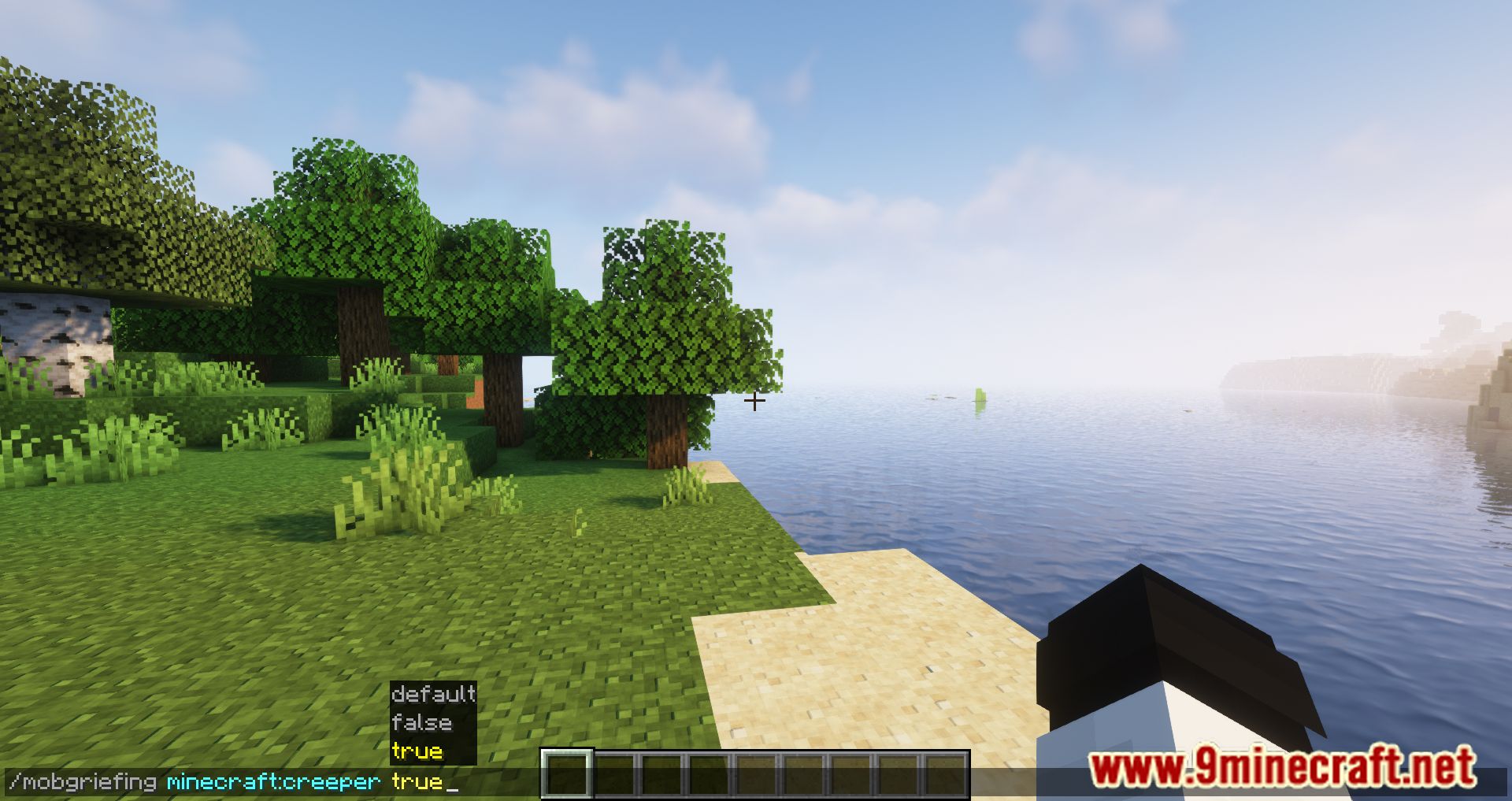
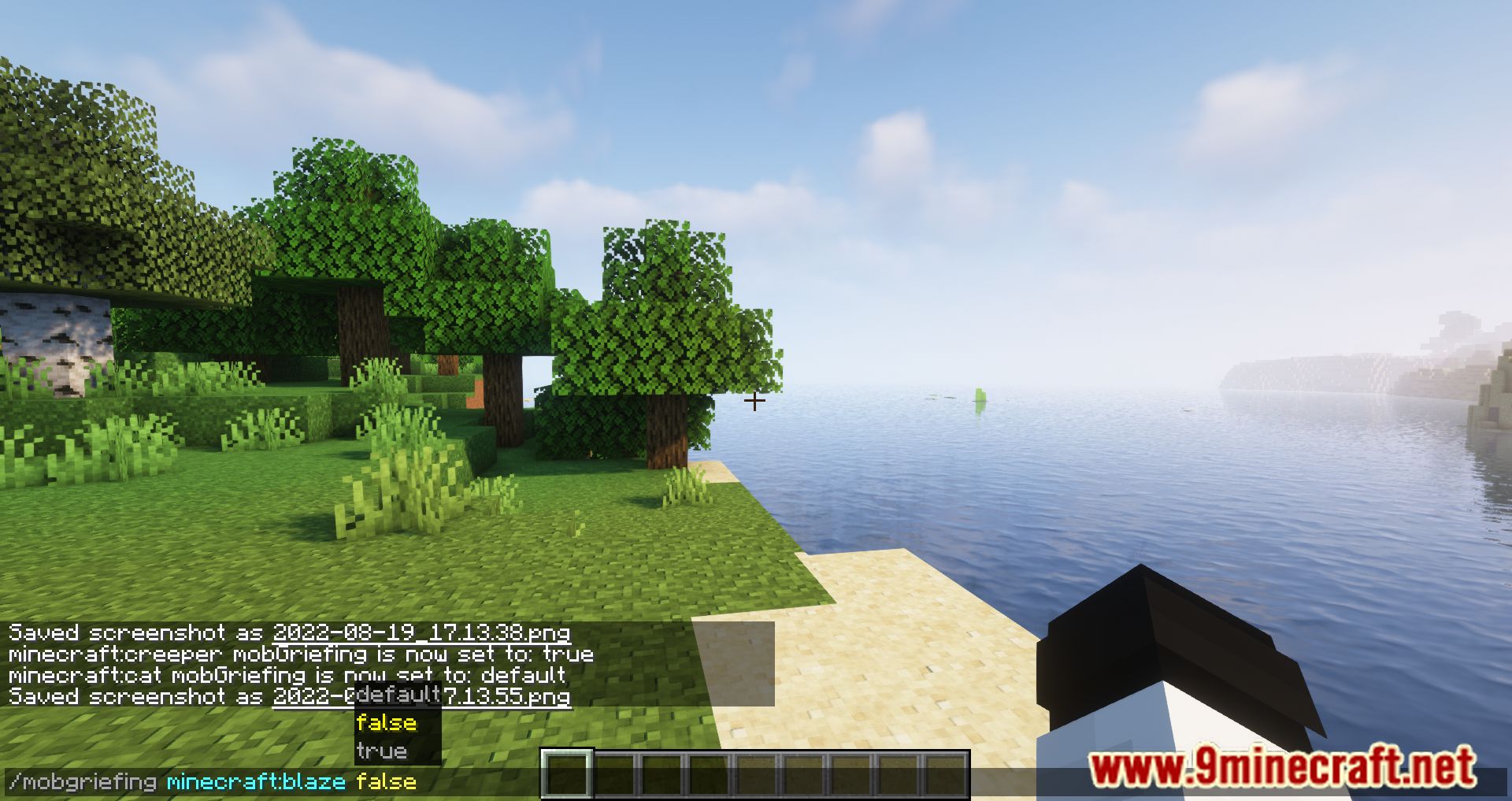
/mobgriefing <entity_name>: Shows the current mob griefing option for the entered entity./mobgriefing <entity_name> <true|false|default>: Sets the mob griefing option for the entered entity to true, false, or default.
How to Use:
- Locate the serverconfig folder inside your world folder to find the configuration file.
- Open the “moremobgriefingoptions-server.toml” file to manually adjust settings for each registered entity.
- Type the /mobgriefing command in the in-game chat followed by the entity name to check its current status.
- Use the /mobgriefing command with true, false, or default parameters to update mob griefing rules directly from chat.
Screenshots:



How to Install:
New to Minecraft? Follow our step-by-step guide to install Mods on your PC.View Guide
Requirements:


More MobGriefing Options Mod Download Links
For Minecraft
26.3,
26.2,
26.1.2
All Versions Covered
26.3
26.2
26.1.2
26.1.1
26.1
All Versions Covered
26.3
26.2
26.1.2
26.1.1
26.1
For Minecraft
1.21.11,
1.21.10,
1.21.9
All Versions Covered
1.21.11
1.21.10
1.21.9
1.21.8
1.21.7
1.21.6
1.21.5
1.21.4
1.21.1
1.21
All Versions Covered
1.21.11
1.21.10
1.21.9
1.21.8
1.21.7
1.21.6
1.21.5
1.21.4
1.21.1
1.21
For Minecraft
1.21.10,
1.21.9,
1.21.8
All Versions Covered
1.21.10
1.21.9
1.21.8
1.21.7
1.21.6
1.21.5
1.21.4
1.21.3
1.21.2
1.21.1
1.21
All Versions Covered
1.21.10
1.21.9
1.21.8
1.21.7
1.21.6
1.21.5
1.21.4
1.21.3
1.21.2
1.21.1
1.21
For Minecraft 1.21.1, 1.21
For Minecraft 1.20.6
For Minecraft 1.20.4, 1.20.3
For Minecraft 1.20.2
For Minecraft 1.20.1, 1.20
For Minecraft 1.19.4
For Minecraft 1.19.3
For Minecraft 1.19.2
For Minecraft 1.19.1
For Minecraft 1.19
For Minecraft 1.18.2
For Minecraft 1.18.1
For Minecraft 1.17.1
For Minecraft 1.16.5
For Minecraft 1.15.2
For Minecraft 1.14.4
Click to rate this post!
[Total: 1 Average: 3]
You May Also Like
Picked for this page
 Mob Battle Mod (26.3, 1.20.1) – Create Easy Mob Fights
 Sodium Extra Mod (1.21.11, 1.20.1) – Optifine’s Features for Sodium
 Fast Trading Mod (26.3, 1.20.1) – Adds A Quick Trading Button
 Blur Plus Mod (26.3, 1.20.1) – Enhance Your GUI With Blur Effects
 QuickCraft Mod (26.1.2, 1.20.1) – Simplify Your Crafting Experience
 Jumpy Boats Mod (26.1.2, 1.20.1) – Never Get Your Boat Stuck Again
 Magma Monsters Mod (1.21.1, 1.20.1) – Lava Lakes Now Fight Back
 Infiniverse API Mod (26.1.2, 1.20.1) – A New Frontier For Minecraft Modding
 Lios Seafaring Dungeons Mod (26.3, 1.20.1) – Seafaring Adventure
 No Glow Mod (1.21.11, 1.20.1) – Disables Rendering Of Glow Effect
 Mc2Discord Mod (26.3, 1.20.1) – Minecraft And Discord Integration
 Cobbleloots Mod (1.21.1, 1.20.1) – Find Pokémon-Style Loot
Most viewed in Mods over the last 7 days
 Ala Industrial Mod (26.3) – Run Electric Power Grids and Automated Factories
 PleasureCraft Mod (26.3, 1.21.1) – Jenny Mod Remake for Fabric
 Jennycraft Mod (26.3, 1.20.1) – Virtual Girlfriend in Minecraft
 Fapcraft Mod (26.3, 1.12.2) – Comprehensive and Detailed Content
 Jenny Mod (Fapcraft) Official Complete Guide – How to use, Tutorial
 BangCraft Mod (1.20.1) – Jenny, Ellie and Elliot
 Fabric Loader (26.3, 1.20.1) – Fabric Installer for All Minecraft Versions
 Meteor Client Mod (26.3, 1.20.1) – Xray, HUD, Fly
 The Shooting Star Demo Mod (26.3, 1.20.1) – Vaporize Terrain From Orbit
 OptiFine HD (26.3, 1.20.1) – Run Faster, FPS Boost, Shaders Support
 Aristois Client Mod (1.21.4, 1.20.1) – World Class Minecraft Utility
 Prestige Client Mod (1.21.11, 1.21.4) – Powerful Ghost Features for Crystal & Sword PvP
More from Mods
 Passthrough Signs Mod (26.3, 1.20.1) – Right-Click Through Wall Signs
 Packing Tape Mod (26.3, 1.20.1) – Move Chests, Machines
 No XP Anvils Mod (26.3, 1.20.1) – Repair And Enchant Without XP
 Naruto Shippuden Mod (26.3, 1.16.5) – Immerse Yourself in The World of Ninja
 Araxer’s Bestiary Mod (26.3, 1.20.1) – Build an In-Game Encyclopedia of Every Mob
 Villagers Plus Mod (26.3, 1.20.1) – Expanded Villager Types and Villages
 Ore Excavation 9minecraft Mod (26.3) – Mine Ores and Chop Trees in a Single Swing
 Dirigo Mod (26.1.2, 1.21.1) – Walk Across Nether Lava Seas and Automate Animal
 HandLib Mod (26.3, 1.21.1) – Keep Your Multiplayer World Stable
 Happy Ghasts Boost Mod (26.1.2, 1.20.1) – Fly Across Vast Distances at Top Speed
 LiquidBounce Client Mod (26.3, 1.20.1) – LiquidLauncher, A Free Client
 Create Hand Made Mod (1.21.1) – Craft Create Recipes By Hand in Your Workshop

This post has no comments yet. Be the first — your comment will appear here.